Freedom251 › Audio Visualizer Software

Music Waveform
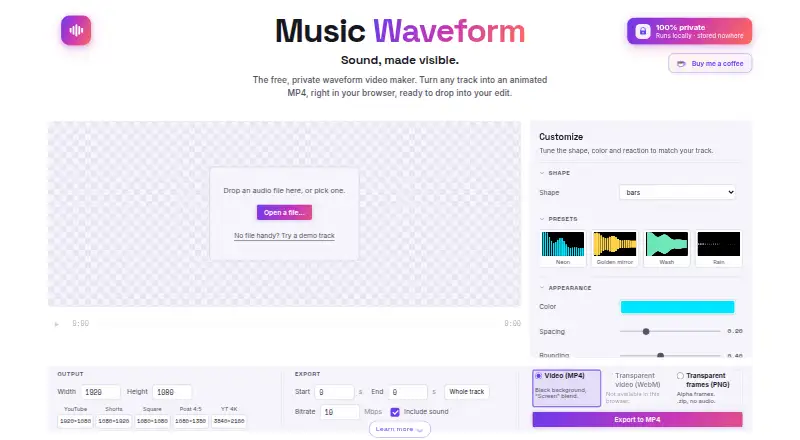
What Music Waveform is
Music Waveform turns audio files into animated waveform videos in a browser. It accepts MP3, WAV, OGG, M4A/AAC and FLAC, with eight adjustable visuals: bars, mirror, radial, scope, area, dots, blob and circle. Users can change color, waveform reaction and resolution, then preview the animation in sync with playback. Exports include MP4, transparent WebM, or a ZIP of transparent PNG frames; PNG frames have no audio track. One-click presets provide analysis and visual settings. Audio decoding, analysis, rendering and encoding happen locally in the browser, and the maker says files are not uploaded or stored on a server. The free plan costs nothing, with no account, watermark or paywall. MP4 export requires an up-to-date Chromium browser or Safari 17 or newer. Long exports may run out of memory on older phones. The tool does not edit or accept video, transcribe audio, separate stems, batch-process or provide an API.
Who it suits
It suits musicians, podcasters and video editors who want waveform videos from audio files. It is also an option for users who want transparent exports or browser-based local processing.
What it does well
- Eight adjustable waveform styles.
- Accepts MP3, WAV, OGG, M4A/AAC and FLAC.
- Exports MP4, transparent WebM and PNG frames.
- Free plan has no account, watermark or paywall.
- Processing happens locally in the browser.
What to know first
- MP4 export requires newer supported browsers.
- Long exports may run out of memory on older phones.
- Does not edit or accept video.
- No transcription, stem separation, batch processing or API.
Limits
The Free plan is listed as free, with no watermark or paywall. MP4 export depends on supported browser technology, and long exports can exceed memory on older phones; PNG frame exports contain no audio track.
Plans
| Plan | Billed and limits | Price |
|---|---|---|
| Free | Free forever · No account · no watermark · no paywall · one audio file at a time · MP4/WebM/PNG exports | Free |
As music-waveform.com lists them, read 14 Oct 2026. The maker's own page has the final word.
Getting started
- Open the Music Waveform website in a browser.
- Use a modern browser for preview; use current Chromium or Safari 17 or newer for MP4 export.
- Load an MP3, WAV, OGG, M4A/AAC or FLAC file.
- Choose a waveform style or apply a preset, then tune color, reaction and resolution.
- Preview the animation with playback and export as MP4, transparent WebM or PNG frames.
Music Waveform is a browser-based converter that turns audio files into animated waveform videos. It is best suited to musicians, podcasters and video editors who need a focused visualizer rather than a full video-production suite. The free, watermark-free output is unusually flexible, provided your browser and device can handle the export.
Overview
Music Waveform concentrates on one job: matching an animated waveform to an audio track. Eight visual treatments and transparent export options make it useful for social clips, podcast artwork, lyric-video backgrounds or compositing into a larger edit. It is less suitable when the project also needs video editing, transcription, stem separation or repeatable batch processing, because those functions are outside its scope.
Key features
The eight adjustable styles are bars, mirror, radial, scope, area, dots, blob and circle. That range covers conventional amplitude displays as well as more abstract circular and organic designs. You can tune color, waveform reaction and resolution, then preview the animation in sync with playback. One-click analysis and visual presets provide a fast starting point when you do not want to adjust every parameter.
Input support includes MP3, WAV, OGG, M4A/AAC and FLAC, so common compressed and lossless files are covered. Export choices are MP4, transparent WebM, or a ZIP of transparent PNG frames. The PNG sequence contains no audio track, which is useful for compositing but means you must add the soundtrack in another editor. A maximum resolution of 4K and no watermark or paywall give the free tool credible delivery options.
Processing stays in the browser: decoding, analysis, rendering and encoding run on your device, and the maker says files are never uploaded or stored on a server. Cookie-free Vercel Analytics and Speed Insights, plus anonymous technical events that exclude audio and file names, are used for site measurement. Local processing is a privacy advantage, but it also makes hardware relevant; long exports can exhaust memory on older phones.
MP4 creation uses WebCodecs, requiring an up-to-date Chromium browser or Safari 17 or newer. Preview works in modern browsers, but users on unsupported browsers may need to choose WebM or PNG output instead. The tool does not accept or edit video, transcribe or caption audio, separate stems, batch-process files or expose an API.
Pricing
Music Waveform has one plan: Free — free. It requires no account, adds no watermark and has no paywall. The plan includes waveform visuals, video export, transparent export and output up to 4K. There is no free trial because the product is already free. This is a strong fit for occasional creators and professionals who only need a standalone visualizer, while teams needing automation, batch queues or an API will have to look elsewhere rather than move to a higher tier.
Platforms
Music Waveform runs on the web and is listed for Android and iOS use. Because rendering is local, available memory and browser capability matter more than a subscription or server quota. For MP4, use current Chromium or Safari 17 and newer; older phones may struggle with lengthy renders.
Who it's for
Choose it for a musician releasing a track with a transparent visual layer, a podcaster making a branded audiogram, or an editor who wants a waveform asset to place over existing footage. It also suits privacy-conscious users who prefer local file processing. It is not the right choice for a production workflow that needs video timelines, captions, stem tools, batch conversion or programmatic generation.
Pros and cons
Pros
- Eight adjustable styles: enough visual variety for both straightforward waveforms and more stylized designs.
- Transparent outputs: WebM and PNG frames can be composited over other video; MP4 covers conventional delivery.
- 4K, watermark-free export at no cost: the free plan does not force a branded mark or a paid upgrade.
- Broad audio compatibility: MP3, WAV, OGG, M4A/AAC and FLAC cover common source files.
- Local processing: audio stays on the device rather than being uploaded to a server.
Cons
- Limited to audio visualization: no video import, captions, transcription, stem separation, batch processing or API.
- Browser-dependent MP4 export: WebCodecs support is restricted to current Chromium browsers and Safari 17 or newer.
- Device memory is the bottleneck: long renders may fail on older phones.
- PNG frames omit sound: a separate editing step is required to reunite the image sequence with audio.
Alternatives
Audio Visualizer Software is the broader directory starting point when you want to compare more visualizer tools.
Pick dmn Visualiser instead if you want a service with a paid model, a free preview and Android, iOS and web coverage. Le Biniou is the better choice for Linux, macOS or Windows users seeking an open-source audio visualizer and VJ tool. Morphyre suits users who want a free visualizer spanning Android, macOS, web and Windows. Choose Renderforest Music Visualizer for template-led creation and paid tiers; its free plan adds a watermark to HD videos. AUDIOVIZOR is an option for community presets and session-based use, with watermarked 720p export on its free plan. Fosfora and Radiance are free desktop open-source alternatives, while Vyrkin Studio targets macOS and Windows with watermark-free 1080p MP4 output.
Verdict
Music Waveform is an excellent choice for creators who need a no-cost, watermark-free waveform video with transparent options and 4K output. Its local processing and broad audio support strengthen that case. Look elsewhere if you need to edit video, automate multiple files, generate captions or export MP4 from an older or memory-constrained device.
Verdict
Music Waveform offers several waveform styles and transparent export options at no cost. Check browser support for MP4 and device capacity before starting long exports.
Questions
How much does Music Waveform cost?
Its Free plan is listed as free. The plan has no account requirement, watermark or paywall.
Which platforms does it support?
It is listed for Android, iOS and web.
What can I export?
Exports are MP4 video, transparent WebM video or a ZIP of transparent PNG frames. PNG frames do not include an audio track.
Which audio formats can I use?
It accepts MP3, WAV, OGG, M4A/AAC and FLAC files.
Does it upload or store audio files?
The maker says audio decoding, analysis, rendering and encoding happen locally in the browser, and files are not uploaded or stored on a server.
Who makes Music Waveform?
Independent developer Damien Yvert builds and maintains it.
Facts from Music Waveform's own pages
- Analytics
- The privacy policy says cookie-free Vercel Analytics and Speed Insights collect aggregate anonymous usage data and technical export events without audio or filenames. · music-waveform.com, 14 Oct 2026
- Audio formats
- It accepts MP3, WAV, OGG, M4A/AAC and FLAC files. · music-waveform.com, 14 Oct 2026
- Browser requirement
- MP4 export requires an up-to-date Chromium browser or Safari 17 or newer, while preview works in modern browsers. · music-waveform.com, 14 Oct 2026
- Customization
- Users can tune color, waveform reaction and resolution, and preview the animation in sync with playback. · music-waveform.com, 29 Sept 2026
- Developer profile
- Malt lists Damien Yvert as a website developer based in Lisbon, Portugal, charging €125 per day and describing himself as full-stack. · malt.com, 14 Oct 2026
- Device limits
- Because export runs on the user’s device, long exports may run out of memory on older phones. · music-waveform.com, 29 Sept 2026
- Documentation
- The site publishes guides covering creation, export formats, styles, social sizes, compositing, colors, voice memos and troubleshooting. · music-waveform.com, 14 Oct 2026
- Exports
- Exports MP4 video, transparent WebM video, or a ZIP of transparent PNG frames; PNG frames have no audio track. · music-waveform.com, 29 Sept 2026
- External analytics context
- Vercel says its Web Analytics records anonymous aggregate data without personal identifiers or cross-site tracking and does not use third-party cookies. · vercel.com, 14 Oct 2026
- External browser support: WebCodecs
- Can I Use lists WebCodecs as unsupported in Safari through 16.3 and only partially supported in Safari 16.4–18.7 in its current table. · caniuse.com, 14 Oct 2026
- External browser support: WebM
- Can I Use lists WebM as fully supported on iOS Safari from 17.4 onward, with partial support in earlier releases. · caniuse.com, 14 Oct 2026
- External technical context: VideoEncoder
- MDN classifies VideoEncoder as limited availability, requiring a secure context and lacking support in some widely used browsers. · developer.mozilla.org, 14 Oct 2026
- External technical context: Web Audio
- MDN describes Web Audio as a browser API for audio processing and visualization and marks it widely available across browsers since April 2021. · developer.mozilla.org, 14 Oct 2026
- External technical context: WebCodecs
- MDN says WebCodecs enables efficient browser-side audio and video encoding with hardware acceleration and per-frame control. · developer.mozilla.org, 14 Oct 2026
- Guide provenance
- The maker says guides are drafted with AI assistance and checked against the tool's implementation. · music-waveform.com, 14 Oct 2026
- Integrations
- The documented workflow is compositing exports in editors such as Premiere Pro, Final Cut, DaVinci Resolve and CapCut using Screen blending or alpha assets. · music-waveform.com, 14 Oct 2026
- Launch timing
- Malt's profile lists Music-Waveform among projects launched by Damien Yvert beginning in April 2026. · malt.com, 14 Oct 2026
- Limit: automation
- There is no batch mode, public API or command-line interface. · music-waveform.com, 14 Oct 2026
- Limit: captions and stems
- It does not transcribe, add captions or separate stems. · music-waveform.com, 14 Oct 2026
- Limit: video editing
- The product does not accept video input or edit video footage. · music-waveform.com, 14 Oct 2026
- Local processing
- Audio decoding, analysis, rendering and encoding occur on the user's device and files are not uploaded or stored on a server. · music-waveform.com, 14 Oct 2026
- Maker
- The site identifies Damien Yvert as the independent developer who builds and maintains Music Waveform. · music-waveform.com, 14 Oct 2026
- Mobile export limitation
- Long or high-resolution exports can exhaust memory on older phones because encoding runs locally. · music-waveform.com, 14 Oct 2026
- MP4 browser support
- MP4 export uses WebCodecs and requires an up-to-date Chromium browser or Safari 17 or newer; preview works in modern browsers. · music-waveform.com, 29 Sept 2026
Where Music Waveform stands on Freedom251
- Audio Visualizer Software#8 of 35