Freedom251 › Audio Visualizer Software

Le Biniou
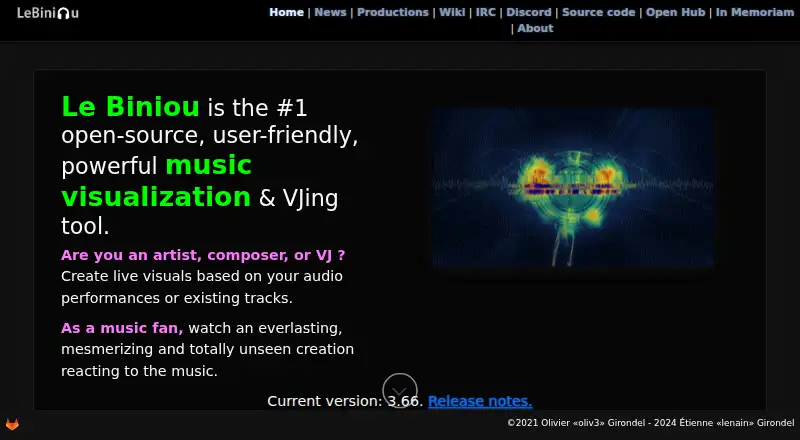
What Le Biniou is
Le Biniou is a free, open-source tool for creating live visuals from audio performances or recorded tracks. It is intended for artists, composers, VJs and music fans. More than 100 plugins produce graphic effects, including more than 40 that react to sound. Users can arrange plugins into sequences, save them in banks or have the software generate sequences in schemes mode. Audio inputs include JACK Audio, ALSA, PulseAudio, Open Sound System, Sndio, audio files and OSC. For output, Le Biniou can record MP4 video, save PNG images, stream over RTMP or send video to a V4L2 loopback device, which can feed compatible software such as OBS. It also supports live cameras and media types handled by FFmpeg or ImageMagick. A web interface can control a running instance from another computer, tablet or mobile device on the network. The project lists GNU/Linux, Windows 10 with WSL2, Mac OS, FreeBSD, NetBSD and OpenBSD as minimum system requirements. Installation options include Debian and derivative distributions, Arch Linux, GitLab packages and Flatpak.
Who it suits
Le Biniou suits artists, composers, VJs and music fans who want to build live visuals from audio. It may also fit users who need video output for compatible software or remote control over a network.
What it does well
- More than 100 plugins, including over 40 sound-reactive ones.
- Audio inputs include JACK, ALSA, PulseAudio and OSC.
- Records MP4, saves PNG, streams RTMP and supports V4L2 output.
- Network web interface can control a running instance remotely.
- Open-source and free.
What to know first
- Windows support is listed for Windows 10 with WSL2.
- V4L2 output requires compatible video software to receive it.
Limits
The listed maximum resolution is 1080p. The project lists Windows 10 with WSL2 among its minimum system requirements.
Plans
| Plan | Billed and limits | Price |
|---|---|---|
| Free | Open-source audio visualizer and VJ tool | Free |
As biniou.lenain.info lists them, read 4 Oct 2026. The maker's own page has the final word.
Getting started
- Open the Le Biniou website.
- Choose a listed download option, such as Flatpak or a package for a supported Linux distribution.
- Install and start Le Biniou on a listed supported system.
- Select an audio input and arrange plugins into a sequence or use schemes mode.
- Use the desired video output, or control the running instance through its web interface.
Overview
Le Biniou is an open-source audio visualizer and VJ tool for turning performances or existing tracks into live graphics. It is best suited to artists and VJs who want to build effect sequences and route visuals into a wider video setup. Its breadth of inputs and outputs is a clear strength; it is less compelling for someone who only wants a simple upload-and-export workflow.
Key features
More than 100 plugins create graphic effects, including more than 40 that react to sound. Users can arrange plugins into sequences and save them in banks, or use schemes mode to generate sequences. This offers both deliberate set-building and an automated starting point, though the large plugin set will matter most to people who want to shape visuals rather than apply a single preset.
Audio sources include JACK Audio, ALSA, PulseAudio, Open Sound System, Sndio, audio files, and OSC. Le Biniou also supports live cameras, video types handled by FFmpeg, and image types handled by ImageMagick. That range makes it a plausible fit for varied performance setups, rather than just track-based visualizers.
Output can be recorded as MP4, saved as PNG images, streamed through RTMP, or sent to a V4L2 loopback device. V4L2 can feed compatible video software such as OBS, so Le Biniou can serve as a visual source in a larger live-video workflow. Its web interface can control a running instance from another computer, tablet, or mobile device on the same network. The project also provides REST API and WebSocket communications for connectivity and automation.
Users can add images under a custom theme directory, and theme selection through the web interface is documented from version 3.54.0. The software includes an on-screen display as well as the web interface, documented from version 3.50.
Pricing
Le Biniou is free: its Free plan costs nothing and is described as an open-source audio visualizer and VJ tool. The plan includes waveform visuals and video export, with a maximum resolution of 1080p. There are no paid tiers or seat-based charges in the plan structure, making it a straightforward option for individuals who can work within the resolution ceiling.
Platforms
Le Biniou is available for Linux, macOS, Windows, and web. The project’s minimum system requirements also name GNU/Linux, Windows 10 with WSL2, Mac OS, FreeBSD, NetBSD, and OpenBSD. Installation options include Debian and derivative distributions, Arch Linux, GitLab packages, and Flatpak. Users who need help can turn to the project wiki’s #lebiniou channel on Libera.Chat.
Who it's for
Le Biniou is a strong fit for musicians, composers, and VJs who want sound-reactive effects, sequence-building, and several ways to capture or route their output. Its range of audio interfaces and V4L2 output is especially useful when visuals need to join an existing performance or streaming setup. People who prioritize a basic browser-based workflow or want an export resolution above 1080p should look elsewhere.
Pros and cons
- Broad visual toolkit: More than 100 plugins, including more than 40 sound-reactive effects, support varied live looks and sequences.
- Flexible routing: MP4, PNG, RTMP, and V4L2 output cover recording, stills, streaming, and feeding compatible video software.
- Remote control: The network web interface lets users operate a running instance from another computer or mobile device.
- 1080p ceiling: Video export is capped at 1080p, which rules it out for workflows that require higher-resolution output.
- Setup demands: Installation options and system requirements are more involved than a browser-only visualizer, so it is a better fit for users comfortable choosing and configuring a desktop environment.
Alternatives
Browse Audio Visualizer Software to compare more tools in the category.
- Renderforest Music Visualizer is an alternative for Android and iOS as well as web users who want a freemium option; its free plan exports HD videos with a watermark and basic features.
- Fosfora is another free, open-source choice for Linux, macOS, and Windows, with 56 effects and an eight-layer stack and no account required.
- Music Waveform is a free option on Android, iOS, and web with no account, watermark, or paywall.
- BeatVisualiser covers Linux, macOS, web, and Windows; its Pro plan is $16.99 a month for unlimited video exports, every visualiser and style, full-length YouTube videos, and 1080p.
- Videobolt is a freemium choice across web, macOS, Windows, and extension platforms, with a free trial and a Lite Unlimited plan at €9.99 a year.
- Specterr is a freemium, web-based alternative.
- SYQEL is a freemium option for web, Windows, macOS, iOS, and Android.
- WaveVisual is a web option with paid plans, including a one-time Single order at 9.00 USD for PNG, JPG, SVG, PDF, MP4, GIF, WEBM, and MOV exports with a commercial license.
Verdict
Choose Le Biniou if you want a free, open-source tool with extensive sound-reactive effects, sequence-building, and flexible live-video routing. Its combination of audio inputs and RTMP or V4L2 output is the main reason to pick it. Look elsewhere if you need a simpler browser-first experience or output above 1080p.
Verdict
Le Biniou offers flexible ways to turn audio into live visuals and route or record the output. Check its listed system requirements and installation options against your setup.
Questions
How much does Le Biniou cost?
Its Free plan is listed as free.
Is Le Biniou open-source?
Yes. The maker describes it as open-source.
What systems does it support?
The project lists GNU/Linux, Windows 10 with WSL2, Mac OS, FreeBSD, NetBSD, and OpenBSD as minimum system requirements.
What can it use as audio input?
Inputs include JACK Audio, ALSA, PulseAudio, Open Sound System, Sndio, audio files, and OSC.
What output options does it provide?
It can record MP4 video, save PNG images, stream using RTMP, or output through a V4L2 loopback device.
How can I install it?
The maker lists Debian and derivative distributions, Arch Linux, GitLab packages, and Flatpak as installation options.
Facts from Le Biniou's own pages
- Audio inputs
- Audio inputs include JACK Audio, ALSA, PulseAudio, Open Sound System, Sndio, audio files, and OSC. · wiki.biniou.lenain.info, 4 Oct 2026
- Custom media
- Users can add images under a custom theme directory, and the documentation says themes can be selected in the web interface starting with version 3.54.0. · wiki.biniou.lenain.info, 4 Oct 2026
- Downloads
- The maker lists Debian and derivative distributions, Arch Linux, GitLab packages, and Flatpak as installation options. · wiki.biniou.lenain.info, 4 Oct 2026
- Effects
- The maker lists more than 100 plugins, including more than 40 that react to sound. · biniou.lenain.info, 4 Oct 2026
- Founded
- 2018 · biniou.lenain.info, 28 Sept 2026
- Integrations
- The V4L2 loopback output can feed video software that supports V4L2, such as OBS. · wiki.biniou.lenain.info, 4 Oct 2026
- Interfaces
- The software includes an on-screen display, and its documentation describes a web interface starting with version 3.50. · wiki.biniou.lenain.info, 4 Oct 2026
- Media
- It supports video types handled by FFmpeg, image types handled by ImageMagick, and live cameras. · biniou.lenain.info, 4 Oct 2026
- Open source
- The maker describes Le Biniou as open-source. · biniou.lenain.info, 4 Oct 2026
- Platforms
- The maker lists GNU/Linux, Windows 10 with WSL2, and Mac OS as minimum system requirements. · biniou.lenain.info, 4 Oct 2026
- Purpose
- Le Biniou creates live visuals from audio performances or existing tracks for artists, composers, VJs, and music fans. · biniou.lenain.info, 4 Oct 2026
- Remote control
- Its web interface lets users control a running instance from another PC, tablet, or mobile device on the network. · wiki.biniou.lenain.info, 4 Oct 2026
- REST API
- The project homepage lists REST API and WebSocket communications under connectivity and automation. · biniou.lenain.info, 4 Oct 2026
- Sequences
- Users can arrange plugins into sequences, save them in banks, or let Le Biniou generate sequences in schemes mode. · wiki.biniou.lenain.info, 4 Oct 2026
- Support
- The project wiki directs users to the #lebiniou channel on Libera.Chat for questions and comments. · wiki.biniou.lenain.info, 4 Oct 2026
- Supported systems
- The project homepage lists GNU/Linux, Windows 10 with WSL2, Mac OS, FreeBSD, NetBSD, and OpenBSD as minimum system requirements. · biniou.lenain.info, 4 Oct 2026
- Video output
- Le Biniou can record MP4 video, save PNG images, stream using RTMP, or output through a V4L2 loopback device. · biniou.lenain.info, 4 Oct 2026
- Visual effects
- The project describes more than 100 plugins for producing graphic effects from sound or recorded audio. · wiki.biniou.lenain.info, 4 Oct 2026
Where Le Biniou stands on Freedom251
- Audio Visualizer Software#2 of 35