Freedom251 › Audio Visualizer Software

BeatVisualiser
What BeatVisualiser is
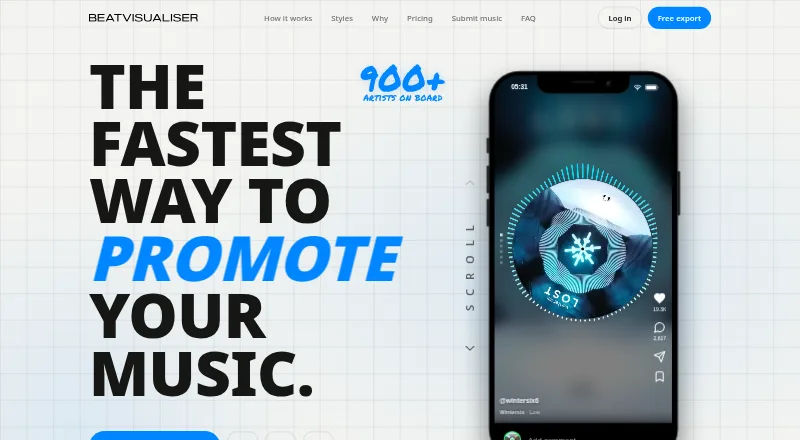
BeatVisualiser creates music visualiser videos for promoting tracks on YouTube, TikTok, Shorts, and Reels. Users can add WAV, MP3, or FLAC audio, trim it to a selected moment, and choose from more than 30 styles, including Spectrum, Waveform, Vinyl, Scope, and Split. Image or video backgrounds, custom artwork, and auto-synced lyrics are also available. The editor exports downloadable MP4s in vertical 9:16 or landscape 16:9 formats, up to 1080p 60fps. YouTube Mode supports tracks up to 10 minutes per export; short-form exports are limited to 60 seconds. A free account includes all styles, 1080p 60fps output, and no watermark, but its one included export is limited to 15 seconds. Later exports use credits. Pro costs $16.99 a month; a 149.00 USD once Lifetime option is limited to the first 150 early supporters. The site says files render locally in the browser. It lists Chrome 94+, Edge 94+, Brave, and Arc as supported browsers; Safari and Firefox lack the required rendering APIs.
Who it suits
BeatVisualiser suits musicians and promoters making visualizer videos for social platforms. It offers styles, backgrounds, artwork, and lyrics for both short-form and YouTube exports.
What it does well
- Accepts WAV, MP3, and FLAC audio
- Offers more than 30 visual styles
- Exports vertical and landscape MP4 video
- Free account output has no watermark
- Site says files render locally in the browser
What to know first
- Free account includes only one 15-second export
- Short-form exports are limited to 60 seconds
- Safari and Firefox lack required rendering APIs
- No free trial
Limits
The free account includes one export of up to 15 seconds; each later export costs one credit. Short-form exports are capped at 60 seconds, and YouTube Mode supports tracks up to 10 minutes per export. Pro is $16.99 per month; the $149.00 Lifetime plan is limited to the first 150 early supporters.
Plans
| Plan | Billed and limits | Price |
|---|---|---|
| Lifetime | once · Unlimited exports · all current and future features · limited to first 150 early supporters | $149, paid once |
| Pro | Billed monthly · cancel any time · Unlimited video exports · every visualiser and style · full-length YouTube videos · 1080p 60fps · Split View and video backgrounds · auto lyric sync and editor · custom artwork and palettes | $16.99 a month |
As beatvisualiser.com lists them, read 28 Sept 2026. The maker's own page has the final word.
Getting started
- Open the BeatVisualiser website.
- Use Chrome 94+, Edge 94+, Brave or Arc.
- Add a WAV, MP3 or FLAC audio file and trim it to a moment.
- Choose a visual style and add any background, artwork or lyrics.
- Select vertical 9:16 or landscape 16:9 and export an MP4.
- Use the free account for one export up to 15 seconds, or choose Pro or Lifetime for unlimited exports.
Verdict
BeatVisualiser offers tools for creating platform-shaped music visualizer videos, with a limited free export and paid options for ongoing use. Check the browser requirements and duration caps against your intended workflow.
Questions
Is BeatVisualiser free?
Yes. A free account includes all visualisers and styles, 1080p 60fps and no watermark, with one export of up to 15 seconds. Later exports cost one credit each.
How much do the paid plans cost?
Pro costs $16.99 per month, billed monthly, and can be cancelled any time. Lifetime costs $149.00 once and is limited to the first 150 early supporters.
Which audio and video formats does it support?
You can add WAV, MP3 or FLAC audio. Exports are downloadable MP4s in vertical 9:16 or landscape 16:9, up to 1080p 60fps.
Which browsers are supported?
The site lists Chrome 94+, Edge 94+, Brave and Arc. Safari and Firefox do not support the required rendering APIs.
Does BeatVisualiser publish directly to social platforms?
No direct publishing integration is described. It generates downloadable MP4 videos for posting.
How are credits and refunds handled?
Purchased credits do not expire, and buying a credit pack does not start a subscription. Unused purchases may be refunded within 14 days by email; purchases used to export a video are not refundable.
Facts from BeatVisualiser's own pages
- Audio formats
- Users can add WAV, MP3, or FLAC audio files and trim a track to a selected moment. · beatvisualiser.com, 28 Sept 2026
- Backgrounds and lyrics
- Users can add image or video backgrounds, custom artwork, and auto-synced lyrics. · beatvisualiser.com, 28 Sept 2026
- Browser support
- The site lists Chrome 94+, Edge 94+, Brave, and Arc as supported browsers, and says Safari and Firefox do not yet support the required rendering APIs. · beatvisualiser.com, 28 Sept 2026
- Credits
- Purchased credits do not expire, and buying a credit pack does not start a subscription. · beatvisualiser.com, 28 Sept 2026
- Export formats
- Exports include vertical 9:16 video for short-form platforms and landscape 16:9 video for YouTube at up to 1080p 60fps. · beatvisualiser.com, 28 Sept 2026
- Free account limits
- A free account includes all visualisers and styles, 1080p 60fps, and no watermark, with one free export of up to 15 seconds; later exports cost one credit each. · beatvisualiser.com, 28 Sept 2026
- Integrations and posting
- The product generates downloadable MP4 videos for posting on social platforms; the site describes no direct publishing integration. · beatvisualiser.com, 28 Sept 2026
- Local rendering
- The site says files render locally in the browser and unreleased music does not touch a server. · beatvisualiser.com, 28 Sept 2026
- Purpose
- BeatVisualiser creates music visualiser videos for promoting music on YouTube, TikTok, Shorts, and Reels. · beatvisualiser.com, 28 Sept 2026
- Refund terms
- The site states that unused purchases may be refunded within 14 days by email, while purchases used to export a video are not refundable. · beatvisualiser.com, 28 Sept 2026
- Rendering method
- The site says the visuals are canvas graphics driven by the audio rather than AI-generated images or video. · beatvisualiser.com, 28 Sept 2026
- Support
- The site lists [email protected] for questions. · beatvisualiser.com, 28 Sept 2026
- Track length limit
- YouTube Mode supports tracks up to 10 minutes per export, while short-form exports are capped at 60 seconds. · beatvisualiser.com, 28 Sept 2026
- Visual styles
- The product offers more than 30 styles, including Spectrum, Waveform, Vinyl, Scope, and Split visualisers. · beatvisualiser.com, 28 Sept 2026
Where BeatVisualiser stands on Freedom251
- Audio Visualizer Software#1 of 35