
Mullvad Browser
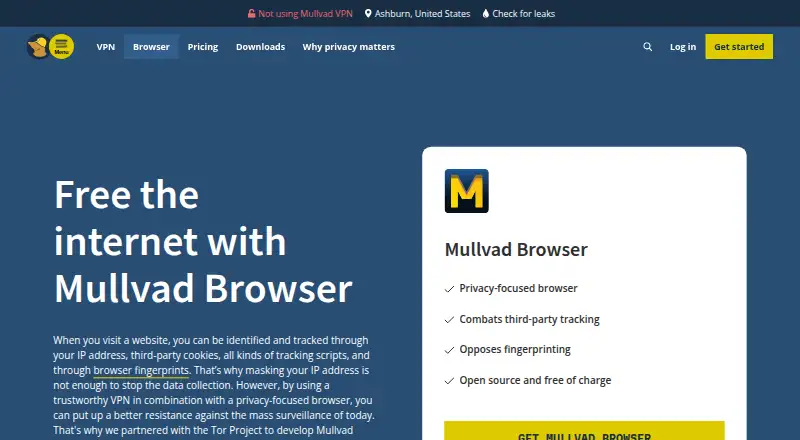
What Mullvad Browser is
Mullvad Browser is a free, open-source browser designed to reduce tracking and browser fingerprinting. It uses the Gecko engine and is available for supported versions of Linux, macOS, and Windows; Windows requires version 10 or later and a 64-bit system. Protection features include uBlock Origin for third-party trackers, built-in ad blocking, and fingerprinting protection intended to make users appear similar to one another. Private mode is enabled by default, so cookies, cache, and history are not saved between sessions. A reset button starts a clean session in one click, and Mullvad says it has removed browser telemetry. The browser connects with or without a VPN, but does not use the Tor Network; it was developed in collaboration with the Tor Project. Cross-device sync is not available. Mullvad says it does not earn money from the browser, with income instead coming from its VPN service. It is free for anyone, and Mullvad lists [email protected] for browser questions.
Who it suits
It suits people seeking a free browser with tracking and fingerprinting protections on Linux, macOS, or Windows. Users who need cross-device sync should note that it is not available.
What it does well
- Free and open source
- Includes uBlock Origin and built-in ad blocking
- Private mode enabled by default
- Reset button starts a clean session
- Available for supported Linux, macOS, and Windows versions
What to know first
- Does not use the Tor Network
- Cross-device sync is unavailable
- Windows requires version 10 or later and 64-bit support
Plans
| Plan | Billed and limits | Price |
|---|---|---|
| Mullvad Browser | Free for anyone · supported Linux, macOS and Windows | Free |
As mullvad.net lists them, read 3 Oct 2026. The maker's own page has the final word.
Getting started
- Visit https://mullvad.net/en/browser.
- Choose the download for Linux, macOS or Windows.
- On Windows, use a 64-bit system running Windows 10 or later.
- Install the browser for your supported operating system.
- Send browser questions to [email protected].
Overview
Mullvad Browser is a free, open-source desktop browser for people who want to reduce tracking and fingerprinting without using Tor. Its privacy-focused defaults are a strong fit for separate, private browsing sessions; the lack of cross-device sync is a drawback if you want browsing data carried between devices.
Key features
Fingerprinting protection is designed to make users appear more alike to websites, limiting how distinctive a browser can be. uBlock Origin blocks third-party trackers, alongside built-in ad, malware and adult-content blocking. These controls suit privacy-conscious browsing, but they do not route traffic through Tor or provide a VPN connection.
Private mode is enabled by default, so cookies, cache and history are not saved between sessions. A one-click reset creates a clean session, useful when you want to discard the current browsing state without clearing data manually. Mullvad says it has removed browser telemetry.
The browser uses the Gecko engine and was developed in collaboration with the Tor Project. That collaboration does not make it Tor Browser: Mullvad Browser connects to the internet with or without a VPN and does not use the Tor Network. Mullvad says it does not earn money from the browser, instead earning income from its VPN service.
Pricing
Mullvad Browser costs nothing. The free plan is for anyone and includes the browser for supported Linux, macOS and Windows systems. There is no trial or paid tier to consider; its main trade-off is that it offers no cross-device sync.
Platforms
Mullvad Browser is available for supported versions of Linux, macOS and Windows. The Windows version requires 64-bit Windows 10 or later. It is a desktop-only choice among these listed platforms, so people seeking a mobile version should look elsewhere.
Who it's for
Choose Mullvad Browser if your priority is reducing tracking and fingerprinting with private sessions, tracker blocking and a quick reset. It is less suitable if you need synchronized browsing across devices, or want your browser itself to send traffic through Tor. Mullvad lists [email protected] for browser questions.
Pros and cons
- Pros: Private mode is on by default, with cookies, cache and history cleared between sessions; the reset button makes starting fresh a one-click action.
- Pros: Fingerprinting protection, uBlock Origin and built-in ad, malware and adult-content blocking address several forms of unwanted tracking or content in one browser.
- Pros: Free and open source across Linux, macOS and Windows.
- Cons: No cross-device sync, so browsing data is not shared between devices.
- Cons: It does not use Tor or include a VPN connection, despite the Tor Project collaboration.
Alternatives
Privacy browsers and web browsers provide broader comparisons. Pick Brave Browser instead if you want a free browser with ad and tracker blocking and support for mobile as well as desktop platforms. Tor Browser is the alternative to consider when Tor routing is what you need. Waterfox is another free, open-source browser. LibreWolf is a free, community-driven open-source option for Linux, macOS and Windows. IronFox is a free, open-source option for Android. SnowHaze offers an iOS privacy browser with tracker and ad blocking, fingerprinting protection and Tor integration. Midori Browser is free to use without an account and spans desktop, mobile and extension platforms. Nav0 is a free browser for Linux, macOS and Windows.
Verdict
Mullvad Browser is a strong choice for people who want free desktop browsing with privacy protections built into the session by default. Its clearest reasons to choose it are the fingerprinting focus, tracker blocking and one-click clean reset; look elsewhere if you need cross-device sync or Tor-based routing.
Verdict
Mullvad Browser centers on reducing tracking, with private sessions and a one-click reset. It does not use Tor and does not offer cross-device sync.
Questions
How much does Mullvad Browser cost?
It is free for anyone. The listed plan price is free.
Is there a free trial?
No. Mullvad Browser has a free plan and no free trial.
Which operating systems does it support?
It is available for supported versions of Linux, macOS and Windows. Windows requires Windows 10 or later and 64-bit Windows.
Is Mullvad Browser open source?
Yes, it is open source.
Does it use the Tor Network?
No. The browser works with or without a VPN and does not use the Tor Network. It was developed in collaboration with the Tor Project.
Who makes Mullvad Browser?
Mullvad makes the browser. Mullvad VPN AB is based in Gothenburg, Sweden, and lists Amagicom AB as its parent company.
Facts from Mullvad Browser's own pages
- Browser engine
- gecko · mullvad.net, 21 Sept 2026
- Built-in ad blocking
- Yes · mullvad.net, 21 Sept 2026
- Business model
- Mullvad says it does not earn money from the browser and earns income from its VPN service. · mullvad.net, 3 Oct 2026
- Company and location
- Mullvad VPN AB lists its address in Gothenburg, Sweden, and says it is owned by parent company Amagicom AB. · mullvad.net, 3 Oct 2026
- Cross-device sync
- No · mullvad.net, 21 Sept 2026
- Fingerprint protection
- The browser uses fingerprinting protection intended to make users appear similar to one another. · mullvad.net, 3 Oct 2026
- Founded
- 2023 · mullvad.net, 28 Sept 2026
- Free plan
- Yes · mullvad.net, 21 Sept 2026
- Headquarters
- Gothenburg, Sweden · mullvad.net, 28 Sept 2026
- Open source
- Mullvad describes the browser as open source and free of charge. · mullvad.net, 3 Oct 2026
- Supported platforms
- both · mullvad.net, 21 Sept 2026
- Private mode
- Private mode is enabled by default, and cookies, cache and history are not saved between sessions. · mullvad.net, 3 Oct 2026
- Purpose
- Mullvad Browser is designed to minimize tracking and browser fingerprinting. · mullvad.net, 3 Oct 2026
- Release history
- Mullvad says it released the browser in collaboration with the Tor Project in April 2023. · mullvad.net, 3 Oct 2026
- Session reset
- The browser includes a reset button that creates a clean session in one click. · mullvad.net, 3 Oct 2026
- Support
- Mullvad lists [email protected] as its contact address for questions about the browser. · mullvad.net, 3 Oct 2026
- Supported systems
- The browser is available for supported versions of Linux, macOS and Windows. · mullvad.net, 3 Oct 2026
- Telemetry
- Mullvad says it has removed all browser telemetry. · mullvad.net, 3 Oct 2026
- Tor collaboration
- Mullvad says the browser was developed in collaboration with the Tor Project. · mullvad.net, 3 Oct 2026
- Tracker blocking
- It includes uBlock Origin to block third-party trackers. · mullvad.net, 3 Oct 2026
- Tracking protection
- advanced · mullvad.net, 21 Sept 2026
- VPN use
- The browser connects to the internet with or without a VPN and does not use the Tor Network. · mullvad.net, 3 Oct 2026
- Windows requirement
- The Windows version works on Windows 10 or later and requires 64-bit Windows. · mullvad.net, 3 Oct 2026
Where Mullvad Browser stands on Freedom251
- Web browsers#7 of 154
- Privacy browsers#4 of 32