
Midori Browser
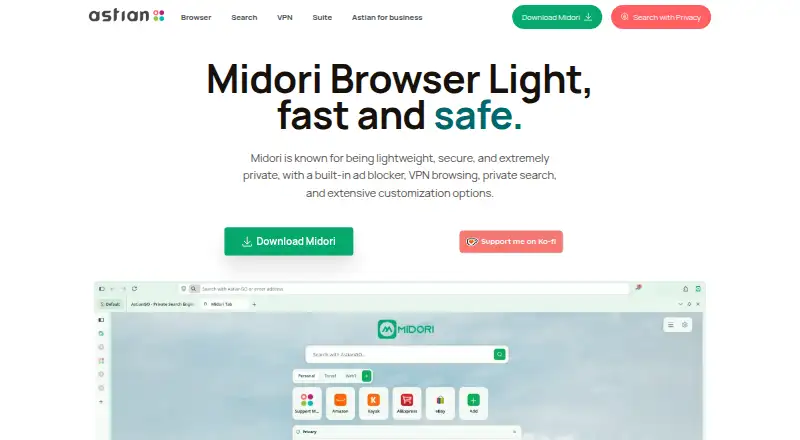
What Midori Browser is
Midori Browser is a free, open-source browser built for private browsing, using the Gecko engine. Ad blocking, anti-tracking, Never-Consent, and IA Shield are built in and active by default. Astian says Midori has no telemetry by default and does not require an account. Its default search engine, AstianGO, is described as having no query logging or profile. MidoriVPN is available from the side panel, where users can choose a server. Midori Center groups controls for tab appearance, the sidebar, workspaces, keyboard shortcuts, privacy, and VPN settings. The maker says the browser supports web extensions, including on Android. Listed platforms include Android, iOS, Linux, macOS, Windows, and an extension; the features page lists native builds for Windows, Linux, and Android. The Android web app catalog currently has a limited selection of applications. Astian directs developers with technical problems to open an issue on GitHub and invites organizations to contact it about Midori Enterprise.
Who it suits
Midori suits people seeking a private-browsing browser with built-in protections and no required account. Its extensions and native builds may also suit users across the listed platforms.
What it does well
- Built-in ad blocking and anti-tracking are active by default.
- No account is required, according to the maker.
- AstianGO has no query logging or profile, according to the maker.
- MidoriVPN lets users choose a server from the side panel.
What to know first
- The Android web app catalog has a limited selection.
- Native builds are listed for only Windows, Linux, and Android.
Limits
The Android web app catalog currently has a limited selection of applications. Midori Browser is free to download and use, with no account required.
Plans
| Plan | Billed and limits | Price |
|---|---|---|
| Midori Browser | Free to download and use · no account required | Free |
As astian.org lists them, read 9 Oct 2026. The maker's own page has the final word.
Getting started
- Visit the Midori Browser website.
- Choose a listed platform: Android, iOS, Linux, macOS, Windows, or extension.
- Download and use Midori for free without creating an account.
- Open Midori Center to adjust appearance, workspaces, shortcuts, privacy, or VPN settings.
Midori is a lightweight Gecko-based browser for people who want strong privacy defaults without creating an account. It is a good fit for individuals who want built-in blocking, private search and optional VPN access across desktop and mobile, although Android’s limited web-app catalog makes it less suitable for users who rely heavily on web apps.
Overview
Midori opens with Ad Blocking, Anti-Tracking, Never-Consent and IA Shield enabled by default. That matters for users who want a protective baseline immediately rather than a browser that requires a long settings session. The maker says zero telemetry is collected by default, and no account is required, reducing the personal information tied to ordinary browsing.
AstianGO is the default search engine. According to the maker, it does not log queries or build a profile, so search privacy is part of the normal browsing flow rather than an optional replacement. MidoriVPN can be activated from the side panel, where users choose a server. This is convenient for browser-focused VPN use, but readers seeking a VPN for every application should not treat this as a system-wide replacement.
Key features
Privacy and search
The combination of default ad and tracker blocking, Never-Consent and IA Shield reduces both nuisance content and routine tracking without depending on extra extensions. It is especially practical for less technical users and for organisations that want a consistent starting policy. Users who prefer to tune every protection individually may find the defaults less distinctive than a highly configurable privacy setup, but Midori’s approach keeps the first-run experience focused.
VPN and customization
MidoriVPN is reachable from the side panel, and Midori Center consolidates tab appearance, sidebar controls, workspaces, keyboard shortcuts, plus privacy and VPN toggles. These controls suit users who move between projects or want browser layout and privacy options in one place. The browser also supports web extensions, including on Android, allowing users to add tools when the built-in controls are not enough.
Engine and support
Midori uses the Gecko browser engine. Developers with technical problems are directed to open an issue on Astian’s GitHub repository, which provides a public route for reporting rather than a promise of one-to-one support. Astian also presents Midori Enterprise as a secure, privacy-first browser for organisations and asks interested teams to make contact; no separate enterprise price or package is stated.
Pricing
Midori Browser costs free. The free plan includes downloading and using the browser with no account required. There is no free trial because the product is already free, and there are no published seat, quota or renewal limits. This is the straightforward choice for individuals, families and teams evaluating a no-cost browser; organisations that need a formal enterprise arrangement must contact Astian rather than select a published paid tier.
Platforms
Midori is offered for Android, iOS, Linux, macOS and Windows, with an extension option. The features page identifies native builds for Windows, Linux and Android, while the broader platform listing includes iOS and macOS as well. Astian says web extensions are supported on Android as well as desktop. Android users should account for the currently limited selection of applications in the Android web-app catalog, particularly if web apps are central to their workflow.
Who it's for
Choose Midori if you want a free, open-source browser with privacy protections active from the first launch, private search without an account and browser-level VPN access. It is also a sensible candidate for organisations that want a privacy-first browser to assess through Astian’s enterprise channel. Look elsewhere if you need a broad Android web-app catalog, a VPN that covers traffic outside the browser, or a platform mix beyond Midori’s native build emphasis.
Pros and cons
- Pro: Ad Blocking, Anti-Tracking, Never-Consent and IA Shield are active by default, reducing setup work.
- Pro: Zero telemetry by default, no account requirement and AstianGO’s stated no-query-logging policy support an account-light privacy model.
- Pro: MidoriVPN, side-panel server selection and Midori Center’s workspaces and shortcut controls combine access and customization in one browser.
- Pro: Web-extension support, including on Android, gives users an additional way to tailor the browser.
- Con: The Android web-app catalog currently has a limited application selection, which can constrain mobile web-app use.
- Con: Native builds are specifically identified for Windows, Linux and Android, so users on iOS or macOS should confirm that the offered build meets their needs.
Alternatives
Mozilla Firefox is the better choice when you need a free, open-source browser with downloads for Windows, macOS, Linux, iOS and Android plus a web option.
Brave Browser suits readers who want free ad and tracker blocking but are open to a freemium model with an optional Brave Origin plan.
Waterfox is an alternative free, open-source browser with no premium tier and builds for Android, Linux, macOS and Windows.
Tor Browser is the alternative for readers who specifically want a free, open-source Tor-focused browser on Android, Linux, macOS or Windows.
Mullvad Browser is worth choosing when desktop-only support for Linux, macOS and Windows is sufficient.
LibreWolf is a free, community-driven open-source option for Linux, macOS and Windows.
Helium Browser fits desktop users seeking free ad and tracker blocking with Chromium extension support on macOS, Windows and Linux.
Aloha Browser is the alternative if you want free ad blocking and VPN features with an optional premium tier for expanded access.
For broader comparisons, see our Web browsers and Privacy browsers lists.
Verdict
Midori is a strong recommendation for privacy-conscious users who want a free Gecko browser with protections, private search and optional VPN access already integrated. Its main reason to look elsewhere is the limited Android web-app catalog, along with the need to verify platform support if iOS or macOS is essential.
Verdict
Midori combines default privacy protections, private search, VPN access, and browser customization in a free, open-source package. Note the limited Android web app catalog and the narrower list of platforms with native builds.
Questions
How much does Midori Browser cost?
The listed plan is free. It is free to download and use.
Does Midori Browser require an account?
No. Astian says Midori requires no account.
Which platforms does Midori support?
It is listed for Android, iOS, Linux, macOS, Windows, and as an extension. Astian lists native builds for Windows, Linux, and Android.
Is Midori Browser open source?
Yes, Midori Browser is listed as open source.
What privacy features does it include?
Ad blocking, anti-tracking, Never-Consent, and IA Shield are active by default. AstianGO is the default search engine, and Midori includes MidoriVPN.
How can developers get technical support?
Astian directs developers with technical problems to open an issue on Midori’s GitHub repository.
Facts from Midori Browser's own pages
- Android limitation
- The Android web app catalog currently offers a limited selection of applications. · astian.org, 9 Oct 2026
- Browser engine
- Midori is built on Gecko, the engine that powers Firefox. · astian.org, 9 Oct 2026
- Built-in ad blocking
- Yes · astian.org, 23 Sept 2026
- Built-in protection
- Ad Blocking, Anti-Tracking, Never-Consent, and IA Shield are integrated and active by default. · astian.org, 9 Oct 2026
- Customization
- Midori Center brings together tab appearance, sidebar, workspaces, keyboard shortcuts, and privacy and VPN toggles. · astian.org, 9 Oct 2026
- Enterprise
- Astian describes Midori Enterprise as a secure, privacy-first browser for organizations and invites interested teams to contact them. · astian.org, 9 Oct 2026
- Extensions
- The maker says Midori supports web extensions, including on Android. · astian.org, 9 Oct 2026
- Free plan
- Yes · astian.org, 23 Sept 2026
- Open source
- Midori is open source under the MPL-2.0 license. · astian.org, 9 Oct 2026
- Supported platforms
- both · astian.org, 23 Sept 2026
- Privacy
- The maker says Midori has zero telemetry by default and requires no account. · astian.org, 9 Oct 2026
- Private search
- AstianGO is included as the default private search engine, with no query logging or profile, according to the maker. · astian.org, 9 Oct 2026
- Purpose
- Midori is a lightweight browser focused on private browsing. · astian.org, 9 Oct 2026
- Support
- Astian directs developers with technical problems to open an issue on its GitHub repository. · astian.org, 9 Oct 2026
- Supported builds
- The features page lists native builds for Windows, Linux, and Android. · astian.org, 9 Oct 2026
- VPN
- Midori includes MidoriVPN, which users can activate from the side panel and use to choose a server. · astian.org, 9 Oct 2026
Where Midori Browser stands on Freedom251
- Web browsers#5 of 154
- Privacy browsers#7 of 32