Freedom251 › AI Motion Capture Software
Move One
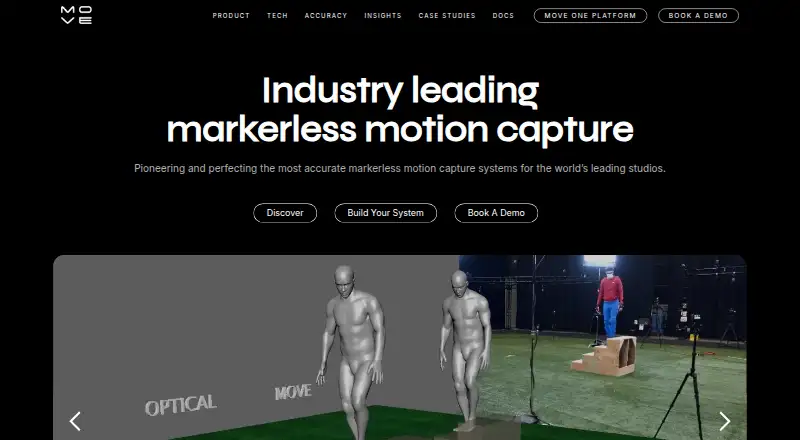
What Move One is
Move One is a single-camera iPhone motion-capture app for creating 3D animations from video. Move.ai describes the technology as AI-powered and markerless, and processing uses credits to turn 2D footage into 3D motion data: Gen 1 uses one credit per person-second, while Gen 2 uses two. The free plan includes 30 one-time credits that do not expire and allows videos up to 30 seconds; paid users can record up to 60 seconds. Accepted inputs include MP4, MOV, and AVI files up to 1GB, with 60fps Full HD recommended for best results. Exports include FBX, USDC, BLEND, USDZ, MP4, and biomechanics output, which contains per-frame joint positions, rotation values, torques, and reaction forces. A Chrome extension can send mocap data directly to a PC using a code generated on the iOS device. A Blender plugin imports animations directly but currently supports FBX files only. Documentation also covers importing or retargeting animations in NVIDIA Omniverse, Unreal Engine, Unity, Maya, and Cinema 4D. Paid plans start at $18 a month, billed at $18/month plus VAT.
Who it suits
Move One suits studios and creators seeking single-camera motion capture from iPhone video. It may also fit users who want biomechanics data or workflows involving the listed animation and 3D tools.
What it does well
- Free plan includes 30 credits that do not expire
- Exports multiple animation and biomechanics formats
- Accepts MP4, MOV, and AVI uploads
- Documents workflows for several 3D tools
What to know first
- Paid users can record up to 60-second videos
- Gen 2 uses two credits per person-second
- Blender plugin currently supports FBX files only
- Paid plans start at $18 a month plus VAT
Limits
The free plan has 30 one-time credits and a 30-second video limit. Starter includes 60 credits per month and 60-second videos; higher paid plans have their own monthly credit allowances.
Plans
| Plan | Billed and limits | Price |
|---|---|---|
| Free | 30 one-time credits · 30-second videos · credits do not expire | Free |
| Starter | $18/month + VAT · 60 credits/month · 60-second videos | $18 a month |
| Plus | $225/month + VAT · 240 credits/month · 60-second videos | $225 a month |
| Standard | $48/month + VAT · 180 credits/month · 60-second videos | $48 a month |
| Advanced | $490/month + VAT · 700 credits/month · 60-second videos | $490 a month |
As move.ai lists them, read 30 Sept 2026. The maker's own page has the final word.
Getting started
- Open the Move One website.
- Use the iOS app to capture video or upload a supported video file.
- Choose the free plan or a paid plan based on its credit allowance and video length.
- Use the Chrome extension to send motion capture data to a PC with a code from the iOS device.
- Import exported animations into Blender or use the documented workflows for supported tools.
Move One suits creators and studios that want markerless 3D motion from ordinary iPhone video rather than a dedicated capture setup. Its strongest case is the combination of AI processing, broad export options and documented engine workflows, while credit consumption and short clip limits shape how much footage you can produce.
Overview
Move One is a single-camera iPhone motion-capture app from Move.ai, founded in 2019 and headquartered in London. It turns 2D video into 3D animation data through AI-powered, markerless capture. The service is aimed at both individual creators and production teams that need motion assets for animation, games, visualization or analysis.
Capture is not real time: you record footage and process it using credits. Gen 1 processing costs one credit per person-second, while Gen 2 costs two credits per person-second. That distinction makes Gen 1 more economical for longer or repeated work, whereas Gen 2 consumes a monthly allowance twice as quickly for the same number of people and seconds.
Key features
Capture and processing
Single-camera uploads accept MP4, MOV and AVI files up to 1GB; 60fps Full HD is recommended for best results. Paid accounts can record clips up to 60 seconds, and the free account is limited to 30 seconds. Hand tracking is supported, but there is no real-time capture mode, so Move One is better for recorded sessions than live performance or immediate preview.
Exports and data
Exports include FBX, USDC, BLEND, USDZ, MP4 and biomechanics output. The biomechanics file provides per-frame joint positions, rotation values, torques and reaction forces, giving researchers and technical artists data beyond a character animation. MP4 is accepted as input, and the single-file upload limits keep very long takes or large batches outside the stated workflow.
Workflow connections
The Chrome Downloader extension transfers mocap data directly to a PC using a code generated on the iPhone. A Move AI Blender plugin imports Move One animations into Blender, although that plugin currently handles FBX files only; users relying on other export types must use another route. Documentation covers importing or retargeting animations in NVIDIA Omniverse, Unreal Engine, Unity, Maya and Cinema 4D, which makes the service practical for established 3D pipelines.
Privacy and support
Move AI’s EULA places personal-data handling under its privacy policy and calls for appropriate technical and organisational measures, including applicable GDPR and UK GDPR compliance. Support is available at [email protected].
Pricing
The free plan costs 0.00 USD and includes 30 one-time credits, clips up to 30 seconds and credits that do not expire. It is useful for trying the capture process or producing occasional short clips, but the one-time allowance is quickly exhausted by multi-person or Gen 2 processing.
Starter costs $18 a month, billed at $18/month plus VAT, with 60 credits per month and 60-second videos. It fits a light user who needs recurring access, though 60 credits represent only 30 person-seconds of Gen 2 processing. Standard is $48 a month, billed at $48/month plus VAT, and raises the allowance to 180 credits while retaining 60-second videos; it is a more workable level for regular solo work or limited batches.
Plus costs $225 a month, billed at $225/month plus VAT, for 240 credits. Advanced costs $490 a month, billed at $490/month plus VAT, for 700 credits. These higher tiers suit teams or projects with sustained processing demand, but their effective capacity still depends on the number of people captured and whether Gen 1 or Gen 2 is used. All paid tiers retain the 60-second clip ceiling.
Platforms
Move One is offered through an iOS app, web platform and Chrome extension. The extension is specifically a PC downloader, while the documented Blender plugin and engine integrations extend the workflow into desktop production tools.
Who it's for
Choose Move One if you already work with Blender, Unreal, Unity, Maya, Cinema 4D or Omniverse and want exports that fit those environments. It also suits creators who can stage a single camera and process footage after recording, and analysts who need joint, torque and force data. Look elsewhere if live capture is essential, if clips routinely exceed 60 seconds, or if your budget cannot absorb credit-based processing.
Pros and cons
- Pro: Markerless, single-camera capture lowers the equipment burden for recorded animation sessions.
- Pro: FBX, USDC, BLEND, USDZ, MP4 and biomechanics exports cover both creative and technical uses.
- Pro: Documented integrations span major engines and DCC tools.
- Con: Gen 2 uses two credits per person-second, making multi-person or high-quality workloads consume plans quickly.
- Con: Free clips stop at 30 seconds and paid clips at 60 seconds.
- Con: The Blender plugin is currently FBX-only, despite the wider export list.
- Con: There is no real-time capture mode.
Alternatives
For a broader directory of options, see AI Motion Capture Software.
- Mocai is a freemium option with Android, desktop, self-hosted, API and web coverage, plus a free allowance of one minute monthly, 15-second clips and single-person capture.
- Move AI offers a similar freemium ecosystem and the same 30-credit free allowance and $18 Starter tier, but supports more platform types including desktop and self-hosted deployments.
- XR Animator is a free public version for Android, Linux, macOS, web and Windows.
- FreeMoCap is free with no subscriptions, licenses or hidden fees.
- mimem.ai provides a free tier with daily tokens, three-camera support and three monthly FBX exports.
- Open Mocap is a free, open-source Blender add-on compatible with Blender 4.0.0 and earlier.
- PINOC has a free plan with five videos per day and a $7.99 monthly Pro tier.
- Rokoko Create offers a free-forever Starter plan with 30 seconds of Vision AI processing monthly and unlimited text-to-motion clips.
Verdict
Move One is a strong choice for creators and studios that need recorded, single-camera motion converted into data they can export across established 3D tools, especially when biomechanics output matters. Its main reason to look elsewhere is the credit model combined with strict clip limits and no live capture, which can make frequent or long-form production expensive and cumbersome.
Verdict
Move One turns single-camera video into 3D motion data and offers several export and downstream workflow options. Consider the credit rates, video-length limits, and the Blender plugin’s FBX-only support when choosing a plan or workflow.
Questions
Is Move One free?
Yes. Its Free plan costs nothing and includes 30 one-time credits that do not expire.
How much do the paid plans cost?
Starter is $18 a month, Standard $48 a month, Plus $225 a month, and Advanced $490 a month. Each is billed at the listed monthly amount plus VAT.
Which platforms does Move One support?
Move One supports iOS and web access, and offers a Chrome extension.
What file formats does it support?
It accepts MP4, MOV, and AVI uploads up to 1GB. Exports include FBX, USDC, BLEND, USDZ, MP4, and biomechanics output.
Does Move One work with Blender?
A Move AI Blender plugin imports Move One animations directly into Blender, and currently supports FBX files only.
Does it capture in real time?
No. The listed real-time capture status is no.
Facts from Move One's own pages
- AI motion capture
- Move.ai describes its technology as AI-powered, markerless motion capture for studios and creators. · move.ai, 30 Sept 2026
- Biomechanics data
- Biomechanics output contains per-frame joint positions, rotation values, torques and reaction forces. · docs.move.ai, 30 Sept 2026
- Blender integration
- A Move AI Blender plugin imports Move One animations directly into Blender and currently supports FBX files only. · docs.move.ai, 30 Sept 2026
- Chrome extension
- The Move One Downloader Chrome Extension sends mocap data directly to a PC using a code generated on the iOS device. · docs.move.ai, 30 Sept 2026
- Credit processing
- Credits generate 3D motion data from 2D video; Gen 1 uses one credit per person-second and Gen 2 uses two credits per person-second. · docs.move.ai, 30 Sept 2026
- Engine integrations
- Move One documentation covers importing or retargeting animations in NVIDIA Omniverse, Unreal Engine, Unity, Maya and Cinema 4D. · docs.move.ai, 30 Sept 2026
- Export formats
- The product exports FBX, USDC, BLEND, USDZ, MP4 and biomechanics output, and accepts MP4 input. · docs.move.ai, 30 Sept 2026
- Founded
- 2019 · move.ai, 28 Sept 2026
- Headquarters
- London, United Kingdom · move.ai, 28 Sept 2026
- Privacy and compliance
- Move AI's EULA says personal data is handled under its privacy policy and requires appropriate technical and organisational measures, including compliance with applicable data protection laws such as the GDPR and UK GDPR. · move.ai, 30 Sept 2026
- Single-file upload
- Single-camera uploads support MP4, MOV and AVI files up to 1GB, with 60fps Full HD recommended for best results. · docs.move.ai, 30 Sept 2026
- Support
- The Move One Acceptable Use Policy lists [email protected] as the support contact address. · move.ai, 30 Sept 2026
- Video length
- Paid users can record videos up to 60 seconds, while free users can record up to 30 seconds. · docs.move.ai, 30 Sept 2026
- What it does
- Move One is a single-camera motion capture iPhone app for capturing and creating 3D animations. · docs.move.ai, 30 Sept 2026
Where Move One stands on Freedom251
- AI Motion Capture Software#8 of 27