Freedom251 › Virtual Event Platforms
MootUp
What MootUp is
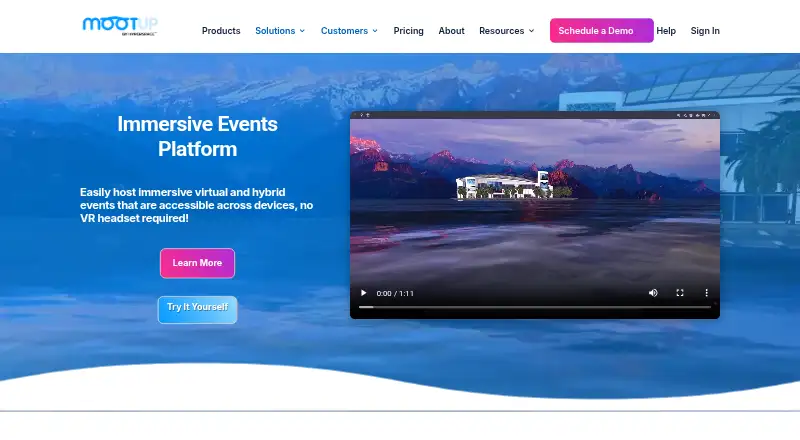
MootUp is a 3D platform for virtual and hybrid events that people can access across devices without a VR headset. Attendees join through a shared browser link, without downloading or installing an app. Organizers can create conferences, exhibitions, breakout sessions, offices, coworking spaces, and classrooms using customizable venues, rooms, sponsor booths, and custom 3D environments. Attendee interactions include voice and video calls, text chat, private messages, gestures, and animations, with customizable 3D, video, and hologram avatars. The platform supports live and prerecorded video, with YouTube Live, Adobe Connect, and Zoom named as streaming integrations. MootUp’s Trophio system tracks visits, content views, popular event elements, and interactions, and supports metric exports. Other listed integrations include Slack, BlueJeans, Intrado, Splash, and Hopin. Its free Basic plan costs nothing and allows up to five participants per meeting, with a 40-minute meeting limit. Business plans have custom pricing and are listed for 50–10,000 participants.
Who it suits
MootUp may suit businesses, educators, event planners, exhibitors, sponsors, and attendees seeking virtual or hybrid event spaces. It is also relevant for organizers who want browser-link access and event analytics.
What it does well
- Attendees can join through a browser link without installation.
- Supports virtual and hybrid event formats.
- Offers customizable venues, breakout rooms, and sponsor booths.
- Tracks visits, views, and interactions with exportable metrics.
- Basic includes unlimited meetings.
What to know first
- Basic meetings are limited to five participants.
- Basic meetings have a 40-minute limit.
- Business pricing is custom and not listed.
- Live event tech support is available separately.
Limits
The free Basic plan allows up to five participants per meeting and limits each meeting to 40 minutes. It includes six environment templates. Business plans are listed for 50–10,000 participants, with custom pricing.
Plans
| Plan | Billed and limits | Price |
|---|---|---|
| Basic | Up to 5 participants per meeting · 40-minute meeting limit · unlimited meetings · 6 environment templates · SSL encryption | Free |
| Business | Custom pricing · plans for 50–10,000 participants · unlimited rooms · 5GB cloud storage · SSO · hybrid cloud security | On request |
As mootup.com lists them, read 3 Oct 2026. The maker's own page has the final word.
Getting started
- Visit the MootUp website and choose a plan to discuss or use.
- For Basic, start with the free plan, which allows unlimited meetings.
- Create an event space using an environment template or customizable venue options.
- Share a link so attendees can join in their browser.
- Add event interactions, video, or named integrations as needed.
Overview
MootUp is a virtual and hybrid events platform built around 3D spaces, rather than a conventional video-meeting layout. It is best suited to organizers of conferences, exhibitions, and networking events who want attendees to move between spaces and interact. Its breadth is compelling, but the free plan is too small and short for most larger live events.
Key features
Attendees enter through a shared browser link, without installing software or wearing a VR headset. That makes access practical across mixed-device audiences, while customizable 3D, video, and hologram avatars give people more ways to appear than a standard video grid. Voice and video calls, text chat, private messages, gestures, and animations support both planned conversation and informal networking; this is a stronger fit for events built around attendee interaction than for a one-way presentation.
Organizers can configure virtual venues, breakout rooms, sponsor booths, and custom 3D environments. Those options can give conferences and expos distinct areas for sessions and exhibitors, but may be unnecessary complexity for teams that only need routine calls. MootUp supports live and prerecorded video, with YouTube Live, Adobe Connect, and Zoom named as streaming integrations. Slack, BlueJeans, Intrado, Splash, and Hopin are also named as integrations.
Trophio tracks visits, content views, popular event elements, and interactions, and supports exporting metrics. That gives organizers several ways to review attendee activity after an event. For capacity, many-to-many video calls support up to 50 people and audio calls up to 250; webinar-style one-to-many video supports thousands. These are different formats, so the large webinar audience should not be mistaken for an equivalent group-call limit.
Pricing
MootUp uses a freemium model and offers a 30-day trial. Basic costs nothing and allows up to 5 participants per meeting, with a 40-minute meeting limit and unlimited meetings. It includes six environment templates and SSL encryption. This is a useful way to try the format or host small, short sessions, but the five-person cap makes it a poor fit for an event that needs room for a broader audience.
Business has custom pricing and plans for 50–10,000 participants. It includes unlimited rooms, 5GB of cloud storage, SSO, and hybrid cloud security. The capacity range and room allowance make it the relevant option for larger events and multi-space programs, while custom pricing means buyers need to establish the cost for their intended scale. Plans include unlimited email and chat support and a set number of onboarding support hours; live event tech support is available separately.
Platforms
MootUp supports Android, iOS, Linux, macOS, web, and Windows. Browser-link entry without an installation requirement is a practical advantage for attendees who do not want to set up a dedicated app or use VR equipment.
Who it's for
MootUp suits business and marketing teams, educators, event planners, exhibitors, sponsors, and attendees involved in virtual or hybrid events. Its booth and networking features are especially relevant to expos and events where people should connect, rather than simply watch a stream. For a small meeting or classroom that needs only straightforward video calls, its 3D event spaces may be more than the job requires.
Pros and cons
- Pro: Browser access without downloads or a VR headset reduces entry friction for audiences using different devices.
- Pro: Configurable venues, breakout rooms, and sponsor booths support events with distinct session, exhibition, and networking areas.
- Pro: Trophio tracks several kinds of attendee activity and supports metric exports for follow-up analysis.
- Con: Basic is capped at five participants and 40 minutes per meeting, limiting its usefulness beyond small sessions.
- Con: The 50-person many-to-many video limit is far below webinar capacity; large audiences need the one-to-many format instead.
- Con: Business uses custom pricing, so its cost is not a simple published amount to compare against event budgets.
Alternatives
Virtual Event Platforms is the broader category to explore when comparing event-focused tools. Consider Webex App if its free plan's 100-attendee meetings of up to 40 minutes suit your needs better than MootUp's five-person Basic limit. Shindig may fit an event needing up to 100 participants, four speakers on stage, and a 1,000-user-hour monthly allowance on its free plan. EventX is an option when a free plan for unlimited events, each with up to 30 attendees, is a closer match.
Micepad is another alternative. SpatialChat offers a free plan with up to 12 participants, two hours of meetings daily, and four customized rooms. EventHash has a free Community plan with 100 AI credits per month, while flat.social allows up to five people at once with unlimited session length on its free plan. Zoom Scheduler is an alternative to consider.
Verdict
Choose MootUp if your event needs configurable 3D venues, exhibitor spaces, and active attendee networking across devices. Its browser entry, interaction tools, and event analytics make that combination persuasive. Look elsewhere for ordinary small-group calls or if you need a large many-to-many video meeting: Basic is tightly capped, and Business pricing is custom.
Verdict
MootUp combines browser-based event access, configurable 3D spaces, attendee interaction tools, and analytics. The free Basic plan has small-meeting limits; larger listed Business plans require custom pricing.
Questions
Does MootUp have a free plan?
Yes. Basic costs nothing and includes unlimited meetings, up to five participants per meeting, and a 40-minute meeting limit. The pricing note also lists a 30-day trial.
What platforms can attendees use?
MootUp is listed for Android, iOS, Linux, macOS, web, and Windows. Attendees can join through a browser link without installing an app.
Does MootUp require a VR headset?
No. MootUp describes the platform as accessible across devices without requiring a VR headset.
What does the Business plan include?
Business has custom pricing and plans for 50–10,000 participants. Listed features include unlimited rooms, 5GB cloud storage, SSO, and hybrid cloud security.
Which integrations does MootUp name?
Examples include Slack, Zoom, BlueJeans, Intrado, Splash, and Hopin. For streaming, it names YouTube Live, Adobe Connect, and Zoom.
Who founded MootUp?
MootUp says it was founded by virtual reality veteran Danny Stefanic.
Facts from MootUp's own pages
- Access
- Attendees can join through a browser using a shared link, with no download, app, or installation required. · mootup.com, 3 Oct 2026
- Analytics
- MootUp says its Trophio system tracks user visits, content views, popular event elements, and interactions, and supports exporting metrics. · mootup.com, 3 Oct 2026
- Avatars
- The platform offers customizable 3D avatars, video avatars, and hologram avatars, among other avatar options. · mootup.com, 3 Oct 2026
- Capacity limits
- The FAQ says many-to-many video calls support up to 50 people and many-to-many audio calls up to 250 people; webinar-style one-to-many video supports thousands. · mootup.com, 3 Oct 2026
- Company history
- The About page says MootUp was founded by virtual reality veteran Danny Stefanic, but does not state a founding year. · mootup.com, 3 Oct 2026
- Event formats
- The platform lists virtual conferences, exhibitions, breakouts, offices, coworking spaces, and classrooms as example experiences. · mootup.com, 3 Oct 2026
- Event spaces
- Organizers can use customizable virtual venues, breakout rooms, sponsor booths, and custom 3D environments. · mootup.com, 3 Oct 2026
- Headquarters
- Phoenix, Arizona, USA · mootup.com, 28 Sept 2026
- Integrations
- The site names Slack, Zoom, BlueJeans, Intrado, Splash, and Hopin as examples of integrations. · mootup.com, 3 Oct 2026
- Intended users
- MootUp presents the platform for business, marketing, education, event planning, exhibitors, sponsors, and attendees. · mootup.com, 3 Oct 2026
- Interaction
- Attendees can use voice and video calls, text chat, private messaging, gestures, and animations to interact. · mootup.com, 3 Oct 2026
- Product
- MootUp describes itself as a 3D virtual and hybrid events platform accessible across devices without requiring a VR headset. · mootup.com, 3 Oct 2026
- Security
- The Basic meetings plan lists Secure Socket Layer (SSL) encryption, while the Business plan lists hybrid cloud security. · mootup.com, 3 Oct 2026
- Support
- The site says plans include unlimited email and chat support and a set number of onboarding support hours; live event tech support is available separately. · mootup.com, 3 Oct 2026
- Video streaming
- The platform supports live and prerecorded video and names YouTube Live, Adobe Connect, and Zoom as streaming integrations. · mootup.com, 3 Oct 2026
Where MootUp stands on Freedom251
- Virtual Event Platforms#7 of 47
- Metaverse Workplace Software#3 of 15