Freedom251 › Fixed Asset Management Software
Minty Assets
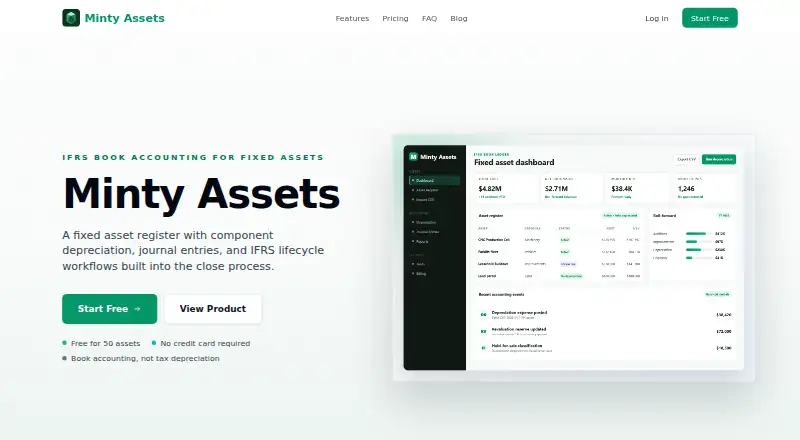
What Minty Assets is
Minty Assets is web-based fixed asset register and depreciation software focused on book accounting, with audit trails, journal entries, and report exports. Its component accounting lets asset parts carry separate costs, residual values, useful lives, depreciation methods, and in-service dates. Listed methods are Straight Line, Declining Balance, Double Declining Balance, Sum of Years Digits, and No Depreciation. Workflows cover IAS 16 component accounting, IAS 36 impairment, IFRS 5 held-for-sale classification, disposals, and annual estimate reviews. Users can preview, post, reverse, and export balanced depreciation journals traceable to assets and components. Eight reports include an Asset Register, Depreciation Schedule, Roll Forward, Expense Summary, Disposals, Fully Depreciated Assets, Journal Report, and Asset Activity. CSV imports map and validate columns and can create opening history for partially depreciated assets. Journal exports include Xero, QuickBooks, and Sage presets, plus custom column mapping. Starter is free, billed Forever, for 50 assets and one company. Pro costs $9 a month billed annually; Accountant costs $29 a month billed annually. US tax depreciation and MACRS are unsupported.
Who it suits
Minty Assets suits businesses and accounting professionals managing book depreciation, especially those tracking asset components or multiple companies. Its multi-company Accountant plan and accounting export options may suit practitioners handling client records.
What it does well
- Supports component-level depreciation details
- Lists five book depreciation methods
- Eight reports are included on Starter
- Journal exports include Xero, QuickBooks, and Sage presets
- CSV imports can establish opening asset history
What to know first
- US tax depreciation and MACRS are unsupported
- Starter is limited to 50 assets and one company
- Pro and Accountant are billed annually
Limits
Starter includes 50 assets, one company, Straight Line and No Depreciation, and CSV import and export. Pro is limited to one company; Accountant includes unlimited companies.
Plans
| Plan | Billed and limits | Price |
|---|---|---|
| Starter | Forever · 50 assets · 1 company · Straight Line + No Depreciation · All 8 reports · CSV import and export | Free |
| Accountant | billed annually · Unlimited assets · Unlimited companies · All 5 book methods · Multi-company client files · Export mappings and presets | $29 a month |
| Pro | billed annually · Unlimited assets · 1 company · All 5 book methods · Lifecycle accounting events · Export mappings and presets | $9 a month |
As mintyassets.com lists them, read 2 Oct 2026. The maker's own page has the final word.
Getting started
- Open https://mintyassets.com/ in a web browser.
- Choose the free Starter plan, Pro, or Accountant.
- Create a company and import asset rows with the CSV Import Wizard, or enter assets.
- Set component accounting details and choose a listed depreciation method.
- Review depreciation journals and export them using a preset or custom column mapping.
Minty Assets is web-based fixed-asset register and depreciation software for book accounting. It fits finance teams that need component-level records, auditable journals and multi-company files more than simple equipment lists. Its strongest case is disciplined IFRS-oriented book depreciation; organizations that require US tax depreciation should choose another system.
Overview
Minty Assets brings asset records, depreciation calculations, accounting entries and reporting into one workflow. The design is particularly useful when an asset contains parts with different economic lives, or when an accountant must explain every posted figure back to its source asset. A free tier makes it viable for a small register, while paid tiers increase method coverage, capacity and company support.
Key features
Component accounting is the product's clearest differentiator. An asset can be split into components, each carrying its own cost, residual value, useful life, depreciation method and in-service date. That level of separation supports IAS 16 accounting and is valuable for complex equipment, buildings or projects; it is more structure than a basic inventory tracker needs.
The five listed book methods are Straight Line, Declining Balance, Double Declining Balance, Sum of Years Digits and No Depreciation. The described IFRS workflows include IAS 36 impairment events, IFRS 5 held-for-sale classification, disposals and annual estimate reviews. Together they cover a broad book-accounting lifecycle, but they do not provide US tax depreciation or MACRS.
For period close, users can preview, post, reverse and export balanced depreciation journals. Entries retain traceability to the relevant asset and component, which supports review and audit follow-up rather than forcing accountants to reconcile opaque totals. Eight reports cover the Asset Register, Depreciation Schedule, Roll Forward, Expense Summary, Disposals, Fully Depreciated Assets, Journal Report and Asset Activity.
The CSV Import Wizard maps columns, validates rows and accepts current accumulated-depreciation values. It can create opening accounting history for assets that are already partially depreciated, reducing the work involved in a migration. Exports include presets for Xero, QuickBooks and Sage, plus custom column mapping. Viewer, editor, admin and owner roles separate permissions for viewing, exporting, depreciation, settings, team management, billing and company deletion.
Pricing
Starter — free, billed Forever. This plan allows 50 assets in one company and includes Straight Line and No Depreciation, all eight reports, and CSV import and export. It is a sensible entry point for a small register or evaluation, but the two-method limit excludes the more varied depreciation approaches and lifecycle accounting available on paid tiers.
Pro — $9 a month, billed annually. Pro removes the asset cap while keeping one company, adds all five book methods, lifecycle accounting events, and export mappings and presets. It suits a single business with a growing register that needs more than straight-line depreciation. The one-company limit makes it less suitable for accountants maintaining separate client files.
Accountant — $29 a month, billed annually. Accountant includes unlimited assets and companies, all five methods, multi-company client files, and export mappings and presets. It is the appropriate tier for practices or finance teams overseeing multiple entities. Both paid plans are annual-billing commitments, so readers should choose them with that renewal structure in mind.
Platforms
Minty Assets runs on the web. That keeps access broad across desktop environments, but the product facts identify no native mobile or desktop applications.
Who it's for
Choose Minty Assets if your work centers on book depreciation, component accounting, IFRS events, journal traceability and exports to Xero, QuickBooks or Sage. Starter is enough for a small, simple register; Pro fits one expanding organization; Accountant is aimed at multi-entity and client-file work. Look elsewhere if US tax depreciation or MACRS is a required part of the process.
Pros and cons
- Pro: Component-level costs, lives and methods support precise IAS 16 treatment.
- Pro: Previewable, reversible journals and eight focused reports strengthen period-close review and audit trails.
- Pro: CSV migration handles accumulated depreciation and opening history for partially depreciated assets.
- Con: The free Starter plan supports only 50 assets, one company and two methods.
- Con: Paid plans bill annually, and Pro still covers only one company.
- Con: US tax depreciation and MACRS are unsupported.
Alternatives
AssetFrog is the better choice when you need Android, iOS, macOS, Windows and web access, or a free plan capped at 50 assets with one user. Fixed Asset Register is worth considering for a paid product with a free trial and Android, web and Windows platforms. AssetCenter suits readers wanting Android, iOS, web and API access; its free plan allows 25 assets but no reports. xAssets ITAM is the alternative for endpoint-oriented deployments spanning API, self-hosted, web and Windows. AssetAccountant offers a free-forever tier for up to 10 assets with integrations except leases. AssetComply provides a free Android and web option for up to 100 assets. AssetsTrak is a paid option with broad platform coverage, while MeltX FAM is a paid Android and web alternative. For more options, browse Fixed Asset Management Software.
Verdict
Minty Assets is a strong choice for accountants who need component-aware book depreciation, traceable journals and structured IFRS workflows, especially across multiple companies on the Accountant plan. Its main reason to look elsewhere is decisive: teams with US tax depreciation or MACRS requirements will need a different product.
Verdict
Minty Assets covers book asset accounting from imports and depreciation through journals and reports. It does not support US tax depreciation or MACRS, so it is not suited to those workflows.
Questions
Is there a free plan?
Yes. Starter costs nothing, billed Forever, and includes up to 50 assets and one company.
How much do the paid plans cost?
Pro is $9 a month billed annually. Accountant is $29 a month billed annually.
Which depreciation methods are available?
The listed methods are Straight Line, Declining Balance, Double Declining Balance, Sum of Years Digits, and No Depreciation. Starter includes Straight Line and No Depreciation; paid plans include all five book methods.
Which accounting exports does it support?
Journal exports include presets for Xero, QuickBooks, and Sage, as well as custom column mapping.
Does it support tax depreciation?
No. US tax depreciation and MACRS are unsupported because the product focuses on book accounting.
Facts from Minty Assets's own pages
- Access roles
- Viewer, editor, admin, and owner roles have different permissions for viewing, exporting, depreciation, settings, team management, billing, and company deletion. · mintyassets.com, 2 Oct 2026
- Accounting exports
- Journal exports include presets for Xero, QuickBooks, and Sage, as well as custom column mapping. · mintyassets.com, 2 Oct 2026
- Component accounting
- Assets can have separate components with their own cost, residual value, useful life, depreciation method, and in-service date. · mintyassets.com, 2 Oct 2026
- Depreciation methods
- The product lists Straight Line, Declining Balance, Double Declining Balance, Sum of Years Digits, and No Depreciation. · mintyassets.com, 2 Oct 2026
- IFRS workflows
- The product describes IAS 16 component accounting, IAS 36 impairment events, IFRS 5 held-for-sale classification, disposals, and annual estimate reviews. · mintyassets.com, 2 Oct 2026
- Imports
- The CSV Import Wizard maps columns, validates rows, supports current accumulated depreciation values, and can create opening accounting history for partially depreciated assets. · mintyassets.com, 2 Oct 2026
- Journal entries
- Users can preview, post, reverse, and export balanced depreciation journals with traceability to the asset and component. · mintyassets.com, 2 Oct 2026
- Product
- Minty Assets is fixed asset register and depreciation software for book accounting, audit trails, journal entries, and report exports. · mintyassets.com, 2 Oct 2026
- Reports
- The product lists eight reports: Asset Register, Depreciation Schedule, Roll Forward, Expense Summary, Disposals, Fully Depreciated Assets, Journal Report, and Asset Activity. · mintyassets.com, 2 Oct 2026
- Unsupported tax accounting
- The product states that US tax depreciation and MACRS are unsupported because it is focused on book accounting. · mintyassets.com, 2 Oct 2026
Where Minty Assets stands on Freedom251
- Fixed Asset Management Software#7 of 27