Freedom251 › Minecraft Add-on Editors
Minecraft Bedrock Debugger
What Minecraft Bedrock Debugger is
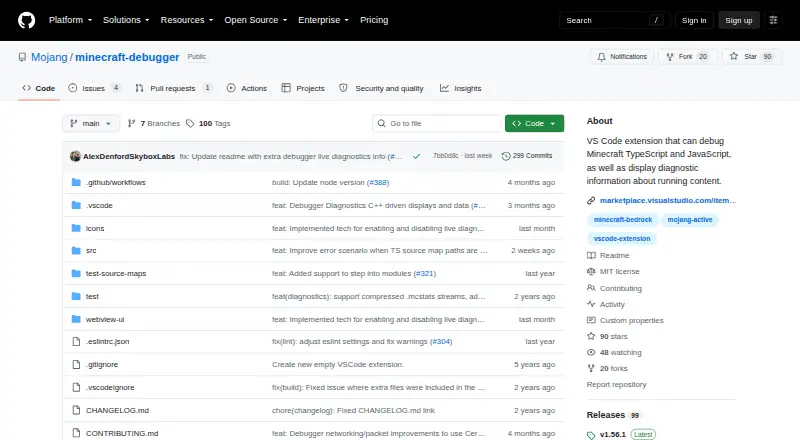
Minecraft Bedrock Debugger is a free, open-source Visual Studio Code extension for debugging JavaScript in Minecraft Bedrock clients and Bedrock Dedicated Server. It gives developers breakpoints, code stepping, a Locals pane, and watches for inspecting a running script. You can also issue Minecraft slash commands from the extension and keep shortcuts for frequently used commands.
For performance work, the extension provides diagnostics and a script profiler that stores captures at a locally configured path. With Minecraft 1.21.10 or later, server statistics can include entities, chunks, memory, tick time, and network usage. Client performance information includes FPS, memory, entity systems, and CPU profiling, provided Minecraft’s “Enabled client diagnostics” creator setting is turned on. Scripts can supply additional live diagnostics through the @minecraft/debug-utilities module.
TypeScript projects that compile to JavaScript can map back to source files using sourceMapRoot and generatedSourceRoot settings. The debugger connects through Minecraft script debugger commands and uses port 19144 by default. Bedrock Dedicated Server debugging requires enabling inbound or outbound script-debugging options in server.properties. Changing variable state and immediate mode are unsupported.
Who it suits
It suits developers creating Minecraft Bedrock behavior packs or add-ons with JavaScript or TypeScript who want code-level debugging and performance diagnostics. It is also relevant to teams debugging scripts on Bedrock Dedicated Server, provided they configure its script-debugging settings.
What it does well
- Supports breakpoints, stepping, local inspection, and watches.
- Runs Minecraft slash commands and offers favorite-command shortcuts.
- Includes a script profiler with locally saved captures.
- Shows server statistics for Minecraft 1.21.10 or later.
- Scripts can add live diagnostics through @minecraft/debug-utilities.
- The public repository lists an MIT license.
What to know first
- Changing variable state and immediate mode are unsupported.
- Client diagnostics require Minecraft’s creator setting to be enabled.
- Dedicated Server debugging is disabled until server.properties is changed.
Limits
The extension does not support changing variable state or immediate mode. Client-side performance data depends on the Minecraft creator diagnostics setting, while Dedicated Server debugging requires changing settings that default to false.
Plans
| Plan | Billed and limits | Price |
|---|---|---|
| Minecraft Bedrock Debugger | VS Code extension · no price listed | Free |
As github.com lists them, read 9 Oct 2026. The maker's own page has the final word.
Getting started
- Install the extension from the Visual Studio Marketplace.
- Use a Windows environment with Visual Studio Code.
- Connect to Minecraft through script debugger commands; the default port is 19144.
- For TypeScript output, configure sourceMapRoot and generatedSourceRoot in launch.json.
- To debug Bedrock Dedicated Server, enable inbound or outbound script debugging in server.properties.
- Enable Minecraft’s “Enabled client diagnostics” creator setting to access client performance data.
Verdict
Choose Minecraft Bedrock Debugger if you develop Bedrock scripts and want breakpoints, inspection, commands, and performance tools within Visual Studio Code. Look elsewhere if your workflow depends on changing variable state or immediate mode, both of which are unsupported.
Questions
How much does Minecraft Bedrock Debugger cost?
It is free; the listed plan is free.
Is it open source?
Yes. The project is open source, and its public GitHub repository lists an MIT license.
What does it debug?
It debugs JavaScript running in Minecraft Bedrock clients and Bedrock Dedicated Server.
Which platforms are listed?
The available platform is Windows, and it is a Visual Studio Code extension.
Does it support TypeScript?
For TypeScript projects that generate JavaScript, source maps can be configured with sourceMapRoot and generatedSourceRoot.
Where can I get help or send feedback?
The project directs users to file feedback as an issue in its GitHub repository.
Facts from Minecraft Bedrock Debugger's own pages
- Breakpoints
- It supports setting breakpoints and stepping through code. · github.com, 4 Oct 2026
- Client diagnostics
- Client-side performance data includes FPS, memory, entity systems, and CPU profiling, and requires Minecraft’s “Enabled client diagnostics” creator setting. · github.com, 4 Oct 2026
- Client diagnostics requirement
- Client-side performance data requires the “Enabled client diagnostics” creator setting to be enabled in Minecraft. · github.com, 9 Oct 2026
- Commands
- It can run Minecraft slash commands and offers shortcuts for favorite commands. · github.com, 4 Oct 2026
- Connection
- The debugger connects to Minecraft through script debugger commands and uses port 19144 by default. · github.com, 9 Oct 2026
- Custom diagnostics
- Minecraft scripts can push custom live diagnostics through the @minecraft/debug-utilities module. · github.com, 4 Oct 2026
- Custom diagnostics integration
- Minecraft scripting can push custom live diagnostics into the debugger using the @minecraft/debug-utilities module. · github.com, 9 Oct 2026
- Debugging features
- Supported features include breakpoints, stepping through code, the Locals pane, watches, performance diagnostics, and running Minecraft slash commands. · github.com, 9 Oct 2026
- Dedicated server settings
- Bedrock Dedicated Server debugging is disabled by default and requires changing server.properties settings to allow inbound or outbound script debugging. · github.com, 9 Oct 2026
- Dedicated Server setup
- Bedrock Dedicated Server debugging requires enabling the relevant inbound or outbound script-debugging settings in server.properties, which default to false. · github.com, 4 Oct 2026
- Inspection
- It provides a Locals pane and watches. · github.com, 4 Oct 2026
- Installation and feedback
- The project directs users to install the extension from the Visual Studio Marketplace and submit feedback through GitHub issues. · github.com, 4 Oct 2026
- Intended users
- The documentation presents the debugger as a tool for developers building Minecraft Bedrock behavior packs and add-ons with JavaScript or TypeScript. · learn.microsoft.com, 9 Oct 2026
- License
- The public GitHub repository lists an MIT license. · github.com, 9 Oct 2026
- Live diagnostics
- For Minecraft servers running version 1.21.10 or later, it can show statistics such as entity counts, memory usage, tick time, and network traffic. · github.com, 9 Oct 2026
- Notable limits
- Changing variable state and immediate mode are listed as unsupported scenarios. · github.com, 4 Oct 2026
- Performance tools
- It includes performance diagnostics and a script profiler that saves captures to a locally configured path. · github.com, 4 Oct 2026
- Profiler
- The extension includes a script profiler that saves performance captures of a running add-on to a configured local path. · github.com, 9 Oct 2026
- Purpose
- The Visual Studio Code extension helps debug JavaScript running in Minecraft Bedrock clients and Bedrock Dedicated Server. · github.com, 9 Oct 2026
- Support
- The project asks users to send feedback by filing an issue in its GitHub repository. · github.com, 9 Oct 2026
- TypeScript
- For TypeScript projects that generate JavaScript, the setup supports source maps through sourceMapRoot and generatedSourceRoot settings. · github.com, 4 Oct 2026
- TypeScript support
- For TypeScript projects that generate JavaScript, the setup uses sourceMapRoot and generatedSourceRoot paths in launch.json. · github.com, 9 Oct 2026
- Unsupported scenarios
- Changing variable state and immediate mode are listed as unsupported. · github.com, 9 Oct 2026
Where Minecraft Bedrock Debugger stands on Freedom251
- Minecraft Add-on Editors#17 of 26