Freedom251 › Minecraft Mod Development Tools
MCreator
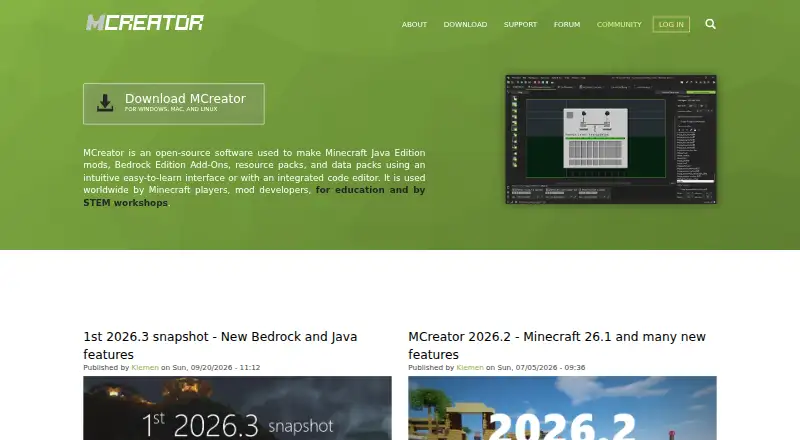
What MCreator is
MCreator is free, open-source software for making Minecraft Java mods, Bedrock add-ons, resource packs, and data packs. Its visual interface lets users create many mod elements without programming knowledge, while the integrated code editor provides syntax highlighting, autocomplete, formatting, and breakpoint support. Asset tools include a texture editor, animation editor, mob animation wizard, and sound manager. A built-in testing environment and Java debugger support work on Minecraft client and server. MCreator Link connects hardware such as Arduino and Raspberry Pi to Minecraft through procedures, commands, and an API. Community plugins can add generator types, procedure blocks, AI tasks, and API support, though the maker warns that plugins, especially Java plugins, can be powerful. The desktop software runs on Windows, macOS, and Linux; internet access is needed during setup to download dependencies. The app collects anonymous usage data, which users can disable in modern versions. Support options include a knowledge base, wiki, user forum, and issue tracker. Donations are voluntary.
Who it suits
MCreator may suit Minecraft players, aspiring mod developers, educators, and STEM workshops looking to make game content. Its visual interface is aimed at users who want to create many mod elements without programming knowledge.
What it does well
- Free and open source
- Visual creation without programming knowledge
- Includes a code editor and asset tools
- Built-in testing environment and Java debugger
- Runs on Windows, macOS, and Linux
What to know first
- Internet access needed during setup
- Plugins may carry significant power
- Anonymous usage data is collected by default
Limits
MCreator is free software, and donations are voluntary. Internet access is required during setup to download dependencies.
Plans
| Plan | Billed and limits | Price |
|---|---|---|
| MCreator | Free software; donations are voluntary | Free |
As mcreator.net lists them, read 4 Oct 2026. The maker's own page has the final word.
Getting started
- Open https://mcreator.net/.
- Choose the installation instructions for Windows, macOS, or Linux.
- Make sure internet access is available during setup to download dependencies.
- Start with visual creation tools, or use the integrated code editor.
- Use the built-in testing environment and Java debugger for Minecraft client or server work.
Verdict
MCreator combines visual tools, code editing, asset creation, and testing for making Minecraft content. It is free and cross-platform, though setup requires internet access and plugin sources warrant care.
Questions
How much does MCreator cost?
The listed plan is free. Donations are voluntary.
Is MCreator open source?
Yes. It is described as open-source software.
Which operating systems does it support?
MCreator supports Windows, macOS, and Linux.
What can I create with MCreator?
It is for making Minecraft Java mods, Bedrock add-ons, resource packs, and data packs.
Does MCreator connect to hardware?
MCreator Link can connect hardware such as Arduino and Raspberry Pi with Minecraft through procedures, commands, and an API.
What support options are available?
Support options include a knowledge base, wiki, user forum, and issue tracker.
Facts from MCreator's own pages
- Asset tools
- MCreator includes tools such as a texture editor, animation editor, mob animation wizard, and sound manager. · mcreator.net, 4 Oct 2026
- Code editor
- The integrated code editor includes syntax highlighting, autocomplete, code formatting, and breakpoint support. · mcreator.net, 4 Oct 2026
- Extensions
- Community plugins can add generator types, procedure blocks, AI tasks, and API support. · mcreator.net, 4 Oct 2026
- Integrations
- MCreator Link connects hardware such as Arduino and Raspberry Pi with Minecraft through procedures, commands, and an API. · mcreator.net, 4 Oct 2026
- Intended users
- The maker describes MCreator as used by Minecraft players, aspiring mod developers, educators, online classes, and STEM workshops. · mcreator.net, 4 Oct 2026
- No-code creation
- Users can create many mod elements through a visual interface without programming knowledge. · mcreator.net, 4 Oct 2026
- Platform limitation
- MCreator needs internet access to download dependencies during setup. · mcreator.net, 4 Oct 2026
- Plugin security
- MCreator warns that plugins, especially Java plugins, can be powerful and advises against downloading them from unknown sources. · mcreator.net, 4 Oct 2026
- Privacy
- The privacy policy says the desktop app collects anonymous usage data and that users can disable analytics in modern versions. · mcreator.net, 4 Oct 2026
- Support
- Support options include a knowledge base, wiki, user forum, and issue tracker for bug reports. · mcreator.net, 4 Oct 2026
- Supported platforms
- The installation page links instructions for Windows, macOS, and Linux. · mcreator.net, 4 Oct 2026
- Testing
- MCreator provides a built-in testing environment and Java debugger for Minecraft client and server. · mcreator.net, 4 Oct 2026
- Website security
- The privacy policy says the website is scanned regularly for security holes and known vulnerabilities. · mcreator.net, 4 Oct 2026
- What it does
- MCreator is open-source software for making Minecraft Java mods, Bedrock add-ons, resource packs, and data packs. · mcreator.net, 4 Oct 2026
Where MCreator stands on Freedom251
- Minecraft Mod Development Tools#11 of 35
- Java IDEs#12 of 23
- Minecraft Add-on Editors#15 of 26