Freedom251 › PC Migration Software
MigrationMerlin
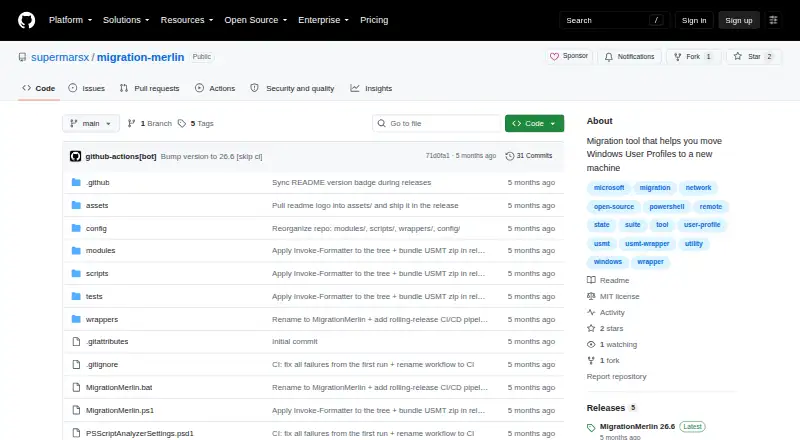
What MigrationMerlin is
MigrationMerlin is a free Windows tool for moving user profiles and settings from one PC to another. It wraps Microsoft's User State Migration Tool, including scanstate.exe and loadstate.exe, and provides an interactive text interface alongside numbered batch wrappers for a step-by-step process. Both computers must run Windows 10 or Windows 11, have administrator privileges, and be reachable on the same network with SMB port 445 open. The toolkit can configure an SMB transfer share on the destination PC, including a firewall rule. IncludeUsers and ExcludeUsers settings let users choose which profiles to move. Its ExtraData option can include taskbar pins, Wi-Fi profiles, power plans, and items covered by custom migration XML. During capture and restore, it displays progress, file counts, and throughput, and writes transcript logs with credentials masked. Migration stores can be encrypted with AES-256, but a lost encryption key cannot be recovered. The project is MIT-licensed and publishes downloadable ZIP artifacts as rolling releases.
Who it suits
It suits Windows sysadmins and power users moving profiles and settings between Windows 10 or 11 PCs on the same network. Both PCs need administrator privileges and SMB port 445 access.
What it does well
- Free and MIT-licensed.
- Supports selective profile migration.
- Can configure an SMB share on the destination PC.
- Shows progress, file counts, and throughput.
- Logs mask credentials.
What to know first
- Both PCs must run Windows 10 or 11.
- Administrator privileges are required on both PCs.
- SMB port 445 must be open between the PCs.
- A lost encryption key cannot be recovered.
Limits
The free plan is limited to Windows 10 or Windows 11 PCs with administrator privileges on both computers and network connectivity with SMB port 445 open. If the migration store is encrypted, there is no recovery path for a lost key.
Plans
| Plan | Billed and limits | Price |
|---|---|---|
| MigrationMerlin | MIT-licensed software · Windows 10/11 · Administrator privileges on both PCs · Both PCs must share a network with SMB port 445 open | Free |
As github.com lists them, read 5 Oct 2026. The maker's own page has the final word.
Getting started
- Download a ZIP artifact from GitHub Releases.
- Run the tool on Windows 10 or Windows 11 PCs.
- Ensure both PCs have administrator privileges and can reach each other over SMB port 445.
- Choose profiles using IncludeUsers or ExcludeUsers.
- Use the interactive text interface or numbered batch wrappers to proceed.
- Optionally configure the destination SMB share, access controls, ExtraData, or AES-256 encryption.
MigrationMerlin is a free Windows utility for moving user state between two PCs through Microsoft’s User State Migration Tool. It is best suited to sysadmins and technically confident power users who can administer both machines and arrange a local SMB connection. The focused workflow is capable and configurable, but its network and Windows requirements rule out many casual migrations.
Overview
MigrationMerlin packages Microsoft’s scanstate.exe and loadstate.exe behind an interactive text interface and numbered batch wrappers. It migrates user profiles and settings over a network, with selective profile controls and optional handling for additional Windows data. This makes it a practical fit for controlled Windows-to-Windows moves rather than a general-purpose transfer service.
Key features
The arrow-key-driven TUI and step-by-step batch wrappers give operators a defined sequence for capture and restore. Live progress, file counts, and throughput make a running job easier to monitor. Transcript logs are written to the migration folder’s Logs directory, with credentials masked, providing a useful record without exposing those values in plain text.
The toolkit can configure an SMB share on the destination PC and create a corresponding firewall rule. IncludeUsers and ExcludeUsers allow specific profiles to be migrated, avoiding an unnecessary all-user transfer. Optional controls can restrict share access to a source user and scope the firewall rule to a source IP address, sensible precautions when the transfer should be limited to one machine.
Its ExtraData option can carry taskbar pins, Wi-Fi profiles, power plans, and data covered by custom migration XML. The configured rules extend to browsers, developer tools, SSH, Git, and VSCode, which is particularly relevant to technical workstations. AES-256 encryption can protect the migration store, but losing the key leaves no recovery path, so key handling must be treated as part of the migration plan.
Both computers must run Windows 10 or Windows 11, provide administrator privileges, share a network, and permit SMB traffic on port 445. Those prerequisites are reasonable for managed environments but make the product unsuitable for cross-platform transfers or networks where SMB cannot be opened.
Pricing
| Plan | Price | What it includes |
|---|---|---|
| MigrationMerlin | free | Free, MIT-licensed software for Windows 10/11; administrator privileges on both PCs and a shared network with SMB port 445 open are required. |
There is no paid tier or quota described. The free plan is therefore the natural choice for administrators who can satisfy the technical requirements; its cost advantage does not remove the need to provide the network, permissions, and encryption-key discipline that the workflow depends on.
Platforms
MigrationMerlin runs on Windows, with both source and destination restricted to Windows 10 or Windows 11. It uses network transfer through SMB rather than a platform-neutral exchange method.
Who it's for
Choose it for repeatable workstation moves where an administrator controls both PCs, can open SMB port 445, and wants profile selection, migration extras, progress visibility, and logs. It is also a strong fit for technical users who value USMT-based control and can manage encryption keys safely.
Look elsewhere if either computer is not on Windows 10 or 11, if administrator access is unavailable, or if the transfer must cross platforms or avoid SMB. Casual users may find the prerequisites and operational responsibility disproportionate to a one-off move.
Pros and cons
Pros
- Selective profiles: IncludeUsers and ExcludeUsers prevent an unnecessarily broad migration.
- Useful workstation extras: Taskbar pins, Wi-Fi profiles, power plans, and configured application data can accompany user state.
- Operational visibility: Live throughput and file counts plus credential-masked transcript logs support monitoring and review.
- Transfer setup assistance: Automatic SMB-share and firewall configuration reduces manual preparation.
- Free and MIT-licensed: There is no software charge for deployments that meet the requirements.
Cons
- Narrow platform scope: Both PCs must use Windows 10 or Windows 11.
- Network dependency: The machines need administrator access, a shared network, and open SMB port 445.
- Irrecoverable encryption-key loss: AES-256 protection has no recovery path if its key is lost.
- Rolling-release distribution: ZIP artifacts are delivered through GitHub Releases rather than a fixed-version channel.
Alternatives
PC Migration Software is the broader category to consult when you want to compare migration tools beyond this Windows-and-SMB workflow.
IObit Uninstaller is a Windows freemium utility centered on removing applications and cleaning leftovers, so it is not a direct user-state migration substitute.
EaseUS Todo PCTrans is the better direction when a Windows transfer should use a freemium product with a 2 GB and five-program free tier, or a paid monthly plan.
Endstate suits readers seeking a self-hosted Windows option with a free plan covering unlimited machines and no limits.
ForensiT Transwiz is another free Windows profile-transfer option.
ForensiT User Profile Wizard is preferable when a GUI-only personal edition or per-seat corporate licensing matches the deployment.
ManageEngine OS Deployer is aimed at broader workstation deployment, with a free allowance of four workstations and one server.
NiloShift is worth considering for non-commercial Windows use under its MIT license.
PC Migration Pro offers a free edition for three computers and paid migration-volume tiers.
Verdict
MigrationMerlin is a strong choice for Windows administrators and power users who need selective, logged user-state moves and can control both endpoints and their SMB network. Its main reason to choose it is the combination of USMT-based migration, guided operation, and configurable extras at no software cost. Look elsewhere when you need cross-platform support, a simpler consumer workflow, or a transfer method that does not depend on administrator access and SMB port 445.
Verdict
MigrationMerlin provides a guided network migration workflow with profile selection, optional extras, and progress details. Its setup depends on administrator access and an available SMB connection between both PCs.
Questions
How much does MigrationMerlin cost?
It is free, with a listed price of $0.
Which Windows versions does it support?
Both the source and destination PCs must run Windows 10 or Windows 11.
What does it migrate?
It supports user profile and settings migration. Optional ExtraData can include taskbar pins, Wi-Fi profiles, power plans, and items covered by custom migration XML.
How are PCs connected for a migration?
Both PCs must be reachable on the same network with SMB port 445 open. MigrationMerlin can set up an SMB share on the destination PC.
Is MigrationMerlin open source?
The repository links to an MIT license.
Where can I download it?
The project publishes downloadable ZIP artifacts on GitHub Releases as rolling releases.
Facts from MigrationMerlin's own pages
- Access controls
- Optional settings can restrict share access to a source user and scope the firewall rule to a source IP address. · github.com, 5 Oct 2026
- Distribution
- The project describes itself as a rolling release and says downloadable ZIP artifacts are attached to GitHub releases. · github.com, 5 Oct 2026
- Downloads
- The project publishes downloadable ZIP artifacts on GitHub Releases as rolling releases. · github.com, 5 Oct 2026
- Encryption
- It can encrypt the migration store with AES-256, and the README says there is no recovery path if the encryption key is lost. · github.com, 5 Oct 2026
- Extra data
- An ExtraData option can include taskbar pins, Wi-Fi profiles, power plans, and items covered by the custom migration XML configuration. · github.com, 5 Oct 2026
- Interface
- It provides an interactive, arrow-key-driven TUI and numbered batch wrappers for a step-by-step migration. · github.com, 5 Oct 2026
- License
- The repository links to an MIT license. · github.com, 5 Oct 2026
- Logging
- The toolkit writes transcript logs to the migration folder's Logs directory and masks credentials in those logs. · github.com, 5 Oct 2026
- Maker
- The linked GitHub profile identifies the maker as Mariana, username supermarsx. · github.com, 5 Oct 2026
- Migration engine
- It wraps Microsoft's User State Migration Tool, including scanstate.exe and loadstate.exe. · github.com, 5 Oct 2026
- Migration extras
- Its ExtraData option can include taskbar pins, Wi-Fi profiles, power plans, and configured rules for browsers, developer tools, SSH, Git, and VSCode. · github.com, 5 Oct 2026
- Profile selection
- IncludeUsers and ExcludeUsers options let users choose which profiles to migrate. · github.com, 5 Oct 2026
- Progress and logs
- It displays live progress, file counts, and throughput during capture and restore, and writes transcript logs with credential masking to the migration folder's Logs directory. · github.com, 5 Oct 2026
- Purpose
- MigrationMerlin is a PC-to-PC user-state migration tool for Windows sysadmins and power users. · github.com, 5 Oct 2026
- Requirements
- Both PCs need administrator privileges and must be reachable on the same network with SMB port 445 open between them. · github.com, 5 Oct 2026
- Support and testing
- The repository documents a Pester v5 test suite with an expected baseline of 645 passed, 0 failed, and 2 environment-gated skipped tests. · github.com, 5 Oct 2026
- Supported Windows versions
- The source and destination PCs must run Windows 10 or Windows 11. · github.com, 5 Oct 2026
- Testing
- The README describes a Pester v5 test suite with about 645 tests and an expected baseline of 645 passed, 0 failed, and 2 skipped. · github.com, 5 Oct 2026
- Transfer
- The toolkit can automatically set up an SMB transfer share on the destination PC, including a firewall rule. · github.com, 5 Oct 2026
- Transfer setup
- It can automatically configure an SMB transfer share on the destination PC, including a firewall rule. · github.com, 5 Oct 2026
- USMT wrapper
- It wraps Microsoft's User State Migration Tool, including scanstate.exe and loadstate.exe, with an interactive text UI and batch wrappers. · github.com, 5 Oct 2026
Where MigrationMerlin stands on Freedom251
- PC Migration Software#5 of 26