Freedom251 › 3D Rigging Software
Mesh2Rig
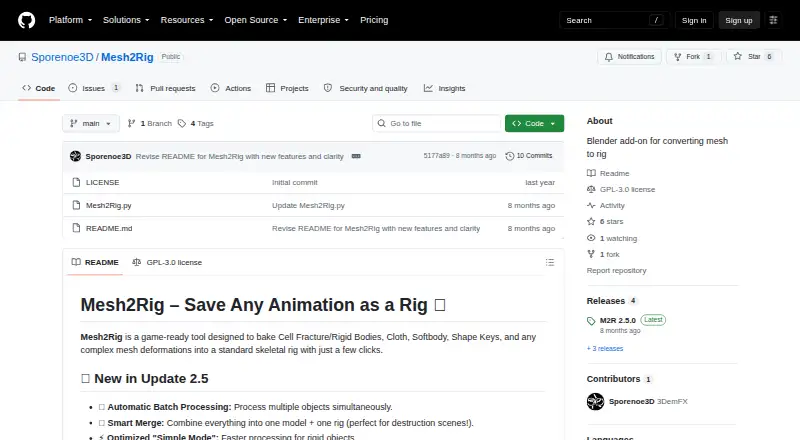
What Mesh2Rig is
Mesh2Rig is a free Blender add-on that converts mesh animation and deformation into standard skeletal rigs. It supports Cell Fracture and rigid-body scenes, cloth, soft bodies, shape keys, and other complex deformations. Automated bone placement uses KDTree proximity, while Simple Mode assigns one bone to each object for rigid debris. For deforming meshes, the add-on sets up Surface Deform modifiers without manual weight painting, and one-click baking turns mesh animation into standard skeletal animation Actions. Batch Processing can rig, bind, and bake objects from Blender collections in sequence. Smart Merging combines generated rigs and meshes into a Master Rig and Mesh while retaining animation. The single-object workflow includes controls for bone count, proximity, length, and optional merging. The maker identifies game-development optimization, simulation baking, and destruction scenes as uses. Mesh2Rig is open source under GPL-3.0 and is listed as compatible with Blender 4.2 LTS and newer. The maker recommends leaving rotation constraints off for automated rigs with many bones to avoid rotation artifacts; after finalizing a rig, original animation sources should be removed.
Who it suits
Mesh2Rig suits Blender users who want to bake simulated or otherwise deforming meshes into skeletal animation, including for game-development optimization or destruction scenes.
What it does well
- Supports cloth, soft bodies, shape keys, and rigid bodies.
- Sets up Surface Deform modifiers without manual weight painting.
- One-click baking converts animation into skeletal Actions.
- Batch Processing handles objects in Blender collections.
- Compatible with Blender 4.2 LTS and newer.
What to know first
- Many-bone automated rigs may show rotation artifacts with constraints.
- Original animation sources should be removed after rig finalization.
Limits
The add-on is free. For automated rigs with high bone counts, the maker recommends leaving rotation constraints off to avoid rotation artifacts; finalized rigs also need their original animation sources removed.
Plans
| Plan | Billed and limits | Price |
|---|---|---|
| Mesh2Rig | Blender add-on · Blender 4.2 LTS and newer | Free |
As github.com lists them, read 9 Oct 2026. The maker's own page has the final word.
Getting started
- Open the Mesh2Rig project website on GitHub.
- Use Blender 4.2 LTS or newer on Linux, macOS, or Windows.
- Install the Blender add-on and choose a mesh animation input it supports.
- Generate a rig, adjust the available single-object controls if needed, then bake the animation.
- For a finalized rig, remove the original animation sources; use Clear Cleanup to remove supported simulation data and settings.
Mesh2Rig is a free Blender add-on for Blender users who need to turn mesh-driven motion into skeletal animation, especially for simulations and destruction scenes. Its strongest case is automating the rigging and baking of many objects; it is not a general-purpose character-rigging tool.
Overview
The add-on works with Cell Fracture and rigid bodies, cloth, soft bodies, shape keys, and other complex mesh deformations. It places bones inside meshes using KDTree proximity, sets up Surface Deform modifiers without manual weight painting, and bakes the motion into standard skeletal animation Actions. That makes it useful when an existing mesh animation needs to become a skeletal one, including for game development optimization.
Automation does not remove every workflow consideration. The maker recommends leaving rotation constraints off on automated rigs with high bone counts to avoid rotation artifacts. Once a rig is finalized, the original animation sources should be cleared; Mesh2Rig’s Clear Cleanup operator removes keyframes, rigid-body settings, shape keys, and simulation modifiers such as cloth, soft-body, and particle systems. That cleanup is a meaningful final step, not an optional substitute for planning how the source scene will be retained.
Key features
Generated rigs and baking
For a single object, users can adjust maximum bone count, bone proximity, and bone length, with optional bone merging. These controls offer some influence over the result while leaving rig generation automated. Simple Mode uses one bone per object, a better fit for rigid debris than for capturing more involved deformation. One-click baking then converts mesh animation into standard skeletal Actions.
Batch processing and merging
Batch Processing works through Blender collections, rigging, binding, and baking hundreds of objects sequence by sequence. This can reduce repetitive setup in destruction scenes or other object-heavy work. Smart Merging combines generated rigs and meshes into a Master Rig and Master Mesh while preserving animation, which is useful when a scene needs consolidated outputs rather than a collection of separate generated rigs.
Pricing
Mesh2Rig costs nothing. The free plan is the add-on itself, with no free trial or paid tier described. It is open source under GPL-3.0, so there is no subscription cost to weigh against the workflow’s constraints.
The add-on is for Blender 4.2 LTS and newer. That version requirement is the main practical limit for prospective users; Blender is its supported host, and deployment is as a host plugin.
Platforms
Mesh2Rig supports Blender on Linux, macOS, and Windows. It does not require special permissions. The maker provides an official tutorial and a video overview of update 2.5, while the Blender Extensions listing offers user reviews and an issue-reporting option.
Who it's for
Mesh2Rig is a strong fit for Blender users baking cloth or soft-body simulations, converting shape-key motion, optimizing animation for game development, or handling complex destruction scenes. Its batch tools particularly suit workflows with many objects. Choose another tool if the main need is building character rigs rather than converting mesh animation, or if rotation constraints are essential to a high-bone-count automated rig.
Pros and cons
- Pro: It supports several kinds of mesh animation and deformation, giving simulation-heavy scenes a route to standard skeletal Actions.
- Pro: Automatic Surface Deform setup avoids manual weight painting, and batch processing can handle hundreds of objects sequence by sequence.
- Pro: Smart Merging consolidates generated rigs and meshes while preserving animation.
- Con: High-bone-count automated rigs can produce rotation artifacts if rotation constraints are used.
- Con: Finalizing a rig calls for clearing original sources such as simulation modifiers, caches, or shape keys, which adds a cleanup step to the workflow.
- Con: It requires Blender 4.2 LTS or newer and addresses mesh-animation conversion, not general character-rig construction.
Alternatives
Compare 3D Rigging Software for a broader set of rigging tools.
- Mixos Mold is a freemium option with a free plan, broad platform support, and unlimited mold sculpting; consider it if sculpting is more important than Mesh2Rig’s Blender animation-baking workflow.
- Houdini is a freemium tool for Windows, macOS, and Linux with a workstation perpetual plan; consider it if Houdini is the better fit for your broader software needs.
- Contour Rig Tools offers a free Animator Mode and a paid Rigger Mode with a free trial; consider it if you want its animator and rigger modes rather than Mesh2Rig’s mesh-animation conversion.
- Mesh2Motion is free for personal or commercial use and runs on Linux, macOS, web, and Windows; consider it if those platforms or use terms suit you better.
- BlenRig is a free option for biped characters; choose it when that narrower character focus is what you need.
- dpAutoRigSystem is a free, open-source automatic rigging system for Maya; consider it if you work in Maya rather than Blender.
- InstantRig is free, Windows-only, and designed for keyframe animation; consider it if that use case matches your workflow.
- Live Link Face is a free app for iOS and Android; consider it if a mobile app is what you need.
Verdict
Choose Mesh2Rig if you work in Blender and need an automated way to bake simulation, shape-key, or destruction animation into skeletal Actions, particularly across many objects. Its free, open-source model and batch and merge workflows are persuasive; look elsewhere if you need general character rigging or cannot accommodate the rotation-constraint guidance and source cleanup.
Verdict
Mesh2Rig offers automated rigging and baking workflows for several kinds of mesh animation, including batch processing and rig merging. Keep its rotation-constraint guidance and cleanup step in mind when planning a workflow.
Questions
How much does Mesh2Rig cost?
Mesh2Rig is free.
Which Blender versions does it support?
It supports Blender 4.2 LTS and newer.
Which operating systems are supported?
Linux, macOS, and Windows.
What kinds of animation can it bake?
It supports Cell Fracture and rigid bodies, cloth, soft bodies, shape keys, and other complex mesh deformations.
Is Mesh2Rig open source?
Yes. The repository identifies its license as GPL-3.0.
Who makes Mesh2Rig?
Sporenoe3D, whose GitHub profile describes the maker as a creator of Blender add-ons.
Facts from Mesh2Rig's own pages
- Adjustable controls
- The single-object workflow exposes maximum bone count, proximity, bone length, and optional bone-merging controls. · github.com, 9 Oct 2026
- Animation baking
- One-click baking transfers mesh animation to standard skeletal animation Actions. · github.com, 9 Oct 2026
- Batch processing
- Batch Processing handles Blender collections and can rig, bind, and bake hundreds of objects sequence by sequence. · github.com, 9 Oct 2026
- Bone generation
- Automated bone generation uses KDTree proximity, with a Simple Mode that creates one bone per object for rigid debris. · github.com, 9 Oct 2026
- Cleanup
- The release notes say its Clear Cleanup operator removes keyframes, rigid body settings, shape keys, and simulation modifiers including cloth, soft body, and particle systems. · github.com, 9 Oct 2026
- Cleanup step
- After finalizing a rig, the maker says to remove the original animation sources, such as cloth simulation, cache modifiers, or shape keys. · github.com, 4 Oct 2026
- Compatibility
- The Blender Extensions listing states compatibility with Blender 4.2 LTS and newer. · extensions.blender.org, 9 Oct 2026
- Deformation setup
- The add-on automatically sets up Surface Deform modifiers without requiring manual weight painting. · github.com, 9 Oct 2026
- Deformation workflow
- It automatically sets up Surface Deform modifiers for deformation without manual weight painting. · github.com, 4 Oct 2026
- Intended users
- The maker describes it as useful for game development optimization, baking cloth or soft-body simulations to bones, and managing destruction scenes. · github.com, 4 Oct 2026
- License
- The GitHub repository identifies the project license as GPL-3.0. · github.com, 9 Oct 2026
- Maker profile
- The GitHub profile describes Sporenoe3D as a Blender add-ons creator. · github.com, 4 Oct 2026
- Notable limitation
- The README recommends leaving rotation constraints off for automated rigs with high bone counts to avoid rotation artifacts. · github.com, 4 Oct 2026
- Permissions
- The Blender Extensions listing says the add-on does not require special permissions. · extensions.blender.org, 9 Oct 2026
- Purpose
- Mesh2Rig bakes mesh animation and complex deformations into a standard skeletal rig. · github.com, 9 Oct 2026
- Rig merging
- Smart Merging combines generated rigs and meshes into a Master Rig and Master Mesh while preserving animation. · github.com, 9 Oct 2026
- Smart merging
- Smart Merging combines generated rigs and meshes into a single Master Rig and Mesh while preserving animations. · github.com, 4 Oct 2026
- Support and feedback
- The maker asks users to share feedback in reviews, and the Blender Extensions listing provides user reviews and an issue reporting option. · github.com, 9 Oct 2026
- Supported animation
- The maker lists Cell Fracture and rigid bodies, cloth, soft bodies, shape keys, and other complex mesh deformations as supported inputs. · github.com, 9 Oct 2026
- Supported inputs
- It is designed for Cell Fracture and rigid bodies, cloth, soft bodies, shape keys, and other complex mesh deformations. · github.com, 4 Oct 2026
- Target users
- The maker describes it as suitable for game development optimization, baking cloth or soft-body simulations to bones, and managing complex destruction scenes. · github.com, 9 Oct 2026
- Tutorials
- The project README links an official tutorial and a video overview of update 2.5. · github.com, 4 Oct 2026
Where Mesh2Rig stands on Freedom251
- 3D Rigging Software#12 of 27