Freedom251 › 3D Rigging Software
Mesh2Motion
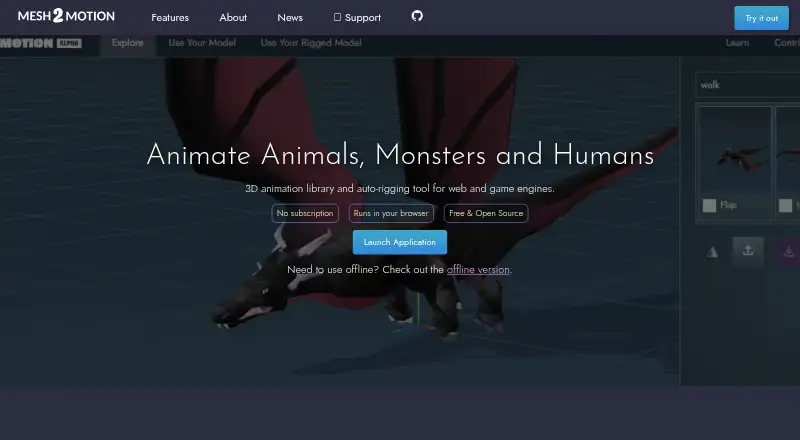
What Mesh2Motion is
Mesh2Motion is a free 3D animation library and auto-rigging tool for web and game engines. Its library offers more than 170 animations that users can preview on a sample model. Users can upload a model for auto-rigging or bring in a pre-rigged, skinned model. It imports GLB, GLTF, DAE, and FBX files, and lists rigs for people and creatures including birds, dragons, spiders, kaiju, foxes, horses, fish, and snakes. Editing tools include skeleton positioning, undo and redo, and importing animations to check compatibility. Multiple animations can be exported together in one GLB or FBX file. The maker says those formats are natively supported by game engines, Three.js, Babylon.js, and most modern 3D pipelines. An offline desktop version for Windows, Mac, and Linux is said to have the same features as the online version. Models, rigs, and animations are CC0 and can be used for personal or commercial work without attribution. Source Blender files are available for study and improvement. A September 25, 2026 update added mirrored animation export and FBX 7.4 export formats for Unity3D and Unreal Engine.
Who it suits
Mesh2Motion suits people animating 3D models for web or game engines, including users who want an offline desktop workflow. Its CC0 assets can also suit personal or commercial projects that need no attribution.
What it does well
- Offers more than 170 animations to preview.
- Imports GLB, GLTF, DAE, and FBX models.
- Exports multiple animations in one GLB or FBX.
- Offline desktop version supports Windows, Mac, and Linux.
- CC0 assets allow commercial use without attribution.
What to know first
- No free trial is listed.
- FBX 7.4 export formats were added in a dated update.
Plans
| Plan | Billed and limits | Price |
|---|---|---|
| Free | No subscription · free for personal or commercial use | Free |
As mesh2motion.org lists them, read 2 Oct 2026. The maker's own page has the final word.
Getting started
- Visit the Mesh2Motion website.
- Use the online tool or download the offline version for Windows, Mac, or Linux.
- Browse and preview animations on the sample model.
- Upload a model for auto-rigging or import a pre-rigged, skinned model.
- Import a supported GLB, GLTF, DAE, or FBX model.
- Position the skeleton, test animation compatibility, and export animations in GLB or FBX.
Mesh2Motion is a 3D animation library and auto-rigging tool for people preparing models for web and game-engine projects. It is best suited to creators who want to rig or animate a model and bundle animations for export without paying for the software. Its broad rig selection and free commercial-use terms are appealing, as long as its supported formats fit the project.
Overview
Users can browse more than 170 animations and preview them on a sample model, then upload a model for auto-rigging or bring a pre-rigged, skinned model. Imports include GLB, GLTF, DAE and FBX. Skeleton positioning, undo/redo history and animation imports for compatibility checks offer some control over the workflow, but Mesh2Motion is focused on rigging and animation rather than a general-purpose 3D production environment.
Exports can pack multiple animations into a single GLB or FBX file. Those formats suit projects targeting game engines, Three.js, Babylon.js and many modern 3D pipelines, according to the maker. If a project needs another export format, this workflow may not be the right fit.
Key features
Rigging and animation
The available rig types span humans and animals, including birds, dragons, spiders, kaiju, foxes, horses, fish and snakes. That range is useful for character projects beyond standard biped models. Auto-rigging gives users a way to start with an uploaded model, while support for pre-rigged and skinned models accommodates assets prepared elsewhere. Skeleton positioning and the ability to import animations for compatibility checks add practical adjustment and validation steps.
Export and assets
Combining multiple animations in one GLB or FBX export can simplify delivery to a supported engine or pipeline. The September 25, 2026 update added mirrored animation export and FBX 7.4 export formats for Unity3D and Unreal Engine, useful additions for those destinations. The maker also provides source Blender models and animation files for study and improvement. Models, rigs and animations are CC0, so they can be used for personal or commercial work without attribution.
Desktop and privacy
An offline desktop version for Windows, Mac and Linux supports the same features as the online version, which gives users a non-browser option without giving up the stated workflow. The maker says Mesh2Motion uses no LLMs or APIs to process or train on user data, and is built with standard JavaScript and TypeScript. That may matter to users weighing how their data is handled, though the tool's stated import and export formats remain the key pipeline constraint.
Pricing
Free: free (No subscription · free for personal or commercial use). There is no subscription or stated trial period. The free plan includes auto-rigging and the core workflow, making it a strong option for individuals and commercial projects alike; the trade-off is not price but whether its formats and rigging options meet a project's needs. The maker accepts tips to help fund animators, hosting and development, but support is optional.
Platforms
Mesh2Motion is available on Linux, macOS, Windows and the web. The desktop version works offline and is described as feature-equivalent to the online version, giving users a choice between browser access and a local app.
Who it's for
Mesh2Motion suits creators who need to animate 3D models for game engines or web projects, especially those working with the listed rig types and GLB or FBX exports. It also suits users who value free commercial-use assets, CC0 licensing and access to source animation files. It is a less natural choice for projects that require a broader 3D suite or formats beyond the supported imports and exports.
Pros and cons
- Pros: Free for personal and commercial use, with no subscription, so cost does not scale with a commercial project's use of the tool.
- Pros: More than 170 animations, multiple rig types and both auto-rigged and pre-rigged model workflows give character creators several ways to get started.
- Pros: Multiple animations can be packed into one GLB or FBX export, and the offline desktop app retains the online version's features.
- Cons: The focused rigging-and-animation workflow is not a general-purpose modeling or production suite.
- Cons: The stated import and export formats may rule it out for projects built around other formats.
Alternatives
3D Rigging Software is a useful category page for comparing rigging tools. Consider Mixos Mold if sculpting is the priority: its free plan offers unlimited mold sculpting and every brush and subdivision level. Houdini is another option for readers whose needs point beyond Mesh2Motion's focused animation workflow; its listed plans include a perpetual workstation license, though at a stated price of $1,995 a month.
Contour Rig Tools may suit users seeking a rig-focused alternative with a free Animator Mode and a paid Rigger Mode. For biped characters only, BlenRig is a free option. dpAutoRigSystem is worth considering for users who specifically want an open-source automatic rigging system for Maya. InstantRig is a Windows option designed for keyframe animation and licensed for one user per license. Live Link Face is a free iOS and Android app, while MakeHuman is a free option with no license fees or paywall.
Verdict
Choose Mesh2Motion if you need a free route from a 3D model to animation exports for web or game-engine work, and its rig types and GLB or FBX formats match your pipeline. Its combination of auto-rigging, a sizable animation library, offline access and CC0 assets is a strong case for trying it. Look elsewhere if you need a broader production environment or depend on formats it does not support.
Verdict
Mesh2Motion pairs a broad animation library with model rigging, editing, and bundled export tools, and it is free for personal and commercial use. Its stated import and export formats and rig options are worth checking against a project's requirements.
Questions
Does Mesh2Motion cost anything?
The Free plan costs nothing, with no subscription. It is free for personal or commercial use.
Can I use Mesh2Motion offline?
Yes. An offline version is available for Windows, Mac, and Linux, and the maker says it has the same features as the online version.
Which model formats can I import?
Mesh2Motion supports GLB, GLTF, DAE, and FBX imports.
Which formats can I export?
Multiple animations can be exported together in one GLB or FBX file.
Can I use its animations in commercial work?
The maker says its models, rigs, and animations are CC0 and can be used commercially or personally without attribution.
Does Mesh2Motion use AI services to process uploaded data?
The maker says the tool uses no LLMs or APIs to process or train on user data.
Facts from Mesh2Motion's own pages
- Animation editing
- The tool provides skeleton positioning and an undo/redo history, and lets users import animations to test compatibility. · mesh2motion.org, 2 Oct 2026
- Animation library
- The site says users can browse over 170 animations and preview them on a sample model. · mesh2motion.org, 2 Oct 2026
- Export
- Users can export multiple animations packed into a single GLB or FBX file. · mesh2motion.org, 2 Oct 2026
- Founded
- 2023 · mesh2motion.org, 28 Sept 2026
- Game engine formats
- The maker says GLB and FBX are natively supported by game engines, Three.js, Babylon.js, and most modern 3D pipelines. · mesh2motion.org, 2 Oct 2026
- Import formats
- The tool supports importing GLB, GLTF, DAE, and FBX models. · mesh2motion.org, 2 Oct 2026
- Intended users
- The maker describes the project as a free way to animate 3D models for web and game engines, and says it was created for people to use and evolve an open tool. · mesh2motion.org, 2 Oct 2026
- Latest update
- The September 25, 2026 update added mirrored animation export and FBX 7.4 export formats for Unity3D and Unreal Engine. · mesh2motion.org, 2 Oct 2026
- License
- The maker says the models, rigs, and animations are CC0 and can be used for commercial or personal work without attribution. · support.mesh2motion.org, 2 Oct 2026
- Model workflows
- Users can upload a model for auto-rigging or upload a pre-rigged and skinned model. · mesh2motion.org, 2 Oct 2026
- Offline desktop app
- The maker says an offline version is available for Windows, Mac, and Linux and supports the same features as the online version. · mesh2motion.org, 2 Oct 2026
- Privacy and AI
- The maker says the tool uses no LLMs or APIs to process or train on user data, and uses standard JavaScript and TypeScript. · mesh2motion.org, 2 Oct 2026
- Rig types
- The site lists animation rigs for birds, dragons, spiders, kaiju, foxes, horses, fishes, snakes, and humans. · mesh2motion.org, 2 Oct 2026
- Source assets
- The maker provides source Blender model and animation files for study and improvement, with source files on GitHub. · mesh2motion.org, 2 Oct 2026
- Support
- The support page accepts tips to help fund animators, monthly hosting costs, and application development. · support.mesh2motion.org, 2 Oct 2026
- What it does
- Mesh2Motion is a 3D animation library and auto-rigging tool for web and game engines. · mesh2motion.org, 2 Oct 2026
Where Mesh2Motion stands on Freedom251
- 3D Rigging Software#8 of 27