Freedom251 › No-Code Database Software

Memento Database
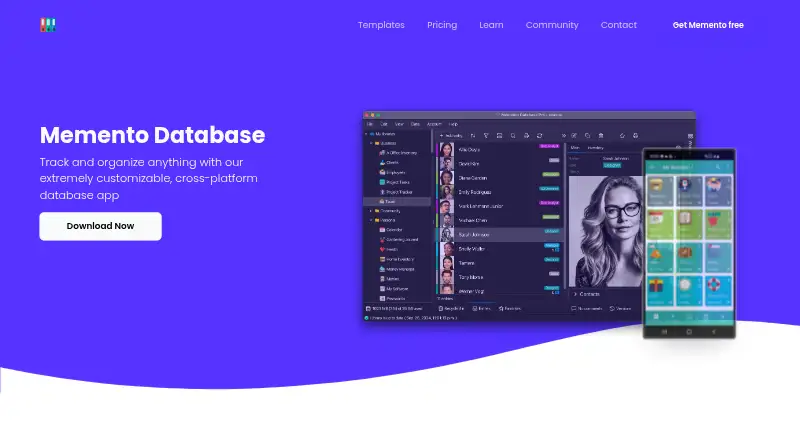
What Memento Database is
Memento Database is a customizable database app for organizing information and building app-like solutions without coding. Users can create libraries with more than 30 field types, calculated fields, and one-to-one, one-to-many, or many-to-many relationships. Records can appear in List, Table, Cards, Map, or Calendar views; charts and PDF or CSV exports are also available. Automation uses visual rules or JavaScript, while Zapier and a Cloud API support integrations. Records can be autofilled from external databases, and custom JavaScript data sources can connect to APIs and web services. Web Forms accept browser submissions, and Memento Cloud supports team synchronization, user groups, and granular permissions. Android and iOS apps work offline and sync after reconnecting; desktop apps need internet to access cloud libraries. The Free plan costs nothing, billed forever, with 100 MB of cloud storage, three libraries, unlimited entries, and 200 AI credits. Pro costs $8 a month; Business costs $14 a month per user. SQL queries support SELECT only, not INSERT, UPDATE, or DELETE.
Who it suits
Memento Database suits individuals organizing collections or task lists and teams managing inventory, CRM, projects, or employee records. It is also suited to users who need customizable data structures, automation, and permissions.
What it does well
- Libraries support more than 30 field types.
- Works with relational data and multiple record views.
- Visual rules and JavaScript support automation.
- Mobile apps work offline and sync after reconnecting.
- Free plan includes unlimited entries.
What to know first
- Free plan is limited to 100 MB and three libraries.
- Desktop apps need internet for cloud libraries.
- SQL supports SELECT queries only.
- Pro and Business plans have monthly charges.
Limits
The Free plan provides 100 MB of cloud storage and three cloud libraries, with unlimited entries and 200 AI credits. Unused monthly AI credits do not roll over. Pro includes 5 GB of storage, while Business includes 20 GB per user.
Plans
| Plan | Billed and limits | Price |
|---|---|---|
| Free | forever · 100 MB Cloud Storage · 3 libraries · Unlimited entries · 200 AI credits | Free |
| Business | $14/mo per user · 20 GB Cloud Storage per user · Unlimited libraries and entries · 3000 AI credits/user · Unlimited Web Sites & Pages · Centralized User Management · Advanced Access Control | $14 a month |
| Pro | $8/mo · 5 GB Cloud Storage · Unlimited libraries and entries · 2000 AI credits · PRO features on all platforms · 1 Web Site & 5 Pages | $8 a month |
As mementodatabase.com lists them, read 7 Oct 2026. The maker's own page has the final word.
Getting started
- Visit https://mementodatabase.com/.
- Choose the Free plan, Pro at $8.00 per month, or Business at $14.00 per month per user.
- Use the web app or choose Windows, macOS, Linux, Android, or iOS.
- Create a library and configure its fields, relationships, and views.
- For shared work, use Memento Cloud synchronization, groups, and permissions.
Memento Database is a no-code system for creating tailored libraries, linked records and app-like workflows. It suits individuals organizing collections or tasks and teams managing inventory, CRM, projects or employee records. Choose it when you need a flexible data model and automation across devices; look elsewhere if a small free allowance, read-only SQL or desktop cloud access requirements would constrain your work.
Overview
Memento is organized around libraries that you design instead of a fixed business template. More than 30 field types, calculated fields and relational links let one library connect to another through one-to-one, one-to-many or many-to-many relationships. That makes it capable of representing connected operational data, but the flexibility brings design responsibility: users must decide their own structure and workflows.
Cloud deployment supports synchronization and team administration. Android and iOS applications continue working offline and synchronize after reconnection, while desktop applications need an internet connection to reach cloud libraries. SQL is currently limited to SELECT queries, so it can inspect data but cannot insert, update or delete records.
Key features
Views, reports and data capture
List, Table, Cards, Map and Calendar views present the same records in formats suited to different jobs. Charts add visual summaries, and PDF or CSV export supports reporting and handoffs. Web Forms let people submit information in a browser without installing Memento; public links, passwords or user restrictions control access.
Automation and external connections
Visual rules handle routine automation, while JavaScript scripts provide more advanced custom logic. Zapier and the Memento Cloud API connect it to other services, and records can be autofilled from external databases. Custom JavaScript data sources can also pull from APIs and web services. These options make Memento more adaptable than a static database, although script-based solutions require technical ownership.
Collaboration and protection
Memento Cloud provides team synchronization, user groups and granular permissions. Business accounts add centralized user management and advanced access control. The maker says cloud traffic uses SSL/TLS, data at rest is encrypted on Google Cloud, and Android libraries can be protected with AES-256 encryption. Those controls suit shared operational data, while the exact security model still depends on how administrators configure access.
Pricing
Free
The Free plan costs free, billed forever. It includes 100 MB of cloud storage, three libraries, unlimited entries and 200 AI credits; unused monthly AI credits do not roll over. It is practical for a personal collection or a small proof of concept, but the three-library and storage caps make it unsuitable for a growing shared system.
Pro
Pro costs $8 a month, billed at $8/mo. It raises storage to 5 GB, removes library and entry limits, includes 2,000 AI credits, adds PRO features on all platforms, and provides one website with five pages. This is the sensible individual or small-project upgrade when the free caps, rather than team administration, are the main obstacle.
Business
Business costs $14 a month per user, billed at $14/mo per user. Each user receives 20 GB of cloud storage and 3,000 AI credits per user, with unlimited libraries and entries, unlimited websites and pages, centralized user management and advanced access control. It fits organizations that need governed collaboration; teams should account for the per-user pricing and storage allocation.
Platforms
Memento Database is available on Windows, macOS, Linux, Android and iOS, with API and web access also supported. Mobile offline work is a meaningful advantage for field use, but desktop users cannot access cloud libraries without internet connectivity.
Who it's for
Personal users can build collections and task lists without adopting a general-purpose spreadsheet structure. Businesses can model inventory, CRM, project management and employee records with linked data, custom views and automated rules. It is a stronger match for teams that need permissions, synchronization and browser forms than for organizations requiring write-capable SQL or a completely prebuilt process.
Pros and cons
- Pro: Relational fields and calculated values support connected, app-like databases instead of isolated lists.
- Pro: Five views, charts and PDF/CSV export cover day-to-day work and reporting without duplicating records.
- Pro: JavaScript, Zapier, API access and external data sources provide several integration paths.
- Pro: Offline Android and iOS apps can keep work moving and sync changes later.
- Con: The Free plan's 100 MB and three-library caps limit serious multi-project use.
- Con: Desktop cloud libraries require internet access, unlike the offline mobile workflow.
- Con: SQL cannot modify data; write operations must use other tools or interfaces.
Alternatives
Pick Lark instead when a broader collaboration suite and a Starter allowance of 20 users, 100 GB storage, 18 months of message history and 1,000 automations per month better match the job.
Matrify is worth considering for a very small deployment: its free Standard License covers up to 300 records and three users.
Choose Ninox when its free allowance of up to five users, 100 MB storage, 5,000 records and 1,000 API calls per month fits your scale.
Saltcorn suits readers who want an MIT-licensed, self-hosted platform with no per-seat fee.
Choose Airtable when a team plan with 50,000 records per base, 100,000 API calls per workspace per month and 20 GB of attachments is the priority.
Grist is an alternative for users wanting unlimited documents and up to 5,000 records per document on its free plan.
Stackby may fit teams needing five editors, 50 read-only users, 20 stacks and 1,500 rows per stack on its free tier.
NocoBase is the better direction for self-hosted deployments with unlimited applications, users and data volume, accepting its retained branding and community support.
For a broader comparison, see No-Code Database Software.
Verdict
Memento Database is a strong choice for people and teams that want to shape a relational, automated database rather than adapt to a preset app. Pro removes the main solo limits at $8 per month, while Business adds the administration and access controls a governed team needs. Look elsewhere when you need write-enabled SQL, generous free cloud capacity or dependable desktop access without an internet connection.
Verdict
Memento Database combines flexible libraries, multiple views, automation, and team controls across a broad set of platforms. Its free plan has storage and library limits, while desktop access to cloud libraries requires internet.
Questions
Is Memento Database free?
Yes. The Free plan is $0.00 per free, billed forever, and includes 100 MB of cloud storage, three libraries, unlimited entries, and 200 AI credits.
What do the paid plans cost?
Pro costs $8.00 per month. Business costs $14.00 per month per user.
Which platforms does it support?
Memento Database is available on Windows, macOS, Linux, Android, iOS, and the web. Its platform list also includes API.
Can I use it offline?
The Android and iOS apps work offline and sync changes after reconnecting. Desktop apps need internet to access cloud libraries.
Does it support integrations and APIs?
It supports Zapier integrations and a Memento Cloud API. JavaScript data sources can connect to APIs and web services.
Can I control access to shared data?
Yes. Memento Cloud supports user groups and granular permissions, and Web Forms can be restricted by password or user access.
Facts from Memento Database's own pages
- Automation
- Automation can use visual rules or JavaScript scripts for advanced custom logic. · mementodatabase.com, 7 Oct 2026
- Collaboration
- Memento Cloud supports team synchronization, user groups, and granular permissions. · mementodatabase.com, 7 Oct 2026
- Custom databases
- Users can create libraries with over 30 field types, calculated fields, and one-to-one, one-to-many, or many-to-many relationships. · mementodatabase.com, 7 Oct 2026
- External data
- Memento can autofill records from external databases and supports custom JavaScript data sources for APIs and web services. · mementodatabase.com, 7 Oct 2026
- Integrations
- Memento supports Zapier integrations and a Memento Cloud API for custom integrations. · mementodatabase.com, 7 Oct 2026
- Intended users
- The maker describes personal uses such as collections and task lists, and business uses such as inventory, CRM, project management, and employee records. · mementodatabase.com, 7 Oct 2026
- Offline use
- Android and iOS apps work offline and sync changes after reconnection; desktop apps need internet to access cloud libraries. · mementodatabase.com, 7 Oct 2026
- Plan limits
- The Free plan includes 100 MB of cloud storage and 3 cloud libraries, while entries are unlimited and unused monthly AI credits do not roll over. · mementodatabase.com, 7 Oct 2026
- Purpose
- Memento Database is a customizable database app for organizing information and building app-like solutions without coding. · mementodatabase.com, 7 Oct 2026
- Security
- The maker says cloud traffic uses SSL/TLS, data at rest is encrypted on Google Cloud, and Android libraries can be password-protected with AES-256 encryption. · mementodatabase.com, 7 Oct 2026
- SQL limitation
- SQL queries currently support SELECT read operations; INSERT, UPDATE, and DELETE are not supported. · mementodatabase.com, 7 Oct 2026
- Supported platforms
- Memento Database is available for Windows, macOS, Linux, Android, and iOS. · mementodatabase.com, 7 Oct 2026
- Views and reports
- The app offers List, Table, Cards, Map, and Calendar views, plus charts and PDF or CSV exports. · mementodatabase.com, 7 Oct 2026
- Web forms
- Web Forms let people submit data through a browser without installing the app, with access controlled by public links, passwords, or user restrictions. · mementodatabase.com, 7 Oct 2026
Where Memento Database stands on Freedom251
- No-Code Database Software#10 of 40