Freedom251 › File Renaming Software
Media Renamer Pro
What Media Renamer Pro is
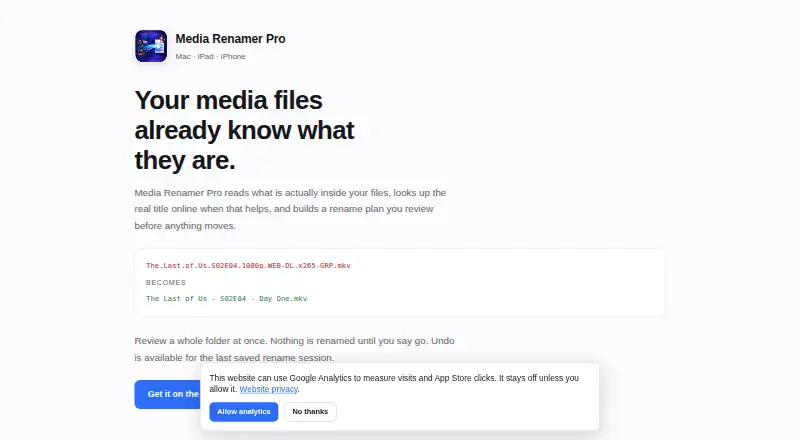
Media Renamer Pro renames media and other files by reading contents and metadata, checking online title sources when useful, and previewing the proposed plan before changes are applied. It handles TV shows, movies, photos and video, music, audiobooks, retro game ROMs, and other files. TV episode lookups can use TVmaze, TMDb, and OMDb; movie lookups identify title and year. Audiobook searches use Google Books and OpenLibrary, while ROM searches use IGDB and RAWG. Photo and video names can include capture date, camera, city, and on-device AI scene descriptions. The app detects conflicts, never overwrites files, and can undo the last saved rename session. Matching subtitles can follow renamed videos while preserving language and forced tags; artwork and .nfo sidecars remain untouched. Mounted SMB shares and NAS folders are supported, though a dropped batch connection can leave temporary filenames. Processing is on-device by default, Local-Only Mode blocks network requests, and there is no account, tracking, ads, or telemetry.
Who it suits
It suits Mac, iPad, and iPhone users organizing varied media libraries with metadata-based naming. It is also useful for people who want previews, undo, and on-device processing.
What it does well
- Metadata-based naming across many media types
- Preview before every rename
- Conflict detection and undo support
- On-device processing and Local-Only Mode
- No account, ads, tracking, or telemetry
What to know first
- No free plan or trial
- Requires macOS 14 or iOS/iPadOS 17
- Dropped NAS connection may leave temporary filenames
- Cloud photo descriptions require the user's key
Limits
The app has no free plan or trial. Cloud photo descriptions are off by default and require a key from the selected provider; TMDb, OMDb, and IGDB keys are optional.
Plans
| Plan | Billed and limits | Price |
|---|---|---|
| Media Renamer Pro | once · Universal purchase for Mac, iPad and iPhone · no subscription | $4.99, paid once |
As bkettering74.github.io lists them, read 7 Oct 2026. The maker's own page has the final word.
Getting started
- Open the Media Renamer Pro website
- Install the universal app on a Mac, iPad, or iPhone meeting its system requirement
- Purchase Media Renamer Pro for 4.99 USD, billed once
- Add media files or mounted SMB/NAS folders
- Review the proposed rename plan and apply the changes
- Enable subtitle handling or Local-Only Mode in Settings if needed
Verdict
Media Renamer Pro focuses on controlled, metadata-aware batch renaming with clear safeguards. Its one-time purchase and Apple-platform requirements define who can use it.
Questions
What does Media Renamer Pro cost?
The Media Renamer Pro plan costs 4.99 USD, billed once, as a universal purchase for Mac, iPad, and iPhone. There is no subscription, free plan, or free trial.
Which devices and systems are supported?
It runs on Mac, iPad, and iPhone. macOS 14.0 or later and iOS or iPadOS 17.0 or later are required.
Does it need API keys?
The app works without API keys. TMDb, OMDb, and IGDB keys are optional, while cloud photo descriptions require the user's own provider key.
Can it rename subtitles with videos?
When subtitle handling is enabled in Settings, matching subtitle files follow renamed videos and retain language and forced tags. Artwork and .nfo sidecars are left alone.
How does it handle privacy?
Renaming and default Apple Vision photo analysis happen on-device. Local-Only Mode blocks network requests, and the app has no account, tracking, ads, or telemetry.
Facts from Media Renamer Pro's own pages
- API keys
- The app works without API keys; TMDb, OMDb, and IGDB keys are optional, and cloud photo descriptions require the user's own provider key. · bkettering74.github.io, 7 Oct 2026
- Maker
- The site identifies Buck Kettering as the maker and describes the app as a one-person app; it does not state a headquarters or founding date. · bkettering74.github.io, 7 Oct 2026
- Media types
- It supports TV shows, movies, photos and video, music, audiobooks, retro game ROMs, and other files. · bkettering74.github.io, 7 Oct 2026
- Network storage
- It can rename files on mounted SMB shares and NAS folders, though a dropped connection during a batch can leave temporary filenames. · bkettering74.github.io, 7 Oct 2026
- Optional cloud processing
- Optional cloud photo descriptions send photos to the selected provider only when configured with the user's own key; the privacy policy says the feature is off by default. · gist.github.com, 7 Oct 2026
- Other integrations
- Audiobook lookups use Google Books and OpenLibrary, and ROM lookups use IGDB and RAWG. · bkettering74.github.io, 7 Oct 2026
- Photo features
- Photo and video naming can use capture date, camera, city, and on-device AI scene descriptions. · bkettering74.github.io, 7 Oct 2026
- Platforms and requirements
- The universal app runs on Mac, iPad, and iPhone and requires macOS 14.0 or later and iOS or iPadOS 17.0 or later. · bkettering74.github.io, 7 Oct 2026
- Privacy
- Renaming and default Apple Vision photo analysis happen on-device; Local-Only Mode blocks network requests, and the app has no account, tracking, ads, or telemetry. · bkettering74.github.io, 7 Oct 2026
- Purpose
- The app reads media file contents and metadata, looks up titles online when useful, and previews a rename plan before applying changes. · bkettering74.github.io, 7 Oct 2026
- Safety
- The app previews every proposed change, detects conflicts, does not overwrite files, and can undo the last saved rename session. · bkettering74.github.io, 7 Oct 2026
- Subtitle handling
- When enabled in Settings, matching subtitle files follow renamed videos with language and forced tags preserved; artwork and .nfo sidecars are left alone. · bkettering74.github.io, 7 Oct 2026
- Support
- Support is by email, and the maker says most replies go out within two business days. · bkettering74.github.io, 7 Oct 2026
- TV and movie lookups
- TV episode titles can come from TVmaze, TMDb, and OMDb, while movie lookups identify title and year. · bkettering74.github.io, 7 Oct 2026
Where Media Renamer Pro stands on Freedom251
- File Renaming Software#28 of 30