Freedom251 › Minecraft Shape Generators

Mcgic Circle Generator
What Mcgic Circle Generator is
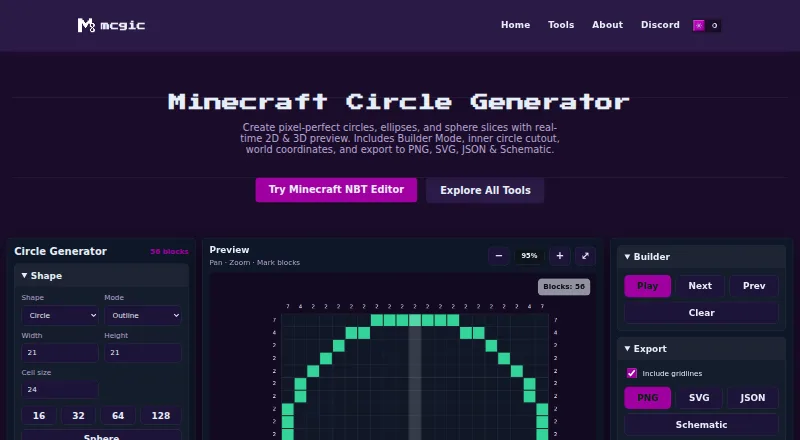
Mcgic Circle Generator creates Minecraft circles, ellipses, and sphere slices, with live 2D and 3D previews. It runs in a browser and handles shapes from 1 to 512 blocks wide, with block counts, coordinates, and a layer-by-layer guide. Builder Mode can guide placement step by step or let users mark blocks directly on the canvas. Designs can be exported as PNG, SVG, JSON with world coordinates, or a .schem file described as compatible with WorldEdit and MCEdit. The tool offers Dark, Light, Forest, Ocean, and Classic themes, and saves settings in the browser to restore the last session without an account. On phones, it has Controls, Preview, and Export tabs, plus pinch-to-zoom and touch panning. Mcgic says projects and exports remain on the user's device rather than being uploaded automatically, though it may use minimal anonymous analytics and third-party integrations to collect activity data. The generator currently supports full blocks only; slab and stair circle generation is planned for a future update. The tool is free to use with no login required.
Who it suits
It suits Minecraft builders, creators, server owners, map makers, and technical players planning geometric builds. Phone users can use touch controls, while schematic exports are intended for WorldEdit or MCEdit.
What it does well
- Creates circles, ellipses, and sphere slices
- Supports shapes up to 512 blocks wide
- Builder Mode offers guided or direct placement
- Exports PNG, SVG, JSON, and .schem files
- Restores the last session without an account
What to know first
- Supports full blocks only
- Slab and stair circle generation is planned, not available
- May use anonymous analytics and third-party integrations
Limits
The free plan supports circle sizes up to 512 × 512 blocks and full blocks only. Slab and stair circle generation is planned for a future update.
Plans
| Plan | Billed and limits | Price |
|---|---|---|
| Free | Free browser-based tools; circle sizes up to 512 × 512 blocks; full blocks only | Free |
As mcgic.com lists them, read 29 Sept 2026. The maker's own page has the final word.
Getting started
- Open https://www.mcgic.com/circle-generator/ in a browser.
- Choose a circle, ellipse, or sphere slice and set its size.
- Use Builder Mode to step through placement or mark blocks on the canvas.
- Review the previews, block count, coordinates, and layer view.
- Export the design as PNG, SVG, JSON, or .schem.
Overview
Mcgic Circle Generator is a free browser tool for planning Minecraft circles, ellipses, and sphere slices. It is best suited to builders who want placement guidance and files they can take into other tools without signing up. Its breadth of previews and exports is appealing, though builds that need slabs or stairs are outside its current scope.
Key features
Preview and construction guidance
Real-time 2D and 3D previews help builders inspect a shape before placing blocks. Shapes range from 1 to 512 blocks wide, and Builder Mode can guide placement one step at a time or let users mark blocks directly on the canvas. Layer-by-layer views, block counts, and coordinate output make the design more actionable than a visual outline alone, especially for larger builds.
The supported shapes are circles, ellipses, and sphere slices. The full-block-only limit matters: anyone planning contours that depend on slabs or stairs will need another approach. Mcgic says those shapes are planned for a future update, but they are not supported now.
Exports and interface
PNG and SVG exports suit visual references, while JSON includes world coordinates and .schem files are described as compatible with WorldEdit and MCEdit. That range gives builders options for both reference material and moving a design into compatible tools. Five themes—Dark, Light, Forest, Ocean, and Classic—offer display choices without changing the building limits.
On phones, Controls, Preview, and Export tabs separate the main tasks; pinch-to-zoom and touch panning support canvas inspection. Settings save in the browser and the last session is restored without an account. Mcgic says projects and exports remain on the user's device and are not automatically uploaded to its servers; it may use minimal anonymous analytics and third-party integrations to track or collect activity data.
Pricing
The Free plan costs nothing and includes browser-based tools, shapes up to 512 × 512 blocks, and full blocks only. It is a strong fit for individual builders who need the supported shapes and exports without a login or subscription. There is no paid tier to weigh against it, but the shape limit and lack of slabs and stairs set clear boundaries for more specialized builds. The tool is free to use, with no free trial.
Platforms
The generator runs in a browser and is listed for web, Android, and iOS. Phone-specific tabs and touch gestures make mobile use practical for reviewing and navigating a design, while browser session saving avoids account setup.
Who it's for
It suits Minecraft creators, builders, server owners, map makers, and technical players who need to plan supported shapes, follow placement guidance, or export a schematic. Mcgic links to its Discord community for support. Mcgic is identified as part of Saddling, a Nenyo brand.
Pros and cons
- Pros: Shapes up to 512 blocks wide, with previews, layer guidance, block counts, and coordinates for planning precise builds.
- Pros: PNG, SVG, coordinate-rich JSON, and .schem exports cover visual references and compatible external tools.
- Pros: Free use, no login, and browser-based session restoration reduce setup friction.
- Cons: Full blocks only exclude designs that rely on slabs or stairs.
- Cons: It focuses on circles, ellipses, and sphere slices rather than a broader set of shapes.
Alternatives
Minecraft Shape Generators is a broader place to compare tools. For more shape types, Block Shape Generator lists spheres, cones, domes, and cylinders, though no numeric limits are stated. CartoVoxel Minecraft Shape Maker offers 11 shapes, live 3D and layer views, and JSON, layer guide, and Java mcfunction exports, making it a better fit for builders seeking more shape variety or that export format.
MC Circle is a simpler choice for circles between 3 and 128 blocks, with Java and Bedrock support. Minecraft Shape Generator may suit someone who wants all shapes and blueprints and browser, desktop, or mobile use. MineSchematic is another free option; its maker is described as an independent developer and Minecraft enthusiast based in the United Kingdom.
SchemForge Sphere Generator is more narrowly focused on spheres and offers an interactive 3D voxel preview and private build history; its free plan allows one build each day, with a 48-hour unlimited option at $0.99, paid once. For world planning rather than shape generation, SeedLander offers premium world plans with markers and portal pairs. Better Plotz Modeller is a free HTML5 modeller for Minecraft.
Verdict
Choose Mcgic Circle Generator if you want a free, no-login way to plan large circles, ellipses, or sphere slices and export construction-ready files. Its guidance, coordinate output, and broad size range make it a practical fit for those jobs. Look elsewhere if your design needs slabs or stairs, or if you need a wider range of shape types.
Verdict
Mcgic Circle Generator pairs placement guidance with several export formats and browser-based session saving. Its current shapes use full blocks only, and the maker says projects are not automatically uploaded.
Questions
How much does Mcgic Circle Generator cost?
It is free to use, with no login required.
What shapes and sizes does it support?
It supports circles, ellipses, and sphere slices from 1 to 512 blocks wide.
Which export formats are available?
Exports include PNG, SVG, JSON with world coordinates, and .schem files described as compatible with WorldEdit and MCEdit.
Does it require an account?
No account is needed. The tool saves settings in the browser and restores the last session.
Can it create circles with slabs or stairs?
The generator currently supports full blocks only. Slab and stair circle generation is planned for a future update.
Where can I use it?
It runs in a browser. On phones, it has Controls, Preview, and Export tabs, with pinch-to-zoom and touch panning.
Facts from Mcgic Circle Generator's own pages
- Analytics
- Mcgic says it may use minimal anonymous analytics and third-party integrations to track or collect activity data to improve the platform. · mcgic.com, 29 Sept 2026
- Builder Mode
- Builder Mode guides block placement with step-through controls or lets users mark blocks directly on the canvas. · mcgic.com, 29 Sept 2026
- Company
- Mcgic is identified as part of Saddling, a Nenyo brand. · mcgic.com, 29 Sept 2026
- Display
- The tool offers five themes: Dark, Light, Forest, Ocean, and Classic. · mcgic.com, 29 Sept 2026
- Exports
- Users can export designs as PNG, SVG, JSON with world coordinates, or a .schem file for WorldEdit or MCEdit. · mcgic.com, 29 Sept 2026
- Integrations
- Schematic exports are described as compatible with WorldEdit and MCEdit. · mcgic.com, 29 Sept 2026
- Intended users
- Mcgic describes its platform as built for Minecraft creators, builders, server owners, map makers, and technical players. · mcgic.com, 29 Sept 2026
- Limit
- The generator currently supports full blocks only; slab and stair circle generation is planned for a future update. · mcgic.com, 29 Sept 2026
- Mobile support
- On phones, the interface uses Controls, Preview, and Export tabs, with pinch-to-zoom and touch panning on the canvas. · mcgic.com, 29 Sept 2026
- Persistence
- The tool automatically saves settings in the browser and restores the last session without an account. · mcgic.com, 29 Sept 2026
- Privacy
- Mcgic says the tools run in the browser, projects and exports remain on the user's device, and data is not automatically uploaded to its servers. · mcgic.com, 29 Sept 2026
- Purpose
- The tool generates Minecraft circles, ellipses, and sphere slices with real-time 2D and 3D previews. · mcgic.com, 29 Sept 2026
- Shape size
- It supports shapes from 1 to 512 blocks wide. · mcgic.com, 29 Sept 2026
- Support
- The Circle Generator page links to Mcgic's Discord community. · mcgic.com, 29 Sept 2026
Where Mcgic Circle Generator stands on Freedom251
- Minecraft Shape Generators#5 of 39
- Minecraft Circle Generators#4 of 9