Freedom251 › Minecraft Shape Generators

Block Round
What Block Round is
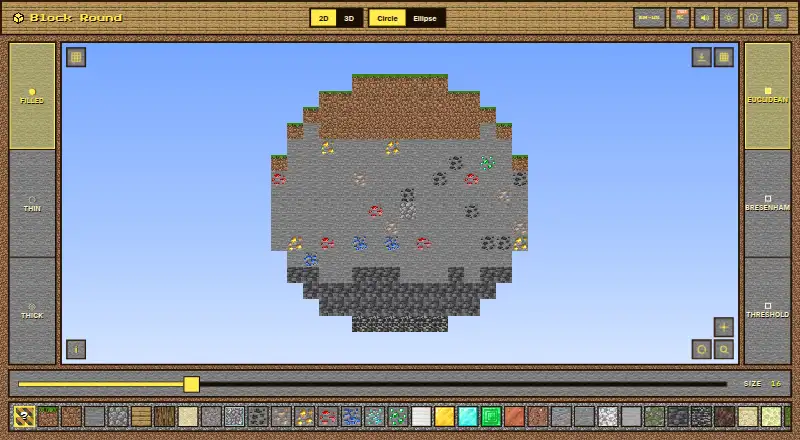
Block Round is a free web tool for creating circles, ellipses, spheres and ellipsoids with Minecraft block textures. Its two-dimensional modes provide Euclidean, Bresenham and Threshold algorithms, while the three-dimensional modes include a preview and support cuts along the X axis, Y axis or a 45-degree diagonal. Choose from blocks such as Grass Block, Dirt, Stone, Oak, Diamond, Sand and Gravel, or select a Random mix. Export two-dimensional figures as PNG images and three-dimensional figures as Sponge schematic v2 files. Those schematic files can be imported by WorldEdit, Litematica and MCEdit. Block Round runs in a browser without an installation, account or backend, and its README describes offline use as a PWA. Settings apply only to the current session and return to their defaults after a reload. A technical math companion is available in nine languages, with each PDF described as at least 25 pages. The project states that its code, layout, design system and sound engine are All Rights Reserved, and that it is not affiliated with, endorsed by or sponsored by Mojang Studios or Microsoft.
Who it suits
Block Round suits Minecraft builders who want to create block-textured geometric figures and export them for use in other tools. It is also suited to people who want a browser-based workflow that does not require an account or installation.
What it does well
- Creates circles, ellipses, spheres and ellipsoids.
- Offers three algorithms for two-dimensional figures.
- Includes a preview for three-dimensional figures.
- Exports PNG images and Sponge schematic v2 files.
- Works offline as a PWA.
What to know first
- Settings reset to defaults after a reload.
- Three-dimensional exports use Sponge schematic v2 format.
Limits
Block Round is free to use for its core job. Settings are session-only and reset to defaults after a reload.
Plans
| Plan | Billed and limits | Price |
|---|---|---|
| Free plan | Free to use for the core job; no paid tier required | Free |
As vinisouza128.github.io lists them, read 7 Oct 2026. The maker's own page has the final word.
Getting started
- Open the Block Round website in a browser.
- Choose a circle, ellipse, sphere or ellipsoid.
- Select a block texture and, for two-dimensional figures, an algorithm.
- For a three-dimensional figure, choose an available cut direction if needed.
- Export a two-dimensional figure as PNG or a three-dimensional figure as a Sponge schematic v2 file.
Block Round is a browser-based generator for Minecraft-textured circles, ellipses, spheres and ellipsoids. It is a strong fit for builders who want to move from a chosen shape to a PNG or schematic without installing software or creating an account. Its useful range of shapes and export paths comes with one recurring inconvenience: settings return to their defaults after a reload.
Overview
The tool handles both 2D figures and 3D forms, with a 3D preview and exports geared to different tasks: PNG files for flat figures and Sponge schematic v2 files for 3D figures. That makes it practical for builders who want to take a generated shape into another editing tool, rather than stop at a visual preview. Browser access requires no installation, account or backend, and the app can work offline as a PWA.
The session-only settings are the clearest limitation. A one-off user can generate a shape and leave; anyone returning to a recurring project must set preferences again. That trade-off is easier to accept for occasional building than for a workflow built around repeated variations.
Key features
- Three 2D algorithms: Circle and ellipse modes offer Euclidean, Bresenham and Threshold algorithms. Having alternatives gives builders a way to choose among different block layouts instead of being locked to one generation method.
- Minecraft block selection: The picker includes Grass Block, Dirt, Stone, Oak, Diamond, Sand and Gravel, alongside a Random mix and other blocks. This lets users vary the material appearance directly in the generator.
- 3D shapes and cuts: Sphere and ellipsoid modes support X, Y and 45-degree diagonal cuts. These options add flexibility for builders shaping 3D forms, while the 3D preview helps keep the work oriented as a spatial object.
- Two export paths: PNG export suits sharing or keeping a 2D figure as an image. The Sponge schematic v2 export is the more useful choice when the aim is to continue editing a 3D figure; it can be imported by WorldEdit, Litematica and MCEdit.
- Offline-capable browser app: The app works offline as a PWA and has no backend. That suits users who want a lightweight browser workflow, though the settings still do not carry over after reloading.
Pricing
Block Round is free to use for its core job, with a Free plan priced at $0. There is no paid tier required to generate the supported shapes or export PNG and schematic files. That makes it a straightforward choice when a builder needs this focused tool without a subscription; the main compromise is the loss of saved preferences between sessions, not a paid-plan gate.
Platforms
Block Round is available on the web. Its browser-based, no-install setup and offline PWA support suit people who prefer not to install a separate application, while the session-only settings make it less convenient for ongoing projects with repeat configurations.
Who it's for
Block Round is best for Minecraft builders who need circles, ellipses, spheres or ellipsoids made from block textures and want to export the result for further use. It is particularly useful when the next step is an image for a 2D figure or a schematic for a 3D build. Someone who mainly needs a small circle, wants a different platform, or values saved settings may prefer to compare other tools.
Pros and cons
- Pro — Flat and 3D shapes in one tool: Circles and ellipses sit alongside spheres and ellipsoids, covering more than a single shape-making task.
- Pro — Practical export choices: PNG and Sponge schematic v2 exports serve image and editing workflows, and the schematic is compatible with WorldEdit, Litematica and MCEdit.
- Pro — No account or installation: The browser app has no backend and can work offline as a PWA, reducing setup for occasional use.
- Con — Preferences do not persist: Reloading resets settings to defaults, adding repeated setup for builders working across sessions.
- Con — Web-only: The platform choice does not suit users specifically seeking an Android or iOS app.
Alternatives
For other options, see Minecraft Shape Generators. Choose Mcgic Circle Generator instead if a browser, Android or iOS circle tool is a better fit and its 512 × 512-block size ceiling and full-block output meet your needs. Minecraft Plot is another freemium option across web, Android and iOS, with a free tier of basic tools and paid premium membership. Choose Astroworld Circle & Dome Generator if a web tool with no sign-up or ads and a 1–256 block diameter range suits the task. Block Shape Generator offers sphere, cone, dome and cylinder controls in a free web tool. BlockBlend may suit builders seeking unlimited palettes, all blocks, WorldEdit export and community sharing. CartoVoxel Minecraft Shape Maker offers 11 shapes, live 3D and layer views, and JSON, layer guide and Java mcfunction exports. MC Circle is a free web option for circles from 3–128 blocks, with Java and Bedrock support. MC Circle Generator offers circle and oval layouts with PNG and SVG export.
Verdict
Choose Block Round if you want a free browser tool that covers both 2D and 3D Minecraft-textured geometry and can export a schematic for continued editing. Its combination of shape types, material choices and export formats is the main reason to pick it. Look elsewhere if you need persistent settings or a mobile app; returning to defaults is a meaningful nuisance for repeated work.
Verdict
Choose Block Round to generate Minecraft block-textured geometry in a browser and export images or schematic files. Its session-only settings mean you will need to reapply preferences after reloading the page.
Questions
How much does Block Round cost?
The listed free plan costs nothing, and no paid tier is required for the core job.
Which platforms does Block Round support?
It is a web tool that runs in a browser. The README also describes offline use as a PWA.
What can I create with Block Round?
It generates circles, ellipses, spheres and ellipsoids rendered with Minecraft block textures.
Which file formats can it export?
Two-dimensional figures export as PNG. Three-dimensional figures export as Sponge schematic v2 files.
Does Block Round require an account or installation?
No. The README describes it as browser-based and requiring no installation, account or backend.
Can I use the exported schematic in other tools?
The Sponge schematic v2 export can be imported by WorldEdit, Litematica and MCEdit.
Facts from Block Round's own pages
- 2D algorithms
- The available 2D algorithms are Euclidean, Bresenham, and Threshold. · github.com, 7 Oct 2026
- 3D cuts
- Sphere and ellipsoid modes support X, Y and 45-degree diagonal cuts. · github.com, 7 Oct 2026
- Access
- The README describes it as browser-based, requiring no installation, account or backend. · github.com, 7 Oct 2026
- Algorithms
- Its 2D modes offer Euclidean, Bresenham and Threshold algorithms. · github.com, 7 Oct 2026
- Block choices
- Users can select Minecraft blocks including Grass Block, Dirt, Stone, Oak, Diamond, Sand and Gravel, along with a Random mix and other blocks. · github.com, 7 Oct 2026
- Block picker
- The block picker includes Minecraft blocks such as Grass Block, Dirt, Stone, Oak, Diamond, Sand, and Gravel, as well as Random mix. · github.com, 7 Oct 2026
- Documentation
- A technical math companion is available in nine languages, with each PDF described as at least 25 pages. · github.com, 7 Oct 2026
- Exports
- It exports 2D figures as PNG and 3D figures as Sponge schematic v2 files. · github.com, 7 Oct 2026
- Image export
- The README states that 2D figures can be exported as PNG files. · github.com, 7 Oct 2026
- Integrations
- The exported schematic can be imported by WorldEdit, Litematica and MCEdit. · github.com, 7 Oct 2026
- License
- The README states that the code, layout, design system and sound engine are All Rights Reserved. · github.com, 7 Oct 2026
- Minecraft disclaimer
- The project says it is not affiliated with, endorsed by or sponsored by Mojang Studios or Microsoft. · github.com, 7 Oct 2026
- Offline use
- The README says the app works offline as a PWA. · github.com, 7 Oct 2026
- Persistence limit
- Settings are session-only and reset to defaults after reload. · github.com, 7 Oct 2026
- Privacy architecture
- The README describes the app as having no backend. · github.com, 7 Oct 2026
- Purpose
- Block Round generates circles, ellipses, spheres and ellipsoids rendered with Minecraft block textures. · github.com, 7 Oct 2026
- Schematic export
- The tool exports Sponge schematic v2 files that the README says WorldEdit, Litematica, and MCEdit can import. · github.com, 7 Oct 2026
- Settings persistence
- Settings are not saved across reloads; each visit starts with the defaults. · github.com, 7 Oct 2026
- Setup
- The README describes it as browser-based, with no installation, account, or backend required. · github.com, 7 Oct 2026
- Technical stack
- It uses vanilla JavaScript, Canvas 2D and three.js, with no framework or build step, and loads as a single static HTML file. · github.com, 7 Oct 2026
Where Block Round stands on Freedom251
- Minecraft Shape Generators#4 of 39