Freedom251 › Minecraft Shape Generators

Astroworld Circle & Dome Generator
Visit Astroworld Circle & Dome Generator Alternatives Pricing
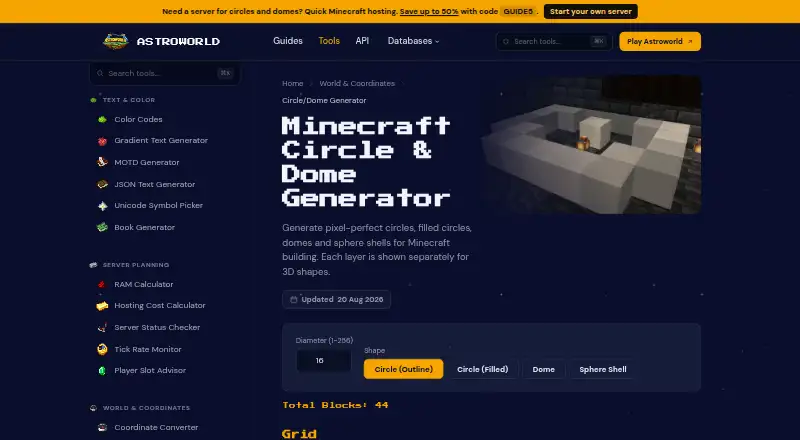
What Astroworld Circle & Dome Generator is
Astroworld Circle & Dome Generator is a web tool for planning block-based shapes in Minecraft. It creates pixel grids for circle outlines, filled circles, domes and sphere shells, using whole-block diameters from 1 to 256. The selected shape’s total block count appears before you start building. Gold cells indicate blocks to place, while dark cells indicate empty space.
For domes and sphere shells, a layer slider lets you view the shape layer by layer. Large grids compress to fit the screen; the page recommends working one layer at a time for larger builds. The tool calculates block positions in the browser based on the diameter entered.
You can embed the generator on your own site or server wiki with an iframe, and set its width, height and theme. The tool is an Astroworld product brought to users by Astroworld MC. Astroworld describes its collection as 31 Minecraft tools for building, configuring and managing servers, with no sign-up and no ads. The generator’s free plan costs nothing, has no sign-up and shows no ads.
Who it suits
This generator suits Minecraft builders who want a block-by-block guide for shapes such as towers, arenas, greenhouses, planetariums and spheres. It is also useful for site or server wiki owners who want to embed the tool for visitors.
What it does well
- Generates circle outlines, filled circles, domes and sphere shells.
- Accepts whole-block diameters from 1 to 256.
- Shows the total block count for the selected shape.
- Provides a layer-by-layer view for domes and sphere shells.
- Can be embedded with iframe width, height and theme settings.
- Free plan has no sign-up and no ads.
What to know first
- Grids compress to fit the screen at larger sizes.
- The page recommends building large shapes one layer at a time.
Limits
The free plan covers diameters from 1 to 256 blocks. Larger grids compress to fit the screen, and the page recommends working one layer at a time for large builds.
Plans
| Plan | Billed and limits | Price |
|---|---|---|
| Free | No sign-up · no ads · diameter 1–256 blocks | Free |
As tools.astroworldmc.com lists them, read 7 Oct 2026. The maker's own page has the final word.
Getting started
- Open the Astroworld Circle & Dome Generator website.
- Enter a whole-block diameter from 1 to 256.
- Select a circle outline, filled circle, dome or sphere shell.
- Review the block count and grid; use the layer slider for a dome or sphere shell.
- Embed the tool on a site or server wiki with an iframe, if needed, and set its width, height and theme.
Astroworld Circle & Dome Generator turns a diameter into a block grid for Minecraft circles, domes and sphere shells. It suits builders who want to plan a shape in a browser before placing blocks. Its layer slider and block count make it useful for larger builds, though compressed grids call for a layer-by-layer approach.
Overview
Enter a whole-block diameter from 1 to 256 to generate a circle outline, filled circle, dome or sphere shell. Gold cells show where blocks go; dark cells show empty space. The tool also calculates the selected shape’s total block count before construction, which helps estimate the scale of a build.
Block positions are worked out in the browser from the diameter. That keeps the task focused on turning a dimension into a plan, rather than requiring a separate design workflow. Astroworld’s wider collection includes 31 Minecraft tools for building, configuring and managing servers, with no sign-up and no ads.
Key features
Shape grids and counts
The four supported shapes cover common round structures, from a flat circle to a dome or sphere shell. Seeing the placement grid and total count together is practical for projects such as towers, arenas, greenhouses and planetariums: builders can inspect the footprint and get a sense of the material scale before starting.
Layer view and embeds
A slider lets users browse dome and sphere-shell layers separately. For a three-dimensional build, that makes each cross-section easier to follow than treating the entire shape as one plan. The generator can also be embedded on a personal site or server wiki, with width, height and theme settings, so a community can keep a reference with its build instructions.
The trade-off is screen space. Grids compress past roughly 64 blocks, and Astroworld recommends working one layer at a time on large builds. The diameter cap of 256 blocks is generous for planning, but a large shape may be less convenient to read as a single grid.
Pricing
The Free plan costs nothing. It includes diameters from 1 to 256 blocks, the four supported shapes and layer-by-layer views. There is no sign-up and no ads, and there is no free trial because the tool is free to use. With one plan and no paid tier to weigh, it is a straightforward choice for builders who need these grids without a subscription.
Platforms
Astroworld Circle & Dome Generator runs on the web. Its browser-based processing suits users who want to enter a diameter and view the result in a browser; an iframe option also lets site and server-wiki owners incorporate it into their pages.
Who it's for
This is a good fit for Minecraft builders planning round structures and wanting a block count alongside the placement map. The separate layers are particularly useful when translating a dome or sphere shell into successive building stages. It is less suited to anyone who needs a compact, fully readable overview of a very large grid, since the display compresses beyond roughly 64 blocks.
Pros and cons
- Pros: Covers circle outlines, filled circles, domes and sphere shells, with diameters up to 256 blocks.
- Pros: Shows the total block count before building, helping users gauge a shape’s scale.
- Pros: Separate dome and sphere-shell layers and configurable iframe embeds support build guides and community wikis.
- Cons: Large grids compress past roughly 64 blocks, making layer-by-layer work the recommended approach.
- Cons: Its focus is on four round shapes; builders seeking a broader set of forms or export options may prefer another tool.
Alternatives
For more options, browse Minecraft Shape Generators. The Mcgic Circle Generator is worth considering for mobile access or circles up to 512 × 512 blocks; its browser-based tools use full blocks only. Minecraft Plot offers a freemium option, with a free user plan and a 30-day Premium Member plan for 4.99 USD.
Block Round is another free web option for the core job, with no paid tier required. Choose Block Shape Generator if its listed sphere, cone, dome and cylinder controls better match the shape you need. BlockBlend includes unlimited palettes, all blocks, WorldEdit export and community sharing. CartoVoxel Minecraft Shape Maker offers 11 shapes, live 3D and layer views, and JSON, layer guide and Java mcfunction exports. MC Circle provides Java and Bedrock circle layouts from 3 to 128 blocks without sign-up. MC Circle Generator is a free browser tool for circle and oval layouts with PNG and SVG export.
Verdict
Choose Astroworld Circle & Dome Generator if you need a free browser tool that turns round Minecraft builds into placement grids and gives you a block count before you start. Its layer slider makes domes and sphere shells more manageable to build in stages. Look elsewhere if you need broader shape choices, export formats, or a grid that remains easy to read at large sizes.
Verdict
Choose Astroworld Circle & Dome Generator when you need a browser-based grid and block count for a Minecraft shape. The layer view and iframe option are useful for larger projects and community wikis. For large grids, expect a compressed display and plan to work one layer at a time.
Questions
How much does it cost?
The Free plan costs nothing.
Do I need to sign up?
No. The Free plan requires no sign-up.
What shapes can it generate?
It supports circle outlines, filled circles, domes and sphere shells.
What diameter range does it accept?
It accepts whole-block diameters from 1 to 256.
Can I embed it on my site?
Yes. You can embed it in an iframe and set the width, height and theme.
Who makes the tool?
The product page identifies it as an Astroworld product brought to users by Astroworld MC.
Facts from Astroworld Circle & Dome Generator's own pages
- 3D layers
- Dome and sphere-shell layers can be browsed separately with a layer slider. · tools.astroworldmc.com, 7 Oct 2026
- Block counts
- It displays the total number of blocks for the selected shape before building. · tools.astroworldmc.com, 7 Oct 2026
- Browser processing
- The page says each block position is worked out in the browser from the entered diameter. · tools.astroworldmc.com, 7 Oct 2026
- Company
- Astroworld’s about page names Stetrin B.V., registered in the Netherlands, as a company partly operating Astroworld. · astroworldmc.com, 7 Oct 2026
- Diameter range
- The generator accepts whole-block diameters from 1 to 256. · tools.astroworldmc.com, 7 Oct 2026
- Embed
- Users can embed the generator on their own site or server wiki using an iframe, with width, height and theme settings. · tools.astroworldmc.com, 7 Oct 2026
- Grid display
- Gold cells mark blocks to place and dark cells mark empty space; large grids compress to fit the screen. · tools.astroworldmc.com, 7 Oct 2026
- Intended users
- The tool is for Minecraft builders planning structures such as towers, arenas, greenhouses, planetariums and spheres. · tools.astroworldmc.com, 7 Oct 2026
- Maker
- The product page identifies the tool as an Astroworld product brought to users by Astroworld MC. · tools.astroworldmc.com, 7 Oct 2026
- Notable limit
- The page says grids compress past roughly 64 blocks and recommends working one layer at a time for large builds. · tools.astroworldmc.com, 7 Oct 2026
- Purpose
- Generates pixel grids for Minecraft circles, filled circles, domes and sphere shells. · tools.astroworldmc.com, 7 Oct 2026
- Support
- Astroworld’s about page lists Discord, staff applications, rules and a business contact email as ways to get involved or reach the organization. · astroworldmc.com, 7 Oct 2026
- Tool collection
- Astroworld’s tools page describes a collection of 31 Minecraft tools for building, configuring and managing servers, with no sign-up and no ads. · tools.astroworldmc.com, 7 Oct 2026
Where Astroworld Circle & Dome Generator stands on Freedom251
- Minecraft Shape Generators#1 of 39