Freedom251 › Minecraft Shape Generators

Block Shape Generator
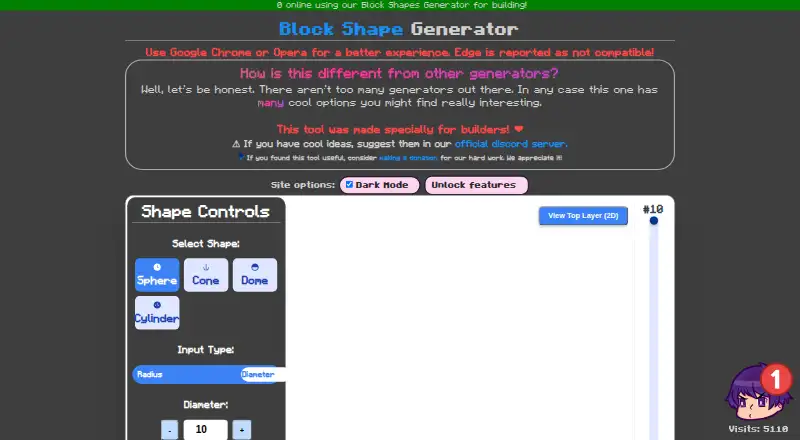
What Block Shape Generator is
Block Shape Generator is a free web tool made for builders who want to create block-based shapes. It can generate spheres, cones, domes, and cylinders, with controls for radius or diameter, height, and color. A hollow-shape option makes a shell instead of a solid form. The tool provides a 3D preview with zoom controls and a switch for grid lines. It also displays the number of blocks required and lets users inspect the current layer or view the top layer in 2D. After choosing a form and its settings, users can generate the shape. The maker recommends Google Chrome or Opera and reports that Edge is not compatible. The page shows controls labelled Unlock features and Enable Model Movement with test-tube symbols, but does not explain their terms. The maker invites suggestions through an official Discord server and links to a donation page for supporting development. The listed free plan states no numeric limits for the tool's controls.
Who it suits
This tool suits builders who want to generate block-based spheres, cones, domes, or cylinders and inspect their layers. It is intended for use in a browser, with Chrome or Opera recommended.
What it does well
- Generates spheres, cones, domes, and cylinders.
- Supports radius or diameter and height controls.
- Offers a 3D preview with zoom and grid controls.
- Shows the required block count.
- Includes current-layer inspection and a top-layer 2D view.
What to know first
- Edge is reported as incompatible.
- Chrome or Opera is recommended.
- Terms for two test-tube-marked controls are not explained.
Limits
The listed Free plan costs nothing, and the page states no numeric limits for it.
Plans
| Plan | Billed and limits | Price |
|---|---|---|
| Free | The generator’s listed controls include sphere, cone, dome and cylinder shapes; the page states no numeric limits. | Free |
As alonsoaliaga.github.io lists them, read 2 Oct 2026. The maker's own page has the final word.
Getting started
- Open https://alonsoaliaga.github.io/block-shapes/ in Google Chrome or Opera.
- Select Sphere, Cone, Dome, or Cylinder.
- Set a radius or diameter and height, then choose a color.
- Enable Hollow Shape if you want a shell.
- Use Generate Shape to create the form.
Block Shape Generator is a free web tool for Minecraft builders shaping basic block forms. It suits projects that call for a sphere, cone, dome, or cylinder, with dimensions and layers to inspect. Its focused controls make it useful for those forms, but its narrow shape range and browser caveat limit its reach.
Overview
The generator turns a small set of geometric choices into a block-based shape. Its block count helps builders judge a design’s scale, while the 3D preview and layer views support planning beyond a single overall view. This is a specialist utility, not a broad modeling tool: the four supported forms are its clear boundary.
Pixel-art, rendering, and animation examples provide related inspiration. The maker also welcomes suggestions through an official Discord server and asks users who find the tool useful to consider donating toward development.
Key features
Shape and dimensions
Choose a sphere, cone, dome, or cylinder, then set a radius or diameter and a height. That combination is practical for sizing familiar forms, though anyone building outside this small catalog will need another option. The Generate Shape control creates the model, and the displayed block count offers a quick sense of its scale.
Appearance and inspection
Color selection and a hollow-shape toggle let builders choose a colored solid or a shell. Zoom controls and a grid-lines toggle help with visual inspection. A current-layer control and a 2D view of the top layer make it easier to examine the model’s structure; these are useful planning aids when the build needs attention at block level.
Experimental controls
The interface also exposes controls labelled Unlock features and Enable Model Movement, each marked with a test-tube symbol. Their terms are not explained, so builders should not rely on them for a particular workflow.
Pricing
The Free plan costs nothing. It includes the generator’s sphere, cone, dome, and cylinder controls, and no numeric limits are stated. For a builder who needs these basic shapes, there is no paid tier to weigh against a quota or seat cap; the tradeoff is the limited shape selection and the unexplained experimental controls.
Platforms
Block Shape Generator runs on the web. The maker recommends Google Chrome or Opera and reports that Edge is not compatible, making browser choice a practical prerequisite. There is no stated security, privacy, or compliance practice to weigh when deciding whether it fits a particular environment.
Who it's for
This is a good fit for builders who want to set dimensions for a handful of common forms, see the block count, and inspect a model in 3D or by layer. It is less suited to projects needing a larger shape library, or to users who need Edge support. Builders who want to influence the tool’s direction can send ideas through Discord; those who want to support ongoing development can donate.
Pros and cons
- Pros: Four core shapes with radius or diameter and height controls cover common geometric builds.
- Pros: A block count plus 3D, current-layer, and top-layer 2D views helps with scale and structural inspection.
- Pros: The free plan has no stated numeric limits, so there is no published shape quota to manage.
- Cons: Only four shapes are supported, which narrows its usefulness for less conventional builds.
- Cons: Edge is reported as incompatible; users should use Chrome or Opera instead.
- Cons: The Unlock features and Enable Model Movement controls have no explained terms.
Alternatives
For more Minecraft shape tools, browse Minecraft Shape Generators. If the project is specifically a circle and needs a browser tool with sizes up to 512 × 512 blocks using full blocks only, Mcgic Circle Generator is a focused alternative, also free across web, Android, and iOS.
Minecraft Plot is another option for builders who want basic tools and standard support on a free plan, with premium membership also offered. For palette work, BlockBlend offers unlimited palettes, all blocks, WorldEdit export, and community sharing at no cost.
For a wider shape set and export options, CartoVoxel Minecraft Shape Maker provides 11 shapes, live 3D and layer views, plus JSON, layer guide, and Java mcfunction exports. Minecraft Shape Generator is a free alternative with all shapes and blueprints for browser, desktop, or mobile use.
MineSchematic is another free web alternative. For a circle-focused tool with no signup, sizes from 3–128 blocks, and Java and Bedrock support, choose MC Circle. Pixel Circle Generator covers circles, ellipses, arcs, and spheres for free.
Verdict
Choose Block Shape Generator if you need a free browser tool for a sphere, cone, dome, or cylinder and value block counts and layer inspection. Its focused controls are the main reason to use it; its limited catalog and Edge incompatibility are the main reasons to look elsewhere.
Verdict
Block Shape Generator provides shape creation and layer inspection controls in a free web tool. Check browser compatibility first, especially if you use Edge.
Questions
How much does Block Shape Generator cost?
The listed Free plan costs nothing.
Which platforms does it support?
It is a web tool. The maker recommends Google Chrome or Opera and reports that Edge is not compatible.
Which shapes can it generate?
Sphere, cone, dome, and cylinder.
Can it create hollow shapes?
Yes. The Hollow Shape toggle creates a shell.
Can I inspect the result by layer?
Yes. The interface shows the current layer and provides a 2D view of the top layer.
How can users suggest ideas or support development?
The maker invites suggestions through its official Discord server and links to a donation page.
Facts from Block Shape Generator's own pages
- Block count
- The interface displays the number of blocks required. · alonsoaliaga.github.io, 30 Sept 2026
- Browser compatibility
- The maker recommends Google Chrome or Opera and reports that Edge is not compatible. · alonsoaliaga.github.io, 2 Oct 2026
- Browser support
- The site recommends Google Chrome or Opera and reports that Edge is not compatible. · alonsoaliaga.github.io, 30 Sept 2026
- Color
- Users can set the shape color. · alonsoaliaga.github.io, 30 Sept 2026
- Community support
- The maker asks users to suggest ideas in the official Discord server. · alonsoaliaga.github.io, 30 Sept 2026
- Dimensions
- Shape dimensions can be entered as radius or diameter, with a separate height control. · alonsoaliaga.github.io, 2 Oct 2026
- Feature controls
- The page exposes controls labelled Unlock features and Enable Model Movement, both marked with a test-tube symbol; it does not explain their terms. · alonsoaliaga.github.io, 2 Oct 2026
- Funding
- The maker asks users who found the tool useful to consider making a donation. · alonsoaliaga.github.io, 2 Oct 2026
- Generation
- The page has a Generate Shape control and displays a blocks-required count. · alonsoaliaga.github.io, 2 Oct 2026
- Hollow mode
- A Hollow Shape toggle creates a hollow shell. · alonsoaliaga.github.io, 30 Sept 2026
- Layer inspection
- Users can inspect the current layer and view the top layer in 2D. · alonsoaliaga.github.io, 30 Sept 2026
- Layer view
- The interface shows a current-layer control and offers a top-layer 2D view. · alonsoaliaga.github.io, 2 Oct 2026
- Preview controls
- Users can adjust zoom and toggle grid lines. · alonsoaliaga.github.io, 2 Oct 2026
- Privacy and security
- The tool page does not state security, privacy, or compliance practices. · alonsoaliaga.github.io, 2 Oct 2026
- Purpose
- The maker describes the tool as specially made for builders. · alonsoaliaga.github.io, 2 Oct 2026
- Related resources
- The page links to pixelart, render, and animation examples. · alonsoaliaga.github.io, 30 Sept 2026
- Security
- The product page does not state any security or compliance features. · alonsoaliaga.github.io, 30 Sept 2026
- Shape options
- The interface offers shape color and a hollow-shape toggle for creating a shell. · alonsoaliaga.github.io, 2 Oct 2026
- Shapes
- Users can select sphere, cone, dome or cylinder. · alonsoaliaga.github.io, 2 Oct 2026
- Support and suggestions
- The maker invites users to suggest ideas through its official Discord server. · alonsoaliaga.github.io, 2 Oct 2026
- Support funding
- The site links to a donation page for supporting development work. · alonsoaliaga.github.io, 30 Sept 2026
Where Block Shape Generator stands on Freedom251
- Minecraft Shape Generators#6 of 39