Freedom251 › Minecraft Shape Generators

MC Circle
What MC Circle is
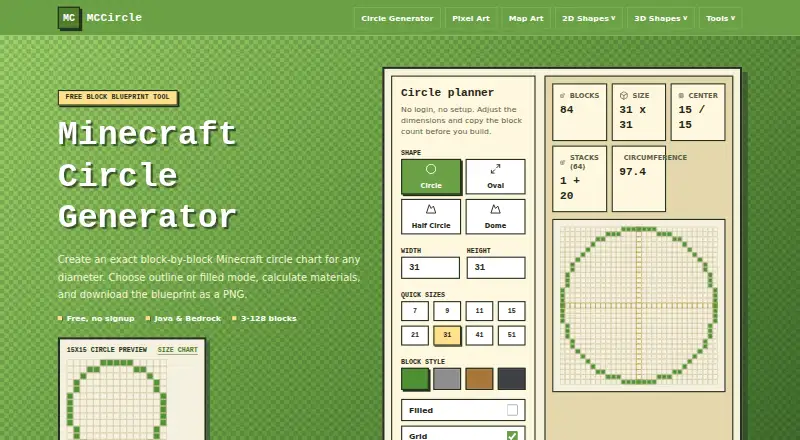
MC Circle is a free browser tool that generates block-by-block Minecraft charts and PNG blueprints for planning builds. Its circle generator supports circles, ovals, half circles, and domes, with outline or filled modes and optional grid lines. Charts can show row and column numbers to guide block placement, while block counts and stack estimates help with material planning. The main generator supports sizes from 3 to 128 blocks and the circle generator page says it supports Java and Bedrock. The site also offers sphere plans with hollow or solid modes, layer counts, and per-layer block plans. Users can download a PNG, copy a chart, or copy a link. The generator maps an ellipse equation to a square block grid and is tuned for practical building rather than vector-perfect drawing. MC Circle is intended for players planning survival builds, megabuilds, and pixel art. It runs in a browser without login, registration, or payment, and the site says it has no subscriptions. It plans to support future monetization through lightweight ads.
Who it suits
MC Circle suits Minecraft players who want block-by-block plans for circles and related shapes, with material estimates and placement coordinates. It may also help players planning sphere builds or pixel art.
What it does well
- Supports circles, ovals, half circles, and domes.
- Shows block counts and stack estimates.
- Offers numbered charts for placement guidance.
- Provides sphere plans with per-layer details.
- Works without login, registration, or payment.
What to know first
- The main generator is limited to 128 blocks.
- Charts are tuned for practical builds, not vector-perfect drawing.
- Future monetization is planned through lightweight ads.
Limits
The main circle generator supports sizes from 3 to 128 blocks. Its output maps an ellipse equation to a square block grid and is tuned for practical building rather than vector-perfect drawing.
Plans
| Plan | Billed and limits | Price |
|---|---|---|
| Free | No signup · circles from 3–128 blocks · Java & Bedrock | Free |
As mccircle.org lists them, read 4 Oct 2026. The maker's own page has the final word.
Getting started
- Open the MC Circle website in a browser.
- Choose a circle, oval, half circle, or dome.
- Set a size within the supported 3–128-block range.
- Choose outline or filled mode and optionally show grid lines.
- Download a PNG, copy the chart, or copy a link.
Verdict
MC Circle provides free browser-based charts for several Minecraft shapes, plus sphere plans and export or sharing options. Its size cap and practical block-grid approach are worth considering for a plan.
Questions
How much does MC Circle cost?
The Free plan costs nothing. The site says there are no subscriptions.
Do I need an account?
No. It works in a browser without login or registration.
Which Minecraft editions does the circle generator support?
The circle generator page says it supports Java and Bedrock.
What can I export?
PNG blueprints can be downloaded. Users can also copy a chart or copy a link.
What shapes can I plan?
The circle generator supports circles, ovals, half circles, and domes. The site also provides sphere plans.
What is the supported size range?
The main page lists a range of 3–128 blocks.
Facts from MC Circle's own pages
- Accounts and cost
- The tool works in a browser without login, registration, or payment, and the page says it has no subscriptions. · mccircle.org, 4 Oct 2026
- Accuracy
- The generator maps an ellipse equation to the square block grid and is tuned for practical building rather than vector-perfect drawing. · mccircle.org, 4 Oct 2026
- Audience
- The site describes the tool as built for Minecraft players planning survival builds, megabuilds, and pixel art. · mccircle.org, 4 Oct 2026
- Build modes
- Users can choose outline or filled mode and optionally show grid lines. · mccircle.org, 4 Oct 2026
- Export and sharing
- Users can download a PNG, copy the chart, or copy a link. · mccircle.org, 4 Oct 2026
- Material planning
- The tool shows block counts and stack estimates to help plan materials. · mccircle.org, 4 Oct 2026
- Monetization
- The page says future monetization is planned through lightweight ads. · mccircle.org, 4 Oct 2026
- Numbered chart
- The numbered circle chart shows row and column numbers to guide block placement. · mccircle.org, 4 Oct 2026
- Other generators
- The site also provides sphere plans with hollow or solid modes, layer counts, and per-layer block plans. · mccircle.org, 4 Oct 2026
- Purpose
- MC Circle generates block-by-block Minecraft circle charts and downloadable PNG blueprints. · mccircle.org, 4 Oct 2026
- Shapes
- The planner supports circles, ovals, half circles, and domes. · mccircle.org, 4 Oct 2026
- Size limit
- The main page lists a supported range of 3–128 blocks. · mccircle.org, 4 Oct 2026
- Supported editions
- The circle generator page says it supports Java and Bedrock. · mccircle.org, 4 Oct 2026
Where MC Circle stands on Freedom251
- Minecraft Shape Generators#8 of 39