Freedom251 › Minecraft Shape Generators
BlockBlend
What BlockBlend is
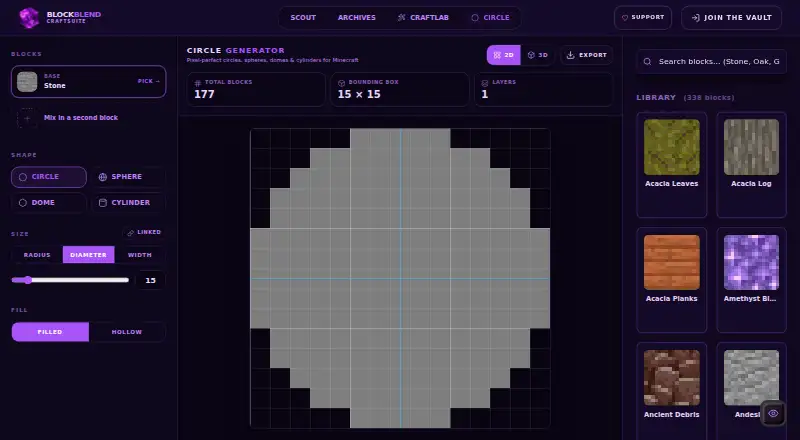
BlockBlend is a free browser-based tool for planning Minecraft block palettes and geometric builds. Its CraftLab library contains more than 300 blocks, and its palette generator can create combinations around moods such as Medieval, Cyberpunk, Fantasy and Oceanic. Palettes can be previewed in 3D, shared, and exported as weighted WorldEdit //set commands. The Circle Generator makes blueprints for circles, rings, spheres, domes and cylinders, including block counts, bounding-box information and layer-by-layer views. Its exports include WorldEdit commands, ASCII blueprints and JSON. The Free plan costs nothing and includes unlimited palettes, all blocks, WorldEdit export and community sharing. Image-to-palette conversion, schematic import and map art are marked as coming soon. The privacy policy describes collection of account details and service usage information, and says Google Analytics is used for aggregated usage analytics. The site provides feature-request and bug-report links, and says donations support its servers.
Who it suits
BlockBlend suits Minecraft builders who want to explore block color combinations or plan supported geometric shapes in a browser. It is useful for people who want palette sharing or WorldEdit and blueprint exports.
What it does well
- Library contains more than 300 blocks
- Previews palettes in 3D
- Creates five supported geometric blueprint shapes
- Exports WorldEdit commands, ASCII and JSON
- Free plan includes unlimited palettes and all blocks
What to know first
- Image-to-palette conversion is coming soon
- Schematic import is coming soon
- Map art is coming soon
- Coordinate output is not available
Plans
| Plan | Billed and limits | Price |
|---|---|---|
| Free | unlimited palettes · all blocks · WorldEdit export · community sharing | Free |
As blockblend.app lists them, read 15 Oct 2026. The maker's own page has the final word.
Getting started
- Open https://blockblend.app/circle in a web browser.
- Use CraftLab to browse blocks or generate a mood-based palette.
- Use the Circle Generator to choose a supported shape and view its blueprint.
- Preview, share, or export the palette or blueprint.
BlockBlend is a browser tool for Minecraft builders who need both coordinated block palettes and geometric build plans. It suits creative players and WorldEdit users who want to move from a color concept to a shaped blueprint without paying. Its focused shape set and missing coordinate output make it less suitable for oval designs or coordinate-driven workflows.
Overview
BlockBlend combines CraftLab palette planning with a Circle Generator rather than treating materials and geometry as separate jobs. CraftLab draws on a library of more than 300 Minecraft blocks, while mood-based generation offers starting directions such as Medieval, Cyberpunk, Fantasy, and Oceanic. That pairing is useful when a project needs a consistent material scheme and a repeatable shape plan.
The geometric side covers circles, rings, spheres, domes, and cylinders. It supplies block counts, bounding-box information, a 3D preview, and a layer-by-layer view, so builders can inspect a form and estimate its material footprint before construction. Ovals and ellipses are not supported, and there is no coordinate output, which narrows its usefulness for exact location-based planning.
Key features
Palette planning and sharing
CraftLab’s large block library gives builders a broad material pool, while mood prompts provide a more useful starting point than choosing every block manually. Palettes can be shared with the community, making the tool suitable for showing a design concept or reusing a selection across projects.
WorldEdit workflow
Palette exports use weighted WorldEdit //set commands. This turns a color selection into an actionable block mix for users already working with WorldEdit, rather than leaving the palette as a reference image. The Circle Generator also exports WorldEdit commands, so both material planning and shape planning can feed that workflow.
Blueprint inspection and exports
Circle, ring, sphere, dome, and cylinder blueprints include block counts and bounding-box information for sizing and resource estimates. The 3D preview helps reveal the overall form, while layer-by-layer viewing and ASCII blueprints give a construction-oriented breakdown. JSON export provides a structured format for workflows that need machine-readable output. There is no coordinate export, so builders who need explicit placement data will need another method.
Roadmap and data handling
Image-to-palette conversion, schematic import, and map-art tools are marked as coming soon, so they should not influence a decision based on current capability. Accounts store an email address, nickname, and auto-generated avatar; usage collection includes page, feature, and device information, with Google Analytics used for aggregated analytics. Optional Google and Discord sign-in supplies an email address and profile picture. Account data is retained while an account is active, and deleted account data is permanently removed within 30 days. Users can access, correct, delete, or export personal data and withdraw consent. Uploaded files are stored on a Railway persistent volume, while account data is held in a PostgreSQL database hosted on Railway.
Pricing
BlockBlend is free. The Free plan costs nothing and includes unlimited palettes, all blocks, WorldEdit export, and community sharing. There are no paid tiers or seat restrictions stated, so it fits solo builders and groups that only need the published palette and blueprint features without a subscription.
Platforms
BlockBlend runs in a web browser. That makes it available across desktop and mobile browsers without a separate platform-specific plan, while the quality of the building experience will depend on the device and browser used.
Who it's for
Choose BlockBlend if you plan Minecraft forms from a defined set of shapes and want palette choices, visual inspection, layer guides, and WorldEdit-ready output in one place. It is particularly well matched to builders who think in themes and need weighted block mixes rather than a simple list of colors. Look elsewhere if your project depends on ovals or ellipses, coordinate output, or features such as image conversion and schematic import now rather than later.
Pros and cons
Pros
- Palette and geometry in one browser tool: reduces switching between a material planner and a shape generator.
- More than 300 blocks and mood prompts: gives themed builds a practical starting point for coordinated materials.
- WorldEdit exports: weighted //set commands and shape commands can be used directly in a WorldEdit workflow.
- Several planning views: 3D preview, layer view, ASCII blueprints, counts, and bounding boxes support both inspection and construction.
- Free with unlimited palettes: removes subscription cost and palette quotas for the stated plan.
Cons
- No oval or ellipse support: limits curved designs to the listed circle-based forms.
- No coordinate output: makes coordinate-driven placement and external positional planning less convenient.
- Some capabilities are future-facing: image-to-palette conversion, schematic import, and map art are not current features.
- Account and usage data collection: users who prefer an account-free workflow should consider the stated storage and analytics practices.
Alternatives
Mcgic Circle Generator is a better fit when you need browser, Android, and iOS access, circles up to 512 × 512 blocks, and full-block layouts.
Minecraft Plot suits users who want a freemium tool with Android, iOS, and web access plus an optional Premium Member plan.
Astroworld Circle & Dome Generator is preferable for a no-sign-up, ad-free web tool limited to diameters of 1–256 blocks.
Block Round is a free web option focused on the core block-rounding job without a paid tier.
Block Shape Generator is worth choosing when sphere, cone, dome, and cylinder controls are the priority and the page states no numeric limits.
CartoVoxel Minecraft Shape Maker is the stronger choice for 11 shapes plus live 3D and layer views, JSON, layer-guide, and Java mcfunction exports.
MC Circle fits users who want no signup, 3–128-block circles, and Java and Bedrock support.
MC Circle Generator is an alternative for circle and oval layouts with PNG and SVG export.
For a broader directory of comparable tools, browse Minecraft Shape Generators.
Verdict
BlockBlend is a strong free choice for Minecraft builders who want themed palette generation, geometric blueprints, and WorldEdit exports together. Its main advantage is the continuity from material selection to layer-aware shape planning. Look elsewhere when oval geometry, coordinate output, or currently available image and schematic import matters more than that integrated workflow.
Verdict
BlockBlend brings palette creation and geometric blueprint planning together in a free browser tool. Its exports and layer views provide several ways to carry a plan into a Minecraft build.
Questions
How much does BlockBlend cost?
The Free plan costs nothing. It includes unlimited palettes, all blocks, WorldEdit export, and community sharing.
Which platforms does BlockBlend support?
BlockBlend runs on the web in a browser.
What shapes can the Circle Generator make?
It supports circles, rings, spheres, domes, and cylinders, with block counts and bounding-box information.
What can I export?
The Circle Generator exports WorldEdit commands, layer-by-layer ASCII blueprints, and JSON. Palettes can be exported as weighted WorldEdit //set commands.
Can I use it without an account?
The privacy policy describes account information and optional Google or Discord sign-in. It does not describe whether an account is required.
What does BlockBlend collect and how long does it retain account data?
The privacy policy says accounts collect an email address, nickname, and auto-generated avatar, and usage collection includes page, feature, and device information. Account data is retained while the account is active; data for deleted accounts is permanently removed within 30 days.
Facts from BlockBlend's own pages
- 3D preview
- Palettes and generated shapes can be previewed in 3D before export. · blockblend.app, 15 Oct 2026
- Account data
- The privacy policy says accounts collect an email address, nickname, and auto-generated avatar, while service usage also collects page, feature, and device information. · blockblend.app, 4 Oct 2026
- Account use
- The palette editor offers a Join to Save Palette flow, indicating accounts are used for saving palettes. · blockblend.app, 15 Oct 2026
- Analytics
- The privacy policy says Google Analytics collects page, feature and device usage information. · blockblend.app, 15 Oct 2026
- API and SDK
- The public pages describe browser tools and file or command exports, without documenting a public API or SDK. · blockblend.app, 15 Oct 2026
- Block library
- The interactive library lists 338 blocks. · blockblend.app, 15 Oct 2026
- Circle generator
- The Circle Generator creates circles, rings, spheres, domes and cylinders. · blockblend.app, 15 Oct 2026
- Color engine
- The color engine generates harmonious palettes from selectable moods such as Medieval, Cyberpunk, Fantasy and Oceanic. · blockblend.app, 15 Oct 2026
- Color model
- CraftLab says its color matching uses the perceptual OKLAB color space. · blockblend.app, 15 Oct 2026
- Color palettes
- CraftLab can generate block palettes based on moods such as Medieval, Cyberpunk, Fantasy, and Oceanic. · blockblend.app, 4 Oct 2026
- Community archives
- The Archives page lets users browse palettes shared by community accounts. · blockblend.app, 15 Oct 2026
- Compatibility disclaimer
- BlockBlend says it is not an official Minecraft product and is not approved by or associated with Mojang or Microsoft. · blockblend.app, 15 Oct 2026
- Data deletion
- The privacy policy says deleted-account data is permanently removed within 30 days. · blockblend.app, 15 Oct 2026
- Data retention
- The privacy policy says account data is retained while the account is active and deleted account data is permanently removed within 30 days. · blockblend.app, 4 Oct 2026
- Data rights
- The privacy policy lists rights to access, correct, delete, and export personal data, and to withdraw consent. · blockblend.app, 4 Oct 2026
- Exports
- The Circle Generator exports WorldEdit commands, layer-by-layer ASCII blueprints, and JSON. · blockblend.app, 4 Oct 2026
- Image conversion status
- Image-to-palette conversion is marked as coming soon. · blockblend.app, 15 Oct 2026
- Layer planning
- Sphere and dome designs can be inspected layer by layer with block counts for each layer. · blockblend.app, 15 Oct 2026
- Licence
- The public pages do not state an open-source licence for BlockBlend. · blockblend.app, 15 Oct 2026
- Limit: donation funding
- The service says donations alone cover its servers, so continued operation depends on donations. · blockblend.app, 15 Oct 2026
- Limit: unfinished features
- Image conversion, schematic import and map-art conversion are not yet available and are labeled coming soon. · blockblend.app, 15 Oct 2026
- Maker capabilities
- High Conversions lists four competency areas: web development, marketing and growth, e-commerce, and AI and automation. · highconversions.it, 15 Oct 2026
- Maker headquarters
- High Conversions gives Trento, Italy as its location. · highconversions.it, 15 Oct 2026
- Maker legal name
- The agency identifies itself as High Conversions Srl and publishes Italian VAT number IT02591940222. · highconversions.it, 15 Oct 2026
Where BlockBlend stands on Freedom251
- Minecraft Shape Generators#3 of 39
- Minecraft Circle Generators#2 of 9