Freedom251 › Sales Email Tracking Software

Mailcastr
What Mailcastr is
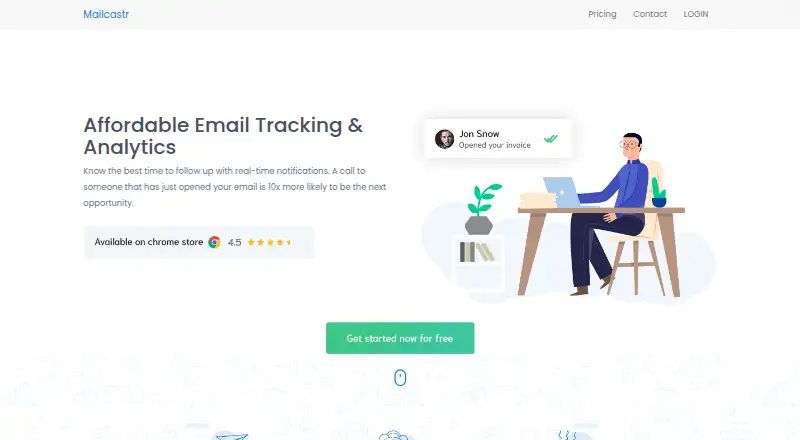
Mailcastr tracks email opens and engagement for Gmail. It records when a message is opened and shows historical activity in a dashboard. Chrome notifications can alert you in real time when someone opens an email, and the service can track link clicks and provide device and location information. Mailcastr is available on web, Android, iOS, and as an extension. To begin tracking, install its Chrome plugin on a PC; it tracks emails sent after installation. The home page describes tracking mail from any device as “Coming soon.”
The BASIC plan includes email tracking with Mailcastr branding, a web dashboard, push notifications, and Android and iOS apps. The ANNUAL plan costs $5 a year and includes unlimited email tracking, removes Mailcastr branding, and adds location and device information and priority chat/email support. A free trial is available, and the pricing page offers a 14-day money-back policy. Mailcastr says it does not access users’ mailboxes or track their activities. Its terms say tracking limits may apply as specified within the service or an order form. Pyten Labs Pvt. Ltd. owns Mailcastr.
Who it suits
Mailcastr suits Gmail users who want to see when messages are opened, review historical activity, or receive real-time alerts. The annual plan may suit users who need unlimited tracking, link engagement details, or priority support.
What it does well
- Shows historical email-open activity in a dashboard
- Chrome notifications can report opens in real time
- Tracks clicks on email links
- Annual plan includes unlimited email tracking
- Available through web, Android, iOS, and extension
What to know first
- Tracking starts only for emails sent after installing the Chrome plugin on a PC
- Tracking mail from any device is described as coming soon
- Service tracking limits may apply
Limits
BASIC includes email tracking with Mailcastr branding. The ANNUAL plan costs $5 a year and includes unlimited tracking; the terms say tracking limits may apply as specified within the service or an order form.
Plans
| Plan | Billed and limits | Price |
|---|---|---|
| BASIC | Email tracking · With Mailcastr branding · Web dashboard · Push notifications · Android & iOS apps | Free |
| ANNUAL | Unlimited email tracking · No Mailcastr branding · Location & device information · Priority chat/email · Push notifications · Android & iOS apps | $5 a year |
As mailcastr.com lists them, read 8 Oct 2026. The maker's own page has the final word.
Getting started
- Open https://mailcastr.com/
- Choose the BASIC plan or the ANNUAL plan at $5 a year
- Install the Chrome plugin on a PC
- Send emails from Gmail after installation to track them
- Use the dashboard, notifications, and Android or iOS apps
Overview
Mailcastr is a Gmail-focused email tracker that records opens, sends alerts, and keeps an engagement history in a web dashboard. It suits individuals and small teams who send from a PC and want a signal for follow-up rather than a full sales platform. The low annual price is attractive, but the Chrome-plugin requirement limits how consistently it works across devices.
Its free tier delivers the core tracking workflow with Mailcastr branding. The paid annual tier removes that branding and adds unlimited tracking, richer engagement context, and priority support, making it the more practical choice for frequent Gmail senders.
Key features
Mailcastr records when tracked Gmail messages are opened and presents historical activity in its dashboard. Chrome notifications can alert you in real time, so you can respond while an email is still fresh instead of repeatedly checking sent mail. Link-click tracking, plus device and location information on the annual plan, adds context beyond a single open event when deciding whether to follow up.
The service says it neither accesses your mailbox nor tracks your activities. Its terms describe commercially reasonable administrative, physical, and technical safeguards for information security, confidentiality, and integrity. Those statements may reassure privacy-conscious users, although the product remains an engagement-tracking tool whose signals should be treated as indications rather than proof of intent.
Setup is the decisive limitation: Mailcastr tracks only messages sent after its Chrome plugin is installed on a PC. The home page labels tracking mail from any device as “Coming soon,” so the Android and iOS apps do not currently turn mobile composing into an equivalent tracking experience.
Pricing
| Plan | Price | What you get |
|---|---|---|
| BASIC | free | Email tracking with Mailcastr branding, web dashboard, push notifications, and Android and iOS apps. |
| ANNUAL | $5 a year | Unlimited email tracking, no branding, location and device information, priority chat/email support, push notifications, and Android and iOS apps. |
The free plan is suitable for occasional Gmail tracking when branding on sent messages is acceptable. It does not promise unlimited volume, so senders with regular outreach should prefer the annual plan, whose unlimited tracking removes the main usage concern while adding click-related context and priority help. At $5 a year, it is unusually inexpensive, but the terms allow tracking limits where the service or an order form specifies them.
A 14-day money-back policy applies. The plans shown are for individual use; no separate seat allowance is published.
Platforms
Mailcastr offers a web dashboard, Chrome extension, Android app, and iOS app, with Gmail as its supported email client. In practice, the extension on a PC is essential for starting tracking; the mobile apps provide access and notifications rather than removing that setup dependency.
Who it's for
Choose Mailcastr if you send Gmail from a PC and want immediate open alerts, a record of past engagement, and optional click, device, and location signals. The annual plan fits frequent senders who want unlimited tracking without branding. It is a weaker fit for mobile-first workflows, multi-client email use, or teams seeking broader campaign and CRM functions. For a wider comparison, see Sales Email Tracking Software.
Pros and cons
Pros
- Real-time Chrome notifications make open activity actionable for prompt follow-up.
- A web history preserves engagement context instead of showing only the latest event.
- The $5 a year annual plan includes unlimited tracking and removes branding.
- Annual subscribers receive device and location information plus priority chat and email support.
- Android and iOS apps extend access to alerts and dashboard information.
Cons
- Tracking starts only after the Chrome plugin is installed on a PC, excluding earlier messages.
- Cross-device tracking is marked “Coming soon,” limiting mobile-first users today.
- The free tier carries Mailcastr branding and does not promise unlimited tracking.
- Tracking limits can apply under the service terms or an order form.
Alternatives
Mailbutler Smart Assistant is a broader freemium option spanning Android, iOS, desktop, Linux, Windows, macOS, web, and extension environments; choose it when platform coverage matters more than Mailcastr’s narrow Gmail tracking focus.
ReadNotify offers a free tier with 20 tracked emails per month and sender-tracking trial access; it suits light users who can live with a monthly quota.
Boomerang combines Gmail/G Suite tracking-related workflow with Send Later and reminders; pick it when scheduling and reminders matter alongside a free allowance of 10 message credits monthly.
Mixmax is aimed at more structured outreach, with 20 tracked emails and 50 sequence recipients per month on its free plan; choose it when sequences are more important than a $5 annual tracker.
DidTheyReadIt is another email-read tracking choice with desktop and web coverage.
Mail Track for Gmail offers unlimited tracked emails, read receipts, counts, timestamps, and push notifications on its free plan; it is preferable when those generous free limits are the priority.
Mailsuite provides a $6.99 a month Mailtrack plan with tracking history and campaign allowances; choose it when you need a more campaign-oriented paid tier.
Right Inbox is a Gmail extension with a limited free plan of five emails per month; consider it when a broader inbox workflow is acceptable despite the smaller allowance.
Verdict
Mailcastr is a strong fit for Gmail users who send from a PC and want inexpensive, timely open alerts with a useful engagement history. The annual plan is the clear choice for frequent sending because it adds unlimited tracking, removes branding, and supplies device and location context. Look elsewhere if tracking must begin from mobile or if you need a broader sales, sequence, or CRM workflow.
Verdict
Choose Mailcastr if you use Gmail and want email-open alerts and a history of engagement. The annual plan adds unlimited tracking and location and device information; look elsewhere if you need tracking to start without installing the Chrome plugin on a PC.
Questions
Does Mailcastr have a free plan?
Yes. The BASIC plan is listed as free and includes email tracking with Mailcastr branding, a web dashboard, push notifications, and Android and iOS apps.
How much does the annual plan cost?
The ANNUAL plan costs $5 a year.
Which email service does Mailcastr support?
Mailcastr provides email tracking and analytics for Gmail.
Which platforms can I use?
Mailcastr lists Android, iOS, web, and an extension. Tracking emails requires installing its Chrome plugin on a PC.
Does Mailcastr offer a free trial?
Yes. The pricing page refers to a free trial and a 14-day money-back policy.
Who owns Mailcastr?
The terms identify Pyten Labs Pvt. Ltd. as its owner.
Facts from Mailcastr's own pages
- Company
- The terms identify Pyten Labs Pvt. Ltd. as the owner of Mailcastr. · mailcastr.com, 8 Oct 2026
- Engagement details
- The site says Mailcastr can provide device and location information and track clicks on links. · mailcastr.com, 8 Oct 2026
- Mobile tracking
- The home page labels tracking mail from any device as “Coming soon.” · mailcastr.com, 8 Oct 2026
- Notifications
- Chrome notifications alert users in real time when someone opens an email. · mailcastr.com, 8 Oct 2026
- Open tracking
- It tracks when emails are opened and provides a dashboard with historical data. · mailcastr.com, 8 Oct 2026
- Privacy claim
- The site says Mailcastr neither accesses the user's mailbox nor tracks the user's activities. · mailcastr.com, 8 Oct 2026
- Purpose
- Mailcastr provides email tracking and analytics for Gmail. · mailcastr.com, 8 Oct 2026
- Security safeguards
- The terms say Mailcastr maintains commercially reasonable administrative, physical, and technical safeguards intended to protect information security, confidentiality, and integrity. · mailcastr.com, 8 Oct 2026
- Service limits
- The terms say email tracking limits may apply as specified within the service or an order form. · mailcastr.com, 8 Oct 2026
- Setup limit
- Mailcastr tracks only emails sent after installing its Chrome plugin on a PC. · mailcastr.com, 8 Oct 2026
- Support
- The annual plan includes priority chat/email support. · mailcastr.com, 8 Oct 2026
- Trial and refund
- The pricing page refers to a free trial but does not state its duration, and says it offers a 14-day money-back policy. · mailcastr.com, 8 Oct 2026
Where Mailcastr stands on Freedom251
- Sales Email Tracking Software#5 of 27