Freedom251 › Sales Email Tracking Software
DidTheyReadIt
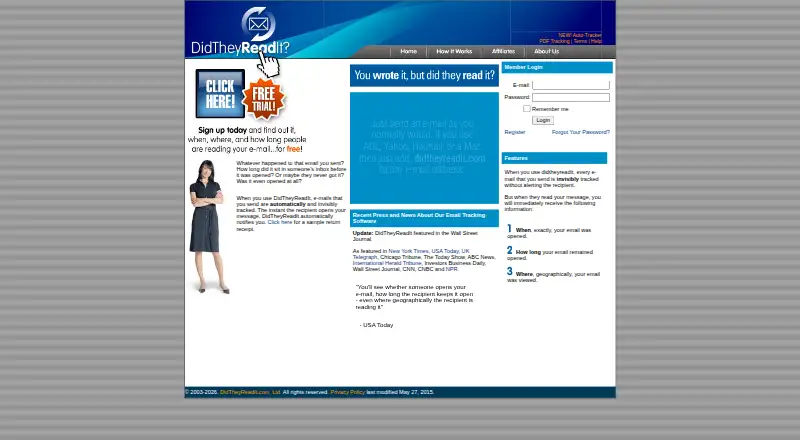
What DidTheyReadIt is
DidTheyReadIt is an email tracking service that notifies senders when a tracked message is opened. Receipts can show the opening time, how long the message stayed open, and the reader’s approximate location. Users set up tracking by adding .DidTheyReadIt.com to the recipient address; instructions cover Outlook, Thunderbird, Gmail, Yahoo, Hotmail, Mac users, and other email clients. An optional Auto-Tracker is described as a Windows beta release with email-program and browser plugins. A paid PDF add-on creates trackable PDF copies and reports when and where they are opened. For a message sent to several recipients, the service tracks the message rather than each recipient, so it cannot identify the opener except by location. Location is approximate and based on the reader’s IP address; the site notes that AOL users appear to be in Virginia. Its privacy policy says messages sent through its online services are not saved, copied, or otherwise stored. Free trial accounts are advertising-supported and may receive offers from DidTheyReadIt and third-party marketing partners. A free subscription is listed, but its trial duration and message limit may vary.
Who it suits
DidTheyReadIt suits individuals and businesses who want notifications and receipts about email opens. It may be useful to users of the listed email clients who can work with approximate location data and message-level tracking for multiple recipients.
What it does well
- Receipts can report open time and duration.
- Setup instructions cover several popular email clients.
- Optional add-on tracks PDF opens and locations.
- Online-service messages are not stored, according to its privacy policy.
What to know first
- Multiple-recipient tracking does not identify each opener.
- Reader location is approximate and IP-based.
- Free trial duration and message limit may vary.
- Free trial accounts are advertising-supported.
Limits
The Free Subscription is a trial, and its duration and message limit may vary. The Semi-Annual and Quarterly Subscription plans each include 500 email messages per month; the Annual Subscription has no message allowance stated here.
Plans
| Plan | Billed and limits | Price |
|---|---|---|
| Free Subscription | trial period and message allowance may vary · advertising supported | Free |
| Annual Subscription | annually · auto-renews unless cancelled | On request |
| Quarterly Subscription | every 3 months · 500 email messages per month · auto-renews unless cancelled | On request |
| Semi-Annual Subscription | every 6 months · 500 email messages per month · auto-renews unless cancelled | On request |
As didtheyreadit.com lists them, read 14 Oct 2026. The maker's own page has the final word.
Getting started
- Open https://www.didtheyreadit.com/.
- Choose the free subscription or a paid subscription.
- Follow the setup instructions for your email client.
- Add .DidTheyReadIt.com to the recipient address to track an email.
- For PDF tracking, use the paid PDF add-on to create a trackable copy.
DidTheyReadIt is an email-tracking service for people and businesses who want a signal when a message is opened. It is best suited to one-to-one follow-up across common email clients; the per-message treatment of group email makes it a weaker choice when individual readership matters.
Overview
To track a message, add .DidTheyReadIt.com to the recipient address. The service tracks sent email invisibly and can notify the sender when it is opened. Receipts report the opening time, how long the message stayed open, and an approximate location. Those details can help with follow-up timing, but they do not prove who read a message sent to multiple recipients.
DidTheyReadIt says it does not save, copy, or otherwise store messages sent through its online services. Free trial accounts are advertising-supported and may receive offers from DidTheyReadIt and third-party marketing partners, a consideration for anyone weighing the trial.
Key features
Open tracking and receipts
Real-time alerts and receipt details offer more context than a simple opened-or-not signal, including how long a message remained open. Location is inferred from the reader’s IP address and is approximate; DidTheyReadIt notes that AOL users may appear to be in Virginia. It should be treated as a rough clue, not a reliable way to identify a reader or establish their location.
Messages to multiple recipients
The service tracks a message as a whole rather than separately tracking each recipient. It cannot tell you which person opened a group email except by location, and that location is only approximate. For confidential or sales communications where recipient-level accountability matters, this is a material limitation.
PDF tracking and setup
A paid add-on creates trackable PDF copies and reports when and where they are opened, giving document senders a reason to consider the service beyond email. Setup instructions cover Outlook, Thunderbird, Gmail, Yahoo, Hotmail, Mac users, and other email clients. An optional Auto-Tracker offers email-program and browser plugins, but it is described as a Windows beta release, so it is not a settled cross-platform option.
Pricing
The Free Subscription costs nothing, but its trial duration and message limit may vary. Free trial accounts are advertising-supported and may receive marketing offers. The Semi-Annual Subscription is custom pricing, billed every six months, and allows 500 email messages per month. The Quarterly Subscription is custom pricing, billed every three months, with the same 500-message monthly allowance. The Annual Subscription is custom pricing and billed annually; no message quota is stated for that plan.
The free option is the lowest-commitment way to try the tracking flow, but variable trial length and message caps make it hard to rely on for ongoing use. The add-on for PDF tracking is paid separately.
Platforms
DidTheyReadIt supports extension, macOS, web, and Windows. Its client instructions span several major mail services, while the Auto-Tracker is specifically a Windows beta. The company is headquartered in Houston, Texas, United States.
Who it's for
This is a practical fit for individuals or businesses who mainly need to know whether a one-to-one email was opened and want timing details to guide a follow-up. It is less suitable for teams that need a dependable record of which person among several recipients read a message, or anyone who expects precise geographic reporting.
Pros and cons
- Pros: Open alerts include timing and duration details, which can make follow-up more informed than relying on silence alone.
- Pros: Paid PDF tracking extends open reporting to document copies, useful for senders who also need to know whether a PDF was opened.
- Pros: The service says it does not store messages sent through its online services, an important privacy distinction for email contents.
- Cons: Group messages are tracked as one message, so the service cannot identify individual readers except by approximate location.
- Cons: IP-based location can be inaccurate, and the service’s AOL example underscores that it should not be treated as precise.
- Cons: The free trial has variable duration and message limits, and it is advertising-supported.
- Cons: The optional Auto-Tracker is a Windows beta, limiting its usefulness for users seeking a mature desktop tool across platforms.
Alternatives
For a broader sales-focused comparison, see the Sales Email Tracking Software list.
Mailbutler Smart Assistant is worth considering if platform coverage matters: it has a free Starter plan and supports Android, iOS, Linux, macOS, web, Windows, and extensions, though its free emails include visible Mail branding.
ReadNotify may suit readers who want a defined free allowance, with 20 tracked emails per month and trial access to sender tracking and detailed recipient tracking.
Boomerang is a better fit for Gmail or G Suite users who want scheduling and reminders alongside tracking; its Basic plan includes 10 message credits per month, Send Later, and Boomerang Reminders.
Mixmax is an option for senders who need sequences as well as tracking: its free plan covers 20 tracked emails monthly and up to 50 sequence recipients per month.
Mail Track for Gmail is worth a look for Gmail users seeking unlimited tracked emails and real-time read receipts on a free plan.
Mailcastr may fit users who prefer mobile apps with tracking: its free BASIC plan includes a web dashboard, push notifications, and Android and iOS apps, with Mailcastr branding.
Mailsuite is an alternative for users who want a paid monthly plan with unlimited tracked emails; its Mailtrack plan is $6.99 a month and includes seven days of tracking history.
Right Inbox is another option for a limited free tier, but its free plan is solo-use only and allows five emails per month.
Verdict
Choose DidTheyReadIt if you want open alerts and message timing for individual emails, with the option to track PDFs as well. Its straightforward receipt details are useful for follow-up, but the group-message limitation and approximate location reporting make it a poor fit when you need to know exactly which recipient read a message.
Verdict
DidTheyReadIt provides open notifications and message receipts, with PDF tracking available as a paid add-on. Its multi-recipient limits and approximate location reporting are important to consider.
Questions
Does DidTheyReadIt have a free plan?
Yes. The Free Subscription costs nothing, and a free trial is available.
Which platforms does it support?
The listed platforms are extension, macOS, web, and Windows.
What can an email receipt show?
It can report when a message was opened, how long it remained open, and the reader’s approximate location.
Can it track PDF attachments?
Yes. A paid PDF add-on creates trackable PDF copies and reports when and where they are opened.
Who makes DidTheyReadIt?
The service is DidTheyReadIt, headquartered in Houston, Texas, United States.
Facts from DidTheyReadIt's own pages
- Account restriction
- Each account can use only one sending email address for tracked messages. · didtheyreadit.com, 14 Oct 2026
- Address-based tracking
- Users can track mail by appending .DidTheyReadIt.com to each recipient address. · didtheyreadit.com, 14 Oct 2026
- API and SDK documentation
- The published help page documents email-address routing and desktop plug-ins but contains no public API or SDK reference. · didtheyreadit.com, 14 Oct 2026
- Background tracker
- A separate background tracker is documented for Windows 2000/XP standard mail accounts, excluding Exchange, AOL and webmail. · didtheyreadit.com, 14 Oct 2026
- Company legal name
- The official terms identify the provider as DidTheyReadIt.com, Ltd. · didtheyreadit.com, 14 Oct 2026
- Data handling
- The privacy policy says the service does not save, copy or otherwise store the email messages sent through it. · didtheyreadit.com, 14 Oct 2026
- Desktop tracker
- The optional Auto-Tracker is described as a Windows beta release and offers email-program and browser plugins. · didtheyreadit.com, 9 Oct 2026
- Domain age
- A domain-information listing reports didtheyreadit.com was registered on September 10, 2003 and currently lacks detected HTTPS support. · ipaddress.com, 14 Oct 2026
- Email clients
- Setup instructions cover Outlook, Thunderbird, Gmail, Yahoo, Hotmail, Mac users, and other email clients. · didtheyreadit.com, 9 Oct 2026
- Email tracking
- The service invisibly tracks sent email and notifies the sender when a recipient opens it. · didtheyreadit.com, 9 Oct 2026
- Exchange compatibility
- The help documentation says the Outlook plug-in works with Microsoft Exchange. · didtheyreadit.com, 14 Oct 2026
- Firefox extension licence
- The Firefox Web Plugin source is released under GNU GPL v3 only. · addons.mozilla.org, 14 Oct 2026
- Firefox extension status
- The latest listed Firefox plug-in version is 2.91, released May 7, 2019, and supports Firefox 42 and later. · addons.mozilla.org, 14 Oct 2026
- Forward detection
- The company says its service can show whether a message was forwarded. · didtheyreadit.com, 14 Oct 2026
- Free account advertising
- The privacy policy says free trial accounts are advertising-supported and may receive offers from DidTheyReadIt and third-party marketing partners. · didtheyreadit.com, 9 Oct 2026
- Headquarters
- The company says it is based in Houston, Texas and has branch offices worldwide. · didtheyreadit.com, 14 Oct 2026
- Historic company
- An independent 2016 article said Rampell Software created DidTheyReadIt in 2003 and described quarterly pricing beginning at $25. · thedigitalbridges.com, 14 Oct 2026
- Historic pricing
- A PC World article reported a $50 annual subscription and ten free messages in the trial. · proquest.com, 14 Oct 2026
- Intended users
- The company describes the service as useful to individuals and businesses who want to know whether recipients read their email. · didtheyreadit.com, 9 Oct 2026
- Licence
- AlternativeTo lists the commercial service as proprietary rather than open source. · alternativeto.net, 14 Oct 2026
- Limit: abandonment complaint
- The Software Advice review described the website as defunct and alleged that paid renewal did not activate the account. · softwareadvice.com, 14 Oct 2026
- Limit: delays and compatibility
- The same G2 review mentioned delays in results and compatibility problems across email systems. · g2.com, 14 Oct 2026
- Limit: failed upgrade and support
- A Capterra reviewer reported receiving only the ten free emails, being unable to upgrade after payment, and getting no response from support. · capterra.com, 14 Oct 2026
- Location accuracy
- Reader location is approximate and based on the reader’s IP address; the site notes that AOL users appear to be in Virginia. · didtheyreadit.com, 9 Oct 2026
Where DidTheyReadIt stands on Freedom251
- Sales Email Tracking Software#2 of 27