Freedom251 › AI Calendar Assistants
Lorvex
What Lorvex is
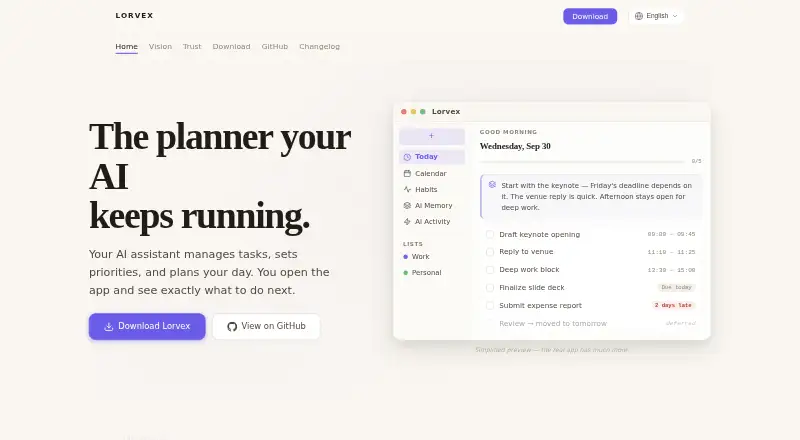
Lorvex is a personal planning app that combines task management with an optional AI assistant. You can add tasks in natural language, and an assistant can capture them from conversation, set priorities, estimate how long they will take, track dependencies, and prepare a daily plan. Automatic scheduling and priority replanning are supported.
The Today view brings the day’s tasks and briefing together, explains what matters, and flags deadlines at risk. Its calendar offers day, week, and month views, with time-blocked plans and links between tasks and events. For longer-term routines and reflection, Lorvex includes habit streaks, heatmaps, daily check-ins, and end-of-day reviews covering mood, energy, wins, and blockers.
Lorvex can work as a standalone task manager, so connecting an AI client is optional. When connected, compatible clients include Claude, Codex, and other MCP clients, using local MCP tools. Planning data is stored in SQLite on the device, and iCloud sync is optional. Lorvex is free and open source under Apache 2.0. Its listed platforms are iOS, Linux, macOS, and Windows; its download page describes macOS and iOS as planned and coming soon.
Who it suits
Lorvex suits people who want tasks, priorities, schedules, and habit reviews in one planning app. It can also suit users who want an AI client to work with their planning through MCP, while retaining the option to use the task manager on its own.
What it does well
- Captures tasks from natural-language conversation.
- Estimates durations and tracks task dependencies.
- Daily briefing flags deadlines at risk.
- Calendar includes time-blocked plans and task-event links.
- SQLite stores planning data on the device.
- AI integration is optional.
What to know first
- The download page lists macOS and iOS as coming soon.
- An external MCP assistant may send requested content to its provider.
Getting started
- Visit https://lorvex.app/.
- Choose a listed platform: iOS, Linux, macOS, or Windows.
- Use Lorvex as a standalone task manager, or connect a compatible MCP client.
- Enter tasks in natural language and use the planning and calendar views.
Verdict
Choose Lorvex if you want a free, open-source planner with task prioritization, daily scheduling, calendar views, and habit reviews. It also supports optional connections to Claude, Codex, and other MCP clients. Consider the stated download availability for macOS and iOS, and the data boundary that applies when using an external assistant.
Questions
Is Lorvex free?
Yes. Its pricing model is free, and the site identifies it as open source under Apache 2.0.
Which platforms does Lorvex list?
The listed platforms are iOS, Linux, macOS, and Windows. Its download page says macOS and iOS are planned and coming soon.
Does Lorvex require an AI assistant?
No. It works as a standalone task manager, and AI integration is optional.
Which AI clients are compatible?
Lorvex lists Claude, Codex, and other MCP clients as compatible through local MCP tools.
Where is planning data stored?
Planning data is stored in SQLite on the device. iCloud sync is optional.
What can an external assistant access?
A connected assistant can access the app tools exposed through MCP and may send requested content to its own provider.
Facts from Lorvex's own pages
- AI boundary
- Lorvex has no built-in AI model; connected external assistants can access only the app tools the user exposes. · lorvex.app, 9 Oct 2026
- AI data boundary
- When an external assistant is connected through MCP, it can access exposed app tools and may send requested content to its own provider. · lorvex.app, 9 Oct 2026
- AI integrations
- Lorvex connects through local MCP tools and lists Claude, Codex, and other MCP clients as compatible. · lorvex.app, 9 Oct 2026
- Availability
- The download page lists macOS and iOS as planned and coming soon. · lorvex.app, 9 Oct 2026
- Calendar
- Calendar features include day, week, and month views, time-blocked plans, and links between tasks and events. · lorvex.app, 9 Oct 2026
- Data storage and sync
- Planning data is stored in SQLite on the device, while iCloud sync is optional. · lorvex.app, 9 Oct 2026
- Download status
- The download page lists macOS and iOS as planned and coming soon. · lorvex.app, 9 Oct 2026
- Habits and reviews
- The app includes habit streaks, heatmaps, daily check-ins, and end-of-day reviews for mood, energy, wins, and blockers. · lorvex.app, 9 Oct 2026
- License
- The site identifies Lorvex as open source under Apache 2.0. · lorvex.app, 9 Oct 2026
- Open source
- The maker describes Lorvex as open source under the Apache 2.0 license. · lorvex.app, 9 Oct 2026
- Privacy
- The privacy policy says Lorvex has no behavioral analytics, advertising, tracking SDKs, or sale of personal data. · lorvex.app, 9 Oct 2026
- Purpose
- Lorvex is a personal planning app where an AI assistant can manage tasks, set priorities, and plan the day. · lorvex.app, 9 Oct 2026
- Standalone use
- Lorvex works as a standalone task manager, and AI integration is optional. · lorvex.app, 9 Oct 2026
- Storage
- Planning data is stored in SQLite on the device, and iCloud sync is optional. · lorvex.app, 9 Oct 2026
- Support
- Public questions, feature requests, and bug reports go through the GitHub issue tracker; sensitive vulnerability reports use GitHub private vulnerability reporting. · lorvex.app, 9 Oct 2026
- Task planning
- An assistant can capture tasks from conversation, set priorities, estimate durations, track dependencies, and compose a daily plan. · lorvex.app, 9 Oct 2026
- Today view
- The Today view presents a daily list and briefing, explains what matters, and warns about at-risk deadlines. · lorvex.app, 9 Oct 2026
Where Lorvex stands on Freedom251
- AI Calendar Assistants#24 of 27