Freedom251 › Calibration Management Software
LabCalibrate
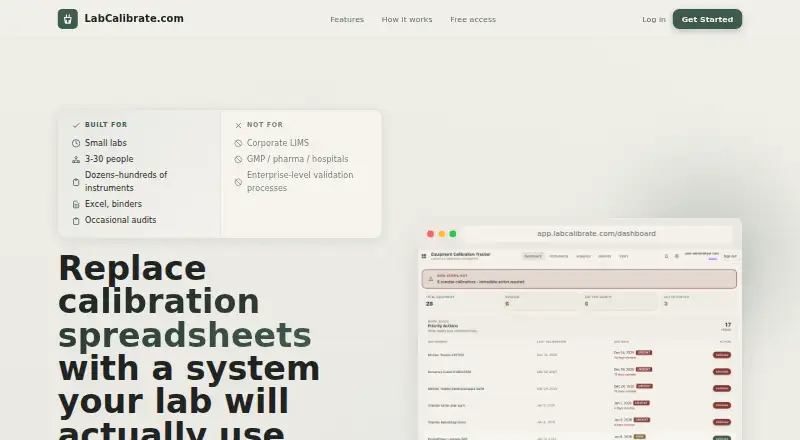
What LabCalibrate is
LabCalibrate keeps instrument records, calibration schedules, certificates, and failed calibrations in one web service. It is designed for small labs with 3–30 people and dozens to hundreds of instruments. Users can import an existing spreadsheet or add instruments manually, record pass or fail results, and attach supporting files. Each instrument can have a timeline of calibrations, failures, maintenance, notes, and certificates. Custom schedules, email reminders before due dates, and dashboard alerts help teams follow upcoming work. Users can export instrument information, calibration events, and documents. The maker also offers help cleaning and importing spreadsheets, calibration history, and certificate references, usually within a few days. Its listed plan costs nothing and includes team access, reminders, audit-ready exports, attachments, and full instrument history; no credit card is required. The service requires internet access and a browser that supports JavaScript and cookies. Uploaded files are limited to 10 MB and checked for file type before storage.
Who it suits
LabCalibrate suits small labs managing dozens to hundreds of instruments and needing calibration records, reminders, and exports. The maker says it is not intended for corporate LIMS, GMP, pharma, hospitals, or enterprise validation processes.
What it does well
- Free plan costs nothing.
- Imports spreadsheets or supports manual instrument entry.
- Tracks calibration, failure, maintenance, notes, and certificates.
- Offers email reminders and dashboard alerts.
- Exports instrument records, events, and documents.
What to know first
- Requires internet access and a JavaScript- and cookie-supporting browser.
- Uploaded files are limited to 10 MB.
- Not intended for corporate LIMS, GMP, pharma, or hospitals.
Limits
The free plan is listed as free and has no stated seat or instrument quota. Uploaded files have a 10 MB size limit.
Plans
| Plan | Billed and limits | Price |
|---|---|---|
| LabCalibrate | Instrument tracking · team access · email reminders and dashboard alerts · audit-ready exports · certificate and document attachments · full instrument history · no credit card required | Free |
As labcalibrate.com lists them, read 7 Oct 2026. The maker's own page has the final word.
Getting started
- Open the LabCalibrate website in a browser with JavaScript and cookies enabled.
- Create an account on the free plan; no credit card is required.
- Import an existing spreadsheet or add instruments manually.
- Set calibration schedules and use email reminders or dashboard alerts.
- Record pass or fail results and attach supporting files.
LabCalibrate is a browser-based calibration register for small laboratory teams that need shared control of instruments, certificates, and due dates. It is best suited to 3–30-person labs moving away from spreadsheets. The zero-cost plan is compelling for that audience, while regulated, enterprise, and offline requirements point elsewhere.
Overview
The service gathers instrument records, calibration outcomes, failures, maintenance notes, and certificates into a single timeline for each asset. Teams can bring in an existing spreadsheet or create records manually, attach supporting documents, and export instruments, calibration events, and files when they need a portable record. That covers the everyday administrative gap between scattered folders and a formal LIMS.
Migration assistance is particularly useful when historical data is messy: the maker can clean and import spreadsheets, calibration history, and certificate references, generally within a few days. The SaaS model requires an internet connection and a JavaScript- and cookie-enabled browser, so it does not suit disconnected work.
Key features
Scheduling and reminders
Email notices, dashboard alerts, and custom schedules give teams several ways to manage upcoming calibration work. Custom timing is valuable when different instruments follow different intervals; this is more operationally useful than an inventory that merely records dates.
Instrument history and evidence
Every instrument receives a chronological record of calibrations, failed results, maintenance, notes, and certificates. Pass-or-fail recording and certificate attachments keep the decision and its evidence together. Uploaded files are limited to 10 MB and are checked for file type before storage, which may require splitting or externally managing unusually large documents.
Imports, exports, and audit trail
Spreadsheet import reduces the cost of switching, while exports include instruments, calibration events, and documents for reporting or handover. Audit-ready exports and a full history help a small lab answer traceability questions without assembling records by hand. The product does not claim the controls expected of corporate LIMS, GMP, pharmaceutical, hospital, or enterprise-validation environments.
Security and data location
Connections use TLS, and organizations receive application-level database isolation. Hosting spans MongoDB Atlas in Frankfurt, Cloudflare R2 for files, Hostkey in the Netherlands, and PostHog in the EU region. The maker says it strives to meet GDPR, Polish data-protection law, and other applicable privacy rules; teams with specialized validation obligations should still assess whether that assurance meets their requirements.
Pricing
| Plan | Price | Includes |
|---|---|---|
| LabCalibrate | free | Instrument tracking, team access, email reminders and dashboard alerts, audit-ready exports, certificate and document attachments, full instrument history; no credit card required |
There is no paid tier to outgrow in the published offer, and no seat or instrument quota is attached to this plan. That makes it a straightforward choice for the stated small-lab audience, with no trial conversion or renewal charge to budget for. The trade-offs are the 10 MB attachment ceiling, browser-only access, and the explicit exclusion of enterprise-grade regulated workflows.
Platforms
LabCalibrate runs on the web and provides mobile support through that web service rather than a separately described native application. Teams need internet access plus a browser that supports JavaScript and cookies.
Who it's for
Choose it for a laboratory of roughly 3–30 people managing dozens to hundreds of instruments, especially when the starting point is a spreadsheet and shared folders. Migration help, reminders, history, attachments, and exports address the practical needs of a small operation without a subscription cost.
Do not choose it for a corporate LIMS replacement, GMP or pharmaceutical quality system, hospital deployment, or enterprise-level validation process. It is also a poor fit for offline environments or records that routinely exceed the attachment limit.
Pros and cons
- Pros: The plan costs nothing and needs no credit card, lowering adoption risk for small labs.
- Pros: Instrument timelines combine calibration, failures, maintenance, notes, and certificates, improving traceability.
- Pros: Spreadsheet migration help can shorten the move from legacy records.
- Pros: Custom schedules, email reminders, and dashboard alerts support varied calibration cycles.
- Cons: A 10 MB file cap can constrain large certificates or supporting evidence.
- Cons: Web-only SaaS access depends on connectivity and a compatible browser.
- Cons: The stated exclusions make it unsuitable for regulated enterprise validation and corporate LIMS use.
Alternatives
Calibration Management Software is the broader category guide for comparing other approaches.
- GageList is the better pick when you need Android, iOS, API, or self-hosted options, or a defined free allowance of five users and 25 gages; its CORE plan is $99 a month for unlimited users and 500 gages.
- Druck 4Sight2 suits teams wanting Windows support, a free tier for three users, one site, and 500 tags, with manual and portable calibration.
- CalibraCore is preferable when a smaller free allowance is acceptable and you want predictable upgrades: 20 instruments and one team member free, then $10 a month for 100 instruments and three members.
- GageRoom fits organizations that favor self-hosting and a free-forever register capped at 50 active gages and two users.
- Gaugify is for buyers seeking paid asset and inventory tooling, with a 70.00 USD-per-month Starter plan for up to 500 assets.
- IndySoft offers hosted cloud plans on monthly or annual terms for teams needing a different commercial service model.
- CompuCal is a paid option priced through a demo request.
- Fluke MET/TEAM is the alternative when full calibration asset management and optional mobile, customer-portal, or commerce modules are priorities.
Verdict
LabCalibrate is a strong recommendation for a small lab that wants a shared, no-cost calibration record with reminders, document history, migration help, and exports. Look elsewhere when your operation needs offline use, larger attachments, native device coverage, or the validated controls associated with corporate LIMS, GMP, hospitals, or enterprise deployments.
Verdict
LabCalibrate offers small labs a shared web record for instruments, calibration activity, and documents, with reminders and exports. Its stated fit excludes several regulated and enterprise settings, and uploaded files cannot exceed 10 MB.
Questions
How much does LabCalibrate cost?
The LabCalibrate plan costs nothing. It includes team access, instrument tracking, reminders, audit-ready exports, attachments, and full instrument history; no credit card is required.
Which platforms does LabCalibrate support?
LabCalibrate is available on the web. It requires internet access and a browser supporting JavaScript and cookies.
Can I import existing calibration records?
Yes. Users can import an existing spreadsheet or add instruments manually. The maker offers help cleaning and importing spreadsheets, calibration history, and certificate references, usually within a few days.
Can I export instrument and calibration data?
Yes. Exports can include instruments, calibration events, and documents.
What file size can I attach?
Uploaded files are limited to 10 MB and undergo file-type validation before storage.
Facts from LabCalibrate's own pages
- Compliance
- The security policy says the maker strives to comply with GDPR, Polish data protection laws, and applicable data protection laws in other jurisdictions. · labcalibrate.com, 7 Oct 2026
- Data hosting
- The maker lists MongoDB Atlas in Frankfurt, Cloudflare R2 for file storage, Hostkey in the Netherlands, and PostHog in the EU region. · labcalibrate.com, 7 Oct 2026
- Exports
- Users can export calibration data, including instruments, calibration events, and documents. · labcalibrate.com, 7 Oct 2026
- File limit
- Uploaded files have a 10 MB size limit and undergo file-type validation before storage. · labcalibrate.com, 7 Oct 2026
- Imports and records
- Users can import an existing spreadsheet or add instruments manually, record pass or fail results, and attach supporting files. · labcalibrate.com, 7 Oct 2026
- Instrument history
- Each instrument can have a timeline of calibrations, failures, maintenance, notes, and certificates. · labcalibrate.com, 7 Oct 2026
- Intended users
- The site describes it as built for small labs with 3–30 people and dozens to hundreds of instruments. · labcalibrate.com, 7 Oct 2026
- Migration support
- The maker offers help cleaning and importing spreadsheets, calibration history, and certificate references, usually within a few days. · labcalibrate.com, 7 Oct 2026
- Notable fit limits
- The site says LabCalibrate is not for corporate LIMS, GMP, pharma, hospitals, or enterprise-level validation processes. · labcalibrate.com, 7 Oct 2026
- Purpose
- LabCalibrate tracks instruments, calibration due dates, certificates, and failed calibrations in one place. · labcalibrate.com, 7 Oct 2026
- Reminders
- It provides email reminders before due dates, dashboard alerts, and custom schedules. · labcalibrate.com, 7 Oct 2026
- Security
- The security policy says data in transit uses TLS and organizations have application-level database isolation. · labcalibrate.com, 7 Oct 2026
- Service model
- The terms describe the service as SaaS that requires internet access and a web browser supporting JavaScript and cookies. · labcalibrate.com, 7 Oct 2026
- Support
- The site lists [email protected] for contact and [email protected] for security matters. · labcalibrate.com, 7 Oct 2026
Where LabCalibrate stands on Freedom251
- Calibration Management Software#6 of 23