Freedom251 › Window Management Software

komorebi
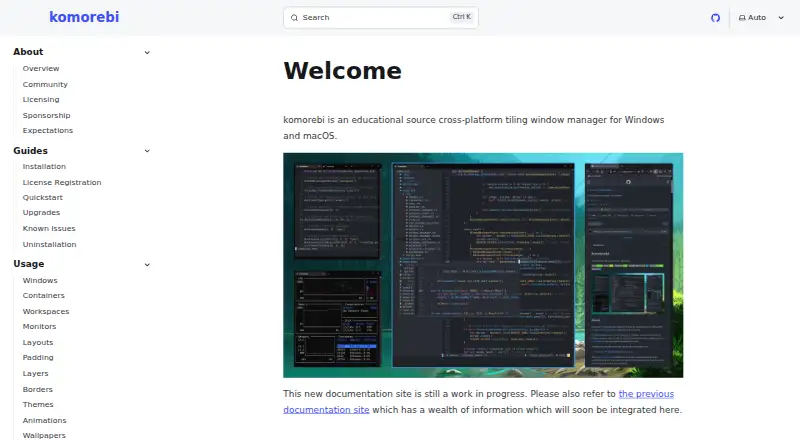
What komorebi is
komorebi is a tiling window manager for Windows and macOS that controls application windows, virtual workspaces, and display monitors. Its configurable layouts arrange windows within workspaces. Users operate it through a command-line interface that can work with any hotkey software. The application responds to operating-system events and messages on a dedicated socket; it does not handle keyboard or mouse input directly.
The license permits personal use but restricts redistribution and distribution of derivative works. Using komorebi at work requires an Individual Commercial Use License, valid for the licensed individual while the subscription is active. A single-platform Windows or macOS license costs $10 a month; a license covering both costs $15 a month. Windows installation options include Scoop and WinGet; macOS options include Homebrew and Nix. Building from source is listed for both platforms. Early access nightly Mac releases are available to GitHub Sponsors on the $10/month tier. The project’s Discord server offers discussion, help, and troubleshooting.
Who it suits
komorebi suits Windows and macOS users who want configurable window layouts and workspace controls, and are comfortable with command-line operation. People using it at work need an individual commercial license for the relevant platform or platforms.
What it does well
- Configurable layouts arrange windows in workspaces.
- Controls virtual workspaces and display monitors.
- Command line can work with any hotkey software.
- Windows and macOS installation methods are listed.
What to know first
- Commercial use requires a paid subscription.
- Single-platform licenses cover only one platform.
- License restricts redistribution and derivative works.
- Mac nightly releases are early access.
Limits
The free plan is for personal use. Workplace use requires an active Individual Commercial Use License: $10 a month for Windows or macOS, or $15 a month for both platforms.
Plans
| Plan | Billed and limits | Price |
|---|---|---|
| komorebi for Windows (single-platform license) | Monthly · Windows · individual commercial use | $10 a month |
| komorebi for Mac (single-platform license) | Monthly · macOS · individual commercial use | $10 a month |
| komorebi for Windows (single-platform license) | Annual · Windows · individual commercial use | $110 a year |
| komorebi for Mac (single-platform license) | Annual · macOS · individual commercial use | $110 a year |
| komorebi for Windows + macOS (multi-platform license) | Monthly · Windows and macOS · individual commercial use | $15 a month |
| komorebi for Windows + macOS (multi-platform license) | Annual · Windows and macOS · individual commercial use | $180 a year |
As komorebi.lgug2z.com lists them, read 30 Sept 2026. The maker's own page has the final word.
Getting started
- Open the komorebi website.
- Choose Windows or macOS.
- Install through Scoop or WinGet on Windows, or Homebrew or Nix on macOS.
- Alternatively, build from source on either platform.
- Use the command-line interface with your preferred hotkey software.
- Choose a commercial license if using komorebi at work.
Overview
komorebi is a tiling window manager for people who want to organize application windows and virtual workspaces on Windows or macOS. Its command-line approach suits users comfortable pairing it with separate hotkey software; the main trade-off is that work use requires a paid individual license.
Key features
- Configurable tiling: Layouts and presets arrange application windows within workspaces, giving users a way to shape a desktop around their workflow.
- Workspace and display controls: komorebi manages application windows, virtual workspaces, and display monitors. Application rules and virtual desktop controls add ways to govern how apps and desktops behave.
- Command-line control: The CLI can be used with any hotkey software. Because komorebi responds to operating-system events and messages on a dedicated socket rather than handling keyboard or mouse input itself, users need a separate input-control setup.
- Installation choices: Windows users can install through Scoop or WinGet; macOS users can use Homebrew or Nix. Building from source is supported on both platforms.
- Mac early access: Nightly Mac releases are available to GitHub Sponsors on the $10/month tier, a route for users who want early access rather than a standard release channel.
Pricing
komorebi is free for personal use under its license, which restricts redistribution and distribution of derivative works. Work use requires an Individual Commercial Use License, valid for the licensed individual while the paid subscription remains active.
- Windows single-platform license: $10 a month, billed Monthly, for individual commercial use on Windows. This is the fit for someone using komorebi only on Windows.
- Mac single-platform license: $10 a month, billed Monthly, for individual commercial use on macOS. It covers one platform, not both.
- Windows + macOS multi-platform license: $15 a month, billed Monthly, for individual commercial use on both systems. It costs less than two separate single-platform subscriptions, which would total $20 a month.
These are individual licenses, not team seats. Separate purchases are required for Windows and macOS unless the multi-platform option is chosen, so cross-platform work favors the combined plan. A device enrolled in mobile device management displays a reminder that the license does not permit commercial use; a license email can be sent in one HTTP request for validation.
Platforms
komorebi runs on Windows and macOS. The install options cover package managers and source builds on both, while Mac nightly releases are available to qualifying GitHub Sponsors.
Who it's for
komorebi is best suited to people who want configurable window tiling and workspace controls on Windows or macOS, and who are comfortable coordinating a command-line tool with hotkey software. It is a practical fit for personal desktop organization; professionals should budget for a subscription tied to the platform or platforms they use. The Discord server provides a place for discussion, help, and troubleshooting.
Pros and cons
- Pro: Windows and macOS support gives users on either platform access to tiling, workspace, and display controls.
- Pro: The $15 a month multi-platform license covers both systems, below the combined price of two single-platform licenses.
- Con: Commercial use is subscription-based and tied to an individual, so it is not a perpetual work license.
- Con: komorebi does not handle keyboard or mouse input directly, so users must arrange hotkey software separately.
- Con: The personal-use license restricts redistribution and derivative-work distribution, limiting how it can be shared or adapted.
Alternatives
For other options, browse Window Management Software. Choose spectrwm if a free X11 window manager with Linux, macOS, and Windows platform coverage better fits your needs. Amethyst is a free macOS-only option with configurable layouts, keyboard shortcuts, and application floating or tiling rules. awesome is a free choice for Linux users seeking an X window manager, while bug.n is a free Windows window manager.
DisplayFusion is another Windows option, with a free version after its trial and a Pro Standard lifetime license at $34 per machine. Linux users can also consider i3, free and open source under the BSD license for GNU/Linux and BSD, or Qtile, a free and open-source Linux desktop window manager/compositor. Reloop is a freemium self-hosted option, though its free plan is for email handling, with monthly and daily email caps, rather than window management.
Verdict
Choose komorebi if configurable tiling and workspace controls across Windows or macOS matter more than a self-contained input setup, and especially if you want one tool spanning both systems. Its strongest case is the combination of platform coverage and command-line flexibility; look elsewhere if you need a perpetual commercial license, direct keyboard and mouse handling, or a window manager for Linux.
Verdict
komorebi offers layout and workspace controls across Windows and macOS, with command-line operation. Review the license terms and platform coverage before using it for work.
Questions
Is komorebi free?
A free plan is available for personal use. Workplace use requires a paid Individual Commercial Use License.
How much does a commercial license cost?
A Windows or macOS single-platform license costs $10 a month, billed monthly. The Windows and macOS multi-platform license costs $15 a month, billed monthly.
Which platforms does komorebi support?
komorebi is available for Windows and macOS. Early access nightly Mac releases are available to GitHub Sponsors on the $10/month tier.
How can I install komorebi?
The listed options are Scoop and WinGet for Windows, Homebrew and Nix for macOS, and building from source on either platform.
Who makes komorebi?
The maker identifies as LGUG2Z and lists komorebi among their software projects.
Can I use komorebi at work?
Yes, with an Individual Commercial Use License for the licensed individual while the paid subscription is active. Separate commercial licenses are needed for Windows and macOS unless you choose the multi-platform license.
Facts from komorebi's own pages
- Command line
- Users control komorebi through a command line interface that can be used with any hotkey software. · komorebi.lgug2z.com, 30 Sept 2026
- Commercial use
- Using komorebi at work requires an Individual Commercial Use License, valid for the licensed individual while the paid subscription is active. · komorebi.lgug2z.com, 30 Sept 2026
- Input handling
- komorebi responds to operating system events and messages on a dedicated socket, and it does not handle keyboard or mouse inputs directly. · komorebi.lgug2z.com, 30 Sept 2026
- Install options
- The documentation lists Scoop and WinGet for Windows, Homebrew and Nix for macOS, and building from source on both platforms. · komorebi.lgug2z.com, 30 Sept 2026
- Layouts
- The documentation describes configurable tiling layouts for arranging application windows in workspaces. · komorebi.lgug2z.com, 30 Sept 2026
- License platform limits
- Separate commercial license purchases are required for Windows and macOS unless the multi-platform license is purchased. · lgug2z.com, 30 Sept 2026
- License verification
- On a device enrolled in mobile device management, komorebi displays a reminder that the license does not permit commercial use, and a license email can be sent in one HTTP request for validation. · komorebi.lgug2z.com, 30 Sept 2026
- Mac availability
- Early access nightly releases of komorebi for Mac are available to GitHub Sponsors on the $10/month tier. · komorebi.lgug2z.com, 30 Sept 2026
- Maker
- The maker identifies as LGUG2Z and lists komorebi among their software projects. · lgug2z.com, 30 Sept 2026
- Personal use
- The Komorebi License permits personal use, while restricting redistribution and distribution of derivative works. · komorebi.lgug2z.com, 30 Sept 2026
- Support
- The project’s Discord server is available for discussion, help, and troubleshooting. · komorebi.lgug2z.com, 30 Sept 2026
- What it does
- komorebi is a tiling window manager for Windows and macOS that lets users control application windows, virtual workspaces, and display monitors. · komorebi.lgug2z.com, 30 Sept 2026
Where komorebi stands on Freedom251
- Window Management Software#20 of 65
- Desktop Wallpaper Software#12 of 34