Freedom251 › Window Management Software
eXtra Buttons
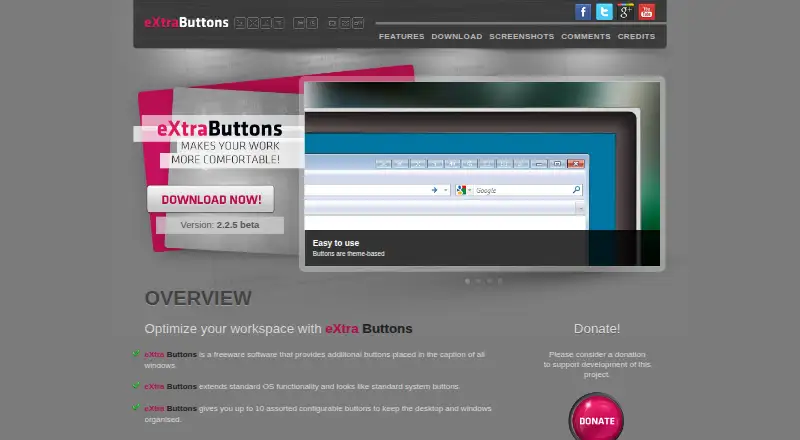
What eXtra Buttons is
eXtra Buttons is a free Windows utility that adds controls to window captions to help organize windows and the desktop. The maker lists 13 button choices, including Always on top, Send to back, Full screen, Bookmarks, transparency, and minimize-to-tray options. Users can select how many buttons to display and arrange their order. Keyboard and modifier-key combinations can be assigned to individual buttons, though duplicate combinations are not allowed. The software can start with the system, and applications can be excluded from its integration. Users can also remove the title-bar buttons while retaining their functions in the window system menu. Bookmarks can point to folders, Internet Explorer addresses, and standalone applications. The maker describes compatibility with Windows versions starting at Windows 98 and including Windows 7, and the homepage displays version 2.2.5 beta. The FAQ says the utility is free forever and invites donations to support development.
Who it suits
eXtra Buttons suits Windows users who want extra window controls and shortcuts in window captions. It may also suit users who want to customize which applications receive those controls.
What it does well
- Offers 13 window-button choices.
- Users can customize button quantity and order.
- Supports keyboard shortcuts for individual buttons.
- Freeware with donation support.
What to know first
- Homepage describes Windows versions through Windows 7.
- Displayed version is 2.2.5 beta.
- Duplicate shortcut combinations are not allowed.
Limits
The maker’s homepage describes Windows compatibility starting at Windows 98 and including Windows 7. The displayed version is 2.2.5 beta, and duplicate keyboard combinations are not permitted.
Plans
| Plan | Billed and limits | Price |
|---|---|---|
| eXtra Buttons | Freeware; donation-supported | Free |
As xtrabuttons.com lists them, read 11 Oct 2026. The maker's own page has the final word.
Getting started
- Open https://www.xtrabuttons.com/.
- Download and install the Windows freeware.
- Choose which buttons to display and set their order.
- Assign shortcut combinations or exclude applications as needed.
- Optionally configure the utility to start with the system.
Verdict
eXtra Buttons offers configurable caption controls, shortcuts, and bookmarks at no listed cost. Its stated Windows compatibility and displayed beta version are worth checking against your needs.
Questions
Is eXtra Buttons free?
Yes. The FAQ says it is free forever and asks users to consider donating to support development.
Which platforms does it support?
It is for Windows. The maker’s homepage describes versions starting at Windows 98 and including Windows 7.
What controls can it add?
The maker lists 13 buttons, including Always on top, Send to back, Full screen, Bookmarks, transparency, and minimize-to-tray options.
Can I customize the buttons and shortcuts?
Yes. Users can select the quantity and order of buttons and assign keyboard and modifier-key combinations. Duplicate combinations are not allowed.
Can I keep features without showing title-bar buttons?
Yes. Buttons can be removed from window title bars while their features remain in the window system menu.
Who made eXtra Buttons?
The maker credits Nikolaj Parshutin as the main author and Alex Skrypnyk as a co-author.
Facts from eXtra Buttons's own pages
- Application exclusions
- Users can add applications to an excluded-applications list so eXtra Buttons will not integrate with them. · xtrabuttons.com, 11 Oct 2026
- Authors
- The maker credits Nikolaj Parshutin as the main author and Alex Skrypnyk as a co-author. · xtrabuttons.com, 11 Oct 2026
- Button choices
- The maker lists 13 buttons, including Always on top, Send to back, Full screen, Bookmarks, transparency, and minimize-to-tray options. · xtrabuttons.com, 11 Oct 2026
- Compatibility limit
- The maker’s homepage says the software works with Windows versions starting at Windows 98 and including Windows 7. · xtrabuttons.com, 11 Oct 2026
- Customizable set
- Users can change the quantity and order of buttons to show only the ones they need. · xtrabuttons.com, 11 Oct 2026
- Folder bookmarks
- The bookmarks feature supports folders and Internet Explorer addresses as well as standalone applications. · xtrabuttons.com, 11 Oct 2026
- Hotkeys
- Users can assign keyboard and modifier-key combinations to individual buttons, and duplicate combinations are not allowed. · xtrabuttons.com, 11 Oct 2026
- Pricing
- The FAQ says eXtra Buttons is free forever and asks users to consider donating to support development. · xtrabuttons.com, 11 Oct 2026
- Startup
- The software can be configured to start with the system. · xtrabuttons.com, 11 Oct 2026
- Support
- The maker invites users to suggest features or report issues by email at [email protected]. · xtrabuttons.com, 11 Oct 2026
- Supported integrations
- The maker’s future-plans page marks Chrome, Firefox, Skype, and Visual Studio integration work as released. · xtrabuttons.com, 11 Oct 2026
- Version
- The homepage identifies the current displayed version as 2.2.5 beta. · xtrabuttons.com, 11 Oct 2026
- What it does
- eXtra Buttons adds functional buttons to Windows window captions to help organize windows and the desktop. · xtrabuttons.com, 11 Oct 2026
- Window menu
- Users can remove buttons from window title bars while keeping the features available in the window system menu. · xtrabuttons.com, 11 Oct 2026
Where eXtra Buttons stands on Freedom251
- Window Management Software#19 of 65