Freedom251 › Product Analytics Tools
Klaritics
What Klaritics is
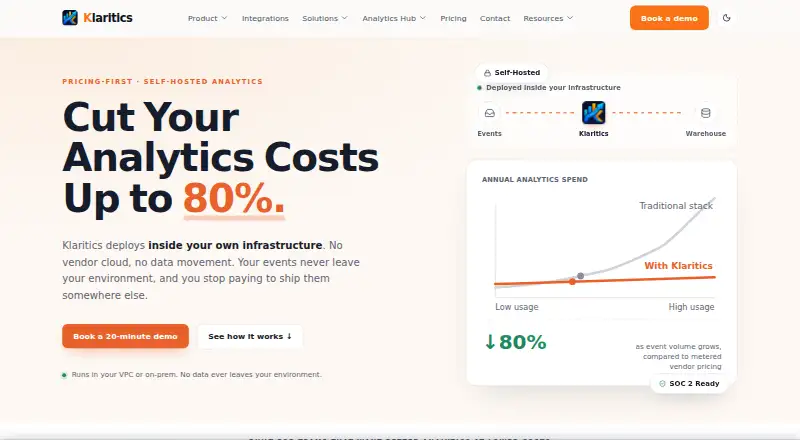
Klaritics is a self-hosted, warehouse-native product analytics platform that analyzes behavior using data in a customer’s existing warehouse. Product, data, and engineering teams can examine funnels, retention, user paths, cohorts, dashboards, SQL, and conversion tracking. Klaritics AI supports natural-language questions, behavioral investigations, anomaly identification, recommendations, and summaries. Native warehouse connectors include Snowflake, BigQuery, Amazon Redshift, PostgreSQL, and ClickHouse. Teams can ingest data through SDKs, a batch-capable HTTP API, or streaming via Kafka, Kinesis, or Pub/Sub. Deployment options include Kubernetes, Docker, and bare-metal Linux; Enterprise deployments can be air-gapped. The maker says raw events stay in the customer’s warehouse and aggregated results stay in the customer’s environment. Optional usage telemetry is off by default. Governance features include row-level security, column masking, PII controls, role-based access, and audit logs. Klaritics lists SOC 2 Type II, ISO 27001, GDPR, HIPAA-ready, and CCPA in its security posture. Alerts can go to Slack, email, and webhooks. Starter is free and aimed at evaluation and small teams; Growth is aimed at production teams. Growth and Enterprise licensing count each deployment separately.
Who it suits
Klaritics suits product, data, and engineering teams that want to analyze product behavior using data in their existing warehouse. Starter is aimed at evaluation and small teams, while Growth is positioned for production teams.
What it does well
- Analyzes funnels, retention, user paths, cohorts, dashboards, SQL, and conversions.
- Connectors include Snowflake, BigQuery, Redshift, PostgreSQL, and ClickHouse.
- Supports SDK, HTTP API, Kafka, Kinesis, and Pub/Sub ingestion.
- Can run on Kubernetes, Docker, bare-metal Linux, or air-gapped for Enterprise.
- Includes row-level security, column masking, PII controls, and audit logs.
What to know first
- Starter is limited to 1M events analyzed per month, three seats, and 30-day retention.
- Starter is a single-instance deployment.
- Growth and Enterprise licensing count each deployment separately.
Limits
Starter includes up to 1M events analyzed per month, a 30-day retention window, up to three seats, and a self-hosted single-instance deployment.
Plans
| Plan | Billed and limits | Price |
|---|---|---|
| Starter | Free · Up to 1M events analyzed / month · 30-day retention window · Up to 3 seats · self-hosted, single-instance deployment | Free |
| Enterprise | Custom · Unlimited events analyzed · custom retention (5+ years) · multi-cluster deployment · air-gapped license and offline validation | On request |
| Growth | Annual license, paid yearly · Up to 100M events analyzed / month · 12-month retention window · unlimited seats · per-deployment license | On request |
As klaritics.com lists them, read 8 Oct 2026. The maker's own page has the final word.
Getting started
- Visit klaritics.com.
- Choose the free Starter plan to begin evaluation.
- Deploy the self-hosted platform on Kubernetes, Docker, or bare-metal Linux.
- Connect a listed warehouse and send data through SDKs, the HTTP API, or supported streaming options.
Klaritics is a self-hosted, warehouse-native product analytics platform for teams that want product behavior analyzed where their data already lives. It is most suitable for product, data, and engineering groups with the capacity to run their own deployment and enforce detailed governance. Its combination of broad analysis, warehouse access, and deployment control is compelling when operational ownership is a requirement rather than a burden.
Overview
Klaritics queries behavioral data in an existing warehouse instead of requiring a separate analytics store. Raw events remain in the customer’s warehouse, while aggregated results stay in the customer’s environment; optional usage telemetry is disabled by default. That design supports residency and control policies, but it also makes the buyer responsible for infrastructure and warehouse administration.
The product covers the central product-analytics workflow: funnels, retention, user paths, cohorts, dashboards, SQL, and conversion tracking. Teams can move from standard conversion and engagement reporting to warehouse-level investigation without exporting raw event data to a vendor-managed environment.
Key features
Analysis and AI
Funnel reports expose conversion and drop-off points, while retention and cohort views show whether usage persists across groups. User paths help trace journeys, SQL gives analysts direct control over queries, and dashboards package repeatable findings for wider teams. Conversion tracking completes the focus on measurable product outcomes.
Klaritics AI accepts natural-language questions, investigates behavior, identifies anomalies, and produces recommendations and summaries. That can shorten the path from a question to an initial explanation, although the quality of any investigation still depends on the event data and warehouse structure your team maintains.
Warehouses and ingestion
Native connectors are provided for Snowflake, BigQuery, Amazon Redshift, PostgreSQL, and ClickHouse. SDKs, a batch-capable HTTP API, and streaming through Kafka, Kinesis, or Pub/Sub give engineering teams several ways to feed events. This breadth is useful for organizations with mixed pipelines, but implementation remains an engineering task rather than a plug-in hosted setup.
Deployment, security, and alerts
You can deploy on Kubernetes, Docker, or bare-metal Linux. Enterprise also supports air-gapped deployment, including offline validation, for environments that cannot permit normal connectivity. Governance features include row-level security, column masking, PII controls, role-based access, and audit logs. The stated security posture includes SOC 2 Type II, ISO 27001, GDPR, HIPAA-ready, and CCPA. Alerts can go to Slack, email, or webhooks, making operational findings easier to route.
Pricing
Klaritics uses event volume as its primary pricing metric and offers a free Starter plan. Starter costs nothing on a free billing term, analyzes up to 1M events per month, retains data for 30 days, supports up to three seats, and runs as a self-hosted single-instance deployment. It is a sensible evaluation option and can suit a small team, but the short retention window and three-seat ceiling limit long-term collaboration and historical analysis.
Growth uses an annual license paid yearly at custom pricing. It raises capacity to 100M events analyzed per month, extends retention to 12 months, and includes unlimited seats. The license is per deployment, and each deployment counts separately, so running multiple environments can materially affect the commercial decision. Growth is aimed at production teams that have outgrown Starter’s quota or need longer history.
Enterprise is also custom priced and removes the published event ceiling with unlimited events analyzed. It offers custom retention of five years or more, multi-cluster deployment, and an air-gapped license with offline validation. Enterprise support adds a dedicated customer success manager and 24/7 SLA-backed support. Starter has community support, while Growth provides standard business-hours support.
Platforms
Klaritics supports Android, iOS, web, API, Linux, and self-hosted deployments. The platform coverage suits teams collecting from mobile and web products while operating analytics infrastructure on Linux-based systems.
Who it's for
Starter fits teams evaluating warehouse-native analytics or running a small, controlled deployment. Growth is the practical tier for production product, data, and engineering teams that need up to 100M monthly events, 12 months of retention, and unlimited seats. Enterprise is for organizations requiring multi-cluster or air-gapped operation, long retention, unlimited analyzed events, and formal support commitments.
Look elsewhere if your team does not want to operate Kubernetes, Docker, bare-metal, or warehouse-connected infrastructure, or if per-deployment licensing complicates a multi-environment rollout.
Pros and cons
- Pro: Raw and aggregated data stay in your environment, with telemetry off by default, supporting stronger residency control.
- Pro: Connectors, streaming, batch HTTP ingestion, SQL, and AI cover both engineering pipelines and analyst-led investigation.
- Pro: Row-level security, masking, PII controls, roles, and audit logs provide unusually concrete governance controls.
- Con: Self-hosting shifts deployment and operational work to the customer.
- Con: Starter’s 30-day retention, three seats, and 1M-event monthly limit are restrictive beyond evaluation or very small use.
- Con: Growth and Enterprise count each deployment separately, while their prices are custom.
Alternatives
Browse Product Analytics Tools for a wider category comparison. Choose Aptabase instead if you want an AGPL-3.0 server, MIT-licensed SDKs, and broader desktop platform coverage. PostHog is a better fit when an MIT-licensed open-source product and hosted/self-hosted options are priorities.
devtodev suits teams that prefer MAU-based limits, a 25k-MAU free tier, custom events, and five team members. GameAnalytics is the alternative for game-focused reporting with no MAU limit on its free plan and predefined and custom dashboards. Pick Helion for another freemium option that includes self-hosting and a free trial.
Zoho Apptics fits teams wanting a free-forever plan with project, application, error, and engagement allowances. TelemetryDeck is suited to teams seeking a simple event-based free tier and low-cost paid plan. Choose Amplio when an MIT-licensed, self-hosted product with no stated usage limits matters most.
Verdict
Klaritics is a strong choice for product, data, and engineering teams that need warehouse-native analysis, self-hosted deployment, and enforceable governance. Starter offers a meaningful free evaluation, while Growth and Enterprise provide the capacity, retention, clustering, and support expected in production. Its main drawback is the operational and licensing responsibility that comes with running each deployment yourself; teams seeking a managed, low-maintenance analytics service should choose another platform.
Verdict
Choose Klaritics if you want warehouse-based product analytics with self-hosted deployment and governance controls. Starter offers a free way to evaluate it, while production teams needing more events, seats, or retention will need Growth or Enterprise. Look elsewhere if your team does not want deployment-based licensing for Growth or Enterprise.
Questions
Does Klaritics have a free plan?
Yes. Starter is free and includes up to 1M events analyzed per month, 30-day retention, and up to three seats.
What does Growth cost?
Growth uses an annual license paid yearly; the price is listed as custom. It includes up to 100M events analyzed per month, 12-month retention, unlimited seats, and a per-deployment license.
What platforms does Klaritics support?
The listed platforms are Android, API, iOS, Linux, self-hosted, and web. Supported platforms are also listed as web and mobile.
Can Klaritics run in an air-gapped environment?
Yes. Air-gapped deployments are listed for Enterprise.
Which warehouses connect natively?
Listed native connectors are Snowflake, BigQuery, Amazon Redshift, PostgreSQL, and ClickHouse.
What support comes with each plan?
Starter includes community support. Growth includes standard business-hours support. Enterprise includes a dedicated customer success manager and 24/7 support with an SLA.
Facts from Klaritics's own pages
- AI
- Klaritics AI supports natural-language questions, behavioral investigations, anomaly identification, recommendations, and summaries. · klaritics.com, 8 Oct 2026
- Alerts
- Alerts can be sent to Slack, email, and webhooks. · klaritics.com, 8 Oct 2026
- Analytics
- Its analytics features include funnels, retention, user paths, cohorts, dashboards, SQL, and conversion tracking. · klaritics.com, 8 Oct 2026
- Data handling
- The maker says raw events stay in the customer’s warehouse and aggregated results stay in the customer’s environment; optional usage telemetry is off by default. · klaritics.com, 8 Oct 2026
- Deployment
- Klaritics supports deployment on Kubernetes, Docker, or bare-metal Linux, including air-gapped Enterprise deployments. · klaritics.com, 8 Oct 2026
- Governance
- Features include row-level security, column masking, PII controls, role-based access, and audit logs. · klaritics.com, 8 Oct 2026
- Ingestion
- Ingestion options include SDKs, a batch-capable HTTP API, and streaming through Kafka, Kinesis, or Pub/Sub. · klaritics.com, 8 Oct 2026
- Intended users
- The site describes Klaritics as built for product, data, and engineering teams, with Starter aimed at evaluation and small teams and Growth aimed at production teams. · klaritics.com, 8 Oct 2026
- Limit
- The pricing page says each deployment counts separately for Growth and Enterprise licensing. · klaritics.com, 8 Oct 2026
- Product
- Klaritics is a self-hosted, warehouse-native product analytics platform that analyzes product behavior using data in the customer’s existing warehouse. · klaritics.com, 8 Oct 2026
- Security
- The maker lists SOC 2 Type II, ISO 27001, GDPR, HIPAA-ready, and CCPA in its security posture. · klaritics.com, 8 Oct 2026
- Support
- Starter includes community support; Growth includes standard business-hours support; Enterprise includes a dedicated customer success manager and 24/7 support with an SLA. · klaritics.com, 8 Oct 2026
- Warehouse connectors
- Native warehouse connectors listed include Snowflake, BigQuery, Amazon Redshift, PostgreSQL, and ClickHouse. · klaritics.com, 8 Oct 2026
Where Klaritics stands on Freedom251
- Product Analytics Tools#15 of 45