
Kiru
What Kiru is
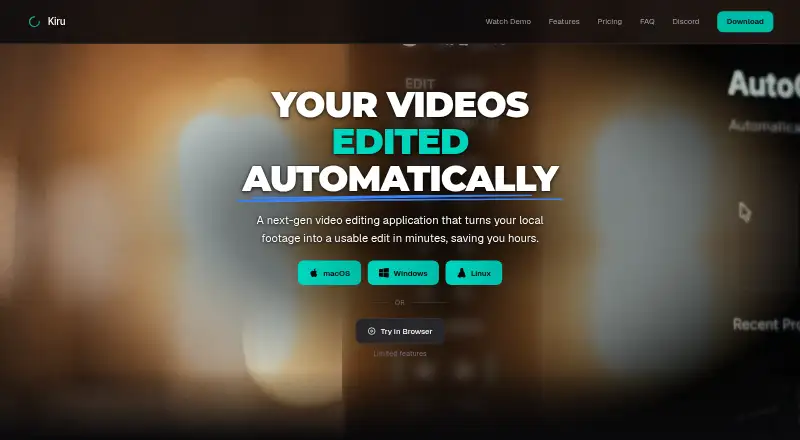
Kiru is a video editing application that turns local footage into an edit, with transcript-based editing and automatic removal of unwanted sections. It transcribes speech and syncs each word to the timeline, so users can work from the transcript. It can detect false starts, stammers, retakes, filler words, and silences for automatic cuts. The desktop app supports styled AutoCaptions and .cube LUT files in its effects panel. Exports include MP4, WAV audio, and project files for DaVinci Resolve, Premiere Pro, and Final Cut Pro. Kiru says original video remains on the user's computer; extracted audio is sent for transcription, and low-resolution proxies are uploaded for AutoCataloging only if opted into. Remote transcription needs an internet connection, but editing, detection, and export work offline afterward. A browser version has limited features. The Free plan allows one hour of video per month and MP4 export. Plus costs $15 a month and Pro costs $30 a month; both list monthly pricing and an annual option labeled “Save 33%.”
Who it suits
Kiru suits video editors who want to cut footage from a transcript and remove pauses or retakes automatically. It may also suit people who want to continue editing offline after transcription.
What it does well
- Transcript words sync to the editing timeline
- Can remove detected false starts, filler words, and silences
- Exports MP4, WAV, and supported project files
- Editing and exporting work offline after transcription
What to know first
- Free plan allows one hour of video per month
- Browser version has limited features
- Remote transcription requires an internet connection
- Plus costs $15 a month
Limits
The Free plan allows one hour of video per month and lists MP4 export. Plus allows 10 hours per month; Pro allows 30 hours per month.
Plans
| Plan | Billed and limits | Price |
|---|---|---|
| Free | 1 hour of video per month · Automatically cut bad takes, silences & mistakes · MP4 export | Free |
| Plus | Monthly pricing shown; the page also offers an annual option labeled “Save 33%.” · 10 hours of video per month · Automatically cut bad takes, silences & mistakes · MP4 export · Resolve, Premiere, Final Cut | $15 a month |
| Pro | Monthly pricing shown; the page also offers an annual option labeled “Save 33%.” · 30 hours of video per month · Automatically cut bad takes, silences & mistakes · MP4 export · Resolve, Premiere, Final Cut · Priority support | $30 a month |
As kiru.app lists them, read 30 Sept 2026. The maker's own page has the final word.
Getting started
- Visit https://kiru.app/ and choose the desktop app for macOS, Windows, or Linux, or use the limited browser version.
- On Linux, install the AppImage, use the Arch AUR package, or install from the Kiru Nix flake.
- Choose Free, Plus, or Pro based on the monthly video allowance and features you need.
- Connect to the internet for remote transcription, then edit, detect cuts, and export offline.
Kiru is a video editor for people who want to shape spoken footage by editing its transcript and automating routine cuts. It is strongest for desktop creators cleaning up dialogue-heavy recordings; its monthly video caps and more limited browser version narrow its appeal.
Overview
Kiru transcribes video, syncs words to the timeline and lets you edit from the text. It can also detect false starts, stammers, retakes, filler words and silences for automatic removal. Together, those tools focus Kiru on repetitive cleanup in interviews, narration and similar speech-led material, rather than establishing it as a general-purpose editing suite.
Original video files stay on the computer, while extracted audio is sent for remote transcription. After that step, editing, detection and export work offline. Low-resolution proxies are uploaded for AutoCataloging only if you opt in. Kiru says it does not permanently store video or audio files on its servers, though transcriptions are stored locally and in its database.
Key features
Transcript editing and automatic cuts
Word-level transcript sync gives speech editors a way to navigate and cut footage by reading rather than relying only on timeline scrubbing. Automatic removal can save time on common mistakes and pauses, but editors should still review the resulting cut. Monthly video allowances also make the workflow less suitable for high-volume production.
Captions, color and exports
The desktop app supports styled AutoCaptions and .cube LUT files in its effects panel. Kiru exports MP4 and WAV, as well as project files for DaVinci Resolve, Premiere Pro and Final Cut Pro. That project handoff makes it more useful to editors who want Kiru to handle initial cleanup before continuing in one of those tools; the Free plan, by contrast, only includes MP4 export.
Privacy and security
Kiru names Deepgram for transcription, Polar for payment processing and cloud hosting providers among its service providers. Its privacy policy says it uses TLS encryption in transit, secure authentication, regular security assessments and access controls, while cautioning that absolute security cannot be guaranteed. It also says the company does not sell personal information. Because audio leaves the computer for transcription, Kiru is not an entirely local workflow.
Pricing
Kiru has a free plan and two paid monthly plans. Plus is $15 a month and allows 10 hours of video per month, automatic removal of bad takes, silences and mistakes, MP4 export, and project exports for Resolve, Premiere and Final Cut. It is the practical step up for regular creators who need those handoff formats but can stay within ten hours.
Pro is $30 a month and raises the allowance to 30 hours, with the same automatic cuts and exports plus priority support. It suits heavier use or creators who value that support; the higher price buys more processing capacity rather than a different editing feature set. Both paid plans also offer an annual option labeled “Save 33%.”
Free costs nothing and includes one hour of video per month, automatic cuts and MP4 export. It is a useful way to try the transcript-led workflow on occasional short projects, but the small quota and lack of the paid plans’ listed project exports make it a poor fit for sustained production.
Platforms
Kiru is available for macOS, Windows, Linux and web browsers. The browser version has limited features, so desktop is the stronger choice for the full editing workflow. Linux users can install an AppImage, an Arch AUR package or the Kiru Nix flake; the AUR package depends on ffmpeg.
Who it's for
Kiru is a good fit for creators and editors who regularly clean up speech-heavy footage, want transcript-based navigation and value offline work after transcription. It is less suitable for users whose work exceeds the monthly quota, requires an entirely offline process from the outset, or depends on the browser version for full functionality.
Pros and cons
- Pros: Word-synced transcripts and automated cleanup target time-consuming dialogue edits directly.
- Pros: Editing, detection and export can continue offline after remote transcription is complete.
- Pros: Paid plans include project exports for three named editing applications, supporting a handoff to an existing workflow.
- Cons: Transcription requires sending extracted audio to a remote service, which rules out a fully local start-to-finish process.
- Cons: The free plan is capped at one hour per month, while Plus and Pro cap usage at 10 and 30 hours respectively.
- Cons: The browser version has limited features, and Free lacks the project exports included with paid plans.
Alternatives
Choose CapCut if mobile-focused editing, free templates and cloud storage matter more than Kiru’s transcript-led cleanup; it spans Android, iOS, macOS, web and Windows. Descript is another freemium, text-based option for macOS, web and Windows, with a free tier offering 60 minutes per month and 100 one-time AI credits.
FireCut may suit short-form work: its free tier allows 25 videos per month up to five minutes, at 720p with a watermark, and includes silence cutting, transitions, sound effects and zoom cuts. Pick Captions instead if its AI video creation and digital twins or custom AI actors are the priority; its Max plan is $24.99 a month for 500 monthly credits.
Gling is a narrower alternative for macOS and Windows users: its free plan covers one hour of AI-edited media monthly, but exports carry a watermark. VEED offers a browser-based alternative whose free exports are limited to 720p and carry a watermark.
NewTake is an iOS-only alternative with three AI-edited videos per month on its free plan, including caption and music previews without watermarks. OpusClip is another freemium option, with its free tier providing 60 credits per month and clips up to 1080p, but with watermarks, no editing and exports that stop being available after three days.
Browse more options in AI Video Editing Software and AI Video Editors.
Verdict
Choose Kiru if transcript-based edits, automatic spoken-footage cleanup and offline work after transcription match your desktop workflow. The main reason to look elsewhere is the combination of monthly video caps and remote audio transcription, especially if you need more volume or a fully local process.
Verdict
Kiru pairs transcript-led editing with automated cuts and offline work after transcription. Check the monthly video allowance and browser limitations before choosing a plan.
Questions
Is Kiru free?
Yes. Its Free plan costs nothing and includes one hour of video per month and MP4 export.
How much do the paid plans cost?
Plus costs $15/mo and Pro costs $30/mo. Both list monthly billing and an annual option labeled “Save 33%.”
Which platforms does Kiru support?
Kiru supports macOS, Windows, Linux, and a browser version with limited features.
Can I use Kiru offline?
An internet connection is required for remote transcription. Editing, detection, and export work offline afterward.
What can Kiru export?
Listed exports include MP4, WAV audio, and project files for DaVinci Resolve, Premiere Pro, and Final Cut Pro.
Who operates Kiru?
Kiru is operated by Dreams of LLC.
Facts from Kiru's own pages
- Automatic captions
- Yes · kiru.app, 21 Sept 2026
- Automatic cuts
- Kiru detects false starts, stammers, retakes, filler words, and silences and can remove them automatically. · kiru.app, 30 Sept 2026
- Captions and color
- The desktop app supports styled AutoCaptions and .cube LUT files in its effects panel. · kiru.app, 30 Sept 2026
- Data practices
- The privacy policy says Kiru does not permanently store video or audio files on its servers, stores transcriptions locally and in its database, and does not sell personal information. · kiru.app, 30 Sept 2026
- Exports
- Kiru lists MP4, WAV audio, and project file exports for DaVinci Resolve, Premiere Pro, and Final Cut Pro. · kiru.app, 30 Sept 2026
- Free plan
- Yes · kiru.app, 21 Sept 2026
- Linux installation
- The Linux page offers an AppImage, an Arch AUR package, and installation from the Kiru Nix flake; the AUR package depends on ffmpeg. · kiru.app, 30 Sept 2026
- Local processing
- The maker says original video files stay on the user's computer; extracted audio is sent for transcription, and low-resolution proxies are uploaded for AutoCataloging only if opted into. · kiru.app, 30 Sept 2026
- Offline use
- An internet connection is required for remote transcription, after which editing, detection, and export happen offline. · kiru.app, 30 Sept 2026
- Operator
- The terms say Kiru is operated by Dreams of LLC. · kiru.app, 30 Sept 2026
- Platforms
- Kiru lists native applications for macOS, Windows, and Linux, plus a limited-feature browser version. · kiru.app, 30 Sept 2026
- Privacy providers
- The privacy policy names Deepgram for transcription, Polar for payment processing, and cloud hosting providers as service providers. · kiru.app, 30 Sept 2026
- Product
- Kiru is a video editing application that turns local footage into a usable edit and provides a browser version with limited features. · kiru.app, 30 Sept 2026
- Security
- The privacy policy says Kiru uses TLS encryption in transit, secure authentication, regular security assessments, and access controls, while noting it cannot guarantee absolute security. · kiru.app, 30 Sept 2026
- Silence removal
- Yes · kiru.app, 21 Sept 2026
- Support
- Priority support is listed as a Pro plan feature. · kiru.app, 30 Sept 2026
- Supported platforms
- macOS,Windows,Linux,web browser · kiru.app, 21 Sept 2026
- Text-based editing
- Yes · kiru.app, 21 Sept 2026
- Transcript editing
- Kiru transcribes video and syncs each word to the timeline so users can edit by reading the transcript. · kiru.app, 30 Sept 2026
Where Kiru stands on Freedom251
- AI Video Editors#16 of 81
- AI Video Editing Software#8 of 32
- Video editors#23 of 71