
ExpoCut
by ExpoCut
What ExpoCut is
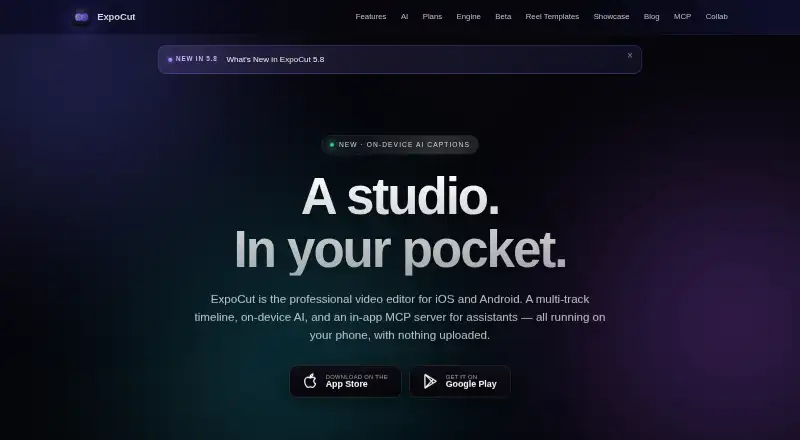
ExpoCut is a mobile video editor for iOS, iPadOS, and Android, with a multi-track timeline and editing tools that run on the device. Its timeline supports unlimited video, audio, image, text, sticker, and shape tracks, with frame-accurate trimming and splitting. On-device AI features include background removal, chroma key, auto reframe, speech-to-text captions, and text-to-speech voiceover. The editor also lists automatic captions, silence removal, and AI audio cleanup. Exports use hardware encoding and can reach 3840×2160 at 60 fps in H.264 or HEVC. The free plan includes the full timeline editor and exports up to 4K without requiring an account; each export includes a three-second ExpoCut outro. Pro and Elite add further editing tools and are billed at local store prices, with weekly through annual options. An optional in-app MCP server connects to Claude, ChatGPT, or another MCP-compatible client for editing and exporting projects. The app also provides royalty-free Pexels stock video and photos, plus a sound-effects library. ExpoCut lists its location as Valley Stream, New York.
Who it suits
ExpoCut suits mobile video editors who want a multi-track timeline, on-device AI tools, and exports up to 4K. Its optional assistant connection may suit people who want to edit and export projects through Claude, ChatGPT, or another MCP-compatible client.
What it does well
- Unlimited tracks for video, audio, images, text, stickers, and shapes
- Frame-accurate trimming and splitting
- On-device exports up to 4K at 60 fps
- Free plan includes the full timeline editor and needs no account
- Projects and media are not uploaded by default
- Optional MCP server connects to compatible assistants
What to know first
- Free exports include a three-second ExpoCut outro
- Pro and Elite prices are set by the local store
- Analytics and crash reporting are enabled by default
Limits
The free plan exports up to 4K, but each export ends with a three-second ExpoCut outro. Pro and Elite prices are set by the local store, with weekly through annual options.
Plans
| Plan | Billed and limits | Price |
|---|---|---|
| Free | $0 forever · No account needed · Full timeline editor · Export up to 4K · Exports end with a 3-second ExpoCut outro | Free |
| Pro | Local store price; weekly through annual options · Full effects, shaders and transitions · AI voiceover and stem separation · Auto captions, Clean Audio, Auto-Cut and stabilization · Keyframes and custom templates · Clean exports | On request |
| Elite | Local store price; weekly through annual options · Everything in Pro · Motion paths and video-inside-text · AI background remover · Template import/export and commercial license | On request |
As expocut.com lists them, read 9 Oct 2026. The maker's own page has the final word.
Getting started
- Visit the ExpoCut website or find the app in the Apple App Store or Google Play
- Install ExpoCut on iOS, iPadOS, or Android
- Start with the free plan without creating an account
- Use the timeline to add and edit media, then export up to 4K
- Choose Pro or Elite at the local store price for their additional tools
ExpoCut is a mobile video editor built around a multi-track timeline and on-device AI, with an optional server that lets compatible assistants work with projects. It suits creators who want detailed editing and high-resolution exports on a phone or tablet. The free plan is capable, but its three-second branded outro makes clean delivery a paid-plan decision.
Overview
The editor combines frame-accurate trimming and splitting with unlimited tracks for video, audio, images, text, stickers, and shapes. That gives projects room to grow beyond a simple clip-and-caption workflow, while on-device editing and rendering keep the main process local by default.
Exports can reach 3840×2160 at 60 fps in H.264 or HEVC, using device hardware encoding. ExpoCut also includes royalty-free Pexels video and photos, plus sound effects. These features make it a substantial mobile editing option; the free outro is the clearest constraint when a finished video needs to look unbranded.
Key features
Editing and AI
ExpoCut’s unlimited tracks and frame-accurate controls suit layered edits where timing and composition matter. On-device AI covers background removal, chroma key, automatic reframing, speech-to-text captions, and text-to-speech voiceover. Silence removal and AI audio cleanup address two common editing chores, while Pro adds stabilization, auto-cut, and stem separation.
Assistant and desktop workflows
An optional in-app MCP server connects projects to Claude, ChatGPT, or another compatible client for editing and exporting. This is a distinctive route for people who want an assistant involved in their workflow, though it is optional rather than necessary for using the editor. A separate command-line renderer can process projects on macOS, Windows, or Linux and output MP4, HLS, image sequences, or a preview stream.
Privacy and controls
Editing, captions, rendering, and export run on-device, and projects and media are not uploaded by default. Cloud AI is opt-in; API keys are stored in the iOS Keychain or Android Keystore. Firebase Analytics and Crashlytics are enabled by default, with an option to turn them off in Settings. People who want local editing should still account for those default analytics settings.
Pricing
Free: free, billed $0 forever. No account is needed, and the full timeline editor can export up to 4K. The trade-off is a three-second ExpoCut outro on exports, so this plan fits personal drafts and projects where branding is acceptable better than polished client or channel delivery.
Pro: custom pricing, billed at the local store price, with weekly through annual options. It adds effects, shaders, transitions, AI voiceover and stem separation, auto captions, Clean Audio, Auto-Cut, stabilization, keyframes, custom templates, and clean exports. This is the practical upgrade for creators who need unbranded output and the broader editing toolkit; the price depends on the local store and selected term.
Elite: custom pricing, also at the local store price with weekly through annual options. It includes everything in Pro, plus motion paths, video-inside-text, AI background removal, template import and export, and a commercial license. It is aimed at creators who need those advanced effects or commercial rights; otherwise, Pro covers the stated clean-export need.
The maker also describes a private-beta toolkit for teams, with SDK modules, remote rendering, white-label branding, custom AI providers, audit logs, and private support. It has custom pricing.
Platforms
The mobile app is available on iOS and Android, with support for iPadOS. The command-line renderer runs on macOS, Windows, and Linux. That gives mobile editors a route to desktop rendering, although ExpoCut’s editing app is positioned for mobile use.
Who it's for
ExpoCut is a strong fit for mobile-first creators who want layered editing, local AI tools, and exports up to 4K without paying upfront. Pro makes more sense for anyone publishing clean exports; Elite is for those who need its added motion tools, template exchange, or commercial license. Teams interested in a branded or remotely rendered setup can consider the private-beta toolkit.
Pros and cons
- Pros: Unlimited media and design tracks plus frame-accurate editing support complex mobile projects.
- Pros: On-device AI and 4K/60 fps hardware-encoded export provide a capable local workflow.
- Pros: The free plan includes the full timeline editor and requires no account.
- Cons: Free exports end with a three-second ExpoCut outro, limiting the plan for clean, public-facing delivery.
- Cons: Pro and Elite prices vary by local store and billing term, making their cost harder to compare in advance.
- Cons: Analytics and crash reporting are enabled by default, so privacy-conscious users need to switch them off in Settings.
Alternatives
Choose CapCut if you want a mobile-focused editor with free templates and cloud storage; its Pro plan includes 100 GB cloud storage. OpenReel Video is the alternative for readers who value a free, no-subscription tool with all features included and an MIT license. Consider Wondershare Filmora if you want a free plan and trial and can accept watermarked exports on its free tier.
Adobe Firefly is a better match for readers seeking a generative-media product with limited daily generations on its free plan and a paid tier that allocates monthly credits. Choose Descript for text-based editing and AI tools on macOS, Windows, or the web, with its free plan capped at 60 minutes per month and 100 one-time AI credits. Diffusion Studio suits readers prioritizing open-source web, desktop, CLI, and skills components under MPL 2.0. FlexClip is a web-based option with a free tier capped at 12 projects, 10 minutes per video, and one stock video and audio item per project. Pick Kiru for a free workflow focused on automatically cutting bad takes, silences, and mistakes, with one hour of video per month.
Browse more options in AI Video Editors and Video Editing Software.
Verdict
ExpoCut is an appealing choice for mobile creators who want a real multi-track editor, useful on-device AI, and up to 4K export without an upfront cost. Its free plan makes it easy to start, but the outro is a material limitation for finished work. Choose Pro for clean exports and the fuller toolkit; look elsewhere if you need unbranded exports at no cost.
Verdict
Choose ExpoCut if you want a mobile multi-track editor with on-device AI and a free plan that exports up to 4K. Look elsewhere if you need clean exports without a paid plan, since free exports include an ExpoCut outro.
Questions
Is ExpoCut free?
Yes. The Free plan costs nothing and includes the full timeline editor and exports up to 4K.
Do I need an account to use the free plan?
No. The Free plan does not require an account.
Which platforms support the mobile app?
ExpoCut is available for iOS, iPadOS, and Android through the Apple App Store and Google Play.
What does the free plan limit?
Free exports include a three-second ExpoCut outro.
What do Pro and Elite cost?
Both use local store pricing, with weekly through annual options.
Can an assistant connect to ExpoCut?
An optional in-app MCP server can connect to Claude, ChatGPT, or another MCP-compatible client to edit and export projects.
Facts from ExpoCut's own pages
- AI assistant integrations
- The optional in-app MCP server can connect to Claude, ChatGPT, or any MCP-compatible client to edit and export projects. · expocut.com, 9 Oct 2026
- AI features
- On-device AI includes background removal, chroma key, auto reframe, speech-to-text captions, and text-to-speech voiceover. · expocut.com, 9 Oct 2026
- Analytics controls
- Firebase Analytics and Crashlytics are enabled by default and can be turned off in Settings. · expocut.com, 9 Oct 2026
- AI audio cleanup
- Yes · expocut.com, 21 Sept 2026
- Automatic captions
- Yes · expocut.com, 21 Sept 2026
- Company location
- The site lists Valley Stream, NY as the company location. · expocut.com, 9 Oct 2026
- Desktop renderer
- A command-line renderer can process projects on macOS, Windows, or Linux and produce MP4, HLS, frame sequences, or a preview stream. · expocut.com, 9 Oct 2026
- Downloads
- The app is available for iOS and Android through the Apple App Store and Google Play. · expocut.com, 9 Oct 2026
- Editing
- The editor supports unlimited video, audio, image, text, sticker, and shape tracks with frame-accurate trimming and splitting. · expocut.com, 9 Oct 2026
- Export
- On-device hardware encoding supports exports up to 3840×2160 at 60 fps in H.264 or HEVC. · expocut.com, 9 Oct 2026
- Maximum export resolution
- 4k · expocut.com, 21 Sept 2026
- Free plan
- Yes · expocut.com, 21 Sept 2026
- Headquarters
- Valley Stream, New York, United States · expocut.com, 28 Sept 2026
- Privacy
- Editing, rendering, captions, and export run on-device, and projects and media are not uploaded by default. · expocut.com, 9 Oct 2026
- Product
- ExpoCut is a mobile video editor with a multi-track timeline, on-device AI, and an in-app MCP server for assistants. · expocut.com, 9 Oct 2026
- Security
- Cloud AI is opt-in, and API keys are stored in the iOS Keychain or Android Keystore. · expocut.com, 9 Oct 2026
- Silence removal
- Yes · expocut.com, 21 Sept 2026
- Stock media
- The app offers royalty-free Pexels stock video and photos plus a built-in sound-effects library. · expocut.com, 9 Oct 2026
- Supported platforms
- iOS,iPadOS,Android · expocut.com, 21 Sept 2026
- Team offering
- The maker describes a private-beta toolkit with SDK modules, remote rendering, white-label branding, custom AI providers, audit logs, and private support. · expocut.com, 9 Oct 2026
Where ExpoCut stands on Freedom251
- AI Video Editors#14 of 81
- Video Editing Software#37 of 155
- Video editors#32 of 71