
Keystatic
What Keystatic is
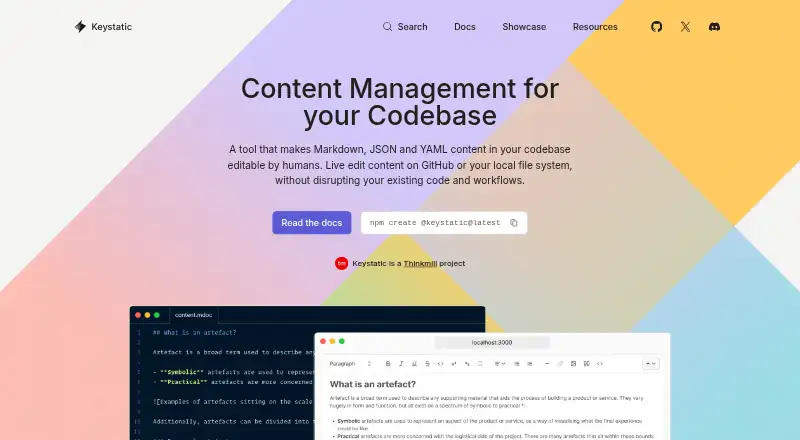
Keystatic lets teams edit Markdown, JSON, and YAML content in a codebase through an admin interface or directly in files. It also supports Markdoc and MDX, with integration guides for Astro, Next.js, and Remix. Content can be saved locally, directly to GitHub, or in both places; the product describes itself as requiring no database. Keystatic Cloud connects to GitHub so team members can edit without their own GitHub accounts. A Cloud team can contain multiple projects, and every team user can access all projects in that team. Optional Cloud Images stores, optimizes, and delivers images for web use. Cloud Pro offers experimental real-time editing by multiple people on the same document, and the Reader API retrieves data from a project directory. The Free plan allows up to three users per team, with unlimited teams and projects. Cloud Pro costs $10 a month; each team user beyond three costs an additional $5/month. The project is identified as experimental, with community support linked through GitHub Discussions and Discord.
Who it suits
Keystatic suits developers and teams who keep site content in a codebase and want an admin UI or direct file editing. Its framework guides cover Astro, Next.js, and Remix.
What it does well
- Supports Markdown, YAML, JSON, Markdoc, and MDX.
- Content can be saved locally or to GitHub.
- Free plan includes unlimited teams and projects.
- Cloud team members can edit without GitHub accounts.
- Optional Cloud Images handles web images.
What to know first
- Project status is experimental.
- Cloud Pro real-time multi-user editing is experimental.
- Cloud Pro adds $5/month per team user beyond three.
Limits
The Free plan allows up to three users per team. Cloud Pro starts at $10 a month, with each additional team user beyond three costing $5/month; multi-player editing is experimental.
Plans
| Plan | Billed and limits | Price |
|---|---|---|
| Free | Up to 3 users per team · unlimited teams and projects | Free |
| Keystatic Cloud Free | Unlimited teams and projects · Up to 3 users per team | Free |
| Keystatic Cloud Pro | Starts at $10/month · More than 3 users · Additional users cost $5/month each · Multiplayer editing · Cloud Images | $10 a month |
As keystatic.com lists them, read 2 Oct 2026. The maker's own page has the final word.
Getting started
- Visit keystatic.com.
- Choose whether to store content locally, in GitHub, or in both places.
- Use an integration guide for Astro, Next.js, or Remix if applicable.
- Choose the Free plan or Keystatic Cloud Pro for team access.
- Connect GitHub to Keystatic Cloud for team editing.
Keystatic is a codebase-oriented CMS for editing Markdown, YAML and JSON through a visual admin interface or directly in project files. It fits developers and content teams whose publishing process already uses Git, especially with Astro, Next.js or Remix. The central trade-off is a database-free, file-based workflow against an experimental project and extra Cloud charges for larger teams.
Overview
Keystatic stores content in a project directory instead of a separate database. You can keep changes local, commit them to GitHub, or use both storage modes. That makes it a practical match for repositories where content changes move through commits, branches and existing deployment automation. It is less suitable when editors expect a conventional hosted CMS with database administration separate from the codebase.
Markdown and YAML/JSON are supported, including Markdoc and MDX. The Reader API retrieves data from a project directory, allowing an application to consume the same files that editors maintain. Keystatic is developed by Thinkmill as part of Thinkmill Labs Research and Development, and its GitHub project describes it as experimental. Production teams that require a mature, stability-first foundation should treat that status as a serious qualification.
Key features
File editing and Git storage
The visual editor gives non-developers a structured way to change repository content while developers retain direct file editing. Local storage is useful for an entirely self-hosted workflow; GitHub storage suits teams that want edits represented in the repository. Supporting both lets a project accommodate different publishing arrangements, but it also keeps content operations tied to Git concepts rather than a standalone editorial system.
Formats, preview and integrations
Markdown, YAML and JSON support covers common documentation and structured-content models, with Markdoc and MDX for projects using those formats. Visual editing and live preview help editors work through an interface rather than raw syntax. Integration guides for Astro, Next.js and Remix make Keystatic most compelling for teams already using one of those frameworks. Branching is part of its content workflow, and Git-commit deployment aligns publishing with repository changes.
Cloud collaboration and media
Keystatic Cloud connects to GitHub and lets team members edit without their own GitHub account. A Cloud team can contain multiple projects, and every user on that team can access all of them, so the access model is broad rather than project-specific. Cloud Images is an opt-in service for storing, optimizing and delivering web images. Cloud Pro adds experimental real-time multi-player editing on the same document; that may help simultaneous editorial work, but its experimental label makes it a feature to adopt cautiously.
Pricing
| Plan | Price | What it includes |
|---|---|---|
| Free | free | Up to 3 users per team, with unlimited teams and projects. |
| Keystatic Cloud Pro | $10 a month | More than 3 users per team costs $5/month per additional user; includes experimental multi-player editing and Cloud Images. |
The Free plan is the sensible starting point for an individual or small team that can stay within three users per team. Unlimited teams and projects avoid a project-count ceiling, but the per-team user cap limits larger editorial groups. Cloud Pro is aimed at teams needing hosted GitHub authentication, image services or simultaneous editing; the $10 monthly base rises by $5 for every user beyond three, so collaboration costs scale with headcount. No trial term or annual billing option is stated.
Platforms
Keystatic is offered through web and API access, with self-hosting supported. That combination suits teams wanting a browser editor while retaining control of the runtime and repository. GitHub is the supported Git provider. Hosting can be self-managed or use Keystatic Cloud, depending on how much infrastructure the team wants to operate.
Who it's for
Choose Keystatic if your site keeps content in Git, your developers are comfortable with Markdown or structured data files, and your stack is Astro, Next.js or Remix. It is also a fit for small teams that need a visual editor without introducing a database, or for Cloud teams that value GitHub-connected access for non-GitHub users. Look elsewhere if you need a stability-proven platform, granular project-level access within one team, or a database-first editorial model.
Pros and cons
- Pro: Markdown, YAML and JSON stay in the codebase, preserving a Git-native source of truth.
- Pro: Local, GitHub or combined storage supports both self-hosted and cloud-oriented workflows.
- Pro: Astro, Next.js and Remix guides reduce friction for those framework communities.
- Pro: The Free plan allows unlimited teams and projects, subject to three users per team.
- Con: The project is experimental, which raises adoption risk for teams demanding mature stability.
- Con: Cloud teams give every user access to every project in that team, limiting separation between projects.
- Con: Cloud Pro adds $5 monthly for each user beyond three, making larger teams progressively more expensive.
Alternatives
For a broader comparison, see Git-Based CMS. Choose Quiqr instead if you want a free, open-source option that runs across desktop platforms, web and self-hosting. deco CMS suits readers seeking an open-source, self-hostable core that the company says is free. Mattrbld is worth considering for mobile access alongside web and self-hosting, with a free hosted instance aimed at small private projects. Decap CMS offers a free-forever plan for one site and one seat. Dhub is a fit for a single user editing public repositories through GitHub, while its Pro plan costs $41 a month. HugoCMS targets Hugo users with a free per-domain plan and a €139 a month paid-once Pro option. Kiln is the alternative for teams wanting a free, AGPL-3.0 self-hosted setup. Netlify is better when the priority is a broader web platform, with a Free plan at $0/month and 300 credits per month.
Verdict
Keystatic is a strong choice for Git-oriented developers and small content teams that want visual editing over repository files without a database. Its flexible storage, framework integrations and generous project allowance are the main reasons to choose it. Look elsewhere when experimental software, broad team access or rising per-user Cloud pricing conflicts with your operational requirements.
Verdict
Keystatic is suited to codebase-based content workflows, with local and GitHub storage options and integrations for several frameworks. Its experimental status and the per-user Cloud Pro charge are worth weighing for team use.
Questions
Is Keystatic free?
Yes. The Free plan costs nothing and allows up to three users per team, with unlimited teams and projects.
How much does Keystatic Cloud Pro cost?
Keystatic Cloud Pro costs $10 a month. Each team user beyond three costs an additional $5/month.
Which content formats does Keystatic support?
It supports Markdown and YAML/JSON content, including Markdoc and MDX.
Which frameworks have integration guides?
The documentation provides guides for Astro, Next.js, and Remix.
Does Keystatic Cloud require each editor to have a GitHub account?
No. Keystatic Cloud connects to GitHub and lets team members edit without needing their own GitHub accounts.
Who makes Keystatic?
Keystatic is a Thinkmill project developed as part of Thinkmill Labs Research & Development.
Facts from Keystatic's own pages
- CLI scaffolding
- The CLI command npm create @keystatic@latest creates a Next.js, Astro or Remix project with Keystatic integrated. · keystatic.com, 15 Oct 2026
- Cloud authentication
- Keystatic Cloud handles GitHub authentication without requiring users to configure environment variables or a custom GitHub app. · keystatic.com, 15 Oct 2026
- Cloud Images
- Cloud Images stores, transforms and serves optimized images without placing image binaries in the GitHub repository. · keystatic.com, 15 Oct 2026
- Cloud multiplayer
- The Pro plan includes experimental real-time multiplayer editing on the same document. · keystatic.com, 15 Oct 2026
- Cloud team access
- Cloud projects are grouped into teams, and access is assigned at team level across that team's projects. · keystatic.com, 15 Oct 2026
- Collaboration
- Keystatic Cloud Pro offers experimental real-time multi-player editing on the same document. · keystatic.com, 2 Oct 2026
- Collections and singletons
- Content structures are defined with collections for repeated entries and singletons for one-off records. · keystatic.com, 15 Oct 2026
- Community support
- Official support channels listed are GitHub Discussions, Discord and X/Twitter. · keystatic.com, 15 Oct 2026
- Content formats
- The product supports Markdown, YAML and JSON content formats. · keystatic.com, 15 Oct 2026
- Database model
- Keystatic describes itself as requiring no database. · keystatic.com, 15 Oct 2026
- Documentation depth
- The documentation includes framework guides, core concepts, configuration references and individual field API pages. · keystatic.com, 15 Oct 2026
- Editorial score on Lucky Media
- Lucky Media gives Keystatic an overall score of 2.7 out of 5. · luckymedia.dev, 15 Oct 2026
- Editorial score on Propicked
- Propicked gives Keystatic an editorial score of 7.9 out of 10. · propicked.com, 15 Oct 2026
- Frameworks
- The docs provide integration guides for Astro, Next.js and Remix. · keystatic.com, 2 Oct 2026
- GitHub reader
- A createGitHubReader function reads a configured repository using a personal access token. · keystatic.com, 15 Oct 2026
- Image transformations
- Cloud image URLs accept fit, format, quality, height and width parameters, with dimensions up to 10,240 pixels. · keystatic.com, 15 Oct 2026
- Limit: custom fields
- An open feature discussion says custom field types complicate the internal API and have slowed core development. · github.com, 15 Oct 2026
- Limit: editorial workflow
- Lucky Media reports that approval-before-publish, scheduling and localization features are missing or immature. · luckymedia.dev, 15 Oct 2026
- Limit: Git workflow trade-offs
- Lucky Media says repository-based content inherits Git workflow constraints and is a poor fit for teams needing editorial independence. · luckymedia.dev, 15 Oct 2026
- Limit: unresolved defects
- The issue tracker showed 167 open issues, including reports of stale-entry save failures, broken Japanese IME composition and date-field truncation. · github.com, 15 Oct 2026
- Maker
- Keystatic is a Thinkmill project and is developed as part of Thinkmill Labs Research & Development. · keystatic.com, 2 Oct 2026
- Maker founded
- Thinkmill lists 2013 as its founding year. · linkedin.com, 15 Oct 2026
- Maker headquarters
- Thinkmill lists its headquarters in Sydney, New South Wales, Australia. · linkedin.com, 15 Oct 2026
- Maker legal name
- The privacy policy identifies the developer and maintainer as Thinkmill Labs Pty Ltd. · keystatic.com, 15 Oct 2026
Where Keystatic stands on Freedom251
- Git-Based CMS#3 of 23