HugoCMS
by HugoCMS
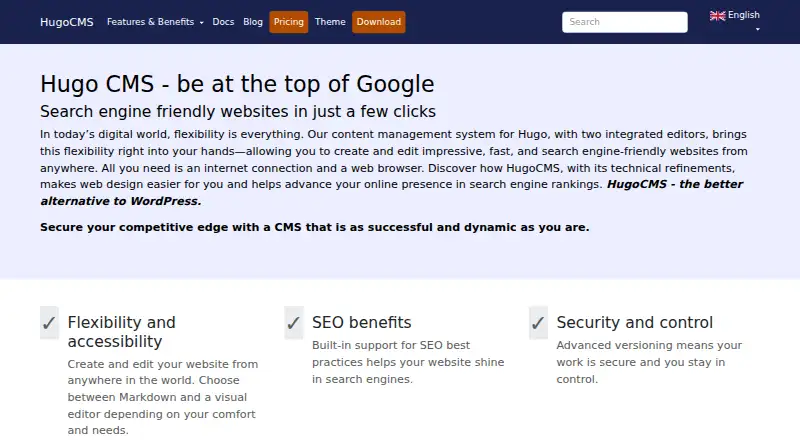
What HugoCMS is
HugoCMS combines the Hugo framework with a browser-based content management system for creating, editing, and managing website content. Users can work in a Markdown editor or a visual editor, with live preview available. Its integrated elFinder file manager lets users upload, edit, copy, move, delete, and preview files in a browser. Git versioning can be used with one click: checking in commits and pushes changes, while restoring performs a hard reset.
HugoCMS is open source and implemented with JavaScript and PHP. The maker says the finished HugoCMS website remains static and does not need database queries to serve pages. Users can choose from over 300 Hugo themes. The Free plan is €0.00 per free, per domain, and includes multilingual support and unlimited updates. The Pro plan costs €139.00 per month, billed once for lifetime use, with a lifetime license, standard support, multilingual support, and unlimited updates. The service supports German and English. It can be self-hosted or used on the web; the download package is a tarball for unpacking into a web hosting working directory, with the document directory pointed to its public folder.
Who it suits
HugoCMS suits people who want to manage site content in a browser, including users without technical knowledge. Developers who want to retain control over site structure and design can use it alongside the Hugo framework.
What it does well
- Choose a Markdown or visual editor in the browser.
- Live preview is available.
- Manage files with the integrated elFinder browser file manager.
- One-click Git versioning can commit, push, and restore changes.
- Choose from over 300 Hugo themes.
- Open source, with multilingual support and unlimited updates on the Free plan.
What to know first
- The Free plan is per domain.
- The Pro plan costs €139.00 per month, billed once for lifetime use.
- The download route requires unpacking a tarball into a web hosting working directory.
Limits
The Free plan is per domain. The Pro plan is billed once at €139.00 per month for lifetime use; its listed support is standard, while the Enterprise plan lists premium support on request.
Plans
| Plan | Billed and limits | Price |
|---|---|---|
| Free | Free; per domain · Open source · multilingual · unlimited updates | Free |
| Pro | One-time payment; lifetime use; per domain · Lifetime license · standard support · multilingual · unlimited updates | €139, paid once |
| Enterprise | Price on request · Lifetime license · premium support on request · multilingual · unlimited updates | On request |
As hugocms.com lists them, read 3 Oct 2026. The maker's own page has the final word.
Getting started
- Visit the HugoCMS website.
- Choose the Free or Pro plan.
- For self-hosting, unpack the download tarball into a web hosting working directory.
- Point the document directory to the package's public folder.
- Edit website content in the browser using the Markdown or visual editor.
HugoCMS combines the Hugo static-site framework with a browser CMS for writing and managing content. It suits teams that want non-technical editors working in Markdown or a visual interface while developers keep control of templates and structure. Its Git workflow and browser file manager make it a practical fit for self-hosted, version-controlled sites, but installation and hosting remain your responsibility.
Overview
HugoCMS is open source software implemented with JavaScript and PHP. You install its tarball in a web-hosting working directory and point the document directory at the package’s public folder. The resulting Hugo site is static, so serving pages does not require database queries. That reduces runtime infrastructure for published sites, while the CMS itself still needs a compatible web host.
The system supports German and English. The maker says people without technical knowledge can create, edit, and manage content, while developers retain control of site design and structure. More than 300 Hugo themes provide a broad starting point, although selecting and adapting a theme still belongs to the site owner.
Key features
Two browser editors
Editors can choose Markdown for source-oriented writing or a visual editor for a more direct authoring experience. Live preview helps authors see the result before publishing, making the visual option useful for occasional contributors and the Markdown option better suited to teams that value precise, text-based control.
Files and media
The integrated elFinder manager handles uploading, editing, copying, moving, deleting, and previewing files in a browser. This is more capable than a simple upload field, though the published media-management level is basic rather than a full digital-asset library.
Git versioning
One-click Git versioning ties editorial actions to familiar repository operations. Checking in performs a commit and push; restoring performs a hard reset. That gives developers a clear history and rollback path, but a hard reset is a forceful restore operation, so teams should use it with an agreed workflow.
Pricing
HugoCMS uses a freemium model.
| Plan | Price | Includes |
|---|---|---|
| Free | free | Open source, per domain, multilingual, unlimited updates |
| Pro | €139 a month | Paid once for lifetime use; lifetime license, standard support license, multilingual, unlimited updates |
| Enterprise | Custom pricing | Lifetime license, premium support on request, multilingual, unlimited updates |
The Free plan is the natural choice for open-source users willing to run the system per domain and manage hosting themselves. Pro is a one-time €139.00 purchase despite the monthly price label, buying lifetime use and standard support rather than recurring access. Enterprise targets organisations that need premium support on request; its price is custom. Standard support is stated as within 24 hours, while premium support is offered within one hour on request.
Platforms
HugoCMS is self-hosted and web-based. Editors work in a browser, while the installation runs on your web host. Git is the deployment method, so repository access and hosting configuration are part of operating the product.
Who it's for
Choose it for Hugo sites where editors need a CMS without giving up Git-based control, static delivery, or theme flexibility. It is especially suitable for developer-led projects with several contributors and a defined hosting environment. It is less suitable if you want a fully managed service, built-in database-backed publishing, or a turnkey installation that hides server and repository administration.
Pros and cons
Pros
- Markdown and visual editing: accommodates both technical writers and browser-first contributors.
- Git actions in the interface: commits, pushes, and restores connect publishing to a traceable version history.
- Static output: published pages do not need database queries at request time.
- Open-source Free plan: removes license cost for each domain, with multilingual support and unlimited updates.
- Broad theme choice: more than 300 Hugo themes can accelerate initial design decisions.
Cons
- Self-hosting overhead: unpacking the tarball, configuring the public directory, hosting, and Git remain your responsibility.
- Basic media management: elFinder covers core file operations but is not presented as a full asset library.
- Hard-reset restores: rollback is powerful and potentially disruptive without disciplined repository practices.
- Support is tiered: the Free plan does not include the paid plan’s standard support license, while Enterprise pricing is custom.
Alternatives
For a broader directory of repository-driven products, compare Git-Based CMS; for a wider field of publishing tools, see Content Management Systems.
- Quiqr is a free, open-source option spanning Linux, macOS, Windows, self-hosted, and web deployments.
- deco CMS suits teams wanting an open-source, self-hostable core with API and macOS support.
- Mattrbld is free across Android, iOS, self-hosted, and web, with an official hosted instance intended for small private projects.
- Decap CMS fits users seeking a free hosted-oriented plan with one site and one seat, plus Git host request shielding.
- Dhub is aimed at GitHub users: its free Hobby plan supports one user, personal GitHub accounts, public repositories, and default-branch pushes.
- Keystatic is a freemium web and self-hosted choice with a Free plan allowing up to three users per team.
- Kiln offers a free, AGPL-3.0 self-hosted plan where you run the worker and GitHub App and provide site hosting.
- Netlify is a broader web platform whose Free plan includes 300 credits per month, one concurrent build, and one team owner.
Verdict
HugoCMS is a strong choice for teams building Hugo sites that need browser editing, Git versioning, and static delivery in one self-hosted package. Pick it when developers want repository control and editors want a visual alternative to Markdown. Look elsewhere if you want managed hosting, richer media operations, or a simpler deployment model with fewer server responsibilities.
Verdict
Choose HugoCMS if you want browser-based content editing with both Markdown and visual editors, plus Git versioning and file management. Its Free plan is open source and per domain; the Pro plan costs €139.00 per month, billed once for lifetime use, and adds a lifetime license and standard support.
Questions
Is HugoCMS free?
Yes. The Free plan costs €0.00 per free and is per domain. It includes open source access, multilingual support, and unlimited updates.
How much does the Pro plan cost?
Pro is €139.00 per month, billed once for lifetime use. It includes a lifetime license, standard support, multilingual support, and unlimited updates.
Which platforms does HugoCMS support?
HugoCMS supports self-hosted and web use. Its download package is a tarball intended for a web hosting working directory.
Is HugoCMS open source?
Yes. The Free plan is listed as open source, and the maker says HugoCMS is implemented with JavaScript and PHP.
What languages and support options are listed?
The pricing comparison lists German and English language support. It lists standard support within 24 hours and premium support on request within one hour.
What does HugoCMS integrate?
It integrates Git-based versioning and the elFinder web file manager. Git check-in commits and pushes changes, while restore performs a hard reset.
Facts from HugoCMS's own pages
- Editors
- Users can choose between a Markdown editor and a visual editor to edit website content in a browser. · hugocms.com, 3 Oct 2026
- File management
- The integrated elFinder file manager supports uploading, editing, copying, moving, deleting, and previewing files in a browser. · hugocms.com, 3 Oct 2026
- Free plan
- Yes · hugocms.com, 20 Sept 2026
- Headquarters
- Rehfelde, Germany · hugocms.com, 28 Sept 2026
- Hosting and installation
- The download package is a tarball intended to be unpacked into a web hosting working directory, with the document directory pointed to its public folder. · hugocms.com, 3 Oct 2026
- Integrations
- The maker describes Git-based versioning and an elFinder web file manager integrated into the CMS. · hugocms.com, 3 Oct 2026
- Intended users
- The maker describes the CMS as allowing people without technical knowledge to create, edit, and manage content, while developers retain control over site structure and design. · hugocms.com, 3 Oct 2026
- Languages
- The pricing comparison lists German and English language support. · hugocms.com, 3 Oct 2026
- Purpose
- HugoCMS combines the Hugo framework with a web-based CMS for creating, editing, and managing website content. · hugocms.com, 3 Oct 2026
- Security
- The maker says the final HugoCMS website remains static and does not need database queries to serve pages. · hugocms.com, 3 Oct 2026
- Support
- The pricing comparison lists standard support within 24 hours and premium support on request within one hour. · hugocms.com, 3 Oct 2026
- Technical implementation
- The maker says HugoCMS is open source and implemented with JavaScript and PHP. · hugocms.com, 3 Oct 2026
- Themes
- The maker says users can choose from over 300 Hugo themes. · hugocms.com, 3 Oct 2026
- Versioning
- Git versioning can be used with one click; checking in performs a commit and push, while restoring performs a hard reset. · hugocms.com, 3 Oct 2026
Where HugoCMS stands on Freedom251
- Git-Based CMS#10 of 23
- Content Management Systems#75 of 165