Freedom251 › Content Management Systems
Decap CMS
by Decap CMS
What Decap CMS is
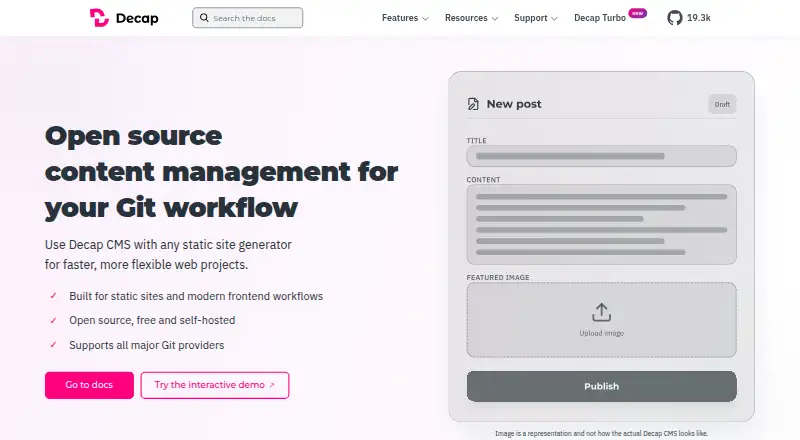
Decap CMS is an open-source content management system for teams building Git-backed static sites. Its web editor gives non-technical contributors structured fields, rich text and live preview, while draft, review and publish states support an editorial workflow. Content remains in the user’s repository, alongside version history, branch workflows and deployment checks. It connects to backends such as GitHub, GitLab, Gitea, Bitbucket and Azure, as well as Git Gateway, proxy and test backends. The media library can work with Cloudinary, Uploadcare or custom integrations. Users can define collections, nested structures, relation fields and slug behavior; developers can add widgets, editor components and plugins. The CMS is MIT-licensed and self-hosted, with users supplying authentication and a backend. The Free plan includes one site and one seat. Pro is €19 / month, then €10/site and €6/seat per month for additions. Deploy notifications currently support GitHub-hosted sites; GitLab support is on the roadmap.
Who it suits
It suits publishers, editors and developers who want to manage content in their own repository and use Git-based workflows. It is designed for static and Jamstack sites, including Hugo, Next.js, Gatsby and Jekyll workflows.
What it does well
- Web editor includes structured fields, rich text and live preview.
- Content supports draft, review and publish statuses.
- Repository content includes version history and branch workflows.
- Developers can add widgets, editor components and plugins.
What to know first
- Users must provide their own authentication and backend.
- Deploy notifications currently support GitHub-hosted sites.
- Free plan includes one site and one seat.
Plans
| Plan | Billed and limits | Price |
|---|---|---|
| Free | Free forever; billed monthly where applicable · 1 site · 1 seat · Faster CMS · Git host request shielding · Activity log · Deploy notifications · Community support | Free |
| Pro | €19 / month; then €10/site · €6/seat per month; billed monthly · 1 site · 5 seats · Extra sites €10/site/month · Extra seats €6/seat/month · Site variables and secrets · S3-compatible media library · Custom roles and priority support are add-ons | €19 a month |
| Enterprise | Custom; billed monthly · Unlimited sites and seats · Unlimited usage · Custom/granular roles included · Dedicated support and SLA | On request |
As decapcms.org lists them, read 30 Sept 2026. The maker's own page has the final word.
Decap CMS is an open-source editor for publishing content through Git-backed static sites. It is best suited to publishers and developers who want contributors to edit in a browser while keeping content and its history in a repository. Choose it for that control and workflow flexibility; look elsewhere if you need hosting, authentication, and a backend supplied as part of a managed service.
Overview
The editor gives non-technical contributors structured fields, rich text, and live preview, with a path from draft through review to publication. Meanwhile, content remains in the user's repository, where teams can use version history, branches, and deployment checks. This division works well when developers can shape and maintain the publishing setup, but puts infrastructure responsibility on the team rather than the product.
Decap CMS targets Git-backed static and Jamstack sites, including Hugo, Next.js, Gatsby, and Jekyll workflows. Collections, nested structures, relation fields, and slug rules let developers fit the content model to a site; custom widgets, editor components, and plugins allow further extension. That flexibility is useful for tailored publishing, though it makes the product a less direct fit for organizations seeking a turnkey CMS.
Key features
Editorial workflow in Git
Draft, review, and publish statuses provide a straightforward editorial sequence. Repository history and branch workflows preserve a familiar development process, and deployment checks connect content changes to delivery. Teams that already work in Git gain a coherent publishing path; teams without that practice may find the repository-centered approach more demanding than a hosted editor.
Backends and media
Supported backends include GitHub, GitLab, Gitea, Bitbucket, Azure, Git Gateway, proxy, and test backends. The range gives developers options for connecting the editor to their Git environment, but they still need to supply authentication and a backend. A media library is included, with integrations for Cloudinary, Uploadcare, or custom services. Decap Turbo encrypts site variables marked as secrets at rest.
One limitation matters for teams choosing a Git host: Decap Turbo deploy notifications currently work for GitHub-hosted sites, while GitLab support is on the roadmap. Teams relying on GitLab should account for that constraint before choosing this workflow.
Pricing
The CMS is MIT-licensed, free, and self-hosted. Decap Turbo adds paid plans, with a 14-day trial and monthly billing for its paid offering.
| Plan | Price | What it includes |
|---|---|---|
| Free | Free forever | One site and one seat, Faster CMS, Git host request shielding, activity log, deploy notifications, and community support. |
| Pro | €19 / month, billed monthly | One site and five seats, site variables and secrets, and S3-compatible media library. Extra sites cost €10/site/month and extra seats €6/seat/month. Custom roles and priority support are add-ons. |
| Enterprise | Custom pricing | Fair-use unlimited sites and seats, custom or granular roles, SSO/SAML, dedicated support, and an SLA. |
The free Turbo tier is suitable for a single-site, single-seat setup, but its seat and site caps make it restrictive for a growing team. Pro raises the allowance to five seats and adds variables, secrets, and S3-compatible media; the per-site and per-seat charges apply beyond those included limits. Enterprise is the better fit for organizations needing SSO/SAML, broader role controls, and dedicated support, though its price is custom. The self-hosted CMS remains free, but users must still provide their own authentication and backend.
Platforms
Decap CMS is a self-hosted web application. Its Git-based design supports static and Jamstack publishing workflows rather than removing the need to operate the surrounding site and services.
Who it's for
Publishers, editors, and developers who want browser-based contribution without moving content out of their repository are the clearest audience. It is particularly suitable for teams already building with Git-backed static sites and able to manage the backend and authentication. Teams looking for an all-in-one hosted CMS with infrastructure handled for them should choose a different approach.
Pros and cons
- Repository ownership: Content and version history stay in Git, which suits teams that want repository-based control over publishing.
- Contributor-facing editor: Structured fields, rich text, live preview, and editorial statuses give non-technical contributors a defined way to prepare and review content.
- Adaptable setup: Multiple backends, configurable content structures, and extension points suit varied Git-backed static-site workflows.
- Self-hosting burden: Users must bring authentication and a backend, so teams seeking managed infrastructure will need another product.
- GitHub-only deploy notifications: The current limitation leaves GitLab-hosted teams without that notification support in Decap Turbo.
- Turbo plan limits: Free covers one site and one seat; Pro includes five seats and one site, with extra usage charged per seat and site.
Alternatives
- Quiqr is a free, open-source alternative for readers who want a free option across Linux, macOS, Windows, self-hosted, or web platforms.
- deco CMS may suit readers looking for an open-source, self-hostable CMS with a free core.
- Mattrbld is another free option, with web, mobile, and self-hosted platforms.
- Dhub is worth considering for a web-based GitHub workflow; its free Hobby plan is limited to one user, personal GitHub accounts, public repositories, and editing the default branch.
- HugoCMS may be a better fit for readers seeking a free, open-source option per domain with multilingual support and unlimited updates.
- Keystatic is an alternative for teams looking for a free plan that supports up to three users per team.
- Kiln offers a free, open-source self-hosted option, but its users run the worker and GitHub App and provide the site host.
- Netlify is an alternative for readers comparing a broader web platform with a free tier that includes 300 credits per month, one concurrent build, and one team owner.
Readers comparing categories can also browse Git-Based CMS and Content Management Systems.
Verdict
Decap CMS is a strong choice for publishers and development teams that want an editorial interface while keeping content, history, and workflow in Git. Its core is free and extensible, and Decap Turbo adds defined team plans. The decisive trade-off is operational: you supply the backend and authentication, and GitLab-hosted teams currently miss Turbo deploy notifications. Choose it when repository ownership matters more than a managed setup; look elsewhere when you want the CMS to handle that infrastructure.
Verdict
Decap CMS combines a contributor-friendly web editor with repository-based content and workflow controls. Its self-hosted setup means users need to supply authentication and a backend.
Facts from Decap CMS's own pages
- Content modeling
- Users can define collections, nested structures, relation fields, and slug behavior. · decapcms.org, 30 Sept 2026
- Editor
- It provides a web editor with structured fields, rich text, and live preview for non-technical contributors. · decapcms.org, 30 Sept 2026
- Editorial workflow
- Content can move through draft, review, and publish statuses. · decapcms.org, 30 Sept 2026
- Extensibility
- Developers can extend the editor with custom widgets, editor components, and plugins. · decapcms.org, 30 Sept 2026
- Free plan
- Yes · decapcms.org, 20 Sept 2026
- Git-based content
- Content stays in the user's repository with version history, branch workflows, and deployment checks. · decapcms.org, 30 Sept 2026
- Headquarters
- Ljubljana, Slovenia · decapcms.org, 28 Sept 2026
- Integrations
- Backends include GitHub, GitLab, Gitea, Bitbucket, Azure, Git Gateway (Netlify), proxy, and test backends. · decapcms.org, 30 Sept 2026
- Intended users
- The project describes Decap CMS as a content system for publishers, editors, and developers who want to own their content and keep it in their repository. · decapcms.org, 30 Sept 2026
- License and hosting
- Decap CMS is MIT-licensed, free, and self-hosted; users bring their own authentication and backend. · decapcms.org, 30 Sept 2026
- Media
- The CMS includes a media library and can integrate with Cloudinary, Uploadcare, or custom integrations. · decapcms.org, 30 Sept 2026
- Notable limitation
- Decap Turbo deploy notifications are currently available for GitHub-hosted sites, with GitLab support on the roadmap. · decapcms.org, 30 Sept 2026
- Product
- Decap CMS is an open-source content management system for Git workflows and static sites. · decapcms.org, 30 Sept 2026
- Security
- Decap Turbo site variables marked as secrets are encrypted at rest. · decapcms.org, 30 Sept 2026
- Site compatibility
- It is designed for Git-backed static and Jamstack architectures, including Hugo, Next.js, Gatsby, and Jekyll workflows. · decapcms.org, 30 Sept 2026
- Support
- The Decap CMS project offers community support; Decap Turbo Enterprise includes dedicated support and an SLA. · decapcms.org, 30 Sept 2026
Where Decap CMS stands on Freedom251
- Content Management Systems#45 of 165
- Git-Based CMS#7 of 23