
Dhub
What Dhub is
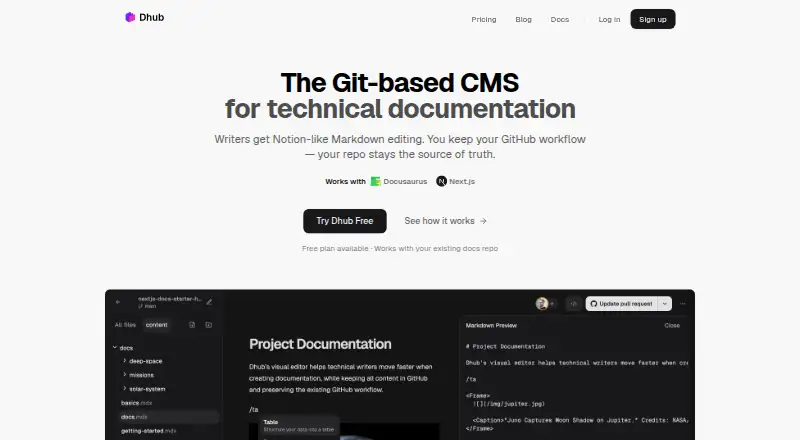
Dhub is a Git-based content management system for technical documentation stored as Markdown or MDX in GitHub repositories. Its visual editor lets contributors edit without learning Markdown syntax, while team members can work together in real time without each needing a GitHub account. Dhub can push changes, create pull requests, and pull the latest content from GitHub. It works with projects using Docusaurus, Next.js, TanStack Start, Astro, Hugo, VitePress, and Fumadocs. The editor handles image uploads, paths, and storage. Teams can rearrange a documentation sidebar visually, with Dhub saving the structure to navigation.json; Docusaurus and Fumadocs require an adapter for this feature. Pull-request changes from teammates or AI agents can appear as page highlights for review. The free Hobby plan is for personal, non-commercial use, and is limited to personal GitHub accounts, public repositories, and pushing to the default branch. Paid plans start at $16/mo, and a 14-day trial is listed. The Business plan includes onboarding and priority support.
Who it suits
Dhub suits teams maintaining product docs, help centers, or knowledge bases in Markdown or MDX files in GitHub repositories. Its free Hobby plan is limited to personal, non-commercial projects with public repositories and default-branch pushes.
What it does well
- Visual editing without Markdown syntax
- Real-time collaboration without every editor needing GitHub
- Works with several named Markdown and MDX frameworks
- Highlights pull-request changes for visual review
What to know first
- Hobby is limited to personal, non-commercial use
- Hobby supports only public repositories
- Docusaurus and Fumadocs need an adapter for sidebar rearrangement
Limits
The Hobby plan is for personal, non-commercial use, works only with personal GitHub accounts and public repositories, and allows pushes only to the default branch. Paid plans start at $16/mo; the listed trial lasts 14 days.
Plans
| Plan | Billed and limits | Price |
|---|---|---|
| Hobby | 1 user · Personal GitHub accounts only · Public repositories only · Edit and push to your default branch | Free |
| Business | Billed $3,588 $2,990 / year · Unlimited seats · Onboarding call and priority support · Help with migration and custom MDX components | $249 a month |
| Pro | Billed $588 $490 / year · 3 seats included · Additional seats $100/seat/year · GitHub Organizations and private repositories · Branches and pull requests · Visual review · Real-time collaboration | $41 a month |
As dhub.dev lists them, read 7 Oct 2026. The maker's own page has the final word.
Getting started
- Open https://dhub.dev/ in a web browser.
- Choose the free Hobby plan or review paid plans starting at $16/mo.
- Use the 14-day trial if you want to try the service before paying.
- Connect a GitHub repository containing a Markdown or MDX project.
- Edit documentation visually and sync changes with GitHub.
Dhub is a visual CMS for technical documentation stored as Markdown or MDX in GitHub. It is best suited to teams that want a shared editing and review layer without moving docs out of their repository. Its main trade-off is that the free plan is restricted to personal, non-commercial use.
Overview
Dhub connects visual editing to a GitHub-based documentation workflow for product docs, help centers, and knowledge bases. Contributors can update content without writing Markdown syntax, while repository changes remain part of the team’s GitHub process. That combination is useful when documentation ownership extends beyond engineers, but less compelling for teams that do not keep Markdown or MDX content in GitHub.
The gap between Hobby and paid plans matters: Hobby is limited to personal GitHub accounts, public repositories, and pushes to the default branch. Teams needing private repositories or branch-based review will have to pay for Pro or Business.
Key features
Visual editing and GitHub sync
Dhub presents Markdown and MDX visually, lowering the syntax barrier for contributors making routine documentation edits. Users can push changes, create pull requests, and pull the latest changes from GitHub. This preserves a Git-centered workflow, though the Hobby plan’s default-branch-only limit means it does not provide the fuller review process teams may want.
Collaboration and visual review
Team members can edit together in real time without each having a GitHub account. Dhub can also show pull-request changes from teammates or AI agents as highlights on the relevant pages. Together, these features make it easier to review documentation in context rather than relying only on a source diff.
Frameworks, images, and navigation
Dhub works with Markdown or MDX projects including Docusaurus, Next.js, TanStack Start, Astro, Hugo, VitePress, and Fumadocs. Its image tools handle uploads, file paths, and storage in the editor, reducing the need to manage image references separately. Users can rearrange a documentation sidebar visually, with the structure saved to navigation.json; Docusaurus and Fumadocs need an adapter for that feature.
Pricing
Dhub is freemium, with a 14-day trial and paid plans starting at $16/mo. The published plan terms show:
- Hobby: free. It allows one user, personal GitHub accounts, public repositories, and editing and pushing to the default branch. Its personal, non-commercial restriction makes it suitable for an individual project, not a team evaluating Dhub against a private or commercial documentation setup.
- Pro: $41 a month, billed Billed $588 $490 / year. It includes three seats, with additional seats at $100/seat/year, plus GitHub Organizations, private repositories, branches and pull requests, visual review, and real-time collaboration. This is the relevant tier for most teams that need a shared GitHub workflow; the annual billing figures and extra-seat charge are worth factoring into the budget.
- Business: $249 a month, billed Billed $3,588 $2,990 / year. It includes unlimited seats, an onboarding call, priority support, migration help, and custom MDX components. The higher tier is aimed at larger teams or those who need implementation support and customization, rather than simply more editing seats.
The free plan’s one-user and repository restrictions are substantial, while Pro’s three included seats mean larger groups must account for extra-seat costs or consider Business. The listed annual billing terms should be checked against the team’s preferred payment cadence before choosing a plan.
Platforms
Dhub is available on the web. It supports GitHub as its Git provider and is vendor-hosted, with both deployment methods supported.
Who it's for
Dhub is a strong fit for teams maintaining Markdown or MDX documentation in GitHub that want non-developers to contribute, collaborative editing, and page-level review of pull-request changes. It is not a good fit for teams seeking an unrestricted free team plan, working outside GitHub, or needing sidebar navigation editing for Docusaurus or Fumadocs without an adapter.
Dhub’s privacy policy says it processes data under GDPR and applicable Lithuanian and EU data-protection law, uses industry-standard technical and organisational safeguards, accesses repository content and metadata within granted GitHub permissions for editing and sync, and does not sell personal data.
Pros and cons
Pros
- Visual Markdown and MDX editing: lets contributors make documentation changes without learning source syntax.
- Shared work without universal GitHub accounts: real-time collaboration can include team members who do not each have GitHub accounts.
- Review tied to pages: pull-request changes from teammates or AI agents can appear as page highlights.
- Integrated image handling: uploads, storage, and file paths are managed in the editor.
Cons
- Hobby is tightly limited: one user, personal accounts, public repositories, default-branch pushes, and personal non-commercial use exclude many team projects.
- Team use costs more: Pro has three seats and charges $100/seat/year for additional seats; Business is the higher-priced unlimited-seat option.
- Some navigation support needs an adapter: Docusaurus and Fumadocs require one for visual sidebar rearrangement.
Alternatives
Explore the Git-Based CMS category to compare more repository-oriented content tools.
- Quiqr is a free, open-source option for readers who want a free-forever product with Linux, macOS, Windows, web, and self-hosted availability.
- deco CMS may suit readers who prefer an open-source, self-hostable CMS with a free core.
- Mattrbld is another free option, with Android, iOS, web, and self-hosted availability; its hosted instance is intended for small-scale private projects and has no availability guarantee.
- Decap CMS is a free, self-hosted web option for readers whose needs fit its one-site, one-seat free plan.
- HugoCMS offers a free, open-source plan per domain with multilingual support and unlimited updates, making it worth considering for those requirements.
- Keystatic is a free alternative with up to three users per team and unlimited teams.
- Kiln offers a free, open-source self-hosted plan for teams prepared to run the worker and GitHub App and provide their own site host.
- Netlify may suit readers looking for a broader web platform, with a free plan that includes 300 credits per month, one concurrent build, and one team owner.
Verdict
Choose Dhub if your team keeps Markdown or MDX documentation in GitHub and wants visual editing, real-time collaboration, and page-focused pull-request review in one workflow. Its clearest advantage is making repository-based docs more accessible to contributors; look elsewhere if you need a genuinely team-ready free tier, a different Git provider, or unrestricted navigation support for Docusaurus and Fumadocs.
Verdict
Dhub combines visual documentation editing with GitHub sync and team review workflows. Its free plan has narrow personal-use limits, so teams should consider the listed paid plans and trial.
Questions
Is Dhub free?
Yes. Its Hobby plan is free for personal, non-commercial use.
What does the Hobby plan allow?
It is limited to personal GitHub accounts, public repositories, and pushing to the default branch.
How much do paid plans cost?
Paid plans start at $16/mo. A 14-day trial is also listed.
Which platforms does Dhub support?
Dhub is available on the web.
Which frameworks can Dhub work with?
It supports Markdown or MDX projects, including Docusaurus, Next.js, TanStack Start, Astro, Hugo, VitePress, and Fumadocs.
Does Dhub support GitHub organizations and private repositories?
The Pro plan lists GitHub Organizations and private repositories. The Hobby plan is limited to personal GitHub accounts and public repositories.
Facts from Dhub's own pages
- AI review
- Dhub can display changes in pull requests from teammates or AI agents as page highlights for visual review. · dhub.dev, 7 Oct 2026
- Audience
- Dhub is for teams with documentation in Markdown or MDX files in GitHub repositories, including product docs, help centers, and knowledge bases. · dhub.dev, 7 Oct 2026
- Collaboration
- Team members can edit together in real time without each needing a GitHub account. · dhub.dev, 7 Oct 2026
- Data handling
- The privacy policy says repository content and metadata are accessed within granted GitHub permissions for editing and sync, and that Dhub does not sell personal data. · dhub.dev, 7 Oct 2026
- Editing
- The editor presents Markdown and MDX content visually so contributors can edit without learning Markdown syntax. · dhub.dev, 7 Oct 2026
- Frameworks
- Dhub works with Markdown or MDX projects, including Docusaurus, Next.js, TanStack Start, Astro, Hugo, VitePress, and Fumadocs. · dhub.dev, 7 Oct 2026
- GitHub sync
- Dhub lets teams push changes, create pull requests, and pull the latest changes from GitHub. · dhub.dev, 7 Oct 2026
- Image management
- Users can upload and manage images in the editor, which handles file paths and storage. · dhub.dev, 7 Oct 2026
- Navigation
- Users can visually rearrange a docs sidebar, with Dhub saving its structure to navigation.json; Docusaurus and Fumadocs require an adapter for this feature. · dhub.dev, 7 Oct 2026
- Plan limits
- The Hobby plan is for personal, non-commercial use and is limited to personal GitHub accounts, public repositories, and pushing to the default branch. · dhub.dev, 7 Oct 2026
- Privacy and security
- The privacy policy says Dhub processes data under GDPR and applicable Lithuanian and EU data protection law, and describes its safeguards as industry-standard technical and organisational measures. · dhub.dev, 7 Oct 2026
- Product
- Dhub is a Git-based content management system with a visual Markdown and MDX editor for technical documentation. · dhub.dev, 7 Oct 2026
- Support
- The Business plan includes an onboarding call and priority support. · dhub.dev, 7 Oct 2026
Where Dhub stands on Freedom251
- Git-Based CMS#9 of 23