Freedom251 › AI Email Assistants
Kerna
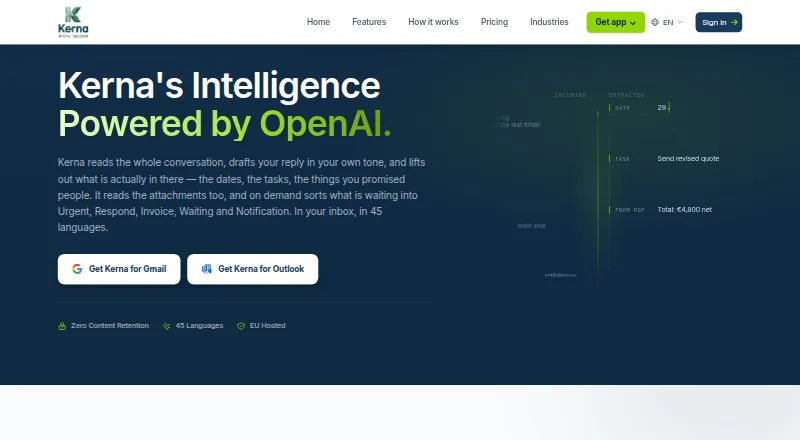
What Kerna is
Kerna is an AI email assistant that works inside Gmail and Outlook, with a free Starter plan and paid plans from €12/mo. When asked, it sorts open messages into categories such as Urgent, Respond, Invoice, Waiting, and Notification; users can also set custom categories and industry taxonomies. It drafts replies using the full email thread, with controls for intent and tone. Kerna creates structured summaries of threads up to 50 messages, summarizes attachments, and extracts selected fields into tables that can be exported. Translation covers inbound messages and outbound replies in 45 languages.
Integrations include Gmail, Outlook, Calendar, Contacts, and Sheets; shared Outlook mailboxes are listed on the pricing page. Kerna says it processes content only when a user initiates an action, rather than scanning inboxes in the background. It says email content is processed in memory and discarded after the request, with personal data redacted before it reaches the inference provider. Its trust information reports TLS 1.2 or higher in transit and AES-256 encryption at rest in Firestore. Outlook requires a Microsoft-hosted mailbox; POP or IMAP connections and on-premises Exchange mailboxes are unsupported.
Who it suits
It suits professionals who want email drafting, triage, summaries, or translation within Gmail or Outlook. Outlook users need a Microsoft-hosted mailbox; POP, IMAP, and on-premises Exchange are unsupported.
What it does well
- Sorts open messages into built-in or custom categories.
- Drafts replies with intent and tone controls.
- Summarizes threads up to 50 messages.
- Translates messages and replies in 45 languages.
- Processes content only after a user action.
What to know first
- Outlook requires a Microsoft-hosted mailbox.
- POP and IMAP connections are unsupported.
- On-premises Exchange mailboxes are unsupported.
- Starter provides 30,000 tokens as trial volume.
Limits
Starter is free and includes 30,000 tokens. Standard costs €12.00 per month and includes 500,000 tokens; both plans have a single-user license.
Plans
| Plan | Billed and limits | Price |
|---|---|---|
| Starter | 30,000 Tokens (Trial Volume) · GPT-5.6 · All features · Single User License | Free |
| Standard | Monthly · 500,000 Tokens (Standard Usage) · GPT-5.6 · All features · Single User Only | €12 a month |
| Pro | Monthly · 1,000,000 Tokens (Power Usage) · GPT-5.6 · All features · Single User Only | €22 a month |
| Enterprise | Monthly · 50,000,000 Tokens (Shared Pool) · Includes 25 Team Seats · Processing Log + CSV Export · Priority Contact | €499 a month |
| Business | Monthly · 7,500,000 Tokens (Shared Pool) · Includes 5 Team Seats · Shared Prompts & Billing · No Wasted Credits | €69 a month |
As kerna.io lists them, read 29 Sept 2026. The maker's own page has the final word.
Getting started
- Open the Kerna website.
- Choose the free Starter plan or a paid plan.
- Connect Gmail or a Microsoft-hosted Outlook mailbox.
- Use Kerna inside the email workflow to start a triage, draft, summary or translation action.
Kerna is an AI email assistant for Gmail and Outlook, aimed at professionals who want help handling messages without handing over continuous inbox scanning. Its range of tools is a strong fit for deliberate, user-triggered work; token caps and Outlook’s mailbox requirements narrow its appeal.
Overview
Kerna combines inbox sorting, reply drafting, thread and attachment summaries, and translation. Users start each action themselves, so it is better for people who want assistance on demand than for those seeking automatic, unattended inbox management.
For privacy, Kerna says it processes email in memory, discards it after the request, and redacts personal data before sending content to its inference provider. It reports TLS 1.2 or higher in transit and AES-256 encryption at rest in Firestore. Its Gmail add-on has CASA Tier 2 validation. The Microsoft Publisher Attestation is a self-assessment, not independent verification or Microsoft 365 Certification.
Key features
Triage and replies
On request, Kerna sorts open messages into Urgent, Respond, Invoice, Waiting, and Notification. Custom categories and industry taxonomies offer room to adapt the sorting to a particular workflow. This is useful for prioritizing a mailbox, but it remains a user-initiated step rather than background automation.
Reply drafts draw on the full thread history, with controls for intent and tone and support for custom instructions. That context is more useful than drafting from a bare prompt when a conversation has accumulated detail, though users still need to review the resulting reply.
Summaries, attachments, and translation
Kerna can create structured summaries of threads up to 50 messages, summarize attachments, and extract selected fields into tables that can be exported to files. Those capabilities suit people who regularly need to scan long correspondence or turn attachment details into structured information. Translation covers inbound messages and outbound replies in 45 languages.
Integrations include Gmail, Outlook, Calendar, Contacts, and Sheets. Shared Outlook mailboxes are included in the pricing features. Kerna is listed for macOS, web, and Windows, and supports both major mail clients; Outlook requires a Microsoft-hosted mailbox. POP or IMAP connections and on-premises Exchange mailboxes are unsupported, a meaningful constraint for organizations with those setups.
Pricing
Kerna is freemium, but its free tier is a 30,000-token trial volume rather than an ongoing high-capacity plan. All five plans use GPT-5.6; the paid individual tiers retain all features and differ chiefly in token allowance.
- Starter: free, with 30,000 tokens and a single-user license. It is a way to try the full feature set, but its trial volume makes it unsuitable for sustained use.
- Standard: €12 a month, billed monthly, with 500,000 tokens and one user. This is the lowest-cost paid choice for an individual with moderate usage; it does not add team seats.
- Pro: €22 a month, billed monthly, with 1,000,000 tokens and one user. It doubles Standard’s token allowance, making it the more suitable individual tier when the lower quota is restrictive.
- Business: €69 a month, billed monthly, with a shared pool of 7,500,000 tokens, five team seats, and shared prompts and billing. It is the first listed plan designed for a small team rather than a single user.
- Enterprise: €499 a month, billed monthly, with a shared pool of 50,000,000 tokens and 25 seats, plus processing logs with CSV export and priority contact. Its much larger pool and administrative features target larger organizations.
The individual plans’ single-user licenses mean a team cannot treat Standard or Pro as shared seats. The paid plans are billed monthly, and the token pools—not separate per-action counts—are the stated usage limits.
Platforms
Kerna is available on macOS, web, and Windows, with mail-client support for Gmail and Outlook. Outlook users should confirm that their account is Microsoft-hosted: Kerna does not support POP or IMAP connections or on-premises Exchange mailboxes.
Who it's for
Kerna is best suited to professionals who want one assistant for triage, context-aware drafting, summarization, attachment extraction, and translation, and who are comfortable initiating each task. Business and Enterprise suit teams that need shared token capacity and billing; Enterprise adds processing logs and CSV export. It is a weaker fit for users who expect automatic inbox scanning or rely on unsupported Outlook mailbox types.
Pros and cons
- Pro: A broad set of email tasks, including attachment extraction to exportable tables, is available across the plans.
- Pro: Drafts use the full thread and offer intent, tone, and custom-instruction controls.
- Pro: Shared pools, prompts, and billing give teams a path beyond single-user licenses.
- Con: Processing only starts when the user acts, so Kerna will not continuously sort an inbox for them.
- Con: Outlook support excludes POP and IMAP connections and on-premises Exchange mailboxes.
- Con: The free plan’s 30,000 tokens are explicitly trial volume, while ongoing usage is constrained by plan token pools.
Alternatives
For a free email writer with no signup requirement and no ads, consider WPS AI Email Writer; it is available on mobile and desktop platforms as well as the web, but Kerna covers a wider set of inbox tasks.
WriteMail.ai is an alternative for readers who prefer monthly plans framed around counts of AI emails, from 50 per month at 6.95 USD to 500 at 19.95 USD. Choose Kerna instead when triage, summaries, attachment extraction, or translation matter alongside drafting.
AI Perfect Assistant may suit readers seeking a tool with Microsoft 365, Chrome, and Telegram integrations; its free tier provides 10 tokens per month. Kerna is the stronger match for the stated Gmail and Outlook workflow and its email-specific features.
Ellie offers a free tier with 10 draft replies per day, one connected email account, and one team seat; choose it when those drafting limits fit better than Kerna’s token-based plans.
ForthWrite is another option for drafting, with a free tier of 10 drafts per week and Gmail and Outlook on the web. Kerna is a better fit when inbox triage, attachment work, and translation are also priorities.
GPT for Gmail is an alternative for readers specifically seeking a Gmail-focused tool.
Flailo has a free Starter tier capped at 50 emails per month and a 29.00 USD monthly Pro plan; it may suit readers who prefer an email-count allowance.
Jetwriter AI offers a free tier with 15 regular-model responses per month and a browser extension; consider it when that extension and response-based free allowance are the priorities.
Browse more AI Email Writing Tools or AI Email Assistants.
Verdict
Choose Kerna if you want a single Gmail or Outlook assistant for user-triggered triage, thread-aware drafting, summaries, attachment extraction, and multilingual translation, with team plans available when one seat is not enough. Look elsewhere if you need unattended inbox processing or an Outlook connection through POP, IMAP, or on-premises Exchange.
Verdict
Kerna brings triage, drafting, summaries, and translation into Gmail and Outlook, with user-triggered processing. Its Outlook mailbox requirements and token volumes are important to consider before choosing a plan.
Questions
Is Kerna free?
Yes. Starter is free and includes a 30,000-token trial volume with all features for one user.
What do the paid plans cost?
Standard is €12.00 per month with 500,000 tokens, and Pro is €22.00 per month with 1,000,000 tokens. Business is €69.00 per month for 7,500,000 shared tokens and five team seats; Enterprise is €499.00 per month for 50,000,000 shared tokens and 25 team seats.
Which email services does Kerna support?
Kerna works inside Gmail and Outlook. Outlook requires a Microsoft-hosted mailbox; POP or IMAP connections and on-premises Exchange mailboxes are unsupported.
Which platforms are available?
Kerna lists macOS, Windows and web platforms.
What integrations are listed?
Kerna lists Gmail, Outlook, Calendar, Contacts and Sheets. Shared Outlook mailboxes are listed on its pricing page.
How does Kerna handle email content?
Kerna says it processes content only after a user initiates an action, processes it in memory and discards it after the request. It says personal data is redacted before content reaches the inference provider.
Facts from Kerna's own pages
- Assurance
- Kerna reports CASA Tier 2 validation for its Gmail add-on and describes Microsoft Publisher Attestation as a self-assessment, not an independent verification or Microsoft 365 Certification. · kerna.io, 29 Sept 2026
- Attachments
- Kerna summarizes attachments and extracts selected fields into tables that can be exported to files. · kerna.io, 29 Sept 2026
- Email drafting
- Kerna drafts context-aware replies using the full thread history and lets users choose an intent and tone. · kerna.io, 29 Sept 2026
- Headquarters
- Katowice, Poland · kerna.io, 28 Sept 2026
- Inbox triage
- On request, Kerna sorts open messages into Urgent, Respond, Invoice, Waiting and Notification, with custom categories and industry taxonomies available. · kerna.io, 29 Sept 2026
- Integrations
- Kerna integrates with Gmail, Outlook, Calendar, Contacts and Sheets, and the pricing page lists shared mailboxes for Outlook. · kerna.io, 29 Sept 2026
- Intended users
- Kerna describes itself as email automation for professionals and offers team plans for collaboration and larger organizations. · kerna.io, 29 Sept 2026
- Languages
- Kerna offers translation in 45 languages for inbound messages and outbound replies. · kerna.io, 29 Sept 2026
- Outlook requirements
- Outlook requires a Microsoft-hosted mailbox; POP or IMAP connections and on-premises Exchange mailboxes are unsupported. · kerna.io, 29 Sept 2026
- Privacy
- Kerna says email content is processed in memory and discarded after the request, with personal data redacted before content reaches the inference provider. · kerna.io, 29 Sept 2026
- Product
- Kerna is an AI email assistant that works inside Gmail and Outlook. · kerna.io, 29 Sept 2026
- Security
- The trust page reports TLS 1.2 or higher in transit and AES-256 encryption at rest in Firestore. · kerna.io, 29 Sept 2026
- Summaries
- Kerna creates structured summaries of email threads, with the About page specifying threads of up to 50 messages. · kerna.io, 29 Sept 2026
- User control
- Kerna says it only processes content when a user initiates an action and does not scan the inbox in the background. · kerna.io, 29 Sept 2026
Where Kerna stands on Freedom251
- AI Email Assistants#5 of 46
- AI Email Writing Tools#9 of 28