Ellie
What Ellie is
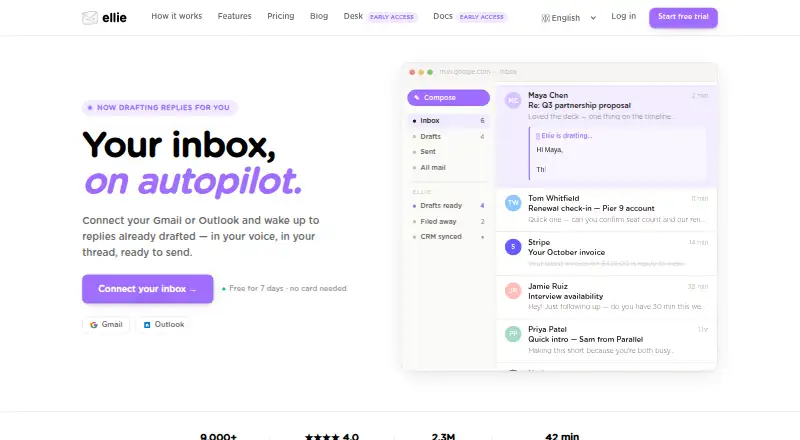
Ellie is an AI email assistant that prepares reply drafts using email-thread context and learns tone, sign-offs, and writing patterns from sent mail. When connected to Gmail or Outlook, it can categorize incoming messages and save draft replies for review; it does not send emails without the user reviewing and sending them. Users can add website addresses or upload PDFs, TXT, DOCX, PPTX, or MD files as factual context. Roles let users configure different personas, knowledge bases, and tones for different email types. Ellie is available on the web, through browser extensions, and on Windows. Extensions are listed for Chrome, Firefox, and Microsoft Edge, and a native Outlook desktop add-in is also available. The Free plan costs nothing and allows 10 draft replies per day, one connected account, and one team seat, with no auto-drafts. Casual costs $19 a month and allows 25 replies per day; Business costs $39 a month and includes auto-drafts and auto-categorization; Professional costs $79 a month and allows unlimited replies per day. Email content is processed by OpenAI and/or Azure OpenAI, and Ellie says it does not use email data to train general models.
Who it suits
Ellie suits people using Gmail or Outlook who want help drafting replies while retaining approval and sending control. Its roles and reference materials may help users who handle different kinds of email.
What it does well
- Drafts replies using thread context
- User reviews and sends each email
- Supports different tones through roles
- Browser extensions and Outlook desktop add-in
What to know first
- Free plan has no auto-drafts
- Free plan allows 10 replies per day
- Email content is processed by OpenAI and/or Azure OpenAI
Limits
The free plan allows 10 draft replies per day, one connected email account, and one team seat, and it has no auto-drafts. Casual allows 25 replies per day and one connected account; Business allows 100 replies per day and one connected account per user. Professional offers unlimited daily replies and up to three connected accounts per user.
Plans
| Plan | Billed and limits | Price |
|---|---|---|
| Free | 10 draft replies/day · no auto-drafts · 1 connected email account · 1 team seat | Free |
| Casual | $ 19 /monthly · 25 replies/day · browser extension · 200 sent-email training examples · 1 connected account | $19 a month |
| Business | $ 39 /monthly · 100 replies/day · auto-draft · auto-categorise · 3 seats included · 1 connected account per user | $39 a month |
| Professional | $ 79 /monthly · Unlimited replies/day · up to 3 connected accounts per user · custom team seats | $79 a month |
As tryellie.com lists them, read 30 Sept 2026. The maker's own page has the final word.
Getting started
- Visit https://tryellie.com/.
- Choose the Free plan or a paid plan.
- Connect a Gmail or Outlook account.
- Use Ellie on the web, install a listed browser extension, or get the Outlook desktop add-in through Microsoft AppSource.
- Add reference website URLs or supported documents and configure roles or tone controls if needed.
Ellie is an AI email assistant for people who want help drafting replies in Gmail or Outlook. It is best suited to users who value personalized drafts and want to approve every message themselves; the main trade-off is that its richer automation requires a paid plan.
Overview
Ellie uses email-thread context to draft replies and learns tone, sign-offs, and writing patterns from sent mail. On Business and higher plans, it can also categorize incoming messages and save drafts for review. It never sends email without the user reviewing and sending it, so it can reduce composition work but does not remove the final inbox decision.
Users can add website URLs and upload PDF, TXT, DOCX, PPTX, or MD files as factual context. Roles let them use different personas, knowledge bases, and tones for different kinds of email; tone controls and custom instructions offer further direction. This flexibility can help when writing needs vary by task, though it makes setup part of getting useful drafts.
Ellie supports connected Gmail and Outlook accounts, with on-demand drafting in Gmail Web and Outlook Web. Its optional Google Calendar integration is read-only and cannot change events or send invitations. When Google Tasks is enabled, Ellie can create follow-up tasks in a list named Ellie. Ellie says it encrypts data in transit and at rest, has completed a Google CASA Tier 2 security review, and runs regular automated vulnerability scans. Email content is processed by OpenAI and/or Azure OpenAI; Ellie says it does not use email data to train general models.
Key features
- Personalized replies: Thread context and patterns learned from sent mail help shape drafts. This is more tailored than a blank prompt, but the user still needs to review and send each reply.
- Auto-drafts and categorization: Business and Professional can read incoming mail, categorize it, and save draft replies. These features are absent from Free and Casual, making the upgrade most relevant to people who want suggestions prepared before opening a message.
- Knowledge and roles: Website URLs and common document formats can supply context, while roles separate personas and tones. These tools suit people with different writing needs or reference material; they are less useful if straightforward replies need no extra context.
- Follow-up integrations: Google Tasks can receive follow-up tasks. Calendar access is limited to reading, so Ellie is not a calendar-management tool.
- Human control: Ellie never sends email without approval. That is a clear safeguard, but users seeking fully autonomous sending will need another approach.
Pricing
The Free plan costs nothing and includes 10 draft replies per day, one connected email account, and one team seat. It has no auto-drafts. That makes it a useful way to try on-demand drafting, but the daily cap and lack of automation constrain regular inbox use.
Casual costs $19 a month (billed $ 19 /monthly). It raises the allowance to 25 replies per day and adds the browser extension and training from 200 sent-email examples, while retaining one connected account. It fits an individual who wants more personalized, on-demand help, but not someone who needs Ellie to prepare drafts automatically.
Business costs $39 a month (billed $ 39 /monthly). It includes 100 replies per day, auto-drafts, auto-categorization, and three seats, with one connected account per user. This is the clearest fit for a small team that wants incoming mail triaged into reviewable drafts. The daily quota still matters for heavy email volume.
Professional costs $79 a month (billed $ 79 /monthly). It offers unlimited replies per day, up to three connected accounts per user, and custom team seats. It suits users or teams whose account count, seat needs, or reply volume exceed Business; custom seats mean team size is not fixed in the stated package.
Ellie also offers a 7-day trial. The Free plan's one-seat limit and one-account cap make it less suitable for teams, while the paid plans remain limited to one account per user through Business. Consider the account and reply limits alongside the price, not just the automation features.
Platforms
Ellie is available as a web app and extension, with extensions for Chrome, Firefox, and Microsoft Edge. A native Outlook desktop add-in is available through Microsoft AppSource, and Windows is also supported. The combination suits people working in browser-based Gmail or Outlook as well as Outlook desktop users.
Who it's for
Ellie is a sensible choice for individuals or small teams who handle substantial email, want replies shaped by their own writing patterns, and are comfortable reviewing every draft. Business is the practical starting point for users who want auto-drafting and categorization; Casual is better for those who only need more on-demand replies. It is a weaker fit for anyone seeking an assistant that sends messages without approval or for a team that needs multiple connected accounts per user on the lower paid tiers.
Pros and cons
- Pro: Drafts draw on thread context and learned writing patterns, which can make assistance more relevant than generic reply generation.
- Pro: Website and document context plus role-based personas help users tailor replies to different kinds of work.
- Pro: The user retains the send decision, and Google Calendar access cannot alter events or send invitations.
- Con: Auto-drafts and categorization start at Business, so the lower-cost plans do not automate inbox preparation.
- Con: Free caps drafting at 10 replies per day and one account; Casual caps it at 25 replies per day and still allows only one account.
- Con: Email content is processed by OpenAI and/or Azure OpenAI, a consideration for people whose email workflows require different data handling.
Alternatives
AI Email Writing Tools is a directory of category options for readers who want to compare beyond Ellie.
- WPS AI Email Writer is worth considering if you want a free, unlimited email writer with no signup and no ads, rather than Ellie's capped free drafting and connected-account workflow.
- WriteMail.ai offers monthly plans with quotas of 50, 150, or 500 AI emails, making it an alternative for readers comparing a paid per-month email allowance.
- AI Perfect Assistant may suit readers looking for a free 10-token monthly option with Microsoft 365, Chrome, and Telegram integrations.
- Kerna is an option for readers comparing a free starter with a stated 30,000-token trial volume and single-user license, or a 12.00 EUR monthly Standard plan.
- ForthWrite may fit users wanting 10 free drafts per week in Gmail and Outlook on the web, with a free tier that excludes custom persona and auto-draft.
- GPT for Gmail is another option for readers seeking a Gmail-focused alternative.
- Demi is a Mac app alternative for readers who prefer a desktop app and a weekly morning digest.
- Flailo may suit readers seeking a web or API option with a free allowance of 50 emails per month.
Verdict
Choose Ellie if you want email drafts shaped by your own writing patterns and reference material, with the send decision firmly in your hands. Business is the strongest fit for a small team that wants auto-drafts and categorization; look elsewhere if you need automated sending, or if the account and reply caps on lower plans are too restrictive.
Verdict
Ellie can prepare email drafts and adapt them to a user's writing patterns while leaving sending under user control. Review the plan limits and note that email content is processed by OpenAI and/or Azure OpenAI.
Questions
Is Ellie free?
Yes. Its Free plan costs nothing and includes 10 draft replies per day, one connected email account, and one team seat.
What do paid plans cost?
Casual is $19 a month, Business is $39 a month, and Professional is $79 a month.
Which email accounts does Ellie support?
Ellie supports connected Gmail and Outlook accounts, and on-demand drafting in Gmail Web and Outlook Web.
Which platforms can I use?
Ellie is available on the web, Windows, and as a browser extension. Listed extensions include Chrome, Firefox, and Microsoft Edge; a native Outlook desktop add-in is also available.
Does Ellie send emails automatically?
No. Ellie saves drafts for review and does not send an email without the user reviewing and sending it.
How does Ellie handle email data?
Ellie says email content is processed by OpenAI and/or Azure OpenAI, encrypted in transit and at rest, and not used to train general models.
Facts from Ellie's own pages
- Auto-drafts
- When connected to Gmail or Outlook, Ellie reads incoming emails, categorises them, and saves draft replies for review. · help.tryellie.com, 30 Sept 2026
- Browser extensions
- The download page lists Chrome, Firefox, and Microsoft Edge extensions. · tryellie.com, 30 Sept 2026
- Calendar integration
- The optional Google Calendar integration is read-only and cannot create, modify, or delete events or send invitations. · tryellie.com, 30 Sept 2026
- Data processing
- Email content is processed by OpenAI and/or Azure OpenAI, and Ellie says it does not use email data to train general models. · tryellie.com, 30 Sept 2026
- Email clients
- Ellie supports connected Gmail or Outlook accounts and on-demand drafting in Gmail Web and Outlook Web. · help.tryellie.com, 30 Sept 2026
- Email support
- Ellie says its support team replies personally by email at [email protected]. · tryellie.com, 30 Sept 2026
- Encryption
- Ellie states that data is encrypted in transit and at rest. · help.tryellie.com, 30 Sept 2026
- Google Tasks
- Ellie can create follow-up tasks in a Google Tasks list named Ellie when that integration is enabled. · tryellie.com, 30 Sept 2026
- Human approval
- Ellie never sends an email without the user reviewing and sending it. · help.tryellie.com, 30 Sept 2026
- Knowledge Base
- Users can add website URLs and upload PDF, TXT, DOCX, PPTX, or MD files for factual context. · help.tryellie.com, 30 Sept 2026
- Outlook add-in
- Ellie is available as a native Outlook desktop add-in through Microsoft AppSource. · tryellie.com, 30 Sept 2026
- Roles
- Roles provide different personas, knowledge bases, and tones for different types of email. · help.tryellie.com, 30 Sept 2026
- Security review
- Ellie says it completed a Google CASA Tier 2 security review and performs regular automated vulnerability scanning. · tryellie.com, 30 Sept 2026
- Voice learning
- Ellie learns tone, sign-offs, and writing patterns from sent mail. · tryellie.com, 30 Sept 2026
- What it does
- Ellie is an AI email assistant that drafts replies in your writing style using thread context. · help.tryellie.com, 30 Sept 2026
Where Ellie stands on Freedom251
- Ai E Mail Tool#3 of 22
- AI Email Writing Tools#4 of 28