Freedom251 › AI Email Writing Tools

GPT for Gmail
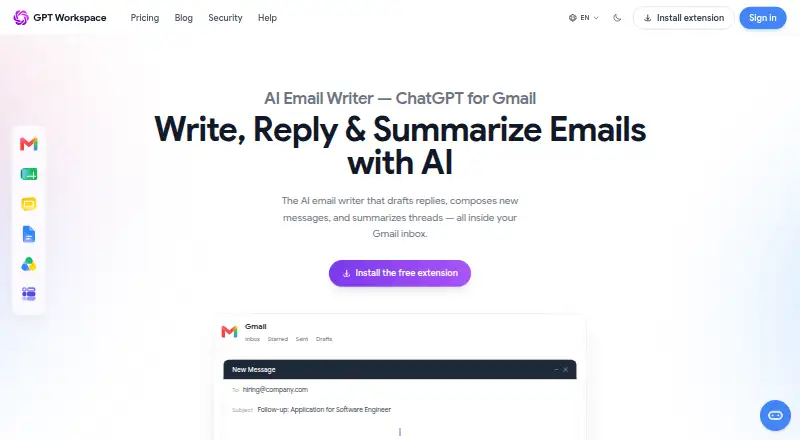
What GPT for Gmail is
GPT for Gmail drafts replies, writes new messages, and summarizes email threads inside Gmail. For reply suggestions, it reads the full thread and offers a response that can be inserted with one click. Its listed tools also include email search, cold emails, templates, subject lines, inbox organization, scheduling, and follow-ups. Users can select a tone, and the product says it supports translations in more than 30 languages. GPT for Gmail is available as a Google Workspace Marketplace add-on, and the maker also offers a Chrome extension for GPT Workspace. The maker offers GPT Workspace integrations for Docs, Sheets, Slides, and Drive. The Gmail product page says reply suggestions and drafts work on iOS and Android. The maker says emails are anonymized before processing and are not shared or commercially used; it also says user emails and other business data are not used to train or fine-tune AI models. The free tier has no feature restrictions, while higher usage limits and priority support require premium. Unlimited Premium starts at $9/mo, with annual billing noted in the pricing information.
Who it suits
It suits Gmail users who want help drafting, replying to, and organizing email, including on iOS and Android. People needing higher usage limits or priority support would need premium.
What it does well
- Reads full threads for contextual reply suggestions.
- Offers tone selection and translation in more than 30 languages.
- Free tier has no feature restrictions.
- Maker says emails are not used to train AI models.
- Available on iOS and Android for drafts and reply suggestions.
What to know first
- Higher usage limits require premium.
- Priority support requires premium.
- Paid plan starts at $9/mo with annual billing.
Limits
The free plan has no feature restrictions, but higher usage limits and priority support require premium. Unlimited Premium is listed at $9/mo (annual).
Plans
| Plan | Billed and limits | Price |
|---|---|---|
| Free | Free tier; no feature restrictions; higher usage limits and priority support require premium | Free |
| Unlimited Premium | starting at 9$/month · Unlimited Premium plan; higher usage limits · priority support | $9 a month |
As gpt.space lists them, read 3 Oct 2026. The maker's own page has the final word.
Getting started
- Open the GPT for Gmail website.
- Install it from the Google Workspace Marketplace, or use the offered Chrome extension for GPT Workspace.
- Use the Gmail features on the web, iOS, or Android.
- Start with the free plan or choose Unlimited Premium for higher usage limits and priority support.
GPT for Gmail is an AI assistant for drafting, replying to, and summarizing messages inside Gmail. It suits individuals and teams that want conversation context carried into suggested replies, especially across multiple languages. The free plan is unusually open on features, while Premium is mainly for heavier use and faster help.
Overview
GPT for Gmail works as a Gmail add-on, Chrome extension, web service, and mobile app for iOS and Android. It reads the complete email thread before proposing a response, then lets you insert that reply with one click. It can also compose new messages and summarize conversations, keeping common writing tasks in the inbox rather than a separate application.
Privacy protections are clearly stated: emails are anonymized before processing, not shared or commercially used, and not used to train or fine-tune AI models. Data in transit uses TLS 1.2 or newer, while Firebase data at rest uses AES-256 encryption. The maker cites ISO 27001, GDPR compliance, CASA Tier III, and Google Cloud Verified Partner status. Support is available by email, with replies promised within two business days, and purchases qualify for a full refund when requested within 30 days.
Key features
- Thread-aware replies: The assistant considers the full conversation instead of only a short prompt. That makes it a better fit for ongoing correspondence, where earlier questions and commitments matter. One-click insertion speeds up routine replies, although the published feature set does not explain how users control which thread content is supplied.
- Writing and message tools: GPT for Gmail lists new-message composition, response generation, cold emails, templates, subject lines, search, summaries, inbox organization, scheduling, and follow-ups. This broad menu can cover varied email workflows, but the strongest demonstrated use case is contextual drafting and summarization rather than any one inbox-management function.
- Tone and language: Tone selection helps adapt a message to its audience, and translation support covers more than 30 languages. That is valuable for multilingual correspondence and for users who need consistent formality across messages.
- Workspace reach: GPT Workspace also supports Google Docs, Sheets, Slides, and Drive. Readers already working across Google Workspace may get more continuity than with a Gmail-only writer, while the Gmail product remains focused on mail.
- Mobile access: iOS and Android support reply suggestions and email drafts, extending the core workflow beyond desktop Gmail. The product is also distributed through the Google Workspace Marketplace and a Chrome extension.
Pricing
The Free plan costs nothing and has no feature restrictions. It is the logical starting point for occasional users and lets readers judge the workflow without a trial deadline. The trade-off is usage: higher limits and priority support require Premium.
Unlimited Premium costs $9 a month, billed starting at 9$/month. It raises usage limits and adds priority support, making it the practical choice for people who draft frequently or depend on quicker assistance. The plan does not add a separately described feature set, so light users may gain little beyond capacity and support.
There is no free trial. The Gmail page offers a full refund when a purchase is canceled within 30 days, which reduces the risk of committing to Premium.
Platforms
GPT for Gmail is available on Android, iOS, the web, and as a browser extension. Gmail is the supported mail client, with a Google Workspace Marketplace add-on and Chrome distribution. Mobile apps focus on reply suggestions and drafts.
Who it's for
Choose GPT for Gmail if you live in Gmail, handle long conversation threads, or regularly write in different tones and languages. Its unrestricted feature access on Free also suits cautious buyers and low-volume users. Premium is aimed at heavier email workloads that would run into free usage limits and at customers who value priority support.
Look elsewhere if you need a published quota structure, controls over context selection, or a mail client beyond Gmail. The product's broader Workspace offering may help Google-centric teams, but the documented email workflow remains its clearest strength.
Pros and cons
Pros
- Full-thread context: Suggestions account for the entire conversation and can be inserted in one click.
- Feature-unrestricted free tier: You can use the listed capabilities without a paid plan, subject to lower usage limits.
- Multilingual control: Tone options and translation in more than 30 languages support varied audiences.
- Stated privacy and security measures: Anonymization, no model training on emails, encryption, and named certifications provide concrete safeguards.
- Cross-device coverage: Web, extension, iOS, and Android access keep drafting available across common workflows.
Cons
- Premium is needed for higher limits: Frequent users must pay $9 a month for expanded capacity and priority support.
- No trial period: New subscribers have to rely on the 30-day refund policy rather than a free trial.
- Gmail-centered support: The documented mail client is Gmail, limiting fit for users committed to other inboxes.
- Limited operational detail: The feature list names many inbox tools, but does not define their individual behavior or quotas.
Alternatives
WPS AI Email Writer is a better pick if you want a free, unlimited email writer with no signup and support across Android, iOS, Linux, macOS, web, and Windows; its free plan includes no ads.
WriteMail.ai suits readers who prefer explicit monthly email quotas, from 50 AI emails at $6.95 per month to 500 at $19.95 per month, across a wider set of desktop platforms.
AI Perfect Assistant is the alternative when Microsoft 365, Chrome, or Telegram integrations matter more than Gmail thread handling; its Free plan includes 10 tokens per month.
Kerna is aimed at users who want a broader desktop and web assistant with token-based plans, including a 30,000-token free starter volume and a 12.00 EUR monthly Standard plan.
Ellie is worth considering for draft-reply workflows with a free allowance of 10 replies per day and one connected account, plus a free trial.
ForthWrite fits readers who want Gmail and Outlook web support and a free allowance of 10 drafts per week.
Demi is a macOS-only alternative with a free weekly morning digest and integrations, rather than a Gmail add-on focus.
Flailo is a web or API option with 50 free emails per month, single generation, and four tone presets.
Browse more options in AI Email Writing Tools.
Verdict
GPT for Gmail is a strong choice for Gmail users who want replies grounded in complete threads, with tone controls, multilingual support, and summaries available on the free tier. Pick it for contextual everyday drafting and broad device coverage; look elsewhere if you need another mail client, transparent per-feature quotas, or more control over how conversation context is selected.
Verdict
GPT for Gmail combines thread-aware drafting with search, summaries, and other email tools. The free tier has no feature restrictions, but higher usage limits and priority support are reserved for premium.
Questions
Is GPT for Gmail free?
Yes. The Free plan costs nothing and has no feature restrictions.
How much does Unlimited Premium cost?
The listed price is $9/mo (annual).
Is there a free trial?
No free trial is offered.
Which platforms does GPT for Gmail support?
It is listed for web, iOS, Android, and as an extension. Its Gmail drafts and reply suggestions are available on iOS and Android.
Does it connect with other Google Workspace products?
GPT Workspace is offered for Gmail, Docs, Sheets, Slides, and Drive.
Who makes GPT for Gmail?
The maker is Qualtir LLC, a software company specializing in Chrome extensions for Google Workspace.
Facts from GPT for Gmail's own pages
- AI training
- The maker says user emails and other business data are not used to train or fine-tune AI models. · gpt.space, 3 Oct 2026
- Certifications
- The maker lists ISO 27001 certification, GDPR compliance, CASA Tier III, and Google Cloud Verified Partner status. · gpt.space, 3 Oct 2026
- Email tools
- The product lists AI email writing, contextual reply suggestions, email search, response generation, summaries, cold emails, templates, subject lines, inbox organization, scheduling, and follow-ups. · gpt.space, 3 Oct 2026
- Installation
- GPT for Gmail is available as a Google Workspace Marketplace add-on, and the maker also offers a Chrome extension for GPT Workspace. · support.gpt.space, 3 Oct 2026
- Integrations
- GPT Workspace is offered for Gmail and other Google Workspace products, including Docs, Sheets, Slides, and Drive. · workspace.google.com, 3 Oct 2026
- Maker
- The maker's company page identifies Qualtir LLC and describes Qualtir as a software company specializing in Chrome extensions for Google Workspace. · qualtir.com, 3 Oct 2026
- Mobile
- The product page says GPT for Gmail works on iOS and Android for reply suggestions and email drafts. · gpt.space, 3 Oct 2026
- Privacy
- The Gmail product page says emails are anonymized before processing and says content is not shared or commercially used. · gpt.space, 3 Oct 2026
- Refund policy
- The Gmail page states that purchases are eligible for a full refund if the user contacts the company within 30 days. · gpt.space, 3 Oct 2026
- Reply context
- The AI reads the full email thread to suggest a reply that can be inserted with one click. · gpt.space, 3 Oct 2026
- Security
- The maker says data in transit is protected with TLS 1.2+ and data at rest in Firebase uses AES-256 encryption. · gpt.space, 3 Oct 2026
- Support
- The help center says users can email [email protected] and that support answers within two business days. · support.gpt.space, 3 Oct 2026
- Tone and translation
- Users can select an appropriate tone, and the product says it supports translations in more than 30 languages. · gpt.space, 3 Oct 2026
- What it does
- GPT for Gmail drafts replies, composes new messages, and summarizes email threads inside Gmail. · gpt.space, 3 Oct 2026
Where GPT for Gmail stands on Freedom251
- AI Email Writing Tools#3 of 28