Freedom251 › AI Email Writing Tools
WPS AI Email Writer
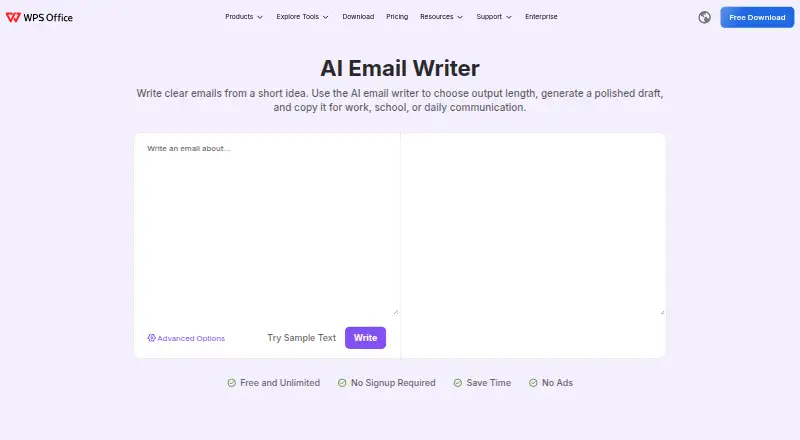
What WPS AI Email Writer is
WPS AI Email Writer turns a short prompt into draft text for work, school, or everyday messages. It can help with requests, replies, apologies, follow-ups, thank-you notes, and business emails, including meeting requests, customer responses, teacher emails, and application messages. Users can choose a shorter or more detailed result, then review and edit it before copying it into an email app or another platform. The page names Gmail and Outlook as places to paste drafts; the tool does not send messages. WPS lists the online tool as free and unlimited, with no signup required and no ads. The product is available on web, Android, iOS, Linux, macOS, and Windows. Its maker is WPS SOFTWARE PTE. LTD., based in Singapore. WPS's AI terms advise against submitting personal data, business secrets, or other sensitive information, and state that user content is not used to train the models.
Who it suits
It suits office workers, students, and general users who want help drafting everyday or business emails. It is useful when a person wants a draft to review and copy, rather than a tool that sends email for them.
What it does well
- Creates drafts for several common email situations
- Lets users choose output length
- Free use is unlimited, with no signup or ads
- Names Gmail and Outlook as places to paste drafts
- Available on web and mobile and desktop platforms
What to know first
- Does not send emails
- WPS advises against entering sensitive information
- No free trial is listed
Plans
| Plan | Billed and limits | Price |
|---|---|---|
| AI Email Writer | Free and unlimited · no signup required · no ads | Free |
| WPS Standard | Free · basic PDF features · free PDF reader · limited template downloads · 1 GB cloud · 47 file formats · 46 languages | Free |
| WPS Pro+ | Billed $69.99/Year · full PDF editing/conversion · unlimited templates · OCR · e-signature · 20 GB cloud · no ads · AI tools with daily limits | $5.83 a month |
| WPS Pro+ Sharing Plan | Free/3 days; billed $41.99/Year/user · two-user minimum · Pro+ benefits per member · 20 GB private cloud per member · shared plan management | On request |
As wps.com lists them, read 7 Oct 2026. The maker's own page has the final word.
Getting started
- Open the WPS AI Email Writer website.
- Enter a short idea or prompt for the email.
- Choose the desired output length.
- Review and edit the generated draft.
- Copy the text into Gmail, Outlook, or another platform.
Overview
WPS AI Email Writer is a prompt-based tool for composing email drafts. It suits office workers, students, and general users handling routine messages. Its strength is a free, unlimited starting point; its drawback is a copy-and-paste workflow that leaves the final email to you.
Key features
Give it a short idea for a request, reply, apology, follow-up, thank-you note, or business message, and choose whether you want a short response or a longer draft. That makes it useful for everyday tasks such as arranging a meeting, answering a customer, writing to a teacher, or preparing an application message. Length control is practical when you know whether the occasion calls for a brief reply or more context.
The tool produces text, not a sent email. You review and edit the draft, then paste it into Gmail, Outlook, or another platform. That keeps the final wording and delivery in your hands, but it is a poor fit if you want composition or sending to happen inside your inbox.
WPS AI terms say not to submit personal data, business secrets, or other sensitive information. They also say user content is not used to train the models. The warning still rules out confidential material, so keep prompts general. WPS directs users needing technical support to its support section and says it will reply as soon as possible.
Pricing
The AI Email Writer plan costs nothing and is described as free and unlimited, with no signup required and no ads. That removes both a usage cap and an account-creation step for users who want occasional or regular drafting. WPS also describes the online tool as free to try. The pricing note mentions paid access from $5.83/mo (annual) and a 3-day trial, while the free trial field says no; the AI Email Writer plan itself is the free option, and the trial and paid terms do not establish a separate email-writer tier. Choose it for no-cost drafts rather than assuming that paid access adds a specific email-writing feature.
The product page identifies WPS SOFTWARE PTE. LTD. in Singapore, and WPS lists the tool as an online service. Founded in 1988, WPS offers a broad platform footprint, but the email-writing workflow described here remains a standalone draft-and-paste process.
Platforms
WPS lists Android, iOS, Linux, macOS, web, and Windows. The online tool can be tried in a browser, while the broad platform range is useful for readers who move among desktop and mobile devices. The described workflow does not depend on a direct mail-client connection.
Who it's for
Choose WPS AI Email Writer if you want help shaping routine work, school, or personal email and are comfortable reviewing text before using it. Its free, unlimited, no-signup plan is especially suitable for people who do not want a subscription or account just to draft. Look elsewhere if your emails contain sensitive details, or if you need a tool that drafts or sends directly from an inbox.
Pros and cons
- Pro: Free and unlimited use without signup or ads makes it accessible for frequent drafting as well as occasional needs.
- Pro: Prompts cover common personal, school, and business messages, with control over draft length.
- Con: Every draft must be reviewed and copied into another platform; WPS does not send it for you.
- Con: WPS advises against entering sensitive information, limiting its suitability for confidential correspondence.
Alternatives
AI Email Writing Tools is the directory list to consult when comparing options across the category.
- WriteMail.ai may suit users who want monthly email quotas: its freemium plans include 50, 150, or 500 AI emails per month at $6.95, $11.95, or $19.95 per month, respectively, and it spans mobile, desktop, web, and extension platforms.
- AI Perfect Assistant is an alternative for readers who want integrations with Microsoft 365, Chrome, and Telegram; its free plan allows 10 tokens per month and uses the default AI model.
- Kerna may fit users seeking a token-based plan: its free Starter plan provides 30,000 tokens, GPT-5.6, all features, and a single-user license.
- Ellie offers a free tier with 10 draft replies per day, one connected email account, and one team seat, which may suit users who want a connected-account workflow.
- ForthWrite may be worth considering for Gmail or Outlook on the web: its free plan includes 10 drafts per week, with several advanced capabilities excluded.
- GPT for Gmail is another option for readers comparing email-writing tools.
- Jetwriter AI offers a free plan with 15 regular-model responses per month, a browser extension, web app, voice input, and live web access.
- Lavender may suit users who want email analysis and personalization; its free plan allows five of each per month.
Verdict
WPS AI Email Writer is a sensible pick for anyone who wants unlimited, no-cost help drafting ordinary emails without signing up. Its main advantage is the friction-free free plan; its main reason to look elsewhere is the manual transfer step, compounded by the instruction to keep sensitive details out of prompts.
Verdict
WPS AI Email Writer offers a free way to turn a prompt into editable email text. It creates drafts rather than sending them, and its terms caution users not to provide sensitive information.
Questions
Is WPS AI Email Writer free?
Yes. Its plan listing says it is free and unlimited, with no signup required and no ads. The pricing note lists paid access from $5.83/mo (annual).
Does it send emails?
No. It generates draft text for users to review and edit, then copy into an email app or another platform.
Which email apps does it work with?
The page names Gmail and Outlook as places to paste a draft. It does not describe a direct sending integration.
Which platforms are listed?
The platform list includes Android, iOS, Linux, macOS, web, and Windows.
Who makes the tool?
The product page identifies WPS SOFTWARE PTE. LTD. as the maker and gives its address as 6 Raffles Quay #14-06, Singapore 048580.
What should users know about AI data terms?
WPS advises against submitting personal data, business secrets, or other sensitive information. Its terms say user content is not used to train the models.
Facts from WPS AI Email Writer's own pages
- AI capabilities
- WPS AI provides drafting, rewriting, summarizing, translation, document analysis, presentation generation and file question answering. · crunchbase.com, 15 Oct 2026
- AI data use
- WPS states that it does not use user data to train its models and that partner sharing is limited to providing WPS AI functions. · help.wps.com, 15 Oct 2026
- API and SDKs
- WPS publishes REST API, plugins, webhooks and command-line integration resources plus JavaScript, Python, Java and .NET SDKs. · www-wps-ss.com, 15 Oct 2026
- Availability
- The AI Email Writer page advertises free and unlimited use without signup or ads. · wps.com, 15 Oct 2026
- Chrome extension
- The WPS PDF Chrome extension supports browser PDF viewing, downloading, printing, annotations, signing and links to desktop editing. · chromewebstore.google.com, 15 Oct 2026
- Company headquarters and size
- Crunchbase lists Palo Alto, California as headquarters and 1,001–5,000 employees. · crunchbase.com, 15 Oct 2026
- Company history
- Crunchbase says the office business was established in 1989 and lists Qiu Bojun as founder. · crunchbase.com, 15 Oct 2026
- Company legal name
- Crunchbase identifies the legal entity as WPS Software Pte. Ltd., also known as Kingsoft Office. · crunchbase.com, 15 Oct 2026
- Documentation depth
- The WebOffice documentation includes product guides, quick starts, API references, SDK documentation and update logs. · solution.wps.cn, 15 Oct 2026
- Feature: copy workflow
- Generated text can be copied into Gmail, Outlook, school platforms, work tools or messaging apps. · wps.com, 15 Oct 2026
- Feature: length control
- Users choose an output length ranging from a short reply to a detailed message. · wps.com, 15 Oct 2026
- Feature: message types
- It supports drafts for requests, replies, apologies, follow-ups, thank-you notes and business messages. · wps.com, 15 Oct 2026
- Feature: no sending
- The tool does not send mail; users must review, edit and send the copied draft themselves. · wps.com, 15 Oct 2026
- Founded
- 1988 · wps.com, 28 Sept 2026
- Headquarters
- Singapore · wps.com, 28 Sept 2026
- Input types
- It can help draft requests, replies, apologies, follow-ups, thank-you notes, and business messages. · wps.com, 7 Oct 2026
- Integrations
- The mobile WPS Office app lists support for Google Drive, Dropbox, OneDrive and other cloud services. · play.google.com, 15 Oct 2026
- Intended users
- The page says it is useful for office workers, students, and general users. · wps.com, 7 Oct 2026
- Length control
- Users can choose the output length, from a short reply to a more detailed message. · wps.com, 7 Oct 2026
- Licence
- The EULA says the software is licensed rather than sold, prohibits redistribution and reverse engineering, and assigns software intellectual property to WPS or its licensors. · wps.com, 15 Oct 2026
- Limit: advertising and paywalls
- Independent reviews commonly complain that the free version shows frequent or intrusive ads and locks advanced features behind subscriptions. · getapp.com, 15 Oct 2026
- Limit: formatting and advanced tools
- GetApp reviewers report occasional formatting problems with imported Microsoft files and fewer advanced capabilities than Microsoft Office. · getapp.com, 15 Oct 2026
- Limit: stability and support
- Trustpilot posts include complaints about crashes, corrupted or unsaved files, automatic startup behavior and slow or ineffective support responses. · trustpilot.com, 15 Oct 2026
- Limit: subscription complaints
- Trustpilot reviewers frequently report unexpected renewals or charges, difficult refunds, upgrade prompts and documents becoming read-only. · trustpilot.com, 15 Oct 2026
Where WPS AI Email Writer stands on Freedom251
- AI Email Writing Tools#14 of 28