Freedom251 › AI Email Writing Tools
AI Email Assistant for Thunderbird
Visit AI Email Assistant for Thunderbird Alternatives Pricing
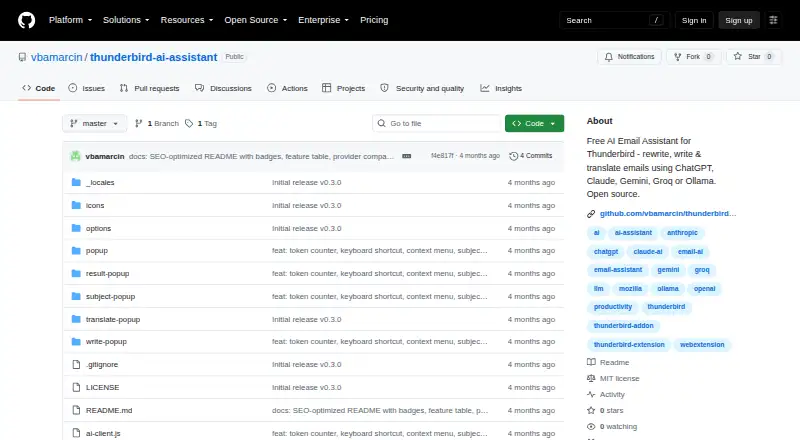
What AI Email Assistant for Thunderbird is
AI Email Assistant for Thunderbird is a free, open-source extension that brings AI tools into Thunderbird’s email compose window. It can rework text you select, create a complete email from a description, or offer three possible subject lines. It also translates email among Polish, English, German, French, Spanish, Ukrainian, and Russian. The extension supports Google Gemini, Groq, OpenAI, Anthropic Claude, xAI Grok, OpenRouter, and Ollama. With Ollama, AI runs locally; the maker describes that option as completely free. You can adjust generated text by adding a comment, then open AI actions from the right-click menu or with Ctrl+Shift+Space. The extension keeps its 50 most recent operations on your device and lets you define unlimited custom writing styles. Its maker says it has no telemetry, analytics, or tracking, and that email content goes only to the provider you select. API keys stay local and can optionally be encrypted with AES-256-GCM; operation history is stored locally and never synced to external servers. The project uses the MIT License and is free for personal and commercial use. Installation is through a downloadable .xpi file and Thunderbird’s Add-ons and Themes menu. The extension costs nothing, and you bring your own API key; provider usage may cost extra.
Who it suits
It suits Thunderbird users who want AI help with drafting, editing, subject lines, or translating email, and who are comfortable bringing an API key. The local Ollama option may suit users who want AI processing on their own device.
What it does well
- Rewrites selected text, drafts emails, and suggests three subject lines.
- Translates among seven listed languages.
- Supports seven providers, including locally run Ollama.
- Keeps the last 50 operations on the device.
- Offers unlimited custom writing styles.
- MIT-licensed and free for personal and commercial use.
What to know first
- Users must bring their own API key.
- AI provider usage may cost extra.
- Available as a Thunderbird extension; no browser extension is listed.
Limits
The extension itself is free, but users bring their own API key and AI provider usage may cost extra. It keeps the last 50 operations locally.
Plans
| Plan | Billed and limits | Price |
|---|---|---|
| AI Email Assistant for Thunderbird | Bring your own API key; AI provider usage may cost extra | Free |
As github.com lists them, read 5 Oct 2026. The maker's own page has the final word.
Getting started
- Download the .xpi file from the project website.
- Open Thunderbird’s Add-ons and Themes menu.
- Follow the maker’s installation instructions.
- Choose an AI provider and supply your own API key if required. The local Ollama option is also supported.
Verdict
Choose AI Email Assistant for Thunderbird if you want a free, open-source writing and translation extension with several provider options and local history. Look elsewhere if you do not want to supply an API key or need an extension for a browser.
Questions
How much does AI Email Assistant for Thunderbird cost?
The listed plan costs nothing. AI provider usage may cost extra.
Is there a free plan or free trial?
There is a free plan and no free trial.
Which AI providers does it support?
Google Gemini, Groq, OpenAI, Anthropic Claude, xAI Grok, OpenRouter, and Ollama.
Does it work locally?
Ollama runs locally and is described by the maker as 100% free.
Is it open source?
Yes. The project uses the MIT License and is free for personal and commercial use.
How do I install it?
Download the .xpi file and follow the instructions for Thunderbird’s Add-ons and Themes menu.
Facts from AI Email Assistant for Thunderbird's own pages
- AI integrations
- Supported providers are Google Gemini, Groq, OpenAI, Anthropic Claude, xAI Grok, OpenRouter, and Ollama. · github.com, 5 Oct 2026
- History and styles
- The extension stores the last 50 operations locally and allows users to add unlimited custom writing styles. · github.com, 5 Oct 2026
- Installation
- The maker provides a downloadable .xpi file and installation instructions for Thunderbird's Add-ons and Themes menu. · github.com, 5 Oct 2026
- Key storage
- API keys are stored locally and can optionally be encrypted with AES-256-GCM; history is stored locally and never synced to external servers. · github.com, 5 Oct 2026
- License
- The project uses the MIT License and is free for personal and commercial use. · github.com, 5 Oct 2026
- Local option
- Ollama runs locally and is described as 100% free, for complete privacy. · github.com, 5 Oct 2026
- Privacy
- The maker says there is no telemetry, analytics, or tracking, and emails are sent only to the AI provider the user chooses. · github.com, 5 Oct 2026
- Purpose
- A free, open-source Thunderbird extension that adds AI to the email compose window. · github.com, 5 Oct 2026
- Refinement and access
- Users can refine generated text with a comment and access AI actions through the right-click menu or Ctrl+Shift+Space. · github.com, 5 Oct 2026
- Support and contributions
- The maker invites bug reports through GitHub Issues and feature ideas through Discussions, and welcomes pull requests. · github.com, 5 Oct 2026
- Translation
- It translates emails into Polish, English, German, French, Spanish, Ukrainian, and Russian. · github.com, 5 Oct 2026
- Writing tools
- It can rewrite selected text, draft a complete email from a description, and suggest three subject lines. · github.com, 5 Oct 2026
Where AI Email Assistant for Thunderbird stands on Freedom251
- AI Email Writing Tools#5 of 28