
Journey
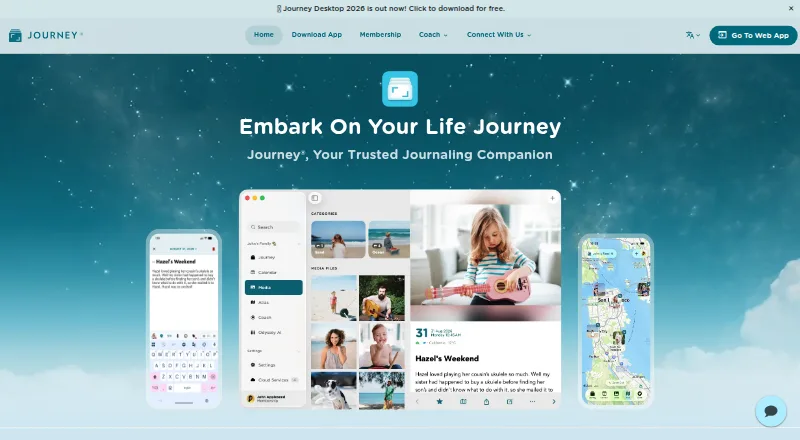
What Journey is
Journey is a journaling app for writing entries with photos, video, audio, GIFs and music. It supports offline access, search and filters, and end-to-end encryption for journal data. Privacy controls include a passcode, Touch ID, Face ID and Android Biometric. Users can share selected entries through web links or collaborate in shared journals with friends, family or loved ones. Integrations include Google Places, Apple Maps, Apple Health, Zapier, email and WhatsApp. Templates, prompts and more than 60 guided coach programs support reflection, self-improvement, healthy living and planning; Odyssey AI can answer questions about a user's life, patterns, moods and progress toward goals. Membership includes 10GB of cloud storage, 5,000 entries and up to 20 media files per entry. The free version is available indefinitely. Annual membership is listed at $4.17 per month, billed annually, and unlocks Journey on Android, iOS, Mac, Windows, web, Chrome OS and Linux. After cancellation, access continues until the next subscription payment is due, and cancelled subscriptions are not refunded.
Who it suits
Journey suits people who want a private journal that can include different media, work offline and sync across platforms. Shared journals and web links may also suit people who want to write or share entries with friends or family.
What it does well
- Journal entries support photos, video, audio, GIFs and music.
- End-to-end encryption protects journal data.
- Offline access and search are available.
- Free version can be used indefinitely.
What to know first
- Annual membership is billed annually.
- Cancelled subscriptions are not refunded.
- Membership storage is limited to 10GB.
Limits
The indefinitely available free version is for trying the product. Annual membership includes 10GB of cloud storage, 5,000 entries and up to 20 media files per entry.
Plans
| Plan | Billed and limits | Price |
|---|---|---|
| Membership (Annual) | $50.04 per year (= $4.17/month, billed annually) · 10GB cloud storage · 5,000 journal entries · 20 photo/video/audio files per entry · 50 web links · 1,000 cloud prints per month · 1,000 ePUB/DOCX exports per month | $50.04 a year |
| Free version | — | Free |
| Membership Annual | $50.04 per year (= $4.17/month, billed annually) | $50.04 a year |
| Membership Lifetime | — | On request |
As journey.cloud lists them, read 5 Oct 2026. The maker's own page has the final word.
Getting started
- Open https://journey.cloud/ in a browser.
- Start with the free version, which is available indefinitely.
- Choose annual membership for $50.04 a year, billed annually, to unlock Journey across platforms.
- Install or open Journey on Android, iOS, Mac, Windows, web, Chrome OS or Linux.
- Create entries and add supported media, prompts or coach programs.
Overview
Journey is a multimedia journal for people who want to keep writing, recordings, and images together across phones, computers, and the web. Its combination of encryption, guided reflection, and selective sharing makes it a strong fit for a private journal that can also involve friends or family, though membership caps matter for heavy users.
Entries support photos, video, audio, GIFs, and music, and can be created offline. Search and filters, privacy locks, and end-to-end encryption make the journal more than a simple writing space. Shared journals and browser-viewable links add useful ways to involve others without making every entry public.
Key features
Multimedia journaling and reflection
Combining several media types in an entry suits people who want a record richer than text alone. Search and filters help retrieve past entries, while offline access is useful when connectivity is unavailable. More than 60 guided coach programs, alongside templates and prompts, offer structure for reflection, self-improvement, healthy living, and planning. Odyssey AI can answer questions about a user's own life, patterns, moods, and progress toward goals, adding a way to examine themes across personal entries.
Privacy and sharing
End-to-end encryption protects journal data, and passcode, Touch ID, Face ID, and Android Biometric controls provide additional privacy options. Selected entries can be shared as browser-viewable links, and shared journals support collaboration with friends, family, or loved ones. Those options make Journey suitable for both personal writing and chosen collaborative projects; users should still consider carefully what they share.
Integrations and exports
Journey integrates with Google Places, Apple Maps, Apple Health, Zapier, email, and WhatsApp. Its export formats include ePUB and DOCX, with paid membership quotas for exports and web links. These connections and output options help people bring context into journaling and take material elsewhere, though the membership quotas may constrain frequent exporters.
Pricing
Journey has an indefinitely usable free version, so readers can continue trying it without a stated trial deadline. Membership Annual costs $4.17 per month, billed annually. It unlocks Journey on all platforms and includes 10GB of cloud storage, 5,000 journal entries, up to 20 photo, video, or audio files per entry, 50 web links, 1,000 cloud prints per month, and 1,000 ePUB/DOCX exports per month. The storage and entry ceilings are worth weighing if the journal is intended to become a long-term archive; the per-entry media limit may also be restrictive for users who attach many files.
A Lifetime membership option is offered at custom pricing. The annual plan can be cancelled at any time, but access continues only until the next subscription payment is due and cancelled subscriptions are not refunded. EU buyers may withdraw within 14 days unless performance begins with consent.
Platforms
Journey supports Android, iOS, Mac, Windows, web, Chrome OS, and Linux. The broad coverage suits people who move between mobile and desktop, though the exact mix of supported platforms differs by device family.
Who it's for
Journey is best suited to people who want a private, cross-platform journal with multimedia entries, structured prompts, and optional sharing or collaboration. It is less compelling for someone who needs uncapped storage or entries, or who wants to share extensively beyond the membership's link quota.
Pros and cons
- Pros: End-to-end encryption plus device privacy locks support sensitive personal writing.
- Pros: Entries can combine text with photos, video, audio, GIFs, and music, while offline access and search support everyday use.
- Pros: More than 60 guided coach programs and Odyssey AI add reflection tools beyond blank-page journaling.
- Pros: Shared journals and selected-entry web links support deliberate collaboration and sharing.
- Cons: Annual membership limits storage to 10GB and entries to 5,000, which may not suit an extensive archive.
- Cons: The 20-file-per-entry and 50-link caps can limit media-heavy or frequent sharing habits.
- Cons: Cancellation does not trigger a refund, so an annual subscriber should account for the full term.
Alternatives
For a broader comparison, browse Journal Apps or Journaling Software.
- Rosebud is another freemium option, with a free plan and a $12.99 per month Bloom subscription.
- Stoic is a freemium journaling option for readers considering guided journals, reflections, exercises, mood tracking, and habit tracking in its premium tier.
- Day One is worth considering for its free one-month trial inside the app, subject to App Store eligibility.
- Daybook offers a free plan with unlimited entries and syncing across multiple devices, making it an alternative for readers prioritizing those capabilities.
- Diarium may suit readers seeking cloud sync, unlimited attachments per entry, and Word export through its Pro tier.
- Penzu is another freemium journal option.
- Apple Journal is a free alternative for readers using iPhone or iPad, with some features limited to select languages and regions.
- Local Journal offers free writing, timeline, search, prompts, and text export on Android and iOS.
Verdict
Choose Journey if you want an encrypted journal that can hold varied media, work across platforms, and support both guided reflection and selective collaboration. Its free version makes it possible to keep using the app without a trial cutoff, while membership unlocks broad access and substantial quotas. Look elsewhere if your archive is likely to exceed its storage, entry, media, or sharing limits, or if the no-refund cancellation terms are a poor fit.
Verdict
Journey offers multimedia journaling, privacy controls and ways to share selected entries or collaborate. Consider the membership storage and entry limits, and note that cancellation does not trigger a refund.
Questions
Is Journey free?
Yes. Its free version is available indefinitely. Annual membership is $50.04 a year, billed annually, or $4.17 a month on an annual basis.
Which platforms does Journey support?
Journey is available on Android, iOS, Mac, Windows, web, Chrome OS and Linux.
What does annual membership include?
It includes 10GB of cloud storage, up to 5,000 entries and up to 20 media files per entry. It also provides access to more than 60 guided coach programs and unlocks Journey across platforms.
Can I add media to journal entries?
Yes. Entries support photos, videos, audio, GIFs and music.
How does Journey handle privacy and sharing?
Journal data is end-to-end encrypted, with passcode and biometric privacy controls. Users can share selected entries through browser-viewable links or collaborate in shared journals.
What happens if I cancel membership?
Access continues until the next subscription payment is due. Cancelled subscriptions are not refunded.
Facts from Journey's own pages
- Annual Price
- $4.17 per month, billed annually. · journey.cloud, 27 Sept 2026
- Cloud Sync Limits
- Membership includes 10GB storage, 5,000 entries, and up to 20 media files per entry. · journey.cloud, 27 Sept 2026
- Coach Programs
- Membership includes access to more than 60 guided journaling coach programs. · journey.cloud, 27 Sept 2026
- Company Owner
- Journey is owned by Two App Studio Pte. Ltd. · journey.cloud, 27 Sept 2026
- Encryption
- Journey provides end-to-end encryption for journal data. · journey.cloud, 27 Sept 2026
- End-to-end encryption
- Yes · journey.cloud, 20 Sept 2026
- EU Withdrawal
- EU buyers may withdraw for 14 days unless performance begins with consent. · journey.cloud, 27 Sept 2026
- Export formats
- multiple · journey.cloud, 20 Sept 2026
- Free plan
- Yes · journey.cloud, 20 Sept 2026
- Free Tier
- The free version can be tried indefinitely. · journey.cloud, 27 Sept 2026
- App Integrations
- Integrations include Google Places, Apple Maps, Apple Health, Zapier, email, and WhatsApp. · journey.cloud, 27 Sept 2026
- Media Uploads
- Journal entries support photos, videos, audio, GIFs, and music. · journey.cloud, 27 Sept 2026
- Cancellation Access
- Access continues until the next subscription payment is due. · journey.cloud, 27 Sept 2026
- Privacy Controls
- Privacy features include passcode, Touch ID, Face ID, and Android Biometric. · journey.cloud, 27 Sept 2026
- Refund Policy
- Cancelled subscriptions are not refunded. · journey.cloud, 27 Sept 2026
- Shared Journals
- Users can collaborate with loved ones, family members, or friends. · journey.cloud, 27 Sept 2026
- Shared Web Links
- Selected entries can be shared through browser-viewable web links. · journey.cloud, 27 Sept 2026
- Paid from
- 4.17 · journey.cloud, 20 Sept 2026
- Supported Platforms
- Android, iOS, Mac, Windows, Web, and Chrome OS; downloads also list Linux. · journey.cloud, 27 Sept 2026
- User Reviews
- The site reports over 100,000 five-star reviews. · journey.cloud, 27 Sept 2026
Where Journey stands on Freedom251
- Journaling apps#3 of 37
- Journaling Software#11 of 37
- Journal Apps#13 of 35