Islet
What Islet is
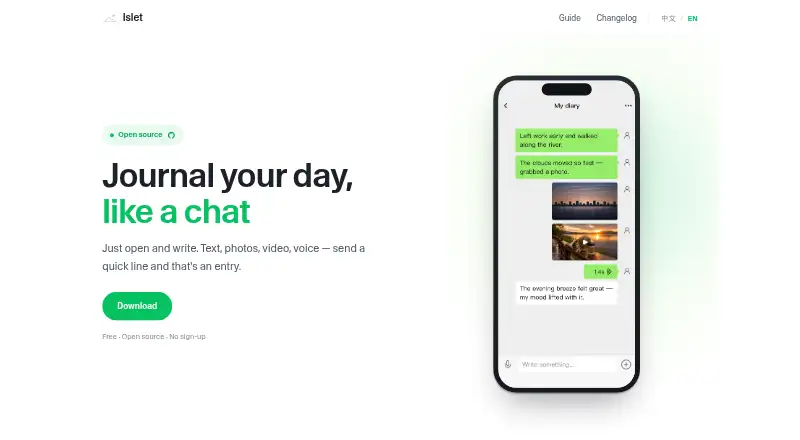
Islet is a free, open-source journal app for text and media entries, arranged into separate notebooks. Each notebook has its own chat-like thread, and a calendar helps users return to entries by date. Entries can contain photos, video, and voice as well as text. No account, sign-up, or personal details are required. Users choose S3 or WebDAV for storage; those services store ciphertext, and Islet says there is no Islet server between users and their chosen storage. Sync is required to use entries across devices. Islet describes privacy and avoiding data loss as core design goals and says users are the sole owners of their data. The app is available for iPhone, iPad, and Android, with a browser extension for Chrome, Edge, and other Chromium browsers. The iOS app is available through the App Store, while Android users download and install the APK directly. Islet suits people who want a media-capable journal organized into notebooks and want to choose where entries are stored.
Who it suits
Islet suits people who want to journal with text, photos, video, or voice in separate notebooks. It may also suit users who want to choose S3 or WebDAV storage without creating an account.
What it does well
- Free and open source, with no account required.
- Entries support text, photos, video, and voice.
- Calendar supports revisiting entries by date.
- Users choose S3 or WebDAV storage.
What to know first
- Sync is required for entries across devices.
- Android installation uses a directly installed APK.
- Storage choice is limited to S3 or WebDAV.
Plans
| Plan | Billed and limits | Price |
|---|---|---|
| Free | No sign-up required · Open source · Text, photos, video, and voice entries | Free |
As islet.hamsterbase.com lists them, read 28 Sept 2026. The maker's own page has the final word.
Getting started
- Get Islet for iPhone or iPad through the App Store, or download and install the Android APK.
- Alternatively, install the browser extension in Chrome, Edge, or another Chromium browser.
- Choose S3 or WebDAV for storage.
- Enable sync to use entries across devices.
- Create notebooks and add text, photos, video, or voice entries.
Overview
Islet is a free, open-source journal for people who want to keep text and media in separate notebooks. It suits privacy-conscious users comfortable choosing their own S3 or WebDAV storage; its appeal is control over stored data, not a hands-off setup.
Entries can include photos, video, and voice, and a calendar helps you revisit them by date. Sync is required to use Islet across devices, so choosing storage is part of getting started.
Key features
Chat-style entries with media
Each notebook has its own chat-like thread, and entries can include text, photos, video, and voice. That combination works well for journaling that captures moments in several formats, while separate notebooks keep different parts of life apart. If you want a conventional long-form writing interface, this chat-like format may be a poor fit.
Calendar review
A calendar provides a date-based way to return to past entries. It is useful for looking back at a particular day, though the described review option is date-focused rather than a broader search feature.
Storage and privacy
Users choose S3 or WebDAV, and Islet says those services store only ciphertext, with no Islet server between the user and storage. The app also says users are the sole owners of their data, and does not require sign-up or personal details. This gives privacy-minded users control over where data is stored, but requires arranging storage and sync rather than relying on an Islet-hosted account.
Pricing
Islet is free to use. Its Free plan costs nothing and includes open-source software, no account or sign-up requirement, and text, photo, video, and voice entries. There is no paid tier or free-plan quota described, so there is no stated upgrade threshold; the trade-off is that users must supply S3 or WebDAV storage and use sync.
Platforms
Islet has an iPhone and iPad app through the App Store, while Android users install the app from an APK. A browser extension is available for Chrome, Edge, and other Chromium browsers. Sync is required for entries to extend beyond one device, so the platform range does not remove the need to configure storage.
Who it's for
Islet is best for people who want a free journal with media entries, separate notebooks, and direct control over storage, and who are willing to handle S3 or WebDAV setup. It is less suitable for anyone who wants to avoid storage configuration, or who expects device-to-device use without required sync.
Pros and cons
- Pros: Free and open source, with no account or personal details required.
- Pros: Text, photos, video, and voice can live in separate notebooks, with a calendar for date-based review.
- Pros: Users choose S3 or WebDAV, and Islet says stored content is ciphertext rather than data passing through an Islet server.
- Cons: Required sync and user-selected storage make setup less turnkey than a journal that handles storage for you.
- Cons: Android installation uses an APK rather than the App Store route offered on iOS.
- Cons: The chat-like notebook format may not suit people who prefer a traditional writing layout.
Alternatives
Choose Journey instead if you want a journal across Android, iOS, Linux, macOS, web, and Windows, and a paid annual membership that includes 10GB cloud storage and 5,000 journal entries; it costs $50.04 a year. MoodHaven Journal is another free option for readers comparing journaling apps. Pick Rosebud if you want a freemium journal with a free trial and apps across Android, iOS, macOS, web, and Windows. Stoic is an alternative with a free tier, free trial, and Android, iOS, macOS, and web apps. Consider Day One for its free tier, supported Android, iOS, macOS, Windows, and extension platforms, and a one-month in-app trial subject to App Store eligibility. Diarium offers free basic journaling with limited Pro features across Android, iOS, macOS, and Windows. Mindsera has a free tier and trial across Android, iOS, and web. Penzu offers a free Basic plan with unlimited entries and mobile apps on Android and iOS, as well as web access.
Verdict
Islet is a strong fit for privacy-conscious journalers who want media-rich, notebook-based entries at no cost and are willing to choose and sync their own storage. Its user-controlled S3 or WebDAV model is the clearest reason to choose it; look elsewhere if you want storage and syncing to be handled for you or prefer a conventional journal layout.
Verdict
Islet combines notebook-based journaling with media entries and user-selected storage. Note that syncing is required across devices, and Android installation uses an APK.
Questions
How much does Islet cost?
Islet is free to use. Its Free plan costs nothing.
Does Islet require an account?
No. No account, sign-up, or personal details are required.
Which platforms support Islet?
It is available on iPhone, iPad, and Android, and as a browser extension for Chrome, Edge, and other Chromium browsers.
Is Islet open source?
Yes, Islet is open source.
Where is journal data stored?
Users choose S3 or WebDAV. Islet says those services store only ciphertext and that it does not put its own server between users and their chosen storage.
Is sync required?
Yes. Sync is required if entries are to be available across devices.
Facts from Islet's own pages
- Account Requirement
- No sign-up or personal details are required. · islet.hamsterbase.com, 28 Sept 2026
- Android Platform
- Android users can download and install the APK directly. · islet.hamsterbase.com, 28 Sept 2026
- Browser Extension
- The extension is available for Chrome, Edge, and other Chromium browsers. · islet.hamsterbase.com, 28 Sept 2026
- Chat-Based Entries
- Each notebook uses its own chat-like thread. · islet.hamsterbase.com, 28 Sept 2026
- Ciphertext Storage
- S3 and WebDAV store only ciphertext. · islet.hamsterbase.com, 28 Sept 2026
- Privacy Focus
- Privacy and preventing data loss are stated as core design goals. · islet.hamsterbase.com, 28 Sept 2026
- Data Ownership
- Islet states that the user is the sole owner of their data. · islet.hamsterbase.com, 28 Sept 2026
- Date Review
- A calendar lets users revisit entries by date. · islet.hamsterbase.com, 28 Sept 2026
- End-to-End Encryption
- Data is encrypted on the device before being uploaded. · islet.hamsterbase.com, 28 Sept 2026
- End-to-end encryption
- Yes · islet.hamsterbase.com, 20 Sept 2026
- Free Access
- Islet is free to use. · islet.hamsterbase.com, 28 Sept 2026
- Free plan
- Yes · islet.hamsterbase.com, 20 Sept 2026
- iOS Platform
- An iPhone and iPad app is available through the App Store. · islet.hamsterbase.com, 28 Sept 2026
- Journal Media
- Entries can include text, photos, video, and voice. · islet.hamsterbase.com, 28 Sept 2026
- Media support
- photos_video_audio · islet.hamsterbase.com, 20 Sept 2026
- Multiple Notebooks
- Users can keep separate notebooks for different parts of life. · islet.hamsterbase.com, 28 Sept 2026
- Open Source
- Islet is presented as open source. · islet.hamsterbase.com, 28 Sept 2026
- Available platforms
- ios,android,chrome_extension · islet.hamsterbase.com, 20 Sept 2026
- Storage Control
- Users choose S3 or WebDAV storage, with no Islet server middleman. · islet.hamsterbase.com, 28 Sept 2026
- Required Sync
- Sync is required so entries are not limited to one device. · islet.hamsterbase.com, 28 Sept 2026
Where Islet stands on Freedom251
- Journaling apps#1 of 37
- Journaling Software#1 of 37