Freedom251 › Journaling Software

Diarium
by Diarium
What Diarium is
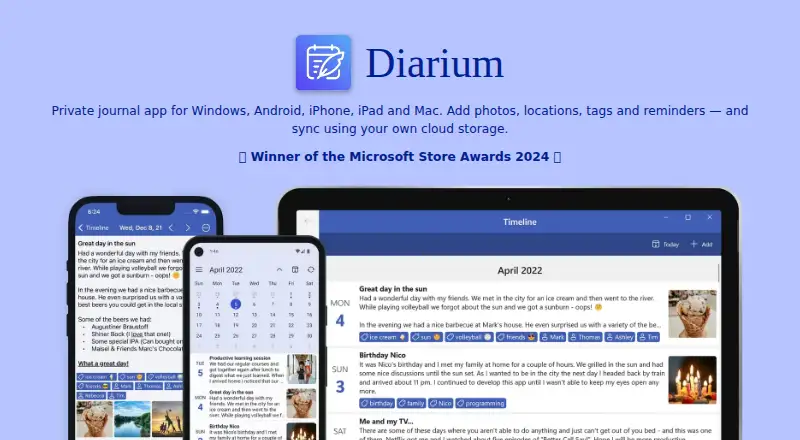
Diarium is a private journal app for recording memories with text, photos, video, audio, locations, and tags. Entries can include rich-text formatting, timestamps, templates, and unlimited attachments, and users can create multiple entries per day. Calendar, timeline, map, gallery, attachment views, search, and “On this day” notifications help revisit past entries. The journal database is stored locally by default, and no account is required. A password, PIN, or biometrics can protect it. Optional Pro Cloud Sync uses the user's OneDrive, Google Drive, Dropbox, iCloud, or WebDAV storage to sync across supported devices; Diarium says it cannot access that personal cloud data. The app can import from several other journal apps and export to Word, plain text, HTML, or JSON. It is available for Android, iOS, macOS, and Windows. A free plan offers basic journaling with limited Pro features. Cloud Sync requires Pro on the platform in use; the paid Windows app includes Pro. The maker is based in Filderstadt, Germany.
Who it suits
Diarium suits people who want a private journal with varied media and ways to browse older entries. It may also fit users who prefer local storage by default and optional syncing through their own cloud storage.
What it does well
- Stores the journal locally by default.
- No account is required.
- Protects the journal with password, PIN, or biometrics.
- Supports multiple entry types and unlimited attachments.
- Exports to Word, plain text, HTML, or JSON.
What to know first
- Cloud Sync requires Pro on the platform being used.
- Windows is a paid app that includes Pro.
- Free plan limits Pro features.
Plans
| Plan | Billed and limits | Price |
|---|---|---|
| Pro | Cloud sync · Unlimited attachments per entry · Word export · Widgets · Integrations · Custom fonts | On request |
| Free | Free on most platforms; Pro features are limited | Free |
| Diarium Pro | One-time purchase per platform; Windows app is paid and includes Pro · Current prices are shown in the app or Microsoft Store on Windows | On request |
As diariumapp.com lists them, read 20 Sept 2026. The maker's own page has the final word.
Diarium is a private, media-friendly journal for people who want to capture writing, photos, video, audio and places in one archive. It suits users who prefer local storage and desktop-and-mobile coverage, while accepting that cloud sync and several extras are tied to Pro on each platform.
Overview
Entries support rich-text formatting, timestamps, templates, tags and multiple entries per day. Locations and unlimited attachments let a single entry hold substantially more than prose, making Diarium a practical fit for travel logs, family records and memory keeping built around media. The free tier does not automatically deliver every capacity: unlimited attachments are part of Pro, so media-heavy users should check the platform purchase before committing.
Diarium stores the journal database locally by default and does not require an account. A password, PIN or biometric lock protects access. Optional connected feeds use official APIs over encrypted HTTPS; OAuth credentials remain in device secure storage, and the maker says these services cannot publish on the user's behalf. Firebase and Mixpanel may collect usage information such as IP address, screens viewed, timestamps, session duration and operating system. Local-first storage therefore reduces dependence on a vendor account, but it is not an analytics-free setup.
Key features
Revisiting an archive is unusually well covered. Calendar, timeline, map, gallery and attachment views suit different kinds of recall, while search and tags help locate a specific person, place or subject. “On this day” notifications turn older entries into a recurring prompt rather than a forgotten archive.
Context can be enriched with weather, the system calendar and camera roll, plus feeds from Facebook, GitHub, Untappd, Last.fm, Trakt, Microsoft To Do, Strava, Apple Health, Health Connect and Google Timeline. These integrations are useful for an automatically contextualized record, but they are optional connections rather than requirements for basic journaling.
Import supports migration from Day One, Diaro, Journey, Daylio, Diarly, Daybook and Evernote. Export to Word, plain text, HTML or JSON, along with multiple export formats generally, makes the archive more portable than a journal locked to one app. Offline access is supported. Pro Cloud Sync uses the user's OneDrive, Google Drive, Dropbox, iCloud or WebDAV storage; Diarium says it cannot access data uploaded to that personal cloud.
Pricing
Diarium uses a freemium model with a 7-day trial. The Free plan costs nothing and provides basic journaling with limited Pro features. It is the sensible starting point for local, straightforward entries, but it is not the complete experience if you need cloud sync, unlimited attachments, Word export, widgets, integrations or custom fonts.
The Pro plan has custom pricing. It adds Cloud Sync, unlimited attachments per entry, Word export, widgets, integrations and custom fonts. Because Cloud Sync requires Pro on the platform being used, someone moving between phone and computer may need to account for platform-specific eligibility rather than assuming one purchase covers every device.
Diarium Pro is a one-time purchase per platform. The paid Windows app already includes Pro, and current prices are shown in the app or Microsoft Store on Windows. This structure favors buyers who dislike recurring subscriptions, while making cross-platform budgeting less predictable than a single universal license.
Platforms
Diarium runs on Android, iOS, macOS and Windows. The broad desktop-and-mobile footprint is a strong reason to choose it over a phone-only journal. Sync remains optional, and its Pro requirement is platform-specific; Windows is sold as a paid app with Pro included.
Who it's for
Choose Diarium for a private archive that may grow into photos, recordings, locations and imported context, especially if you want to keep storage in your own cloud account. It also fits users who value offline access, device-level protection and several browsing modes. It is less suitable if you want one subscription to cover every platform, or if avoiding usage analytics is a primary requirement.
Pros and cons
Pros
- Local by default: no account is required, and the database stays on the device unless you enable sync.
- Media-rich entries: rich text, locations, tags and unlimited Pro attachments support detailed records.
- Strong retrieval tools: calendar, map, timeline, gallery, search and “On this day” offer distinct ways to rediscover entries.
- Portable archive: imports from major journal apps and exports to Word, plain text, HTML and JSON.
- Wide coverage: Android, iOS, macOS and Windows with offline access.
Cons
- Platform-specific Pro: cloud sync and key extras require Pro on the platform in use.
- Custom pricing: Pro prices are not published, and the one-time license is per platform.
- Analytics collection: Firebase and Mixpanel may receive usage data even with local storage.
Alternatives
Journey is a better fit if you need Android, iOS, Linux, macOS, web and Windows coverage with an annual membership that includes 10GB of cloud storage and 5,000 journal entries.
Rosebud suits readers seeking a free journaling option with a trial and broad mobile, desktop and web availability.
Stoic is the alternative when guided journals, reflections, exercises, mood tracking and habit tracking matter more than Diarium's media-and-location archive.
Clearful is preferable for unlimited free entries, with a Pro tier adding photos and unlimited devices.
Day One is worth considering for its Android, iOS, macOS, Windows and extension coverage and its in-app free one-month trial.
Daybook fits users who want free unlimited entries with multi-device sync, or a $3.49 a month Pro tier for mood analytics and writing features.
Family Journal is the more focused choice for shared family use, with a free plan for up to five family members.
Lugelo is an alternative for users wanting a free service with unlimited journals, moments, shared journals and contributors.
The Journal Apps and Journaling Software lists cover more choices.
Verdict
Diarium is a strong choice for anyone building a private, searchable journal that combines text with substantial media and location context across four major platforms. Its main reason to choose it is local-first storage paired with excellent ways to revisit an archive; its main reason to look elsewhere is the platform-by-platform Pro requirement and unpublished pricing for sync and other advanced features.
Verdict
Diarium offers flexible journal entries, browsing tools, and local storage by default across four platforms. Check the platform-specific Pro requirement if syncing or other Pro features matter to you.
Facts from Diarium's own pages
- Account and protection
- Diarium does not require an account, and users can protect the journal with a password, PIN or biometrics. · diariumapp.com, 2 Oct 2026
- Analytics
- The privacy policy says Firebase and Mixpanel may collect app usage information such as IP address, viewed screens, timestamps, usage duration and operating system. · diariumapp.com, 2 Oct 2026
- Connected services security
- The privacy policy says optional feeds use official APIs over encrypted HTTPS, store OAuth credentials in device secure storage and do not publish data on the user's behalf. · diariumapp.com, 2 Oct 2026
- Entry features
- Entries support rich text formatting, multiple entries per day, timestamps, templates, tags and unlimited attachments. · diariumapp.com, 2 Oct 2026
- Export formats
- multiple · diariumapp.com, 20 Sept 2026
- Free plan
- Yes · diariumapp.com, 20 Sept 2026
- Headquarters
- Filderstadt, Germany · diariumapp.com, 28 Sept 2026
- Import and export
- Diarium supports migration from apps including Day One, Diaro, Journey, Daylio, Diarly, Daybook and Evernote, and exports to Word, plain text, HTML or JSON. · diariumapp.com, 2 Oct 2026
- Integrations
- Feeds and context can include weather, system calendar, camera roll, Facebook, GitHub, Untappd, Last.fm, Trakt, Microsoft To Do, Strava, Apple Health, Health Connect and Google Timeline. · diariumapp.com, 2 Oct 2026
- Maker
- The maker's website identifies Timo Partl as an independent app developer from Germany. · timopartl.com, 2 Oct 2026
- Notable limitation
- Cloud Sync requires Pro on the platform being used; the paid Windows app already includes Pro. · diariumapp.com, 2 Oct 2026
- Privacy and storage
- The journal database is stored locally by default; when Cloud Sync is enabled, it is uploaded to the user's personal cloud storage, which Diarium says it cannot access. · diariumapp.com, 2 Oct 2026
- Support
- The maker directs users to its FAQ and community forum for questions, and provides an email contact on the privacy policy. · diariumapp.com, 2 Oct 2026
- Sync
- Optional Pro Cloud Sync uses the user's OneDrive, Google Drive, Dropbox, iCloud or WebDAV storage to sync across supported devices. · diariumapp.com, 2 Oct 2026
- Ways to revisit entries
- Calendar, timeline, map, gallery, attachment views, search and “On this day” notifications help users browse past entries. · diariumapp.com, 2 Oct 2026
- What it does
- Diarium is a private journal app for recording memories with text, photos, videos, audio, locations and tags. · diariumapp.com, 2 Oct 2026
Where Diarium stands on Freedom251
- Journaling Software#3 of 37
- Journaling apps#4 of 37
- Journal Apps#8 of 35