Freedom251 › Journaling Software

Diaro
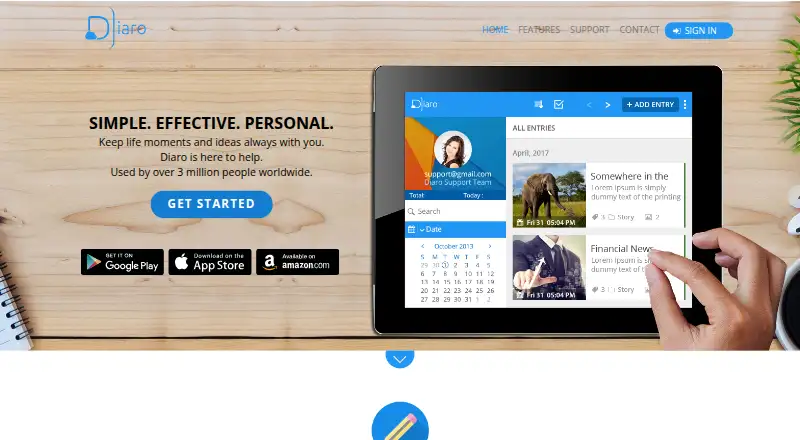
What Diaro is
Diaro is a diary and journal app for recording daily activities, experiences, thoughts, and ideas. It also supports notes and mood tracking. Entries can include media attachments, and a privacy lock is available. Search by keyword or filter entries by date, tags, folder, or location. The FAQ says there is no limit to how many entries a user can add in a day.
Diaro is available on Android, iOS, and the web. Its homepage says the app is offered in more than 30 languages. Diaro Online can import backup files and data from Evernote and DayOne, and export entries as PDF, DOCX, or TXT. When exporting, users can choose to include only entries matching their current filters. Dropbox sync connects the mobile app with Diaro Online in a browser, but is available only to PRO users. The Free plan costs nothing and covers basic diary and journal use; Google Play describes the app as free to download with ads and in-app purchases. On iOS, the app can be set to request a security code at launch. The privacy policy says mobile private content is stored on the device, while content accessible on the website is stored in the user's Dropbox account. It says synced private content is encrypted, except attached photos stored in Dropbox, and does not guarantee absolute privacy or security.
Who it suits
Diaro suits people who want to keep a searchable diary, journal, notes, or mood record across mobile and web platforms. It is also a fit for users who want to import entries from Evernote or DayOne, or export filtered entries from Diaro Online.
What it does well
- Search entries by keyword, date, tags, folder, or location.
- No daily limit on the number of entries.
- Diaro Online imports backup files, Evernote, and DayOne data.
- Exports to PDF, DOCX, or TXT, including filtered entries.
- Available on Android, iOS, and the web.
What to know first
- Dropbox synchronization is available only to PRO users.
- Google Play lists ads and in-app purchases.
- The listed PRO plans have no stated price.
Limits
The Free plan covers basic diary and journal use. Dropbox synchronization, exports, ad-free use, and priority customer support are listed as PRO features.
Plans
| Plan | Billed and limits | Price |
|---|---|---|
| Free | Basic diary and journal use | Free |
| Diaro Pro 1 Year | Dropbox synchronization · Export to PDF and other formats · Ad-free experience · Priority customer support | On request |
| Diaro PRO | US$5.99/year; auto-renewing subscription · Dropbox sync · export to PDF and other formats · ad-free · priority support | $5.99 a year |
As diaroapp.com lists them, read 20 Sept 2026. The maker's own page has the final word.
Getting started
- Visit the Diaro website or find the app for Android or iOS.
- Download the app for your mobile platform, or use Diaro Online in a browser.
- Start with the Free plan for basic diary and journal use.
- Add entries and organize them with keywords, dates, tags, folders, or locations.
- For Dropbox sync, use a PRO plan; Diaro Online can import backups, Evernote, and DayOne data.
Verdict
Choose Diaro if you want a diary with flexible search, organization, and web exports, or want to keep notes and track moods. Check the PRO offering if Dropbox sync is essential; the listed PRO plans do not include a price.
Questions
Is Diaro free?
The Free plan costs nothing and covers basic diary and journal use. Google Play describes the app as free to download with ads and in-app purchases.
Which platforms can I use?
Diaro is available on Android, iOS, and the web.
Does Diaro sync across mobile and web?
Dropbox sync connects the mobile app with Diaro Online, and the FAQ says it is available only to Diaro PRO users.
What can Diaro Online import and export?
It can import backup files, Evernote, and DayOne data, and export entries to PDF, DOCX, or TXT. Exports can include only currently filtered entries.
How does Diaro handle stored content?
The privacy policy says mobile private content is stored on the device and website-accessible content is stored in the user's Dropbox. It says synced private content is encrypted except attached photos stored in Dropbox, and does not guarantee absolute privacy or security.
What do the listed PRO plans cost?
No price is listed for Diaro Pro 1 Year or Diaro PRO.
Facts from Diaro's own pages
- Data storage
- The privacy policy says mobile private content is stored on the device and content accessible on the website is stored in the user's Dropbox account. · diaroapp.com, 8 Oct 2026
- Encryption caveat
- The privacy policy says synchronized private content is encrypted except attached photos stored in Dropbox, and says it cannot guarantee absolute privacy or security. · diaroapp.com, 8 Oct 2026
- Entry limit
- The FAQ says there is no limit to the number of entries a user can add in a day. · diaroapp.com, 8 Oct 2026
- Export
- Diaro Online can export entries to PDF, DOCX, or TXT, including only currently filtered entries when that option is selected. · diaroapp.com, 8 Oct 2026
- Export formats
- multiple · diaroapp.com, 20 Sept 2026
- Free availability
- The Google Play listing describes the app as downloadable for free and lists ads and in-app purchases. · play.google.com, 8 Oct 2026
- Free plan
- Yes · diaroapp.com, 20 Sept 2026
- Import
- Diaro Online can import data from backup files, Evernote, and DayOne. · diaroapp.com, 8 Oct 2026
- Languages
- The maker's homepage says Diaro is available in 30+ languages. · diaroapp.com, 8 Oct 2026
- Platforms
- The maker describes Diaro as an Android, iOS, and web app, with Diaro Online accessible in a browser on PC or Mac. · diaroapp.com, 8 Oct 2026
- Product
- Diaro is a diary, journal, notes, and mood-tracking app for recording daily activities, experiences, thoughts, and ideas. · diaroapp.com, 8 Oct 2026
- Search and organization
- Entries can be searched by keyword and filtered by date, tags, folder, or location. · diaroapp.com, 8 Oct 2026
- Security code
- The iOS app can be configured to request a security code when launched. · diaroapp.com, 8 Oct 2026
- Support
- The app listing gives [email protected] as the contact address and lists priority customer support as a PRO feature. · play.google.com, 8 Oct 2026
- Sync
- Dropbox sync connects the mobile app with Diaro Online in a web browser, and the maker’s FAQ says Dropbox sync is available only to Diaro PRO users. · diaroapp.com, 8 Oct 2026
Where Diaro stands on Freedom251
- Journaling Software#5 of 37
- Journal Apps#12 of 35
- Journaling apps#15 of 37