Freedom251 › Photo Management Software
jAlbum
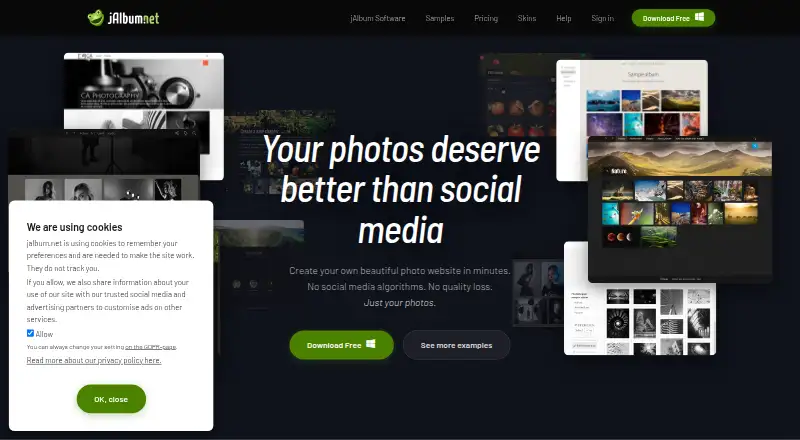
What jAlbum is
jAlbum is desktop software for turning photos and videos stored on a computer into gallery websites. Finished galleries can be uploaded to a personal website through the built-in FTP client or published to a jalbum.net account. For editing, the software includes cropping, sharpening, level adjustments, automatic correction, watermarks, and batch processing. Its organizer can arrange photos by date and location, remove duplicates, and add tags. Users can choose from hundreds of album templates, called skins, and customize the gallery presentation. The Free plan costs nothing and allows galleries with up to 24 objects. The maker says gallery size may otherwise be constrained by computer memory. Other plans include hosted accounts with differing storage and commercial-use features, and licenses with different use rights, upload allowances, shopping-cart features, updates, and support. Listed platforms are Android, iOS, Linux, macOS, web, and Windows, though desktop is the primary platform. jAlbum does not offer cloud sync. The maker identifies photographers, artists, businesses, organizations, and families as potential users.
Who it suits
jAlbum suits photographers, artists, families, businesses, and organizations that want to make web galleries from locally stored photos and videos. It can work for people who want to upload galleries to their own web hosting or publish through a jalbum.net account.
What it does well
- Creates photo and video galleries from local media.
- Built-in editor includes watermarks and batch processing.
- Organizer can sort by date or location and remove duplicates.
- Hundreds of customizable album templates are available.
- Includes an FTP client for uploading galleries to web hosting.
What to know first
- The Free plan limits galleries to 24 objects.
- Gallery size may be constrained by computer memory.
- Cloud sync is not offered.
Limits
The Free plan costs nothing and allows galleries of at most 24 objects. Gallery size may otherwise be constrained by computer memory.
Plans
| Plan | Billed and limits | Price |
|---|---|---|
| Free | Max. 24 objects · Forever · own-site storage | Free |
| Premium Account | monthly, yearly or two-year storage billing; page shows 15% annual and 32% two-year discounts · 10 GB storage · non-commercial use · unlimited upgrades · up to two custom domains · 100s of skins | On request |
| Pro License | one-time license; one year of updates and support · commercial and non-commercial use · unlimited uploads · shopping-cart skin features · ad-free galleries | On request |
| Power Account | monthly, yearly or two-year storage billing; page shows 15% annual and 32% two-year discounts · 100 GB storage · commercial use · unlimited upgrades · custom domains · 100s of skins | On request |
| Standard License | one-time license; one year of updates and support · non-commercial use · unlimited uploads · ad-free galleries · dozens of skins | On request |
| Super Account | monthly, yearly or two-year storage billing; page shows 15% annual and 32% two-year discounts · 300 GB storage · commercial use · unlimited upgrades · custom domains · 100s of skins | On request |
As jalbum.net lists them, read 7 Oct 2026. The maker's own page has the final word.
Getting started
- Visit the jAlbum website and choose the desktop software.
- Create a gallery from local photos or videos.
- Edit and organize the media, then choose and customize a skin.
- Upload the gallery through FTP to your web hosting, or publish it to a jalbum.net account.
jAlbum is desktop software for organizing, editing, and publishing photo and video galleries. It suits photographers, artists, organizations, and families who want control over gallery design and where their work is hosted. Its strongest case is a flexible publish-to-web workflow; it is a poor fit for cloud-synced libraries or free galleries larger than 24 objects.
Overview
jAlbum turns media stored on a computer into gallery websites, which users can publish to their own site or a jAlbum account. That makes it more useful for presenting selected work than for maintaining a continuously synchronized photo library. Galleries do not rely on server-side scripting, and an FTP client provides a direct route to existing web hosting.
The free license is enough for a small gallery, but its 24-object maximum makes it restrictive for larger collections. Beyond that cap, gallery size may also depend on the computer’s available memory.
Key features
Organize and edit
The organizer sorts photos by date and location, removes duplicates, and adds tags. The built-in editor handles cropping, sharpening, level adjustments, auto-correction, watermarks, and batch processing. RAW support, face recognition, and metadata tools add useful breadth for photo collections, while the editing tools help prepare images before publication.
Design and publish
Hundreds of album templates, called skins, give users a choice of gallery presentation, with options to customize the result. Galleries can be uploaded to personal hosting through FTP or published to a jAlbum account. Users can also connect with Facebook or Twitter to share albums. The mix suits people who want to choose both the presentation and publishing destination; the absence of cloud sync means it does not serve as an automatically shared media library.
Privacy and support
jAlbum says hosted files are stored on its servers in Sweden and on AWS servers in Ireland and Germany, with access restricted to a few people. It collects account email, name, username, and certain IP addresses, and says it deletes personal data within 60 days of account closure. Standard and Pro licenses include one year of priority email support, with replies within 24 hours on business days.
Pricing
jAlbum uses a freemium model. The free plan costs nothing, lasts forever, permits galleries of up to 24 objects, and uses own-site storage. It is a sensible starting point for a small portfolio or occasional gallery, but not for a large set of photos.
Paid options are described without a published price, so each has custom pricing. The Standard License allows non-commercial use, unlimited uploads to own-site storage, and includes one year of updates and support. It fits personal projects that exceed the free cap, but does not include commercial use. The Pro License adds commercial use and shopping cart features, with the same unlimited uploads, own-site storage, and one year of updates and support; it is the relevant license for commercial gallery work.
The account plans bundle storage with licenses. Premium Account offers 10 GB, non-commercial use, a Standard license, and priority email support. Power Account provides 100 GB and commercial features. Super Account provides 300 GB, a Pro license, commercial use, and a shopping cart. These tiers suit users who want hosted storage and bundled licensing, with the larger accounts geared toward commercial publishing.
Platforms
jAlbum lists Android, iOS, Linux, macOS, web, and Windows support, but its primary platform is desktop. Its workflow centers on preparing local media and publishing galleries; cloud sync is not included.
Who it's for
Photographers and artists who want to curate and style galleries for their own site are the clearest fit. Businesses and organizations can use the commercial options and shopping cart features, while families can make smaller galleries without paying. Anyone whose priority is automatic cloud backup or ongoing synchronization should look elsewhere.
Pros and cons
- Pros: Organizing, editing, and gallery publishing sit in one desktop workflow, reducing the need to prepare images in separate tools.
- Pros: Hundreds of skins and both FTP and jAlbum-account publishing give users meaningful choice over presentation and destination.
- Pros: The free license lasts forever and supports own-site storage, making it useful for small galleries without a recurring fee.
- Cons: The free license stops at 24 objects, a tight limit for substantial albums.
- Cons: No cloud sync means jAlbum is not a replacement for a synchronized photo library.
- Cons: The paid plans have custom pricing, so users cannot compare their cost from the plan prices alone.
Alternatives
For a cloud-oriented photo library, consider Ente Photos: it has a free plan with 10 GB and lists Android, iOS, Linux, macOS, web, and Windows support. Lomorage is a free option across desktop and mobile platforms, including self-hosted use, but requires external storage. Choose PhotoPrism if self-hosting matters; its Community plan is free, with unlimited storage and instances and community support.
Amazon Photos offers 5 GB of shared photo and video storage on its free plan, while its Prime benefit includes unlimited full-resolution photo storage. Synology Photos is free but requires a Synology NAS. Tonfotos offers a free lifetime license with full paid-version functionality, limited by the number of people on photos. Damselfly is free, open-source, and self-hosted. Flickr offers a free plan for 1,000 public photo and video uploads, shown with ads.
Browse more options in Photo Management Software.
Verdict
Choose jAlbum if you want desktop tools to curate, edit, design, and publish galleries to your own hosting or a jAlbum account. Its combination of local organization, customizable skins, and flexible publishing is the reason to choose it. Look elsewhere if you need cloud sync, or if the free 24-object limit is too small for your galleries.
Verdict
Choose jAlbum if you want desktop tools to organize, edit, and publish photo or video galleries, with a choice of templates and upload destinations. Look elsewhere if you need cloud sync or want galleries with more than 24 objects on the Free plan.
Questions
Is jAlbum free?
Yes. The Free plan costs nothing and permits galleries with up to 24 objects.
Where can I publish galleries?
You can upload galleries to web hosting with the built-in FTP client or publish them to a jalbum.net account.
Which platforms are listed?
The listed platforms are Android, iOS, Linux, macOS, web, and Windows. Desktop is the primary platform.
Does jAlbum offer cloud sync?
No. jAlbum does not offer cloud sync.
What do paid plans include?
The listed hosted accounts include storage and commercial-use features, and the listed licenses include use rights, upload allowances, shopping-cart features, updates, or support. Standard and Pro licenses include one year of priority email support with replies within 24 hours on business days.
Who makes jAlbum and where is it based?
jAlbum was founded in 2002 and is headquartered in Stockholm, Sweden.
Facts from jAlbum's own pages
- Android app scope
- Google Play describes the Android app as a supplementary lite client with limited functionality compared with the desktop application. · play.google.com, 15 Oct 2026
- Android complaints
- Google Play reviews report crashes, inability to update albums on users' own servers and earlier Android 12 folder-opening problems. · play.google.com, 15 Oct 2026
- API surface
- The public Javadoc API exposes packages for components, filters, metadata, FTP/SFTP remote filesystems, scripting, views and related modules. · jalbum.net, 15 Oct 2026
- Audience
- The maker describes photographers, artists, businesses, organizations, and families as potential users. · jalbum.net, 7 Oct 2026
- Company history
- Founder David Ekholm started jAlbum in 2002 after finding existing photo-album software inadequate. · jalbum.net, 15 Oct 2026
- Company size
- LinkedIn lists jAlbum.net as privately held with 2–10 employees. · se.linkedin.com, 15 Oct 2026
- Data deletion
- The GDPR page says personal data are deleted within 60 days after account closure. · jalbum.net, 15 Oct 2026
- Data handling
- jAlbum says it collects account email, name, username, and certain IP addresses, and deletes personal data within 60 days after account closure. · jalbum.net, 7 Oct 2026
- Developer extensibility
- The developer center documents skin creation, plugins, scripting, JSON data, tags, variables, Groovy and Java API/Javadoc resources. · jalbum.net, 15 Oct 2026
- Drag-and-drop workflow
- The application accepts drag-and-drop photos and videos, folder organization, captions and context-menu actions. · jalbum.net, 15 Oct 2026
- Editing
- The built-in image editor supports cropping, sharpening, level adjustments, auto-correction, watermarks, and batch processing. · jalbum.net, 7 Oct 2026
- Founded
- 2002 · jalbum.net, 28 Sept 2026
- Funding
- LinkedIn shows one funding round, a Series B dated November 16, 2008, with Nordic Venture Partners listed as investor. · se.linkedin.com, 15 Oct 2026
- Gallery generation
- A single Make action batch-processes images, scales them for the web and creates the gallery pages. · jalbum.net, 15 Oct 2026
- Generated galleries
- jAlbum says its generated albums do not rely on server-side scripting. · jalbum.net, 7 Oct 2026
- Headquarters
- Stockholm, Sweden · jalbum.net, 28 Sept 2026
- Help and support
- Official help includes tutorials, manuals, FAQ, developer center and a user forum, while paid licenses advertise priority email replies within 24 business hours. · jalbum.net, 15 Oct 2026
- Hosting flexibility
- Generated galleries can be uploaded through built-in FTP to any website or hosted on jalbum.net, with no server-side code required. · jalbum.net, 15 Oct 2026
- Image editing
- Editing includes captions, filters, crop, straighten, gamma, levels, artistic effects and text overlays while leaving originals untouched. · jalbum.net, 15 Oct 2026
- Image protection
- The software supports batch watermarks, copyright metadata, web-sized copies and optional right-click-save suppression in supported skins. · jalbum.net, 15 Oct 2026
- Integrations
- The jAlbum community site says users can connect with Facebook or Twitter to share albums. · jalbum.net, 7 Oct 2026
- Java requirement
- Installer packages bundle Java; unbundled ZIP versions require at least Java 18. · jalbum.net, 15 Oct 2026
- Large collections
- The maker says jAlbum handles galleries ranging from typical 70-image projects to portfolios containing 10,000–100,000 images. · jalbum.net, 15 Oct 2026
- Latest release
- Release notes state that jAlbum 40 launched on October 12, 2026 with rewritten image tools, local face recognition and tag-based grouping. · jalbum.net, 15 Oct 2026
Where jAlbum stands on Freedom251
- Photo Management Software#10 of 37