Freedom251 › Reverse Engineering Tools

ImHex
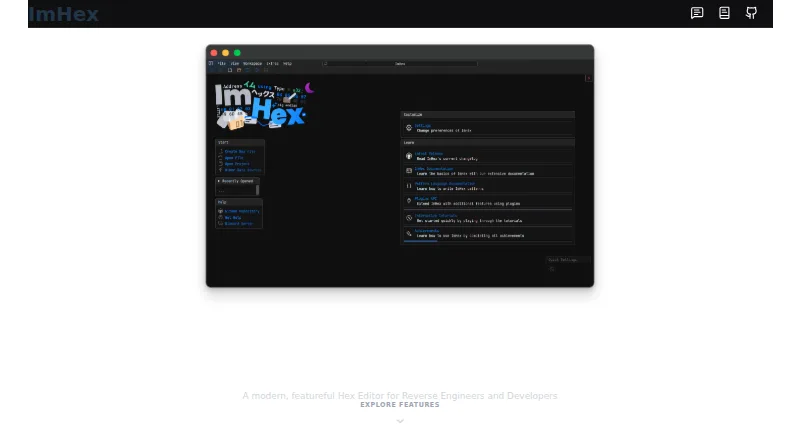
What ImHex is
ImHex is a free hex editor for reverse engineers and programmers, with tools to inspect and modify file contents. Its hex view supports searching, byte patching, patch management, and undo and redo. A custom C-like Pattern Language lets users describe structures and data types for parsing and highlighting content. Analysis features include data inspection, file type parsing, byte type and entropy graphs, and detection of encrypted or compressed files. The YARA view scans files against rules, highlights matches, and provides navigation to them. An in-app Content Store supplies community patterns, libraries, data processor nodes, encodings, themes, and YARA rules; developers can also build plugins using libimhex, the ImHex API, and the Content Registry. Most of ImHex is GPLv2-only, while libimhex and the UI plugin library are LGPLv2.1. It is available for Windows, macOS, and Linux. ImHex generally requires a GPU supporting OpenGL 3.0, although slower software-rendered releases are available. Release binaries for macOS require macOS 15 or later; lower versions require compiling from source.
Who it suits
ImHex suits programmers and reverse engineers who need to inspect, parse, search, or patch file contents. Plugin developers may also use its API and Content Registry.
What it does well
- Pattern Language can parse and highlight defined structures.
- Includes YARA scanning with match navigation.
- Content Store provides community resources.
- Available for Windows, macOS, and Linux.
- Software-rendered releases are available.
What to know first
- Generally requires a GPU supporting OpenGL 3.0.
- macOS release binaries require macOS 15 or higher.
- Older macOS versions require compiling from source.
Limits
The free plan is listed as free. ImHex generally requires a GPU with OpenGL 3.0 support; users without one can use slower software-rendered releases. macOS release binaries require macOS 15 or later.
Plans
| Plan | Billed and limits | Price |
|---|---|---|
| ImHex | Open-source hex editor | Free |
As imhex.werwolv.net lists them, read 29 Sept 2026. The maker's own page has the final word.
Getting started
- Visit https://imhex.werwolv.net/.
- Choose a package for your platform: Windows installer or portable package, macOS DMG, or a Linux package.
- On macOS, use a release binary with macOS 15 or later, or compile from source for an older version.
- Install or launch ImHex, then use the hex view, Pattern Language, or YARA view for your file task.
Overview
ImHex is a free hex editor for people who need to investigate and change binary files, especially reverse engineers and programmers. It is a stronger fit for structured analysis than byte editing alone, but its GPU requirement and macOS version floor can rule it out on some systems.
Key features
ImHex’s C-like Pattern Language lets users define structures and data types, then parse and highlight them in file contents. That makes it useful when a binary format needs to be read as meaningful fields rather than a stream of bytes. For quick edits, byte patching, patch management, searching, and unlimited undo and redo provide a practical toolkit without sacrificing the ability to backtrack.
Analysis tools cover data inspection, file-type parsing, byte-type and entropy graphs, and detection of encrypted or compressed files. These help users assess unfamiliar files, though the broad feature set may be more than someone seeking only a basic hex editor needs. YARA scanning highlights rule matches and lets users jump to them, which makes ImHex a more capable choice for rule-based investigation.
The in-app Content Store offers community patterns, libraries, data processor nodes, encodings, themes, and YARA rules. Developers can build plugins using libimhex, the ImHex API, and the Content Registry. That extensibility is valuable for users who can adapt tools to their workflows, but less decisive for someone who only needs occasional edits.
Most of ImHex is GPLv2-only; libimhex and the UI plugin library are LGPLv2.1. The project says the application transfers information to other networked systems only when specifically requested by a user or operator. Its security policy generally supports only the latest release, and critical vulnerability reports go through Discord (@werwolv).
Pricing
ImHex costs nothing. Its free, open-source plan includes binary comparison, binary templates, scripting, plugin support, and disk editing. There is no paid tier or free trial to weigh against it; the trade-off is that users need to check the system requirements and accept the project’s license terms.
Platforms
ImHex supports Windows, macOS, and Linux. Downloads include Windows installers and portable packages, a macOS DMG, and Linux AppImage, Flatpak, Snap, DEB, and RPM packages. It generally requires a GPU with OpenGL 3.0 support; slower software-rendered releases are available for systems without a GPU. Release binaries require macOS 15 or later, so users on older macOS versions need to compile ImHex from source.
Who it's for
ImHex suits reverse engineers and programmers who need to parse, inspect, scan, or patch binary files in one application. Its templates, YARA support, and plugin path also make it a fit for users who need to extend their analysis workflow. It is a less compelling choice for someone after a minimal editor, or anyone whose hardware or macOS version falls short of its requirements.
Pros and cons
- Pro: The Pattern Language can parse and highlight user-defined structures, making complex file contents easier to interpret.
- Pro: Editing, analysis, and YARA scanning sit alongside each other, so users can move from inspecting data to patching or rule-based investigation.
- Pro: The Content Store and plugin APIs support community additions and custom extensions.
- Con: The usual GPU requirement excludes some systems, while software rendering comes with slower releases.
- Con: macOS release binaries require macOS 15 or later; older systems require a source build.
- Con: Security support generally covers only the latest release, which may not suit users who need support for older versions.
Alternatives
For another free hex editor with broader platform coverage, BinEd supports Android, Linux, macOS, web, and Windows; its Android app is described as a free service. REHex is another free, GPL-2.0-licensed option with Windows, macOS, and Linux packages. Choose wxHexEditor if a free hex and disk editor better matches the job, or wxMEdit if text and column editing matter too; its hex mode supports files up to 32GB.
Hex Editor Neo is a Windows-only freemium alternative with a free tier for basic editing and limited or no support. Hex Fiend is worth considering when you need a macOS-only open-source editor under a BSD-style license. For Windows users seeking a free option for private and commercial use, HxD is another candidate. Hecate is a further free option for Linux, macOS, and Windows.
Browse more options in Hex Editors or Reverse Engineering Tools.
Verdict
Choose ImHex if you need a free editor that combines byte-level changes with structured parsing, file analysis, and YARA scanning. Its breadth is the main reason to prefer it; the GPU requirement and macOS 15 binary limit are the clearest reasons to look elsewhere.
Verdict
ImHex combines byte editing with parsing, analysis, YARA scanning, and community extensions. Check the GPU and macOS requirements against your system before installing.
Questions
Is ImHex free and open source?
Yes. Its plan is listed as free. Most of the application is GPLv2-only, while libimhex and the UI plugin library are LGPLv2.1.
Which platforms can run ImHex?
ImHex supports Linux, macOS, and Windows. Downloads include Windows installers and portable packages, a macOS DMG, and Linux AppImage, Flatpak, Snap, DEB, and RPM options.
What are ImHex's macOS requirements?
Release binaries require macOS 15 or higher. Older macOS versions require compiling ImHex from source.
Does ImHex support plugins?
Yes. Developers can build plugins using libimhex, the ImHex API, and the Content Registry.
Does ImHex need a particular graphics capability?
It generally requires a GPU with OpenGL 3.0 support. Slower software-rendered releases are available for users without a GPU.
Does ImHex send information over a network?
The project says it will not transfer information to other networked systems unless specifically requested by the user or operator.
Facts from ImHex's own pages
- Analysis
- ImHex includes data inspection, file type parsing, byte type and entropy graphs, and encrypted or compressed file detection. · github.com, 29 Sept 2026
- Community content
- The in-app Content Store provides community patterns, libraries, data processor nodes, encodings, themes, and YARA rules. · docs.werwolv.net, 29 Sept 2026
- Downloads
- The install guide lists Windows installers and portable packages, a macOS DMG, and Linux AppImage, Flatpak, Snap, DEB, and RPM options. · github.com, 29 Sept 2026
- Editing
- The hex view supports byte patching, patch management, infinite undo and redo, and searching. · github.com, 29 Sept 2026
- Extensibility
- Developers can build plugins using libimhex, the ImHex API, and the Content Registry. · github.com, 29 Sept 2026
- GPU requirement
- ImHex generally requires a GPU with OpenGL 3.0 support, with slower software-rendered releases available for users without a GPU. · github.com, 29 Sept 2026
- License
- Most of ImHex is GPLv2-only; libimhex and the UI plugin library are LGPLv2.1. · github.com, 29 Sept 2026
- macOS limitation
- The project says release binaries require macOS 15 or higher; lower versions require compiling ImHex from source. · github.com, 29 Sept 2026
- Network privacy
- The project says ImHex will not transfer information to other networked systems unless specifically requested by the user or operator. · github.com, 29 Sept 2026
- Pattern language
- Its custom C-like Pattern Language lets users define structures and data types to parse and highlight file contents. · github.com, 29 Sept 2026
- Purpose
- ImHex is a hex editor for reverse engineers and programmers. · github.com, 29 Sept 2026
- Security support
- The security policy generally supports only the latest release and directs critical vulnerability reports to Discord (@werwolv). · github.com, 29 Sept 2026
- YARA
- The YARA view can scan files with rules, highlight matches, and jump to matches. · github.com, 29 Sept 2026
Where ImHex stands on Freedom251
- Reverse Engineering Tools#22 of 73
- Hex Editors#12 of 32