Freedom251 › Reverse Engineering Tools
EMBA
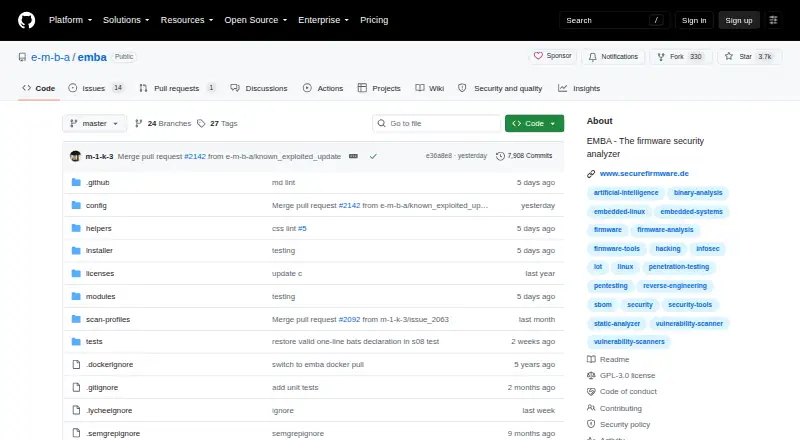
What EMBA is
EMBA is a free Linux environment for analyzing embedded-device firmware. It extracts firmware, performs static and dynamic analysis, generates software inventories and produces web-based vulnerability reports. Its checks cover issues such as outdated software, vulnerable scripts, hard-coded passwords, weak binary functions and weak file permissions. The F15 module creates a JSON SBOM using CycloneDX, while F20 gathers detected software versions and searches for known vulnerabilities and possible exploits. The project site announces an integration with Dependency-Track. EMBA is intended for penetration testers, product security teams, developers and responsible product managers. The installation guide recommends a virtual machine with current Kali Linux and the default Docker mode; Ubuntu 22.04 or 24.04 should also work. It lists 16 GB or more of RAM, recommends at least eight processor cores and specifies 30–100 GB of free disk space. The FAQ describes EMBA as a research and testing platform that may include raw code, and advises against productive or unprotected environments. Maintainers warn that developer mode can execute malicious code and harm the host. Help is available through GitHub issues.
Who it suits
EMBA is intended for penetration testers, product security teams, developers and responsible product managers analyzing firmware. It suits users who can run it in a suitable Linux environment and account for its security cautions.
What it does well
- Combines firmware extraction with static and dynamic analysis.
- F15 generates a CycloneDX JSON SBOM.
- F20 searches for known vulnerabilities and possible exploits.
- The project announces Dependency-Track integration.
What to know first
- Does not run on ARM architecture, according to the guide.
- Requires at least 16 GB of RAM.
- The guide recommends eight or more processor cores.
- Developer mode can run malicious code on the host.
Limits
The free EMBA plan is the free and open-source firmware analysis environment. The installation guide calls for at least 16 GB of RAM, recommends eight or more processor cores, lists 30–100 GB of free disk space, and says EMBA does not run on ARM architecture.
Plans
| Plan | Billed and limits | Price |
|---|---|---|
| EMBA | Free and open source firmware analysis environment | Free |
As github.com lists them, read 4 Oct 2026. The maker's own page has the final word.
Getting started
- Visit the EMBA project site on GitHub.
- Use a Linux system; the guide recommends current Kali Linux and says Ubuntu 22.04 or 24.04 should also work.
- Run EMBA in a virtual machine using its default Docker mode, as recommended by the project.
- Provide at least 16 GB of RAM, eight or more processor cores recommended, and 30–100 GB of free disk space.
- Open a GitHub issue with the question label for help.
Verdict
EMBA brings firmware analysis, software inventory and vulnerability reporting into a free Linux environment. Its maintainers characterize it as a research and testing platform, not for productive or unprotected environments.
Questions
Is EMBA free?
Yes. The listed EMBA plan costs nothing and is described as a free and open-source firmware analysis environment.
Which platforms does EMBA support?
It is designed for Linux. The installation guide recommends current Kali Linux and says Ubuntu 22.04 or 24.04 should also work.
What does EMBA do with firmware?
It extracts firmware and performs static and dynamic analysis, SBOM generation, and web-based vulnerability reporting.
Does EMBA generate an SBOM?
Yes. Its F15 module generates a JSON SBOM from identified software inventory using CycloneDX.
What should I know about using EMBA safely?
The maintainers warn that developer mode can execute malicious code and harm the host. The FAQ describes EMBA as a research and testing platform that may include raw code, and advises against productive or unprotected environments.
How can I get support?
The FAQ directs users to open a GitHub issue with the question label.
Facts from EMBA's own pages
- Architecture support
- EMBA is designed for x86-64 and the guide says it does not run on ARM architecture. · github.com, 4 Oct 2026
- Firmware checks
- Its modules check for issues including outdated software, vulnerable scripts, hard-coded passwords, weak binary functions, and weak file permissions. · github.com, 4 Oct 2026
- Integration
- The project site announces an integration with Dependency-Track. · securefirmware.de, 4 Oct 2026
- Intended users
- EMBA is designed for penetration testers, product security teams, developers, and responsible product managers. · github.com, 4 Oct 2026
- Linux support
- The installation guide says current Kali Linux is recommended and Ubuntu 22.04 or 24.04 should also work. · github.com, 4 Oct 2026
- Project maturity
- The FAQ describes EMBA as a research and testing platform that may include raw code and says it is not recommended for productive or unprotected environments. · github.com, 4 Oct 2026
- Purpose
- EMBA analyzes embedded-device firmware through extraction, static and dynamic analysis, SBOM generation, and web-based vulnerability reporting. · github.com, 4 Oct 2026
- Run environment
- The project recommends running EMBA in a virtual machine with current Kali Linux and using its default Docker mode. · github.com, 4 Oct 2026
- SBOM
- The F15 module generates a JSON SBOM from identified software inventory using CycloneDX. · github.com, 4 Oct 2026
- Security caution
- The maintainers warn that developer mode can execute malicious code and harm the host system. · github.com, 4 Oct 2026
- Support
- The FAQ directs users to open a GitHub issue with the question label for help. · github.com, 4 Oct 2026
- System requirements
- The installation guide lists 16 GB or more of RAM, at least 8 processor cores recommended, and 30–100 GB of free disk space. · github.com, 4 Oct 2026
- Vulnerability aggregation
- The F20 module aggregates detected version numbers and searches for known vulnerabilities and possible exploits. · github.com, 4 Oct 2026
Where EMBA stands on Freedom251
- Reverse Engineering Tools#20 of 73
- Mobile Databases#10 of 26