wxHexEditor
What wxHexEditor is
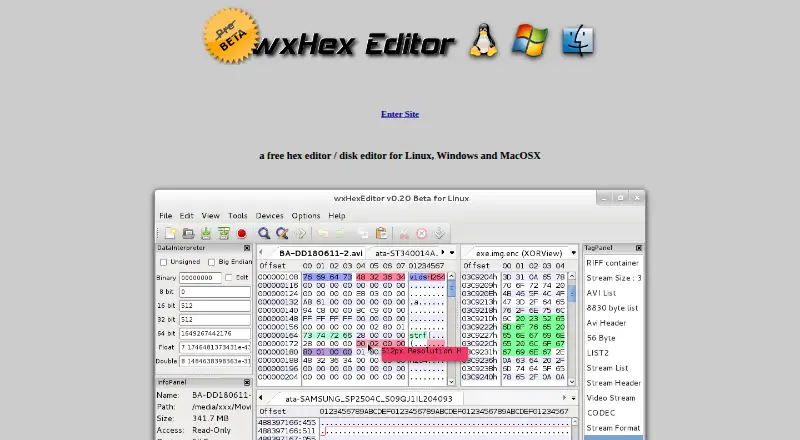
wxHexEditor is a free hex and disk editor for examining and changing binary data, with a particular focus on large files on Linux. It uses 64-bit file descriptors and can work with files or devices up to 2^64 bytes. The maker reports that it does not copy entire files into RAM and uses about 25 MB with multiple files larger than 8 GB open. Editing includes inserting and deleting bytes without making a temporary file, binary comparison with nearby results merged, and x86 disassembly. It can access devices and edit disk sectors on Linux, Windows, and Mac OS X; raw-sector work can be used to alter partition tables or filesystems and recover data. Other tools include many text encodings, checksum functions, XOR operations, color tags, and selection dumps. Downloads are listed for Linux, Mac Intel, and Win32. The latest release event listed is version 0.24 Beta, dated December 31, 2017. The free plan costs nothing.
Who it suits
It suits people who need to inspect or edit large binary files, disk sectors, or raw data across Linux, macOS, and Windows. Its comparison, checksum, encoding, and disassembly tools also suit users doing detailed binary analysis.
What it does well
- Works with files or devices up to 2^64 bytes.
- Uses about 25 MB with multiple files over 8 GB open.
- Inserts and deletes bytes without a temporary file.
- Includes binary comparison and x86 disassembly.
- Available for Linux, macOS, and Windows.
What to know first
- Latest listed release is version 0.24 Beta from 2017.
- Windows downloads are listed as MinGW-compiled Win32 binaries.
- Source compilation requires wxWidgets 2.8.11 or newer.
Plans
| Plan | Billed and limits | Price |
|---|---|---|
| wxHexEditor | Free hex editor / disk editor | Free |
As wxhexeditor.org lists them, read 3 Oct 2026. The maker's own page has the final word.
Getting started
- Visit the wxHexEditor website and open its download page.
- Choose from the listed Linux, Mac Intel, or Win32 binaries.
- If compiling from source, use wxWidgets 2.8.11 or newer.
- Open a file or device to inspect or edit its binary data.
- Consult the project wiki for documentation and shortcuts.
Verdict
wxHexEditor combines large-file handling with disk-sector editing and a range of binary analysis tools. Its latest listed release is from 2017, so readers should note the project’s stated release history before choosing it.
Questions
Is wxHexEditor free?
Yes. The listed wxHexEditor plan costs nothing, and a free plan is available.
Which platforms are supported?
The listed platforms are Linux, macOS, and Windows. Downloads include Linux binaries, a precompiled Mac Intel binary, and MinGW-compiled Win32 binaries.
Can it edit disks?
Yes. It can open devices on Linux, Windows, and Mac OS X and edit disks and HDD sectors.
Can wxHexEditor compare binary files?
Yes. Binary comparison is supported, including merging nearby results.
What is the latest release listed?
The home page lists version 0.24 Beta, dated December 31, 2017, as the latest release event.
What is required to compile it from source?
The download page says compilation requires wxWidgets 2.8.11 or newer.
Facts from wxHexEditor's own pages
- Binary tools
- Features include binary file comparison with merging of nearby results and x86 disassembly through the integrated udis86 library. · wxhexeditor.org, 3 Oct 2026
- Build requirement
- The download page says compiling from source requires wxWidgets 2.8.11 or newer. · wxhexeditor.org, 3 Oct 2026
- Checksums
- The site lists MD, RIPEMD, SHA, TIGER, HAVAL, CRC, ADLER, GOST, WHIRLPOOL, and SNEFRU checksum functions through the integrated mhash library. · wxhexeditor.org, 3 Oct 2026
- Disk access
- It can open devices on Linux, Windows, and Mac OS X and edit disks and HDD sectors. · wxhexeditor.org, 3 Oct 2026
- Downloads
- The download page lists Linux binaries, a precompiled Mac Intel binary, and MinGW-compiled Win32 binaries. · wxhexeditor.org, 3 Oct 2026
- Editing
- It supports inserting and deleting bytes without creating a temporary file. · wxhexeditor.org, 3 Oct 2026
- Encodings
- It supports many encodings, including UTF-8/16/32, Shift JIS, GBK, and EUC-KR. · wxhexeditor.org, 3 Oct 2026
- Languages
- The site says the supported languages are English, Turkish, and partially Russian. · wxhexeditor.org, 3 Oct 2026
- Large files
- It uses 64-bit file descriptors and supports files or devices up to 2^64 bytes; the site says it has been tested with a 1-petabyte file. · wxhexeditor.org, 3 Oct 2026
- Memory use
- The site says wxHexEditor does not copy the whole file into RAM and uses about 25 MB while multiple files larger than 8 GB are open. · wxhexeditor.org, 3 Oct 2026
- Other features
- It supports XOR file operations, color tags, importing and exporting tags, and saving a selection as a dump file. · wxhexeditor.org, 3 Oct 2026
- Project status
- The latest release event listed on the home page is version 0.24 Beta, dated December 31, 2017. · wxhexeditor.org, 3 Oct 2026
- Purpose
- wxHexEditor is a free hex editor and disk editor built especially for working with large files on Linux. · wxhexeditor.org, 3 Oct 2026
- Recovery
- The site describes using raw sector editing to recover data and edit partition tables or filesystems by hand. · wxhexeditor.org, 3 Oct 2026
- Support and documentation
- The site asks users to report bugs through its tracker and says documentation and shortcuts are available on its wiki. · wxhexeditor.org, 3 Oct 2026
Where wxHexEditor stands on Freedom251
- Hex Editors#18 of 32