Freedom251 › Study Planner Apps
Homeroom
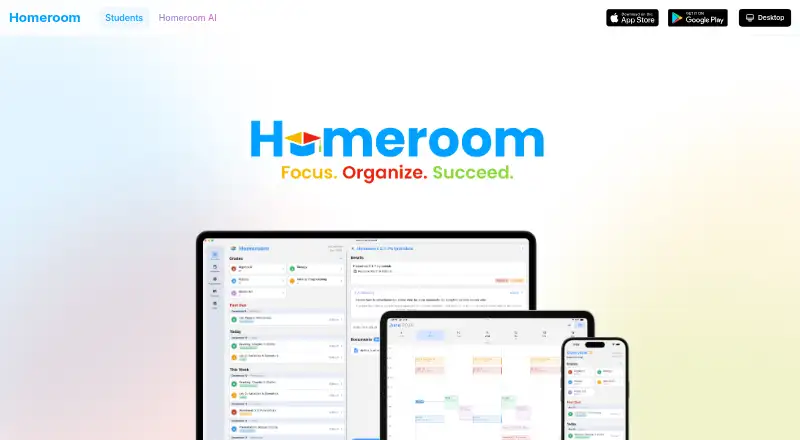
What Homeroom is
Homeroom is a student companion for organizing courses, assignments, schedules, and grades. Its assignment tracker records due dates and lets students filter work by course or type. Grade Analytics provides performance insights and a calculator for predicting grades. Homeroom AI can make multiple-choice questions and flashcards from schoolwork, images, or files, while its tutor answers questions with step-by-step explanations informed by courses and assignments. It can also extract syllabi, assignments, and schedules from document photos. Students can start by entering courses and assignments manually or connect Google Classroom for assignment, due-date, and grade information. The connection can be disconnected, and Homeroom says it does not store Google passwords. The Help Center says data is encrypted in transit and at rest, and users can delete accounts at any time. Homeroom is available for iOS, Android, macOS, Windows, and Linux. The Free plan costs nothing; Homeroom Premium is $4.99 a month, billed monthly, and Premium Yearly is $39.99 a year, billed yearly.
Who it suits
Homeroom suits students who want to track coursework and grades alongside AI study and tutoring tools. Its services are directed to students aged 13 and older, according to its privacy policy.
What it does well
- Assignments can be filtered by course or type.
- Grade calculator helps predict grades.
- AI creates questions and flashcards from schoolwork or files.
- Google Classroom can provide assignment, due-date, and grade information.
- Available on iOS, Android, macOS, Windows, and Linux.
What to know first
- Advanced AI Pro features are listed with paid Premium plans.
- Premium monthly access costs $4.99 a month.
- Premium Yearly costs $39.99 a year.
Limits
The Free plan includes assignment tracking, grade management, and basic AI assistance. Grade analytics, priority support, advanced reminders, and AI Pro features are listed with Premium plans.
Plans
| Plan | Billed and limits | Price |
|---|---|---|
| Free | Assignment tracking · grade management · basic AI assistance | Free |
| Premium | monthly · grade analytics · priority support · advanced reminders | $2.99 a month |
| Homeroom Premium Yearly | annual in-app purchase · premium features | $39.99 a year |
| Homeroom Premium | in-app purchase · premium features | $4.99 a month |
As thehomeroom.app lists them, read 8 Oct 2026. The maker's own page has the final word.
Getting started
- Visit https://thehomeroom.app/.
- Choose the Free plan or a Premium plan.
- Install Homeroom on iOS, Android, macOS, Windows, or Linux.
- Start by manually adding courses and assignments.
- Connect Google Classroom if you want to use its assignment, due-date, and grade information.
Homeroom is a student companion for keeping assignments, courses, schedules and grades together, with AI study tools and a Google Classroom connection. It suits students who want planning and study support in one app, particularly those who can use the free plan’s basic tools. Its main trade-off is that grade analytics and the more advanced AI features sit behind a paid plan.
Overview
Homeroom brings day-to-day school organization and AI-assisted study into one place. Students can track assignment deadlines, organize work by course or type, and use AI to turn school materials into practice questions and flashcards. Google Classroom integration can bring in assignment, due-date and grade information; students can disconnect the connection, and Homeroom says it does not store Google passwords.
Manual setup is also an option: students can add courses and assignments themselves. Document capture can extract syllabi, assignments and schedules from photos, which may reduce setup work when those materials are on paper. Data is encrypted in transit and at rest. The service is directed to students aged 13 and older.
Key features
Planning and grades
The assignment tracker supports filtering by course or type, making it more useful than a single undifferentiated deadline list. Grade management is included on the free plan, while Grade Analytics adds performance insights and a calculator for predicting grades on paid Premium.
AI study support
Homeroom AI can make multiple-choice questions and flashcards from schoolwork, images or files. Its tutor answers questions with step-by-step explanations informed by courses and assignments. Basic AI assistance is part of Free; AI Pro features are included with paid plans. That makes the free tier a sensible way to organize coursework and try basic assistance, but students who want the advanced AI tools need to budget for Premium.
Pricing
| Plan | Price | What it includes |
|---|---|---|
| Free | free | Assignment tracking, grade management and basic AI assistance |
| Homeroom Premium | $4.99 a month, billed Monthly | Grade analytics, priority support, advanced reminders and AI Pro features |
| Homeroom Premium Yearly | $39.99 a year, billed Yearly | AI Pro features |
Free covers core assignment and grade organization without a subscription. Monthly Premium is the fuller upgrade for students who want analytics, reminders and priority support alongside AI Pro. The yearly plan costs less than twelve monthly payments at the stated prices, but its listed inclusions are narrower: AI Pro features, rather than the monthly plan’s full set of named extras.
Premium can be canceled through the App Store or Play Store subscriptions page, and its features continue through the current billing period. Email support is available, with priority support included in Premium.
Platforms
Homeroom is available on Android, iOS, Linux, macOS and Windows, covering mobile and desktop users across these operating systems.
Who it's for
Homeroom is a good fit for students aged 13 and older who want assignment tracking, grade management and AI study help in the same companion. It is especially suited to students using Google Classroom or those who would benefit from turning school documents into study materials. Students who only need a basic planner can start free; those seeking grade insights, advanced reminders or AI Pro should consider Premium. It is less compelling for anyone who wants those premium capabilities without a recurring subscription.
Pros and cons
Pros
- Useful free starting point: Free includes assignment tracking, grade management and basic AI assistance, so core organization does not require a paid plan.
- Study tools use students’ materials: AI can produce questions and flashcards from schoolwork, images or files, while the tutor can explain answers in course and assignment context.
- Flexible setup and access: Students can add courses and assignments manually, and the app spans five mobile and desktop platforms.
- Clear account controls: Students can disconnect Google Classroom, delete their account at any time and cancel Premium through their store subscription settings.
Cons
- Important academic features are paid: Grade Analytics and AI Pro are not part of Free, so students wanting grade predictions or advanced AI need a subscription.
- Yearly inclusions are narrower: The yearly plan names AI Pro features, while the monthly plan also includes Grade Analytics, priority support and advanced reminders.
- Google Classroom is not essential for setup, but syncing depends on connecting it: Students who do not connect it need to add courses and assignments manually.
Alternatives
For a broader study planner apps comparison, consider what matters most: Homeroom emphasizes AI study support alongside assignment and grade organization.
myHomework Student Planner is worth considering for a free assignment and class tracker with due-date reminders, device sync and ads. Power Planner may suit students who want a free planner with explicit limits on semesters, grades per class, bulk entries and photo attachments.
Adapt is another freemium option for students comparing study planners. Fasti is an alternative freemium app. MyStudyLife offers a free planner with a cap of five tasks at a time and an initial AI timetable scan. Save My Exams is another freemium study option.
School Planner is an alternative for students comparing freemium planners. Simplyr may appeal to students looking for free course, assignment, exam and grade planning alongside focus timers and core study tools.
Verdict
Choose Homeroom if you want one student companion for assignment and grade organization, with AI study tools and optional Google Classroom syncing. The free plan gives students a practical place to start, while Premium makes sense for those who need analytics, advanced reminders or AI Pro. Look elsewhere if the monthly upgrade’s broader feature set is essential but you prefer not to pay a subscription.
Verdict
Homeroom combines assignment and grade organization with AI study tools and a Google Classroom connection. The free plan includes basic AI assistance, while Grade Analytics and AI Pro features are associated with paid plans.
Questions
Is there a free plan?
Yes. The Free plan costs nothing and includes assignment tracking, grade management, and basic AI assistance.
How much does Homeroom Premium cost?
Homeroom Premium costs $4.99 a month, billed monthly. Homeroom Premium Yearly costs $39.99 a year.
Which platforms does Homeroom support?
Homeroom is available on iOS, Android, macOS, Windows, and Linux.
Does Homeroom connect to Google Classroom?
Its privacy policy describes a connection that accesses assignment, due-date, and grade information. Users can disconnect it, and Homeroom says it does not store Google passwords.
Who is Homeroom for?
Homeroom’s services are directed to students aged 13 and older.
Can I cancel Premium?
Users can cancel through their App Store or Play Store subscriptions page. Premium features continue through the billing period.
Facts from Homeroom's own pages
- Account deletion
- The Help Center says users can delete their account at any time. · thehomeroom.app, 8 Oct 2026
- Age requirement
- Terms require users to be at least 13 in the United States and 16 in the European Union. · thehomeroom.app, 15 Oct 2026
- AI document capture
- Snap and Go extracts syllabi, assignments and schedules from photos, then categorizes items and assigns due dates. · thehomeroom.app, 15 Oct 2026
- AI study guides
- Homeroom AI creates multiple-choice practice questions and flashcards from schoolwork, images or files. · thehomeroom.app, 15 Oct 2026
- AI study tools
- Homeroom AI can generate multiple choice questions and flashcards from schoolwork, images, or files. · thehomeroom.app, 8 Oct 2026
- AI tutor
- The AI tutor gives step-by-step explanations, uses course history for context and saves conversations for continuation. · thehomeroom.app, 15 Oct 2026
- AI tutoring
- The AI tutor answers questions with step-by-step explanations and context from courses and assignments. · thehomeroom.app, 8 Oct 2026
- Apple requirements
- The iOS app requires iOS 15.3 or later; the Mac version requires macOS 12.2 or later on an Apple M1-or-newer Mac. · apps.apple.com, 15 Oct 2026
- App privacy disclosure
- Apple's listing says identifiers may be used for tracking and that linked data can include contact information, photos or videos, usage data and diagnostics. · apps.apple.com, 15 Oct 2026
- Assignment tracker
- Assignments can be filtered by course or assignment type and tracked against due dates. · thehomeroom.app, 15 Oct 2026
- Assignment tracking
- The assignment tracker lets students track due dates and filter assignments by course or type. · thehomeroom.app, 8 Oct 2026
- Audience
- The privacy policy says Homeroom’s services are directed to students aged 13 and older. · thehomeroom.app, 8 Oct 2026
- Company size
- LinkedIn lists Homeroom as an education partnership with 2–10 employees. · linkedin.com, 15 Oct 2026
- Company usage claim
- Homeroom says its platform is used by thousands of students across the country. · thehomeroom.app, 15 Oct 2026
- Course management
- Users can keep courses and course materials together in the app. · thehomeroom.app, 15 Oct 2026
- Cross-device sync
- Assignments, grades and study materials synchronize across devices with real-time updates and cloud backup. · thehomeroom.app, 15 Oct 2026
- Dark mode
- The app provides a dark theme with additional color customization. · thehomeroom.app, 15 Oct 2026
- Dashboard
- The dashboard summarizes upcoming assignments and scheduled activities. · thehomeroom.app, 15 Oct 2026
- Desktop requirements
- The Windows desktop app requires Windows 10 or later; Linux downloads target Ubuntu, Debian, Fedora and other distributions. · thehomeroom.app, 15 Oct 2026
- Document capture
- Homeroom AI can extract syllabi, assignments, and schedules from photos of documents. · thehomeroom.app, 8 Oct 2026
- Founded
- The About page says Homeroom was founded in 2025 by two friends who started the idea in a college dorm. · thehomeroom.app, 15 Oct 2026
- Free and premium tiers
- The free tier includes assignment tracking and grade management, while premium adds analytics, priority support and advanced reminders. · thehomeroom.app, 15 Oct 2026
- G2 listing identity
- G2 describes its Homeroom profile as an after-school enrichment platform and says it has too few reviews to provide buying insight. · g2.com, 15 Oct 2026
- Google Play availability
- The Google Play listing identifies HOMEROOM LLC, shows 100+ downloads and lists advertisements and in-app purchases. · play.google.com, 15 Oct 2026
Where Homeroom stands on Freedom251
- Study Planner Apps#5 of 38