Freedom251 › Study Planner Apps

CourseLink
What CourseLink is
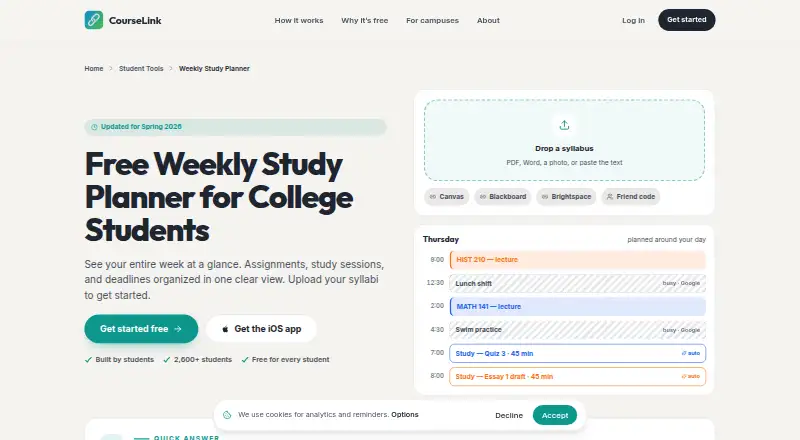
CourseLink is a calendar and weekly study planner for college students. It brings classes, deadlines, study time, campus events, work shifts, friends, and forwarded professor emails into one calendar. Students can add syllabi as PDFs, Word files, photos, or pasted text; CourseLink extracts assignments and deadlines. The weekly planner lets students move tasks between days, estimate study time, track completion, and carry unfinished work forward.
CourseLink can place study blocks around busy times in Google Calendar and move them when new events arrive. It lists Canvas, Blackboard, Brightspace, two-way Google Calendar sync, Apple Calendar, and Outlook. Students can forward email to TED for calendar updates and receive push reminders. They can also export a weekly plan as a PDF or share a read-only link with classmates. Assignment tracking, exam planning, and calendar sync are included. CourseLink is available on the web and iOS. Its free plan costs nothing and includes unlimited classes and every feature; a 7-day trial is also offered. CourseLink says it does not sell data or display banner ads. It says it is funded by student donations and by clubs and event organizers paying to promote events to students.
Who it suits
CourseLink suits college students who want class deadlines, study blocks, and campus commitments together in a calendar. It may also fit students who want to plan a week collaboratively through read-only links or keep their calendars updated from forwarded professor emails.
What it does well
- Accepts syllabi as PDFs, Word files, photos, or pasted text.
- Extracts course assignments and deadlines from syllabi.
- Moves unfinished tasks to a later day.
- Includes assignment tracking, exam planning, and calendar sync.
- Offers unlimited classes and every feature on its free plan.
- Provides iOS and web access.
What to know first
- The listed 7-day trial is short.
- The listed platforms are iOS and web.
Limits
The free plan is listed as free and includes unlimited classes and every feature. A 7-day trial is also offered.
Plans
| Plan | Billed and limits | Price |
|---|---|---|
| Free for every student | Unlimited classes · every feature · iOS app + web | Free |
As courselink.org lists them, read 7 Oct 2026. The maker's own page has the final word.
Getting started
- Open https://courselink.org/weekly-study-planner.
- Use the free plan, listed as free, or consider the 7-day trial.
- Use the web version or iOS app.
- Add a syllabus as a PDF, Word file, photo, or pasted text to extract assignments and deadlines.
- Connect a listed calendar integration or forward professor emails to TED for calendar updates.
Verdict
Choose CourseLink if you are a college student who wants course deadlines and study time organized alongside campus events and other commitments. Its free plan includes unlimited classes and every feature. The listed platforms are iOS and web, so it may not suit someone seeking a different platform.
Questions
How much does CourseLink cost?
The free plan costs nothing. A 7-day trial is also offered.
Does CourseLink have a free plan?
Yes. The plan is listed as free for every student, with unlimited classes and every feature.
Which platforms does CourseLink support?
CourseLink is available on iOS and the web.
What calendars and services does CourseLink list?
It lists Canvas, Blackboard, Brightspace, two-way Google Calendar sync, Apple Calendar, and Outlook.
Can students share their plans?
Students can export a weekly plan as a PDF or share a read-only link with classmates.
How does CourseLink say it is funded?
CourseLink says it receives student donations and payments from clubs and event organizers promoting events to students.
Facts from CourseLink's own pages
- Email and reminders
- Students can forward emails to TED for calendar updates and receive push reminders. · courselink.org, 7 Oct 2026
- Funding
- CourseLink says it is funded by student donations and by clubs and event organizers paying to promote events to students. · courselink.org, 7 Oct 2026
- Integrations
- CourseLink lists Canvas, Blackboard, Brightspace, and two-way Google Calendar sync; the planner page also names Apple Calendar and Outlook. · courselink.org, 7 Oct 2026
- Intended users
- CourseLink describes itself as built by students for students and presents the planner for college students. · courselink.org, 7 Oct 2026
- Privacy claims
- CourseLink says it does not sell data and does not show banner ads. · courselink.org, 7 Oct 2026
- Purpose
- CourseLink brings classes, due dates, study time, campus events, work shifts, friends, and forwarded professor emails into one calendar. · courselink.org, 7 Oct 2026
- Sharing
- Students can export a weekly plan as a PDF or share a read-only link with classmates. · courselink.org, 7 Oct 2026
- Study planning
- CourseLink places study blocks around busy times on Google Calendar and can move them when new events arrive. · courselink.org, 7 Oct 2026
- Support
- The site directs feedback to founder Noah at [email protected]. · courselink.org, 7 Oct 2026
- Syllabus import
- It accepts syllabi as PDFs, Word files, photos, or pasted text and extracts course assignments and deadlines. · courselink.org, 7 Oct 2026
- Weekly planner
- The weekly planner lets students move tasks between days, estimate study time, track completion, and carry unfinished tasks over. · courselink.org, 7 Oct 2026
Where CourseLink stands on Freedom251
- Study Planner Apps#7 of 38