Freedom251 › AI Chord Progression Generators
Harmony Pro
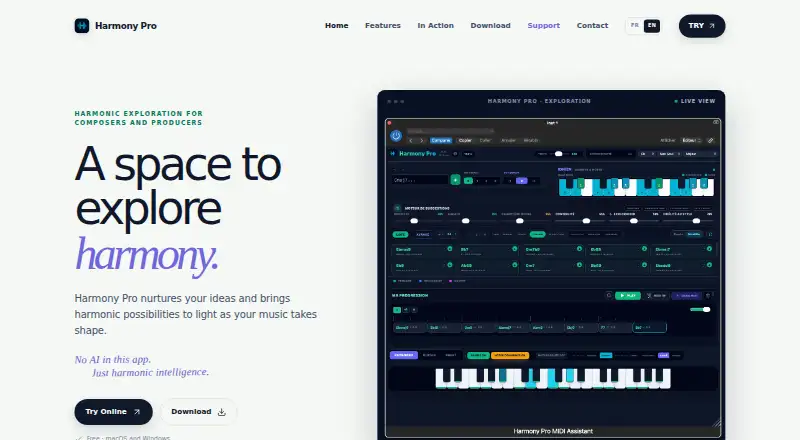
What Harmony Pro is
Harmony Pro helps composers and producers explore chord possibilities while shaping a progression. Its suggestion engine includes Balanced, Conservative, Exploratory, and Jazz Expert profiles, with controls for richness, boldness, modal character, continuity, exploration, and style fit. A progression workspace includes key detection and playback, while keyboard, guitar, and sheet views show harmony in different forms. Scale and common-tone controls, reverse chord lookup, a progression generator, and a voicing explorer provide additional ways to work with chords; chord audio playback is also available. Harmony Pro runs on macOS, Windows, and the web. On macOS and Windows, it is offered as AU and VST3 plugins, including a VST3 version intended for Ableton Live. The maker says the app contains no AI. It may ask permission to send minimal usage statistics and technical data, while stating that musical content is not transmitted. Users can change this choice at any time. The listed free plan costs nothing.
Who it suits
Harmony Pro suits composers and producers who want to examine chord options, progressions, and voicings. It also fits users working in Ableton Live with its VST3 version.
What it does well
- Offers four suggestion profiles and several controls
- Includes keyboard, guitar, and sheet views
- Provides reverse chord lookup and voicing exploration
- Available on macOS, Windows, and the web
What to know first
- Optional usage statistics and technical data may be sent
- AU and VST3 plugins are limited to macOS and Windows
Plans
| Plan | Billed and limits | Price |
|---|---|---|
| Harmony Pro | Free · Free · macOS and Windows | Free |
As harmonylabaudio.com lists them, read 5 Oct 2026. The maker's own page has the final word.
Getting started
- Visit the Harmony Pro website.
- Use the web version, or choose macOS or Windows.
- On macOS or Windows, use the AU or VST3 plugin format.
- If using Ableton Live, the maker identifies the VST3 version for that purpose.
Harmony Pro is a free harmony workspace for composers and producers who want to develop chord progressions with adjustable suggestions. It is best for people who want chord exploration in a web app or desktop plugin, rather than an AI songwriting tool.
Overview
Harmony Pro brings chord suggestions, progression tools, and several ways to inspect harmony into one workspace. Its focus is practical: help composers explore what might come next, then examine chords across keyboard, guitar, and sheet views. The maker says there is no AI in the app, so users looking for generated lyrics, songs, or AI-led composition should choose another kind of tool.
The app asks permission to send minimal usage statistics and technical data. The maker says musical content is not transmitted, and users can change their choice at any time. That separation may matter to composers protecting unreleased work, while the opt-in setting gives users control over telemetry.
Key features
Suggestions with direction
Balanced, Conservative, Exploratory, and Jazz Expert profiles give users different starting points for chord ideas. Controls for richness, boldness, modal character, continuity, exploration, and style fit add more ways to steer those ideas. This range suits composers who want to explore alternatives without taking every suggestion as-is; users who want a simple, fixed chord finder may find the controls more than they need.
Progression development and chord lookup
Key detection, playback, and a progression workspace support the process of building and hearing a sequence. Reverse chord lookup, a progression generator, voicing exploration, and chord audio playback extend the app beyond suggestions alone. Together, these tools make Harmony Pro a more rounded option for working through harmonic choices than a single-purpose lookup utility.
Multiple ways to inspect harmony
Keyboard, guitar, and sheet views let users examine the same harmonic material in different forms. Scale and common-tone controls provide further context when comparing choices. That breadth is useful for composers who move between instruments or notation, though the product remains focused on harmony rather than a general music-production suite.
Pricing
Harmony Pro costs free under its Free plan, which is described as Free for macOS and Windows. The free offering makes it a low-risk option for composers who want its chord and progression tools without a subscription price. The published plan does not establish a separate paid tier, so there is no higher-priced plan to compare against.
The product is also available on the web, while the Free plan description names macOS and Windows. For desktop users, Harmony Pro is offered as AU and VST3 plugins; the maker says its VST3 version is specifically intended for Ableton Live. That makes it a stronger fit for people seeking a harmony tool alongside desktop music software than for those who only need a mobile app.
Platforms
Harmony Pro supports macOS, web, and Windows. Its AU and VST3 plugin formats are available on macOS and Windows, and the VST3 version is intended for Ableton Live. This combination offers a choice of browser-based or desktop-plugin use, but there is no Android or iOS version among its supported platforms.
Who it's for
Harmony Pro is a good fit for composers and producers who want to generate and inspect chord options while developing a progression, especially those who value adjustable suggestion styles or multiple musical views. It is less suitable for mobile-first users, people seeking an AI composition tool, or anyone looking for a broad production environment rather than a focused harmony workspace.
Pros and cons
- Pros: Four suggestion profiles and six additional controls let users shape chord ideas to suit different harmonic aims.
- Pros: Key detection, playback, reverse lookup, progression generation, and voicing exploration support more than one stage of chord work.
- Pros: Keyboard, guitar, and sheet views help users inspect harmony in forms relevant to different instruments and notation.
- Pros: The Free plan costs nothing, and desktop users can use AU or VST3 plugins.
- Cons: There is no Android or iOS version, so it is not a mobile choice.
- Cons: The app is explicitly not AI-powered, which rules it out for users seeking AI songwriting or music generation.
- Cons: Its emphasis is harmony and progressions, not a complete music-production suite.
Alternatives
For a broader set of chord-finding options, browse Chord Finder Software.
- ChordU is worth considering for Android or iOS use; its free plan has limited access, while Premium costs $5 a month and includes uploads, MusicOnly mode, and downloads.
- Chord Analyser is an Android and iOS alternative for users who want a mobile-focused chord tool.
- Chordio is another option for iOS and macOS users.
- ChordSequence suits Android or web users who want all features free, with no paywall or usage limit, plus WAV and MIDI export.
- OtoTheory is an iOS and web alternative; its free iOS plan allows three local sketch saves, while MIDI and audio export are unavailable on that plan.
- Autochords is an iOS alternative, though some progressions require PRO.
- Chord ai is available on Android and iOS and offers basic features with unlimited free use stated; its Pro plan adds advanced features.
- ChordProgressions.org is a free web-based studio; JavaScript is required for playback and editing.
Verdict
Choose Harmony Pro if you want a free, focused workspace for exploring chord possibilities and shaping progressions, especially on macOS or Windows where its plugins can sit alongside music software. Its configurable suggestions and multiple harmony views are the clearest reasons to choose it. Look elsewhere for mobile access, a general-purpose production suite, or AI-generated music.
Verdict
Harmony Pro brings chord suggestions, progression tools, and multiple harmony views together for music creation. Users can choose whether to allow its optional usage-statistics transmission.
Questions
How much does Harmony Pro cost?
The Harmony Pro plan is free.
Which platforms does it support?
Harmony Pro is available on macOS, Windows, and the web. Its AU and VST3 plugin formats are available for macOS and Windows.
Does Harmony Pro use AI?
The maker says Harmony Pro has no AI in the app.
Does it work with Ableton Live?
A maker response says the product includes a VST3 version specifically intended for Ableton Live.
What does the app do with usage data?
It may ask permission to send minimal usage statistics and technical data. The maker says musical content is not transmitted, and users can change the choice at any time.
Facts from Harmony Pro's own pages
- Ableton Live
- A maker response says the product includes a VST3 version specifically intended for Ableton Live. · kvraudio.com, 5 Oct 2026
- Chord suggestions
- The suggestion engine offers chord possibilities for exploring a progression. · harmonylabaudio.com, 5 Oct 2026
- Harmony views
- The app provides keyboard, guitar, and sheet views, plus scale and common-tone controls. · harmonylabaudio.com, 5 Oct 2026
- Maker identity
- The product site identifies the maker as Harmony Lab Audio; the pages opened did not state its headquarters or founding date. · harmonylabaudio.com, 5 Oct 2026
- No generative AI
- The maker says Harmony Pro has no AI in the app. · harmonylabaudio.com, 5 Oct 2026
- Optional usage statistics
- The app asks permission to send minimal usage statistics and technical data, says musical content is not transmitted, and lets users change this choice at any time. · harmonylabaudio.com, 5 Oct 2026
- Plugin formats
- Harmony Pro is available for macOS and Windows as AU and VST3 plugins. · kvraudio.com, 5 Oct 2026
- Progression tools
- The app includes key detection, playback, and a progression workspace. · harmonylabaudio.com, 5 Oct 2026
- Purpose
- Harmony Pro helps composers and producers explore harmonic possibilities as music takes shape. · harmonylabaudio.com, 5 Oct 2026
- Suggestion controls
- The suggestion engine includes Balanced, Conservative, Exploratory, and Jazz Expert profiles, plus controls for richness, boldness, modal character, continuity, exploration, and style fit. · harmonylabaudio.com, 5 Oct 2026
Where Harmony Pro stands on Freedom251
- AI Chord Progression Generators#3 of 29
- Chord Finder Software#11 of 27